Search the Community
Showing results for tags 'windows 11'.
-
I have been using Safe Money to open bank websites for years and it has always worked well. Today when I try to open any bank website in the Protected Browser I get a message saying "Run error: Failed to run Protected Browser. Reason: Process was stopped." I am in Firefox, Windows 11 24H2 64-bit, Kaspersky Internet Security v. 21.3.10.391(m) databases are up to date. Subscription: Active Paid until: Feb 16, 2026 Remaining days: 284 Please advise.
-
Um vírus esta criando links nas pastas raiz de meu servidor e ocultando as pastas. Removo os links e mudo o atributa das Pastas Ocultas para não ocultas ... mas logo em seguida fica tudo oculto novamente e o link recriados. O karpeskay não encontrou nenhum vírus, como resolver?
-

Is Kaspersky stopping Windows Volume Shadow Copy?
TheUndertaker posted a topic in Kaspersky: Basic, Standard, Plus, Premium
My windows 11 cannot create system restore points. I have exlucded 99% of other causes and Kaspersky volumn shadow copy service bridge is my suspected cause. When I run vssadmin command line, it says its blocked by av software. so... -
Здравствуйте! У меня возникла проблема с вирусом на моем компьютере с Windows 11. Я заметил несколько подозрительных процессов, которые начали активно использовать ресурсы системы. Среди них были такие процессы как “Ulta-service” и “rvcontrolsvc”, которые, как мне кажется, связаны с вредоносной активностью. Я не могу остановить эти процессы, так как вирус блокирует все попытки: при попытке запустить антивирус, браузеры начинают закрываться, а сам процесс на компьютере не удается выполнить. Описание проблемы: Вирус блокирует работу антивирусных программ (в том числе Kaspersky и другие). При запуске Kaspersky или других антивирусных утилит система начинает резко замедляться и появляются ошибки, а также происходят сбои в работе приложений. Все попытки получить доступ к безопасному режиму также не увенчались успехом, так как вирус блокирует доступ к командной строке и настройкам. Я не могу использовать msconfig, так как программа сразу закрывается после запуска. Мои действия: Я пытался воспользоваться встроенной функцией восстановления системы и командой sfc /scannow, но они не решают проблему. Вирус не позволяет мне скачать и установить обновления Windows, блокируя их процесс. Я загрузил несколько утилит для очистки системы, но вирус снова восстанавливает свою активность. Системные характеристики: ОС: Windows 11. Процессор: Ryzen 53600 Оперативная память: 32 ГБ. Жесткий диск: SSD. Антивирус: Kaspersky (не удается запустить). Прошу помочь в следующем: Как можно удалить вирус или хотя бы приостановить его действия, чтобы безопасно провести полную очистку системы? Есть ли способ загрузиться в безопасном режиме без использования msconfig или других настроек, которые блокирует вирус? Может ли вирус мешать нормальной работе операционной системы, или же это только локальные проблемы, связанные с вирусом? Заранее благодарен за помощь! U.P.D у меня получилось получить доступ к безопасному режиму, но ситуация не изменилась, антивурис так же не дает запустить, после выхода с безопасного режима, мой комп начал сходить с ума, водяное охлаждение начало гудеть и шуметь, видео карта как шайтан машина начала жужжать

-

How to make a complain to Kaspersky security network.
Kuser7985Sh posted a topic in Kaspersky: Basic, Standard, Plus, Premium
I recently reset my PC and started installing the usual stuff that I need for work. Daz Studio (very popular 3D rendering app) and Ren'Py (arguably the most popular visual novel-making engine) and Kaspersky added both these applications into the high-restricted group (intrusion prevention). I'm aware that you can manually add applications to the trusted group and make it work, but the thing I don't understand is these two programmes were previously trusted by KSN, and K added them as trusted just a few weeks ago. So how can I make a complaint to KSN? Kaspersky premium 21.20.8.505 version Thank you.
-
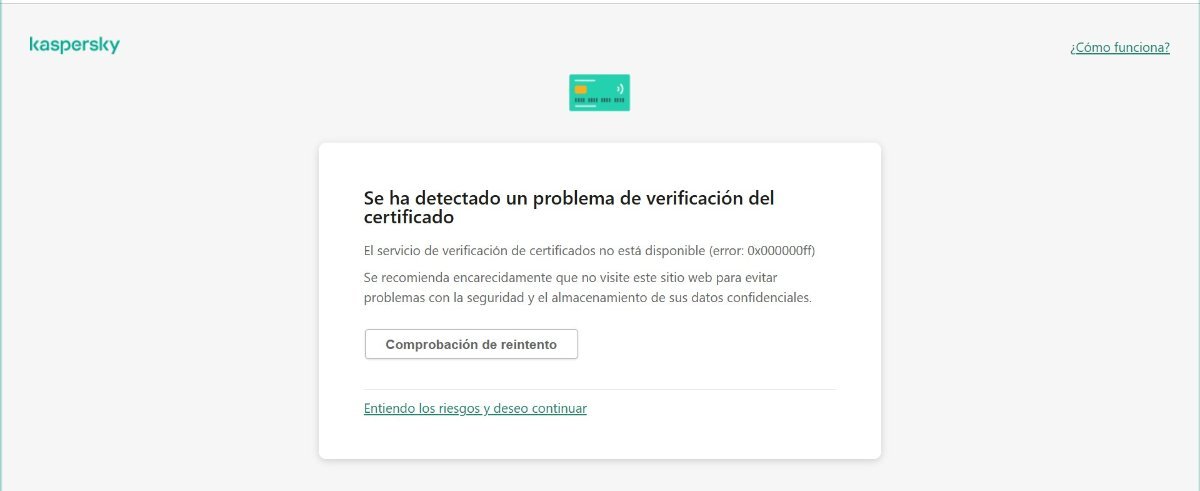
Hola a todos, tengo Kaspersky total seguridad, cuando intento acceder a pago seguro, me sale "se ha detectado un problema de verificación de los certificados" *tengo las bases actualizadas. *tengo Windows 10. *hasta hace una semana me funcionaba bien lo de pago seguro. gracias a todos *********************** Hi everyone, I have Kaspersky Total Security, but when I try to access Secure Payment, I get the message "A problem has been detected verifying the certificates." *I have updated databases. *I have Windows 10. *Until a week ago, Secure Payment was working fine for me. Thanks everyone.
-

false positive Kaspersky Plus keep deleting file in Exclusion folder
Hendarto posted a topic in Virus and Ransomware related questions
Operation System : Windows 11 v 10.0.22631 Build 22631 Kaspersky Plus 21.20.8.505 Subscription: Kaspersky Total Security Burp Suite v2025.2.4 Build 37731 SQLipy Sqlmap Integration v0.8.5 by Josh Berry I work as a pentester using Burp Suite, so this is very disruptive to my work. I have an issue related to the exclusion feature in Kaspersky Plus, where even though I have set an exclusion for a folder, Kaspersky still scans that folder, causing the files inside it to be detected and deleted The scenario started when I tried to install the Burp extension sqlmap. After successfully installing, the extension file was automatically deleted by Kaspersky because it was detected as HEUR:HackTool.Python.Agent.gen. I then performed an exclusion for the folder C:\Users[MYUSER]\AppData\Roaming\BurpSuite, including checking the box for included subfolders. However, Kaspersky still deleted the settings.py file or other files owned by the sqlmap extension in the Burp folder. The setting I used was to uncheck all component protection in the exclusion. I also tried the opposite by checking all component protection. The result was the same. Link Video Scenario : https://drive.google.com/file/d/12r0r3ksJfxkIk3yVSv8LGZTT2jwbRPiN/view?usp=sharing
-
 Операционная система: Windows 11 Pro, версия 24H2 (сборка ОС 26100.3624) Программа: Kaspersky Secure Connection, версия 21.20.8.505-1 Здравствуйте! Прежде всего, хочу поблагодарить команду Kaspersky за ваш труд. Я прекрасно понимаю, что текущая ситуация в мире и в России создаёт определённые ограничения и сложности — возможно, не всё из предложенного будет возможно реализовать. Тем не менее, я решил поделиться своими мыслями, потому что искренне пользуюсь и ценю ваш продукт. Если данное обращение размещено не в подходящем разделе, прошу направить меня туда, где можно делиться предложениями по улучшению. Пользуюсь Kaspersky Secure Connection достаточно давно, и хочу сначала отметить положительные моменты, которые мне особенно нравятся: Возможность регистрации и оплаты подписки из России без лишних сложностей — это серьёзное преимущество, которое экономит время, деньги и нервы. Наличие множества стран для подключения, а также дополнительные функции, такие как «Защита от сбора данных в интернете», — действительно полезны. Приятно, что при подключении к VPN устройства внутри локальной сети продолжают видеть друг друга — это удобно при трансляции контента с телефона на телевизор и других задачах. Я с уважением отношусь к вашему продукту и хотел бы, чтобы он стал ещё лучше. Ниже перечислю предложения, которые, как мне кажется, могли бы улучшить пользовательский опыт: ? Предложения по улучшению Kaspersky Secure Connection: 1. Приложение для Android TV и других платформ Хотелось бы видеть полноценное приложение для Android TV и других популярных платформ (например, для медиаприставок). Использование VPN через роутер — не всегда удобный выход, особенно если для разных сервисов нужна смена стран. Поддержка таких устройств сделала бы сервис значительно удобнее для мультимедийного использования. 2. Скорость и задержка При подключении даже к оптимальному серверу (например, Москва), скорость снижается на 25–75% от исходной, а пинг возрастает в 8–12 раз. Возможно, имеет смысл рассмотреть оптимизацию серверной инфраструктуры, например, за счёт кэширования в оперативной памяти (если это применимо с учётом вашей архитектуры), или другим способом, который бы улучшил стабильность и скорость. 3. Блокировка рекламы и трекеров Поддержка функций по блокировке рекламы, трекеров и аналитических скриптов — крайне востребованная возможность, которую хотелось бы видеть в будущем. Это может ускорить загрузку страниц, снизить нагрузку на трафик и повысить приватность. 4. Выбор режимов подключения во всех приложениях На Windows уже реализована полезная возможность выбора задач (например, «Онлайн-кино», «Игры», «Загрузка», «Двойной VPN»). Было бы здорово видеть эту функциональность и в других версиях приложения, например, на Android или в будущей версии для Smart TV. Это позволило бы гибко использовать VPN в зависимости от сценария — и повысило бы удобство. 5. Гибкое количество подключаемых устройств На текущий момент поддерживается только 5 устройств на подписку. Хотелось бы либо увеличить лимит (например, до 10), либо реализовать гибкую систему тарификации, где пользователь может сам выбрать количество нужных подключений. Например: «одно устройство — 100 руб. в месяц, каждое следующее — +X руб.», с возможностью масштабирования. Понимаю, что есть технические и коммерческие риски, в том числе попытки обхода ограничений через маршрутизаторы, но всё же считаю, что такой подход дал бы большую гибкость честным пользователям. ? Дополнительные предложения, основанные на пользовательском опыте и индустриальных практиках: 6. Исключение отдельных стран из функции автоматического подключения Сейчас при выборе автоматического подключения VPN выбирает ближайший и самый быстрый сервер — в моём случае это часто оказывается Россия. Однако в ряде ситуаций требуется исключить определённые страны (например, по причинам контента или безопасности). Было бы удобно иметь возможность указывать страны, к которым подключение исключается при автоматическом выборе. 7. Встроенный тестер скорости и фильтр по скорости/пингу Хотелось бы, чтобы в интерфейс VPN был встроен тест скорости и пинга до серверов, с возможностью сортировки или фильтрации по наилучшим значениям. Это позволило бы пользователю быстро выбрать страну с оптимальным соединением для текущих задач. 8. Обход блокировок и фильтрации (Stealth-режим) Некоторые сети фильтруют VPN-трафик. Было бы полезно реализовать режим, при котором VPN-трафик маскируется под обычный HTTPS, чтобы можно было использовать сервис в условиях ограничений, например, в корпоративных или публичных сетях. 9. Браузерное расширение VPN (в дополнение к приложению) В Kaspersky уже реализована удобная функция VPN-соединения только для выбранных приложений. Однако хотелось бы видеть также браузерное расширение (например, для Chrome и Firefox), позволяющее включать VPN только для браузера, без запуска отдельного приложения. Это может быть полезно в ограниченных средах, где нельзя установить полноценный клиент, или в ситуациях, когда VPN требуется только для веб-серфинга. 10. Поддержка современных VPN-протоколов и стабильная доступность Когда начались глобальные ограничения, я сначала использовал Kaspersky Secure Connection, но в определённый момент он перестал подключаться, из-за чего мне пришлось искать альтернативу. Недавно я решил попробовать снова — и был приятно удивлён, что он снова работает. Особенно порадовало наличие протокола WireGuard и собственного решения, предположительно Catapult Hydra. Хотелось бы, чтобы поддержка таких протоколов активно развивалась, а стабильность подключения сохранялась даже в сложных сетевых условиях. На этом всё. Благодарю за внимание, за то, что продолжаете развивать продукт, и за возможность высказаться. Если мои предложения покажутся полезными, буду только рад. Если есть какие-то нюансы, которых я не учёл — с интересом выслушаю замечания и аргументы. С уважением, Вячеслав
 -

Internet Security blocking access to Steam UI and XBox Apps on Windows 11
VSampedro posted a topic in Kaspersky Internet Security
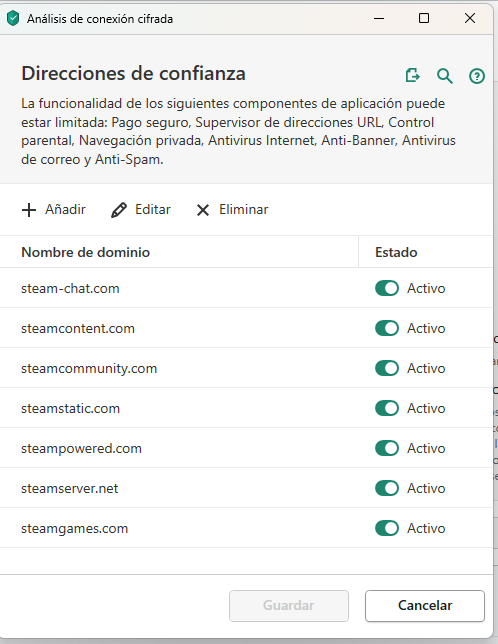
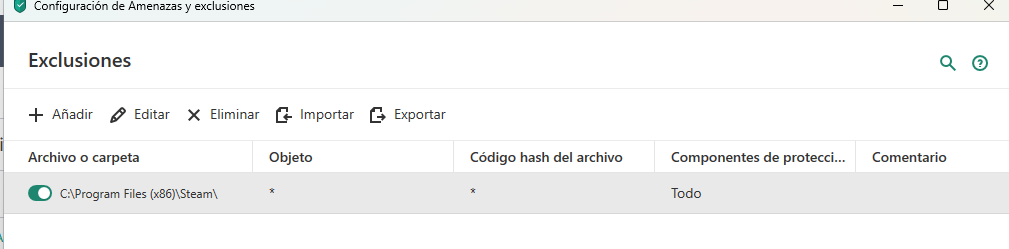
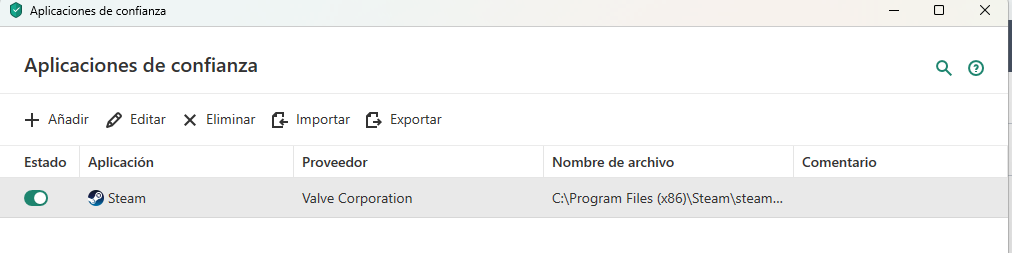
For the last weeks, I'm unable to access the Steam Store, Community or XBox App games, I'm getting an error saying I'm not connecto to Internet. If I pause Internet Security protection, everything works as intended, but it's nothing I plan to do. I've tried adding the Steam app as a trusted app, as well as the steam DNS, but it doesn't works. What do I need to configure so I can play Steam and XBox games without disabling my firewall?
-
Здравствуйте. Антивирус удаляет расширение Troywell из браузера. Как сделать так, чтобы он его не трогал?
-

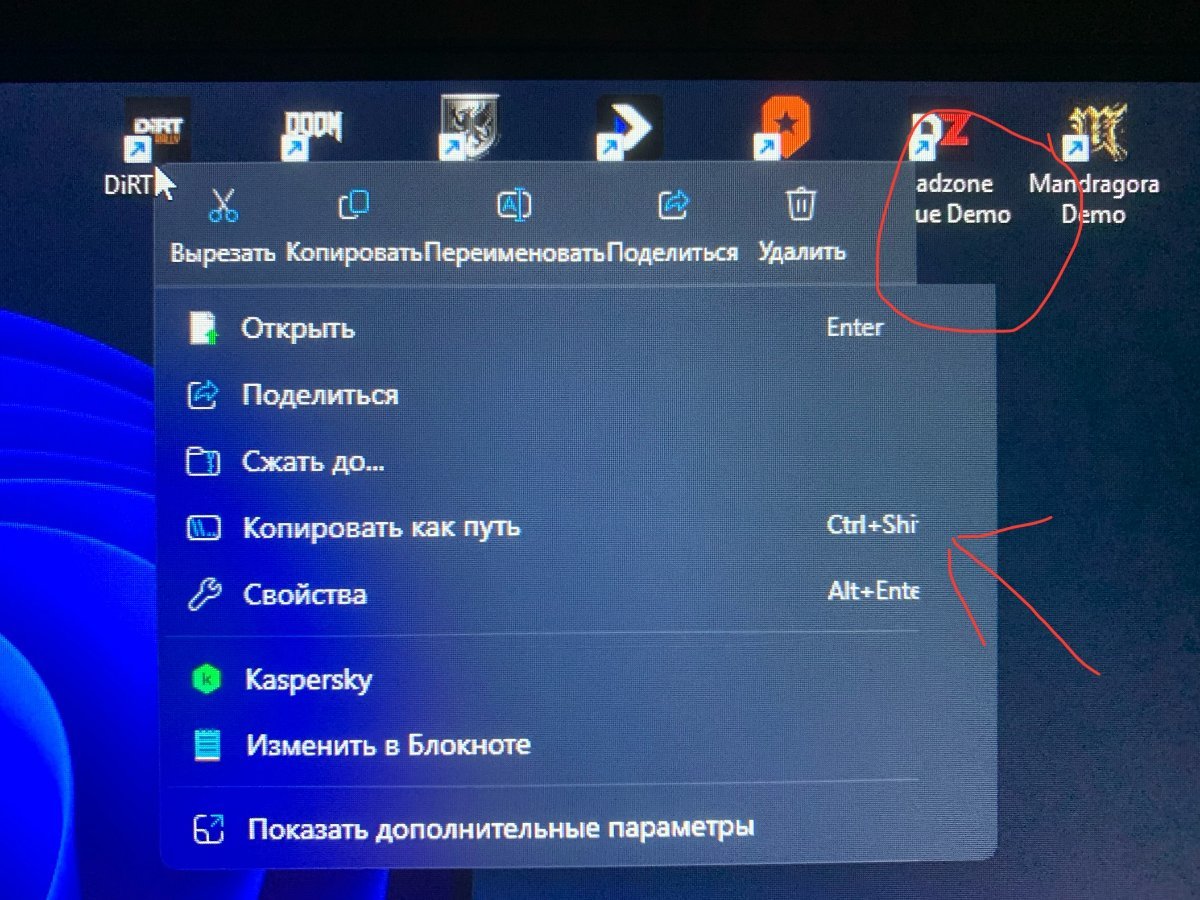
windows 11 24H2 баг контекстное меню из-за Kaspersky Premium
nero117 posted a topic in Kaspersky: Basic, Standard, Plus, Premium
Когда нажимаешь по файлам правой клавишей мыши срезается правый верхний угол контекстного меню и часть текста. Написал в службу поддержи Microsoft там ответили что баг вызывает какая та программа. Когда удаляешь антивирус баг пропадает и появляется после установки. Кто-нибудь сталкивался с такой проблемой, надеюсь скоро исправят. а то глазам больно смотреть. Kaspersky Premium [21.20.8.505] Windows 11 Домашняя Версия 24H2 Сборка ОС 26100.3476 Пакет интерфейса компонентов Windows 1000.26100.54.0
-

Remote connection to Sql server is blocked
Dilum posted a topic in Kaspersky: Basic, Standard, Plus, Premium
I am using kaspersky standard edition. I wanted to remotley connected sql server via public static ip. I have done every configuration including assigning port 1433 for TCP ip also port forwarding in router . But I still can't get the remote access to sql server via static ip. Is there any setting in Kaspersky standard edition to configure in order to get the remote connection successfully. -

How to change ownership of Kapersky Premium?
Joel65675 posted a topic in Kaspersky: Basic, Standard, Plus, Premium
I recently bought from a store here in Malaysia and the store assistant helped me installed Kapersky into my rig. Apparently the store assistant entered the wrong email address and I don't have any accessibility to that account because I didn't set it up. I would like to use my proper email address. Unfortunately the subscription is linked to the wrong email address. Is there a way to work around this problem? Or do I have to cancel the purchase > ask for refund > and reinstall with new activation code? If cannot, then please help me resolve this issue. Thanks -

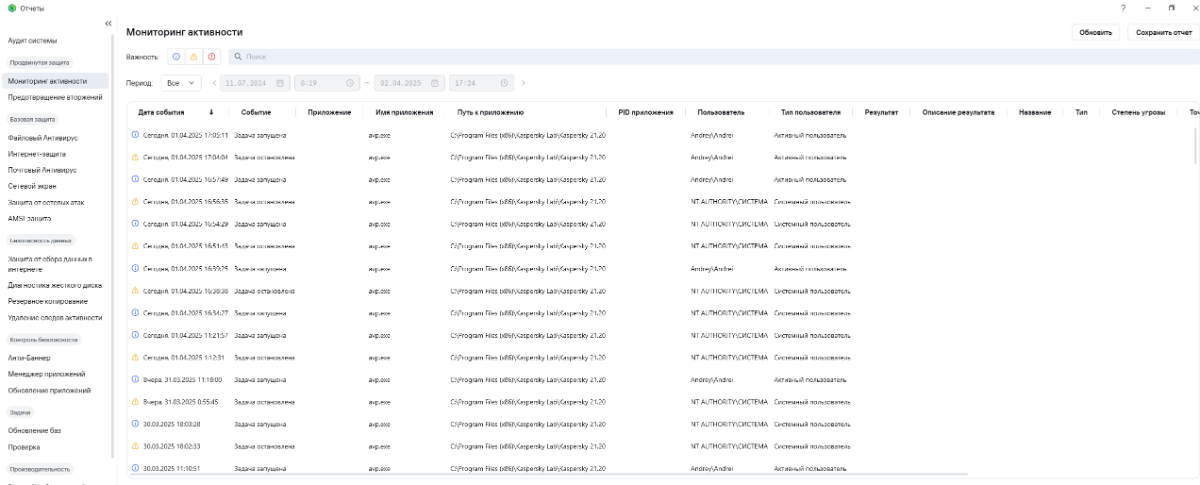
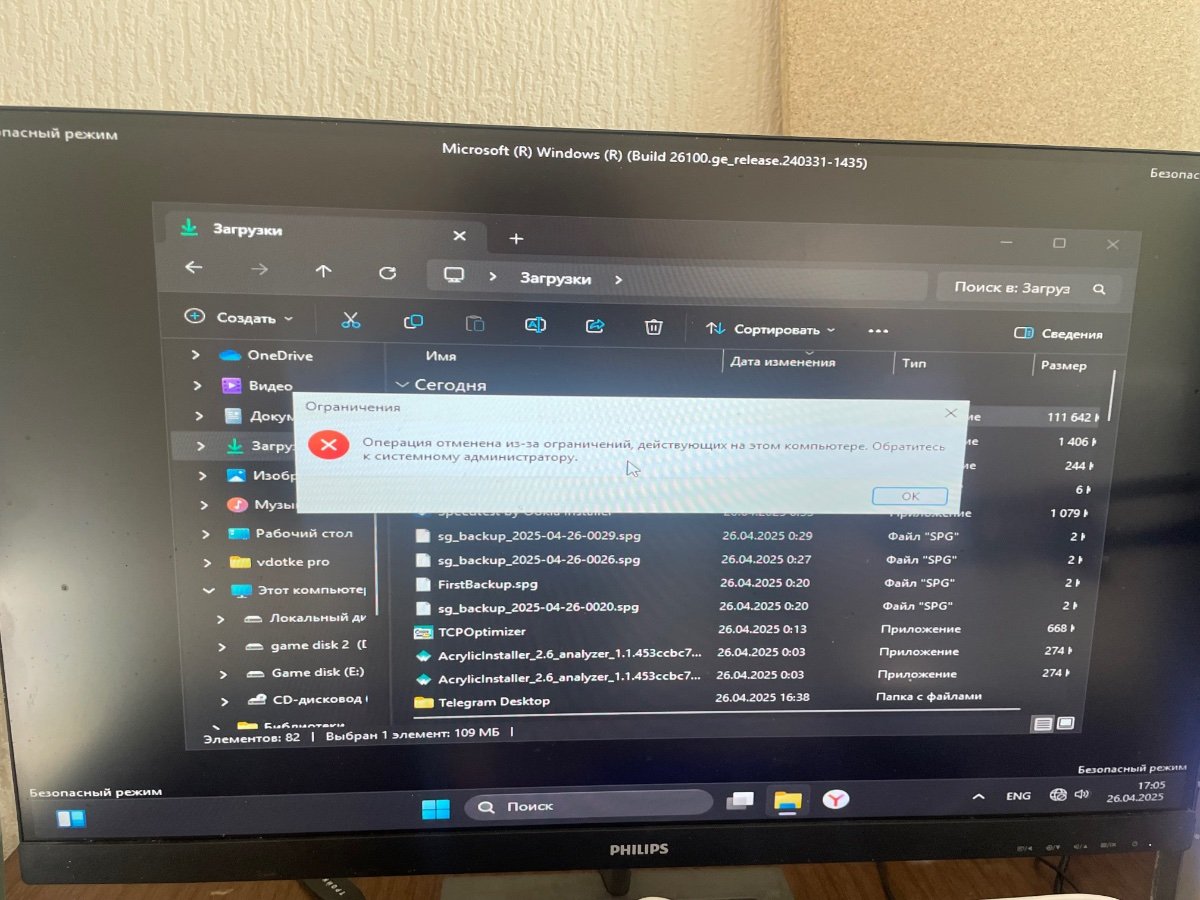
Касперский задача постоянно запускается и останавливается
mlpav posted a topic in Kaspersky: Basic, Standard, Plus, Premium
Постоянно идет перезапуск,даже в простое,если его отключить и снова запустить,то тогда все нормально.Также сегодня после отключения света,при этом происходит звук подключения нового устройства.Прилагаю скриншот
-

false positive Question about Disinfectation
Bluessssss posted a topic in Virus and Ransomware related questions
So apparently Kaspersky has detected false positive and ask me to do disinfectation stuff, so i selected "Disinfectation and restart". Couples of windows pop up saying bad image appear and i clicked ok ok ok and i can't click anthing other than that pop up. It's been 15 minutes and im stucking in homepage doing nothing. Should i restart my computer? I have work to do. -
We have an onsite KES admin server, and have been using KES for several years. Latest KES edition 12.8.0.505 package downloaded and a distribution task created (with Agent bundle). Setting up a new laptop - an HP ProBook 455, literally out of the factory box -and KES will not activate. We have a 75-device licence and are currently using just 64 of the allocation, so we have not exceeded licence count. I have followed the troublshooting tips such as https://support.kaspersky.com/kes-for-windows/12.8/troubleshooting/other/16052#block3 suggest without any luck. System has been restarted, I uninstalled KES 12.8, reinstalled, uninstalled again, installed previous KES 12.7, but these all fail to allow activation. Tried a KES Admin Task to upgrade the 12.7 instance to 12.8, and selected the recommended option for how to deploy the licence ("do not place license key in installation package"), which has worked previously. Install completes happily, but still activation. Tried manually adding the licence code directly within the KES app (activation code taken from the exported key). The app looks like it has activated, but as soon as you click the Finish button, it immediately reverts to unlicenced. Tried manual activation using the exported key (which is just plain text), and we are told the key file is corrupt.
-
Kaspersky Threat Intelligence Portal — Report — d654160c83d3b2574826dacac8698547 今天在运行游戏《刺客信条:影》时出现死机,发现卡巴斯基将该游戏主程序识别为了病毒,请尽快解决。TIP查询(见链接)也可以看到卡巴斯基将该程序识别为病毒(BSS:Trojan.Win32.Generic)的记录。
-
У меня настроено резервное копирование на внешний диск. Около 40 Гб В первый раз, что понятно, это заняло около 2 часов. Но следующие копии, настроенные по расписанию, занимает столько же времени. Вопрос почему так. Разве при копировании не должны просто перезаписываться только изменённые файлы? Я ничего не скачивал, но ощущение будто бы копирование каждый раз начинается по новой.
-

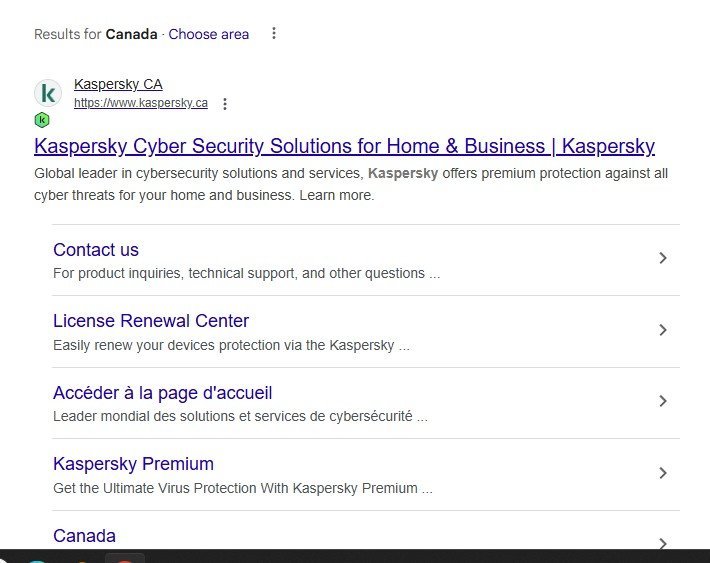
windows 11 K green icon not showing in subheading urls
cc2150dx posted a topic in Kaspersky: Basic, Standard, Plus, Premium
K green icon not showing in subheading urls, but showing on main url. This happens to all sites that have subheadings. This issue has persisted for a month maybe more. The last time this happened it was fixed with a database update but not this time. Any ideas ? Kaspersky Premium 21.20.8.505 Google Chrome 134.0.6998.89 64-bit (with Google search engine) Windows 11 64-bit 24h2
-

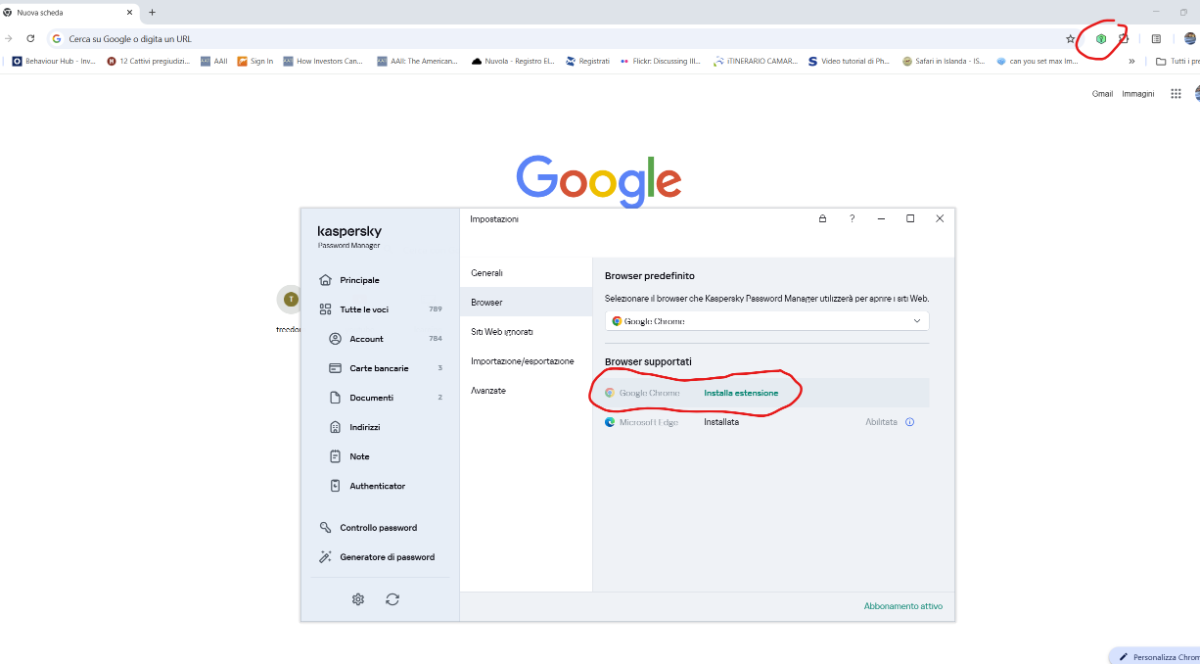
password manager chrome app installed but the software does not see it
thenax posted a topic in Utenti privati
I installed the Google Chrome app dedicated to the password manager but if I run the Windows software "Kaspersky Password Manager" it always tells me that it still needs to be installed. Why? How do I solve it? windows 11 - version 24.3.0.327 / 1741787757_7668 / 1.1.0.2_1
-

Отключить уведомление "запрещен доступ к веб-камере".
Ласка posted a topic in Kaspersky Total Security
Приветствую, подскажите решение проблемы. Я хочу отключить уведомление "запрещен доступ к веб-камере", оставляя правило запрета на использование веб-камеры действующим. Не нашёл событие "Программе запрещен доступ к веб-камере" в настройках уведомлений. Ни во вкладках Безопасности данных, ни во вкладке Контроль программ. -
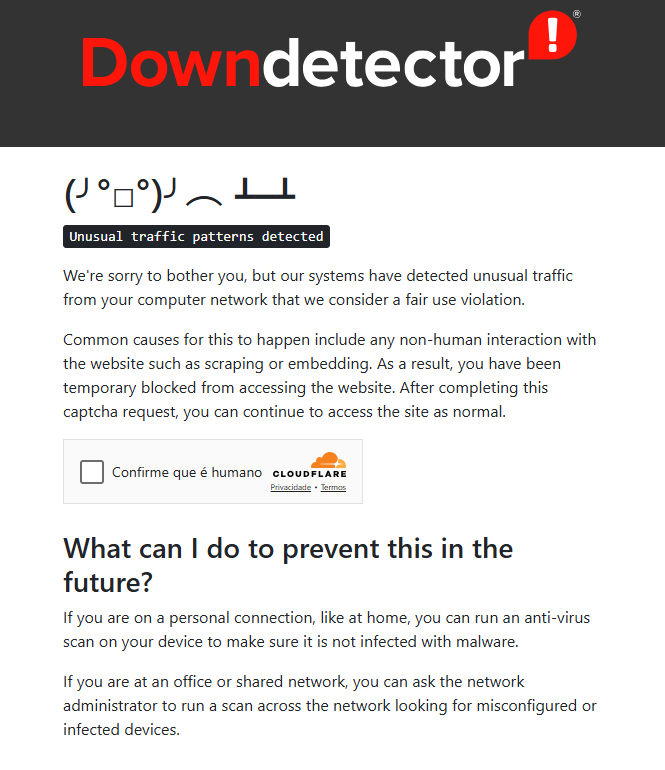
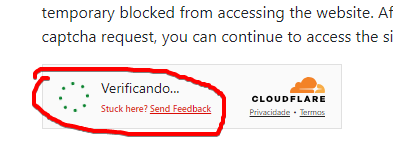
-- OS: Windows 11 Pro 23H2 Versão do aplicativo Kaspersky: 21.20.8.505 --- Quando acesso alguma página que exige autenticação de 2 fatores e/ou checagem de captcha pela cloudflare fica com um aviso “Preso nessa pagina? Acione o suporte” Só consigo dar sequência quando deixo o kaspersky em pausa por 1 minuto que é o suficiente para dar sequência e com um ctrl + F5 a pagina carrega normalmente. Alguém sabe se marquei algum campo onde bloqueia esse tipo de site? Exemplos: https://downdetector.com.br/ Com a ferramenta do kaspersky para gravação de problemas fiz uma gravação, só não sei se já posso anexá-la aqui.
-
Cant add some Zoom.exe file to application control
Hendarto posted a topic in Kaspersky Total Security
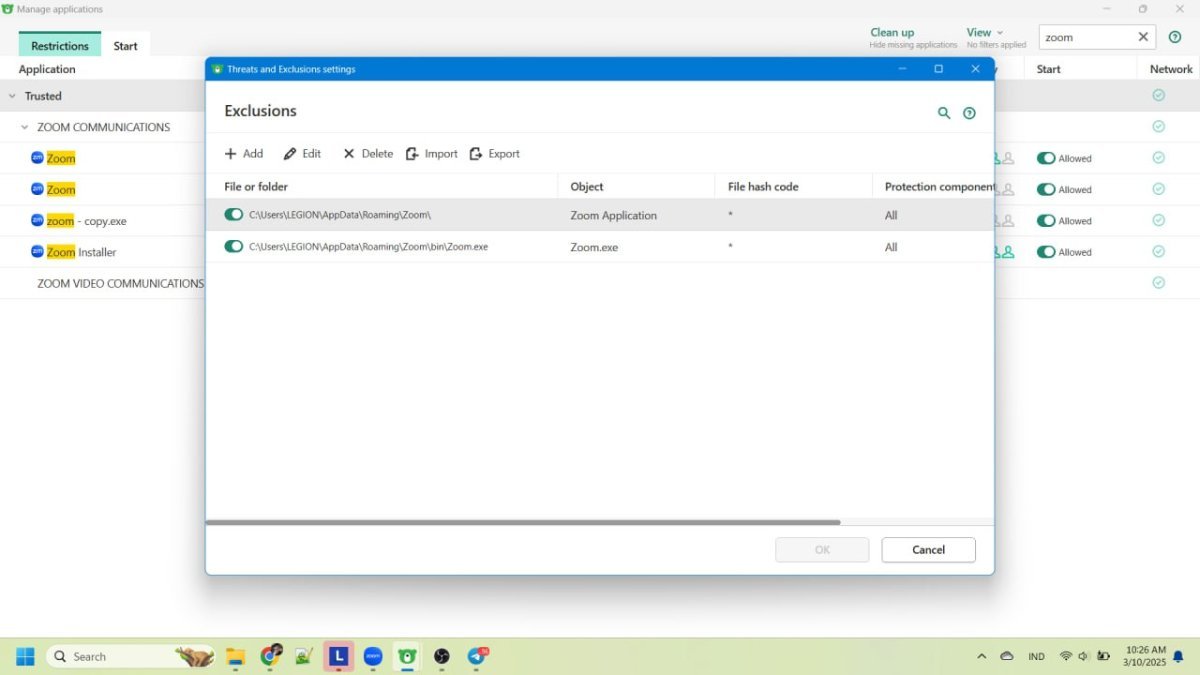
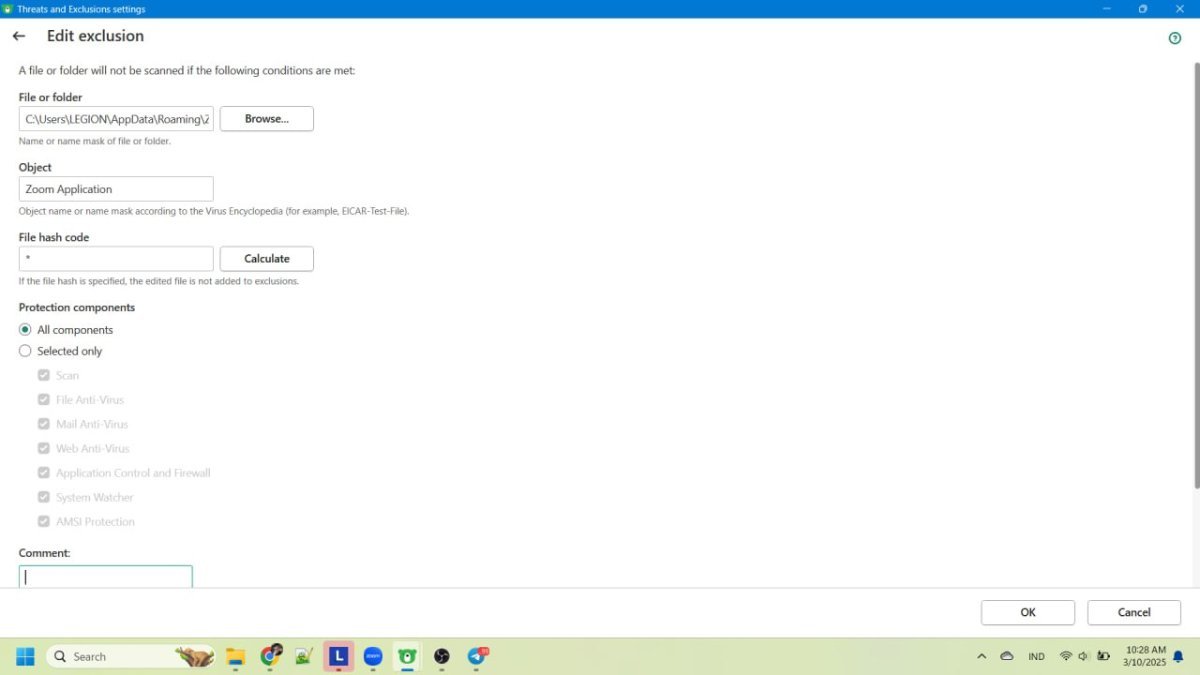
I cant add Zoom.exe to my Application Control rule. Thats make my zoom cant do login or join some zoom video call. I always need to pause kaspersky to be able to join or login, and when i resume the protection and try to rejoin the error shown error 5003 that told me to mske sure my connection is not blocked by firewall. I have try to add zoom.exe but the my application control prevent its, have try to reinstall the zoom but the problem still occur. But when i try other file like, the file can be added to rules, and funny things is i did copy Zoom.exe to Zoom-copy.exe and it can added to the rules but its not solve my main problem because the Zoom itself refers to Zoom.exe not with the copy name on its. Here the video that i cant add my file only for Zoom.exe to rules. https://drive.google.com/file/d/1UD816GyJn6iKgDcXrSmuG4N1HgyAfqHo/view?usp=sharing I have try to add the folders that zoom located as threat and exclution but still get blocked Windows 11 v 10.0.22631 Build 22631 KTS 21.3.10.391 (m) 2021 AO Kaspersky Lab
-

Kaspersky Installation Disabled All USB Input Devices – Cannot Log In to Windows
hega333 posted a topic in Kaspersky Total Security
After installing Kaspersky, all USB input devices (keyboard & mouse) stopped working immediately after booting into Windows. Windows itself boots fine, but since no input devices work, I cannot log in. The issue started after attempting to install Kaspersky. During installation, it gave a message stating that Avira was still installed, even though it had been removed two years ago. I manually checked the registry and deleted two Avira-related entries, but one entry could not be removed. I continued with the Kaspersky installation anyway, and then both of my monitors went gray, and several DLL errors appeared. After restarting the PC, USB devices stopped working completely in Windows, even though they still work in BIOS and in the Windows Recovery menu. Steps Already Attempted (None Worked): 1. BIOS & Hardware Checks: - Keyboard and mouse work in BIOS, so this is not a hardware issue. - Legacy USB Support is already enabled in BIOS, so USB ports are not blocked at the motherboard level. - Tried multiple USB ports (front, back, USB 2.0, USB 3.0), but none work in Windows. - No PS/2 ports available, so that option is ruled out. 2. Windows Recovery & Safe Mode Attempts: - Booted into Advanced Startup (Recovery Mode), and USB devices work there. - Booted into Safe Mode (F4), but USB devices do not work. - Booted into Safe Mode with Networking (F5), but USB devices do not work. - Booted into Safe Mode with Command Prompt (F6), but USB devices do not work. - Attempted “Startup Repair” in Recovery Mode, but it did nothing. - Tried “Reset This PC” with “Keep My Files,” but it failed with the error “Could not reset this PC, no changes were made.” 3. Kaspersky Removal Attempts (Failed Due to No Input): - Tried opening Command Prompt in Safe Mode to uninstall Kaspersky, but no input devices work, so I couldn’t type commands. - Manually checked Kaspersky’s installation folders using Command Prompt in Recovery Mode: - C:\Program Files\Kaspersky Lab does not exist. - C:\ProgramData\Kaspersky Lab does not exist. - Manually checked Windows registry for Kaspersky-related services (klflt, klkbdflt, klmouflt, avp, etc.), but none were found. 4. USB Driver Repair Attempts (Did Not Work): - Tried enabling USB drivers manually via Registry in Command Prompt: reg add "HKEY_LOCAL_MACHINE\SYSTEM\CurrentControlSet\Services\USBHUB3" /v Start /t REG_DWORD /d 3 /f reg add "HKEY_LOCAL_MACHINE\SYSTEM\CurrentControlSet\Services\usbhub" /v Start /t REG_DWORD /d 3 /f reg add "HKEY_LOCAL_MACHINE\SYSTEM\CurrentControlSet\Services\usbxhci" /v Start /t REG_DWORD /d 3 /f reg add "HKEY_LOCAL_MACHINE\SYSTEM\CurrentControlSet\Services\usbehci" /v Start /t REG_DWORD /d 3 /f reg add "HKEY_LOCAL_MACHINE\SYSTEM\CurrentControlSet\Services\USBSTOR" /v Start /t REG_DWORD /d 3 /f None of these commands fixed the issue. - Tried forcing USB driver reinstallation using DISM & pnputil in Command Prompt, but it did nothing. - Checked disk partitions (diskpart) to confirm Windows installation drive was correct, but there was confusion with the drive letters (C: and X: were mismatched). Current Situation: - Windows still boots fine, but I cannot log in because keyboard and mouse do not work. - Recovery Mode recognizes USB, but Safe Mode and normal Windows do not. - Kaspersky is not listed in Program Files, ProgramData, or the registry, but the issue clearly started right after installing Kaspersky. - Resetting Windows fails, so I cannot even attempt a repair install from inside Windows. --- What I Need from Support: - How to fully remove Kaspersky (including any hidden services) without being able to log in. - How to manually enable USB drivers from Recovery Mode. - How to fix the "Reset This PC" failure in case a repair install is required. -

How do I change the language to English?
Sjaak posted a topic in Kaspersky: Basic, Standard, Plus, Premium
Where is the setting that allows me to change the language to English? Thanks!


.png.0c858cca5515571e93d639f54d866989.png)
.png.ebbcc6f0658318c8cb1aa3a065f06eea.png)