Search the Community
Showing results for tags 'windows 10'.
-

KES 11.10.0.399 и коммутаторы SNR
Vidoc3000 posted a topic in Kaspersky Endpoint Security для бизнеса
Добрый день. Подскажите кто сталкивался с такой проблемой и как правильно ее решить: Стоит KSC 13, агенты и KES 11.10.0.399 все настроено и работает прекрасно, но к свичам SNR не хочет подключаться... Открывается страница ввода пароля и после ввода пароля соединение рвется. Методом научного тыка нашлись 2 виновника (защита от веб угроз и анализ поведения). Ранее общались с тех. поддержкой по решению данной проблемы, даже 2 патча получали, но это не помогло. Временное решение: создал профиль для нужных пк и отключил эти компоненты. Самое интересное что из-за анализа поведения приходится чистить кэш браузера, чтобы заработало (без этого даже с отключеным касперским воспроизводится такая ошибка!). P.S. исключения добавлялись во всевозможные места, но толку не было. В настройках защита от веб угроз > действия при обнаружении угрозы видимо не работает пункт "информировать"... -

-

VPN F5 can't establish connection when KES11 is enabled
Antarion posted a topic in Kaspersky Endpoint Security for Business
Hi, We are running Windows 10 21h1 and Kaspersky Endpoint Security 11.9 since we updated from 11.8 to 11.9 our F5 VPN client doesn't work anymore. I've added *.domain.com/* to the "Trusted Web Addresses" of the "Web Threath Protection component" and added the folling files to the "Scan Exclusion and Trusted Applications" But still it doesn't work. Only when i pause the protection the connection can be established. C:\Windows\Downloaded Program Files\F5ElHelper.dll C:\Windows\Downloaded Program Files\F5ElHelper.exe C:\Windows\Downloaded Program Files\F5ElHelper64.dll C:\Windows\Downloaded Program Files\f5instd.exe C:\Windows\Downloaded Program Files\F5InstH.exe C:\Windows\Downloaded Program Files\F5InstP.dll C:\Windows\Downloaded Program Files\F5InstP64.dll C:\Windows\Downloaded Program Files\f5LogViewer.exe C:\Windows\Downloaded Program Files\f5tunsrv.inf C:\Windows\Downloaded Program Files\f5unistall.exe C:\Windows\Downloaded Program Files\f5vpn.exe C:\Windows\Downloaded Program Files\F5Win32CheckHelper.dll C:\Windows\Downloaded Program Files\F5Win32CheckHelper.exe C:\Windows\Downloaded Program Files\InstallerControl.dll C:\Windows\Downloaded Program Files\InstallerControl.inf C:\Windows\Downloaded Program Files\scew_uls.dll C:\Windows\Downloaded Program Files\setup2000.dll C:\Windows\Downloaded Program Files\setupdrvdll.dll C:\Windows\Downloaded Program Files\TunnelServer.exe C:\Windows\Downloaded Program Files\TunnelServerX.dll C:\Windows\Downloaded Program Files\uregsvr.exe C:\Windows\Downloaded Program Files\urset64.exe C:\Windows\Downloaded Program Files\ursetarm64.exe C:\Windows\Downloaded Program Files\ursetvpn.exe C:\Windows\Downloaded Program Files\urSuperHost.dll C:\Windows\Downloaded Program Files\urxdialer.dll C:\Windows\Downloaded Program Files\urxdialerres.dll C:\Windows\Downloaded Program Files\urxhost.dll C:\Windows\Downloaded Program Files\urxhost.inf C:\Windows\Downloaded Program Files\urxhostres.dll C:\Windows\Downloaded Program Files\urxshost.inf C:\Windows\Downloaded Program Files\urxvpn.inf C:\Windows\Downloaded Program Files\urxvpnad.tag Thank you for your help -
Hi, I was wondering if there was a way to shred files and folders from the windows context menu rather than opening the shredder from the Kaspersky application? I'm using Kaspersky Total Security v21.3.10.391 (j)
-
Moin! Wir haben ein kleines Konfigurationsproblem: Domänennetzwerk mit Kas SC 13.2, auf den betreffenden WS ist 11.9 Endpoint Security installiert. Wenn diese Benutzer Überweisungen mit Profi Cash tätigen, bekommen diese am Ende einen Codebase Error von ProfiCash, weil Kaspersky den Hosts aus dem Netzwerk für 30 Minuten ausschließt. Ist auch soweit klar. (Die Benutzer starten dann ihren Rechner neu und sind wieder im Netzwerk). Kaspersky meint das wäre ein Verschlüsselungsangriff mit Trojan.multi.genericcryptor.ksws. Das ist aber definitiv eine Falschmeldung. Jetzt haben wir ein Problem, eine Ausnahme dafür für PC 192.168.1.1 (Beispiel) zu setzen. Wir haben im Cryptmodul schon Ausnahmen gesetzt (in der Richtlinie)für (beispiel) o:\shares\bank und \\File-srv\shares\bank\profi\ selbst die Datei .DR$ haben wir in die Ausnahme gesetzt. Das Problem besteht aber weiterhin. Wir haben selbst den Prozess wpc.exe in die Vertrauenswürdige Zone eingetragen, Fehler kommt trotzdem. Wir kommen eigentlich mit Kaspersky gut klar, aber mit Profi Cash ärgert er es jetzt schon länger. Kann uns jemand ein Tipp geben wo genau wir in der Richtlinie das als Ausnahme definieren müssen ?
-
Добрый день! Приобрёл лицензию Total Security, на 3 устройства (2 стационарных ПК, 1 ноутбук). В 1 из них планируется замена 1 комплектующего (видеокарты) примерно через месяц. Подскажите, слетит ли лицензия, или никаких проблем не будет? Нужно ли выполнить какие-либо действия после установки новой видеокарты на ПК с активированной лицензией?
-
In my data drive, which is always included in my full scans, I have some symbolic directory links that link to a network drive. Kaspersky Internet Security is following those links and ends up scanning huge chunks of my network drive, which I don't want to do, at least not in this particular scan. Is there any way to set the scan options so that it does not follow the symbolic links and scan their destinations? System configuration is KIS 21.3.10.391, Windows 10 w/all updates, Dell Precision 7920 workstation. Thank you!
-
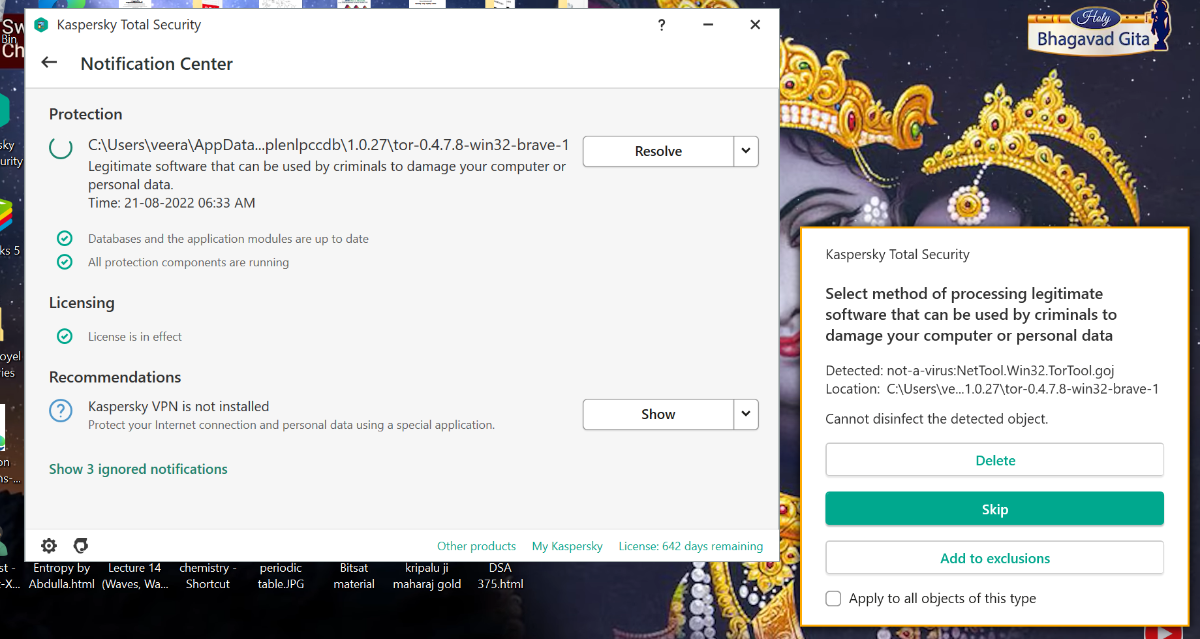
 Hello I am using kts on my windows 10 home and kaspersky Kts version 21.3.10.391 (j) This morning (i.e. now when I am writing this) I got this error message :- I have not done anything or clicked anywhere as of yet so this popup is currently on my screen as I type: what should be the proper step for me now ... and kindly help me quickly as the popup is currently open and I haven't selected any of the 3 (delete, skip, add to exclusion) options. Kindly guide me.... as soon as possible thanks!
-
Multiple Nexway/Kaspersky UK/KTS & VPN Subscription Renewal Issues
Vaj posted a topic in Kaspersky Total Security
We have run Kaspersky Total Security and VPN on Windows 10 for many years and have been very happy with the products and the quality of technical support. The situation in respect of Nexway/Kaspersky UK/subscription renewals seems however to have changed radically for the worse since last year. Can anybody suggest a way around the following issues please? We'd like to continue with Kaspersky but will not do so at any cost... We have previously been stiffed by the UK/French company for a huge auto-renewal renewal cost for Kaspersky Total Security which support sorted out - they applied an ~ 50% discount and credited us with the difference. Our understanding was that all auto-renewal permissions were rescinded at that time as requested. Despite this we a few weeks ago discovered that the VPN subscription was auto-renewed by Nexway/Kaspersky UK in late June while we were ill at more than double the cost of the previous year. Trying to renew the Kasperksy Total Security subscription today we're finding that all options except UK/Nexway or other local agents are blocked. That the cost from Nexway/Kaspersky UK has again more than doubled, that the option to delete a credit card from the account is disabled/greyed out, and that the dialogue box forces explicit acceptance of auto-renewal and at whatever price the company feels like charging!!! The geopolitical situation may provide some sort of feeble excuse for a price increase, but the measures adopted to force auto renewals at whatever price the company decides to magic up is utterly unacceptable and amounts to sharp practice. We've taken the matter up with support, but have not had a reply yet. Nor do we know whether support is as before - it may well by now be controlled from Nexway France/Kaspersky UK. We're not however going to accept yet another attempt by a business to use the power of a web platform to bludgeon the customer into signing up to utterly acceptable conditions. Even if the auto-renew and credit card issues are resolved may depending on the market refuse the sort of price increases sought too.... -

How to import passwords from Chrome? I FOUND IT
1111GD1111 posted a topic in Kaspersky Password Manager
Win10 KTS I'm a new user and for the life of me I can't find out how to import Chrome passwords into KPM!!! I think I've searched everywhere but it's probably right under my nose. Someone please help! TY! -

(Skype Desktop) unable to sign in please check your internet connection skype
dongman posted a topic in Kaspersky Internet Security
Hi, i can't sign in my skype desktop until i exit kaspersky internet security I can sign in skype on web and and my phone I already add "Manage exclusions" to location on skype folder and still no luck When i try to add "Trusted applications" on skype.exe, kaspersky get crash for no reason For some reason, when i click "details and removes" on "skype-8.83.0.408.tmp" in Manage applications, i get "Application was moved or removed" Or maybe for some reasnon i can't find the real skype on Manage applications list
-
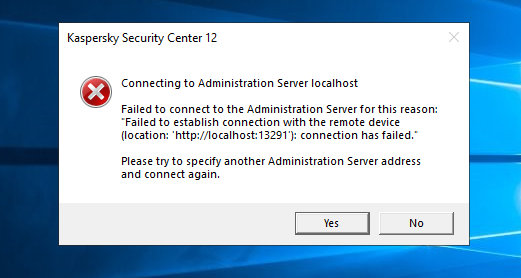
Por favor ayudarme con este erro que no puedo hacer que conecte la consala de kaspersky
-

Kaspersky Stopped Download from Malicious Source
SullySP posted a topic in Virus and Ransomware related questions
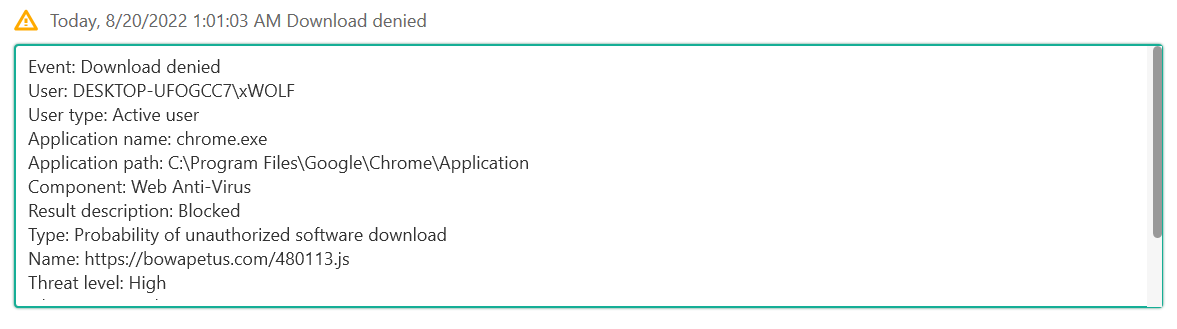
Hello, This evening I launched Google Chrome dashboard, and I got a notification that Kaspersky had stopped a malicious download. While I'm greatful that it had stopped the download, I have to assume that my computer is compromised, right? I conducted a few full scans by both Kaspersky and Windows Defender, and they found nothing. I haven't had another download happen yet, but I'm unsure on how to check if I'm 100% safe at this point. Can I get some help or advice on what to check for next? Thanks for all the help in advance!
-
У меня приобретены 3 лицензии Kaspersky Internet Security. Как я могу увеличить число действующих лицензий? Только купив новые лицензии отдельно (как новый пакет лицензий) от действующей или можно докупить необходимое число лицензий к действующим?
-
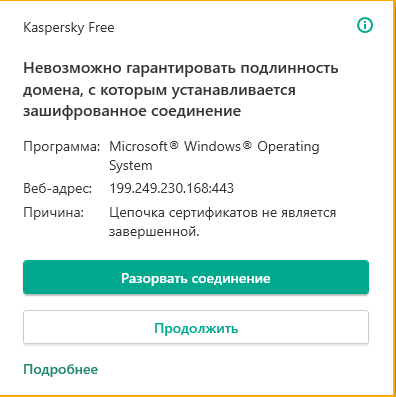
I have been getting this notification that the "authenticity cannot be guaranteed" for map.windows.com and given the option to disconnect or continue. When I look place the domain into my browser, it cannot be reached. Should I continue or disconnect this authorisation?
-
 As title says, chrome trying to access my webcam few times per day. Anyone else with this problem? Mostly when i open gmail. Pls share solution .
 -

Касперский блокирует работу программ по сети (ВЫМОГАТЕЛЬСТВО!)
Eksper posted a topic in Kaspersky Security Cloud
Касперский блокирует работу "брандмауэр виндовс" и не даёт возможности вести настройки блокировок "брандмауэр виндовс". Считаю преступным заблокировать стандартное программное обеспечение и требовать за подобную функцию внутри касперского за деньги! Это ВЫМОГАТЕЛЬСТВО! Мало того, что не даёте блокировать спам IP адреса, как в "брандмауэр виндовс", да ещё к этому и сама "касперский секюрити клауд" отрезает некоторое программное обеспечение от доступа в интернет, без возможности вручную это исправить. Всё, что советуют в "поддержке касперского" - купи программу и получи доступ... ВЫМОГАТЕЛЬСТВО! -
Bonjour, Je suis actuellement en train de paramètre un serveur Kaspersky Security Center et j'ai vu qu'il y a la possibilité de faire des notifications mails Le problème c'est que mon entreprise n'a pas d'adresse e-mail qui communique vers l'extérieur. J'aimerais donc savoir comment faire pour paramétrer des notifications en utilisant Gmail Outlook iCloud ou d'autres types de service ce qui serait compatible avec. J'ai déjà essayé avec Gmail mais apparemment depuis mai 2022 il n'est plus possible de pouvoir se connecter à Gmail en utilisant juste nom de utilisateur et mot de passe y a-t-il des alternatives? Merci de votre réponse
-
Касперский блокирует работу программ по сети
-
QUiero comunicarme con alguien ya es la segunda vez que me cobran una suscripcion automatica que no utilizo. Por favor quiero un telefono o un mail Es imposible encontrar el contacto directo
-

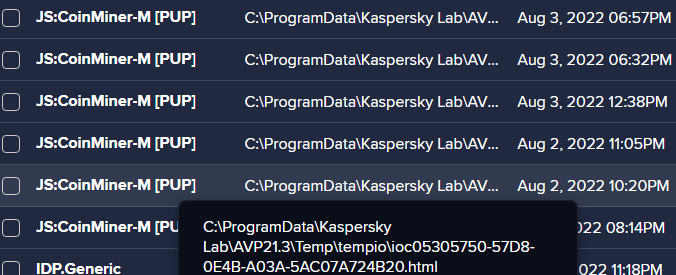
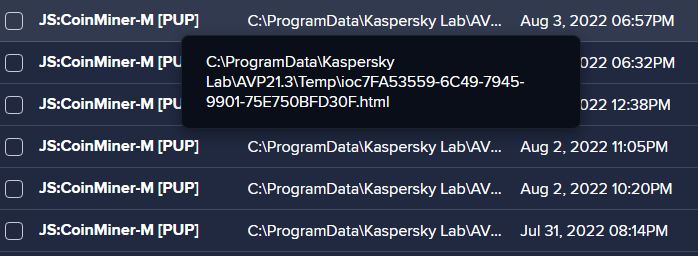
Avast is detecting a virus-threat in C:\ProgramData\Kaspersky Lab\AVP21.3\Temp
Stormmaker23410 posted a topic in Kaspersky Security Cloud
My Avast is going of constantly, first it said it was in tempio folder, now its just Temp. It started like from nowhere. I tried deleting them, but they came back.
-
Добрый день! Хотел бы узнать, будет ли реализована защита от захвата экрана в Windows. Например, когда показываешь демонстрацию экрана, делаешь скриншот или снимаешь видео. чтобы программа не где не была видна, такая функция уже реализована в keepassxc.
-
 Здравствуйте! Простите, если не сюда пишу. Не подключается консоль управления Kaspersky Security Center 13.2.0.1511 к Серверу администрирования. Консоль управления на Windows 10 Сервер администрирования на Windows 7 Появляется сообщение: Не удалось соединиться с сервером администрирования: отсутствуют права доступа. Было произведено по аналогии инструкции https://support.kaspersky.ru/15245#block2 Однако это не помогло. Помогите, пожалуйста, исправить ситуацию. Буду благодарен советам.
 -
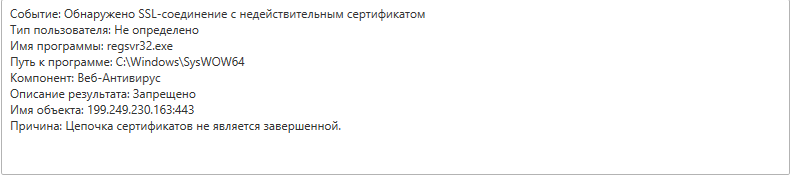
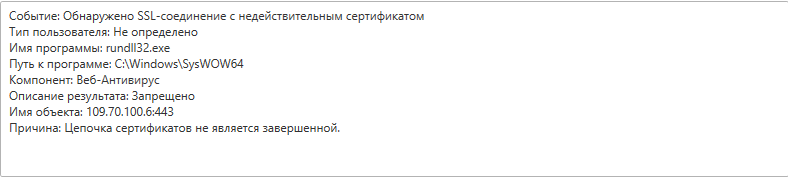
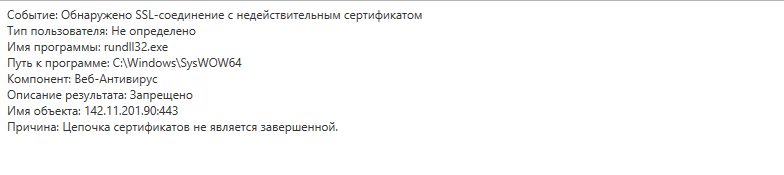
 Поймал троян, антивирус его удалил, но продолжил отсылать мне подобные уведомления с запросами от rundll32 и regsvr32 с какими-то случайными IP, подозреваю, что заразили систему, можно это как-то решить без сноса винды?
-
Hello there, I recently had an app crash resulting in KIS closing on its own (I actually managed to see it closed when Windows Security popped up with a message saying it was off). After that, I went through my Program Files and started it with avpui.exe since I didn't make a shortcut on my desktop, but ever since (it's been 3 days now) the database doesn't seem to update. Here is a screenshot of the tooltip I get when I hover the app icon in the taskbar. As you can see, the database seem stuck somewhere in 2020 and I have no idea why. I tried to manually update, and nothing really happens. I get no errors, might it be from KIS saying my database is outdated or when I try to update, it's just that the tooltip still says 2020 for some reason. I have been using Kaspersky products for years and never got any issue, first time I stumble upon this, if anyone has an idea it would be great! I use KIS 21 on a Windows 10. Thanks in advance.