All Activity
- Past hour
-

Список доступных локаций после автоматического продления старой подписки
Danila T. replied to Роман Романов's topic in Kaspersky Secure Connection
Про Турцию согласны и работаем над этим. -

1С Не дает подключиться к WEB серверу через тонкий клиент
XS_ZH replied to svv1979's topic in Kaspersky Internet Security
У меня похожая проблема. Вы разобрались в чём было дело и как лечить? -
XS_ZH joined the community
-
 Андрей11111 joined the community
 -

-

Endpoint Security 12.12 не появляется в консоли KSC Обновления ПО
mrA replied to HotPaganini's topic in Kaspersky Security Center
Похожая ситуация Установлена KSC 16.1, KES 12.12 в консоли появился, его можно скачать как инсталляционный пакет, а можно бесшовно на него обновить. При этом также вылезло уведомление: "Плагинов Kaspersky Security Center 16.1, которые должны быть обновлены с предыдущих версий, чтобы управлять доступными или установленными бесшовными обновлениями: 1" Версия вэб плагина установлена 12.12.0.2141. Куда чего дальше обновлять, непонятно. -

Список доступных локаций после автоматического продления старой подписки
Роман Романов replied to Роман Романов's topic in Kaspersky Secure Connection
Думаю, локации стран СНГ и Турция куда более востребованы, чем те же Канада и Австралия. - Today
-
Список доступных локаций после автоматического продления старой подписки
Danila T. replied to Роман Романов's topic in Kaspersky Secure Connection
Локации добавлены и добавляются по мере востребованности среди наших клиентов. -

RustDesk Remote Desktop Software Blocking Communication between Netagent and KSC
Seeam0217 replied to Tahmeed702's topic in Kaspersky Security Center
Hello @JL - KL DACH I belive this is most certainly a question for this forum. If a simple remote desktop software can disable a significant part (NetAgent) of your security system, then what kind of security Kasparsky is providing actually?. I would not say that if KS disabled Rustdesk, that would have been understandable. But a Remote Desktop is obstructing the Security software! -
顺带问一下138是upd端口为主,如果我在tcp那一栏的本地端口里写了135、138、139、445,是不是等于也封掉了138/tcp。多余写的138是否影响我封掉135和139以及445?
-
卡巴斯基防火墙规则设置的问题。我如果要封闭数个tcp端口或udp端口,那我是不是只要在本地端口那一栏里填写,数字然后用英文逗号隔开他们就行了?然后远程端口那里是怎么填的?我是填写英文any还是空着不填? 比如我是要封137、138、139、445这几个。
-
遇到了一个叫7-zip.com的网站,不知道是假网站,在edge浏览器输入框输入这个网址后,卡巴斯基在新页面上出现一个绿色背景的页面,好像说是恶意拦截。然后我关闭这个页面,没有进一步操作。 然后我查询了卡巴斯基的日志如下: 用户类型: 活动用户 应用程序名称: msedge.exe 应用程序路径: C:\Program Files (x86)\Microsoft\Edge\Application 组件: 安全浏览 结果描述: 已阻止 类型: 恶意链接 名称: www.7-zip.com 精确度: 确切 威胁级别: 高 对象类型: 网页 对象名称: www.7-zip.com 原因: 数据库 同时看了一下隔离区里没有任何文件残留。 请问这种情况我是否算是没有实际登录到这个恶意网站,并且没有感染到他的木马。还是我已经算登陆上去了?甚至是有感染病毒或者木马的风险? 同类型的网站遇到一个叫事件: 检测到无效证书 SSL 连接 用户类型: 未定义 应用程序名称: msedge.exe 应用程序路径: C:\Program Files (x86)\Microsoft\Edge\Application 组件: 安全浏览 结果描述: 已阻止 对象名称: lanjai.cn 原因: 无效的证书名。该名称未包括在允许名称列表中,或明确排除在该列表之外。 这个无效证书也是点进去绿色背景页面,然后我退出了,是否情况和前面类似?
-
两个问题 1、重新安装系统,不熟练,导致卡巴斯基用激活码在同一主机上重复激活超过5次,是否不能在激活了?限定的具体次数官方有说法吗,最好能说一个准确的数字? 2、我查阅到好想要联系官方可以重置次数,请问我要给客服邮件提供什么必要的信息? 我是kaspers.com.cn上直接购买的。
-
 海豚王子 joined the community
 -
Seeam0217 joined the community
-
系统版本:Windows10 LTSC 2021 卡巴斯基版本:21.23.6.614(a) 自昨晚开始卡巴斯基对我的Aria2C程序持续报毒,我很确信这个程序是从Github上下 载并且是安全的,而且已经添加了排除项。但卡巴斯基仍然多次报毒。 在virustotal上的查杀报告
-
 Pomelo_neko joined the community
 -

Cara mudah mengatasi octo mobile terblokir
Cara buka posted a topic in Kaspersky Anti-Ransomware Tool
Anda dapat menghubungi call center 0881081114041 untuk membuka User ID yang terblokir. - Kami akan mengirimkan user ID Bapak/lbu melalui SMS. Mohon gunakan user ID ini untuk login ke OCTO Mobile -
Anda dapat menghubungi call center +628I748ʘʘʘII untuk membuka User ID yang terblokir. - Kami akan mengirimkan user ID Bapak/lbu melalui SMS. Mohon gunakan user ID ini untuk login ke OCTO Mobile. Anda dapat menghubungi call center +628I748ʘʘʘII untuk membuka User ID yang terblokir. - Kami akan mengirimkan user ID Bapak/lbu melalui SMS. Mohon gunakan user ID ini untuk login ke OCTO Mobile
-
Cara buka joined the community
-
Klfoc Service Failed To Start On Windows Server 2025 Everytime After Reboot
Sang replied to Sang's topic in Kaspersky Security Center
Hello, Account 'ksc' had Logon as a service account along with 'rightless' and also kaspersky related services. Also, thank you, my team will submit a ticket with technical support soon. - Yesterday
-
 fatma gungor joined the community
 -
 pocovo joined the community
 -
 ziadnasser0x1 changed their profile photo
 -
我发现我的卡巴斯基在指定的受信任的应用程序这一栏里出现了一个程序,而我没添加他,会存在什么情况卡巴斯基自动添加吗?我应该怎么做。
-
 Sergio Concha joined the community
 -

Dónde está la VPN en la versión móvil premium?
calvarez21 posted a topic in Para usuarios particulares
Tengo la versión Premium de Kaspersky. En mi desktop la VPN es una opción claramente accesible, pero en mi móvil no la encuentro y me es indispensable cuando viajo, DÓNDE ESTÁ? -
 kinoman08 joined the community
 -
Список доступных локаций после автоматического продления старой подписки
MagiMagi replied to Роман Романов's topic in Kaspersky Secure Connection
А что самое примечательное: локации исключительно "дружественные" даже ни одной нейтральной нет сплошь англосаксы с их прачечной(сингапур). Россия не в счет в нашем контексте т.к. абсолютно неприменима как коридор, исключительно только маскировки от провайдера (мтс билайн итп) -
https://forum.kaspersky.com/topic/změna-hesla-v-kaspersky-password-manager-58145/#findComment-227223
-
Привет! Не могу изменить мастер-пароль из-за ошибок синхронизации. Помогите!
-
Probleme mit Buisiness select (Next) Version auf 3 Servern
FIEROSE replied to FIEROSE's topic in Für Unternehmen
Ja das dachte ich mir auch. Allerdings finde ich nirgends einen Task der dies durchführt. Aber es ist zumindest auf einem Server etwas interessantes passiert. Nachdem ich es dort geschafft habe alles im Temp Ordner zu löschen wurden keine neuen Ordner angelegt. Ich vermute die Routine ruft sich selbst auf wenn ein Eintrag noch im Temp Ordner liegt und erzeugt eine Schleife. Bei den beiden anderen Servern bin ich noch am löschen. Aber evtl. kommen die Ordner danach auch dort nicht wieder. Die Installationsdatei war damals bei allen drei Servern die gleiche. Die scheint aber einen Bug zu haben. -

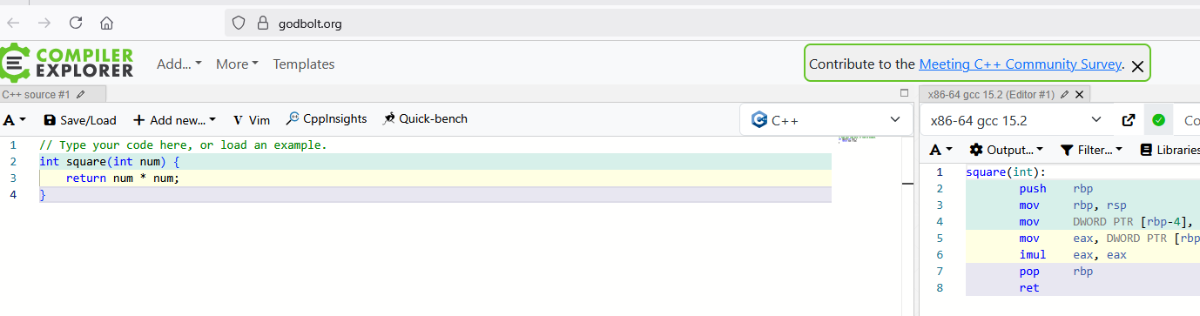
godbolt.org не прогружается (client-options.js)
ashenone-00 replied to ashenone-00's topic in Kaspersky Free
не, не снят,.. зря быканул, прошу прощения😬 энивей не помогло. я так думаю в момент этого окна антивирус перезапускается и это всё равно, что ВЫКЛ-ВКЛ и скрипт успел подгрузиться.
-

godbolt.org не прогружается (client-options.js)
kmscom replied to ashenone-00's topic in Kaspersky Free
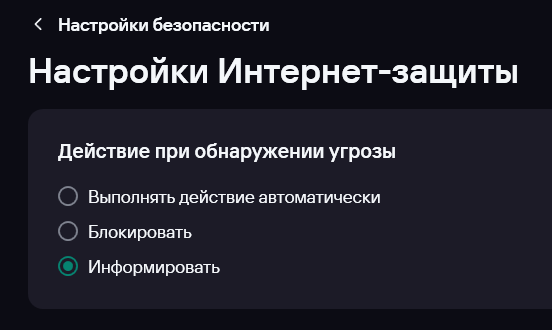
Информировать. Интернет-защита информирует вас об обнаружении зараженного или возможно зараженного объекта и запрашивает дальнейшее действие над ним. Этот вариант доступен, если в разделе Настройка → Настройки безопасности → Исключения и действия с найденными объектами снят флажок Автоматически выполнять рекомендуемые действия. снят флажок? -

godbolt.org не прогружается (client-options.js)
Maratka replied to ashenone-00's topic in Kaspersky Free
Ровно так же в FF, приостановил защиту - что-то там открылось.
-
godbolt.org не прогружается (client-options.js)
ashenone-00 replied to ashenone-00's topic in Kaspersky Free
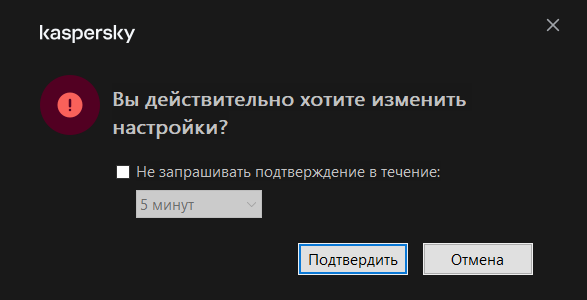
я переставил здесь: Выбор с "Выполнять действие автоматически" на "Информировать" и Firefox волшебным образом меня пустил, а Edge - нет,.. но для меня это good enough Правда я так и не понял, где и когда антвирус меня "проинформировал" о том, что этот скрипт вообще-то загружать не стоит (раньше-то он не загружался),.. но ладно Нет, обманул. Перезапустил инкогнито мод и то же самое... Зря, короче, тему создал, потому что сам не понимаю, "что" и "почему" вообще происходит, соответственно, воспроизвести где-либо очень проблематично