All Activity
- Past hour
-
Буквально только что ещё советы по апгрейду читал: https://forum.kaspersky.com/topic/релиз-kaspersky-security-center-151-windows-51483/#findComment-190476 Чет мне страшно, перед НГ ещё "сюрпризов" не хватало 😄
-

<Kaspersky Standard> Taskbar Icon Frozen to RED after PC Restart
Flood and Flood's wife replied to DigitFish's topic in Kaspersky: Basic, Standard, Plus, Premium
Hello @DigitFish, Surprisingly, not!🤦♂️ Thank you for both updates! We're delighted to read the issue was resolved by following step 2 in the initial instructions. IF the problem *returns* & is not resolved by: uninstalling K Standard, a full shutdown with delay, power ON, login, download new exe, install, manually update databases, run a full scan to completion, do *another* full shutdown - IF after all of that the problem returns & patch OR new version waiting to be applied, log a request with support as we provided guidance for in our first reply. Thank you🙏 Flood🐳+🐋 -

Невозможно нормально соединиться с FTP сервером.
AlexeyK replied to Alexander70's topic in Kaspersky Free
Насколько я понимаю, на лету загружаемые файлы не проверяются. Вредоносное ПО, если это просто какой-то файл, будет в лучшем случае детектироваться файловым антивирусом в кеше приложения или уже в папке загрузок, а для этого скан защ. соед. не нужен. Во всяком случае мой опыт проверок с браузером говорит именно об этом. Плюс к этому, недавно добавленный компонент проверки веб-почтовых клиентов это подтверждает: продукт сначала скачивает файл в некое временное хранилище и сканирует его, потом дает скачать пользователю, если все чисто. Возможно, с обычными почтовыми приложениями как-то иначе, не знаю. Про клиенты FTP тоже не могу точно сказать, но думаю, тут скан тоже будет файловым антивирусом после загрузки. -

haspersky no desactivo completamente microsoft defender
harlan4096 replied to zaffero's topic in Para usuarios particulares
Además de lo anterior, ¿tienes configurados los análisis bajo de manda del Microsoft Defender?
-
 Pokemoncheg joined the community
 -
День добрый. 1.Сделайте бекапы. 2. Обновите MSSQL до 2016 версии. Обновляется поверх. 3. Обновите поверх KSC. По мне это самый простой путь. Вдруг Вы везучий человек))))
-
Добрый день, коллеги! Дайте совет по обновлению сервера с KSC версии 13.2 до 15.1. Прочитал прежде всего официальный сайт тут. Потом ещё несколько видео посмотрел (для надежности). Собственно в одном из видео перед установкой новой версии сервера администрирования пользователь удалил Microsoft SQL Server и Web-консоль с самим сервером администрирования. А потом установил SQL и полный пакет KSC 15.1. Ну и развернул в него заранее сделанный бекап. Как поступить более верным путем? И да, т.к. требования для KSC 15.1 стали выше, то мне точно придется ставить новый Microsoft SQL Server. Сейчас в минимальных требованиях стартует 2016, а у меня 2014.
-
Wie ja schon @Tscheker sagte ich schaue dafür immer hier https://forum.kaspersky.com/topic/patchstand-der-aktuellen-kl-produkte-1349/?page=3#comment-220773
- Today
-

<Kaspersky Standard> Taskbar Icon Frozen to RED after PC Restart
DigitFish replied to DigitFish's topic in Kaspersky: Basic, Standard, Plus, Premium
Surprisingly, after a shutdown, some time delay and start PC again, this problem is solved. The icon is still red on startup (when cursor hover on it, a message shows kaspersky is starting), but after a very short time it turns green. -
<Kaspersky Standard> Taskbar Icon Frozen to RED after PC Restart
DigitFish replied to DigitFish's topic in Kaspersky: Basic, Standard, Plus, Premium
Thanks for your reply! Version Win11 25H2 26200.7462 Restart | Shutdown Problem can be reproduced when **restart**. For now I haven't seen similar problem when using **shutdown**. I used to use Kaspersky Internet Security, and similar problem happened (in Windows 24H2 or 25H2? I can't remember...) Yes, have fully uninstalled. Then after some restarts the same problem appears again. -
windows 11 Kaspersky App caused Windows 11 apps go offline
AlexeyK replied to Inexperto's topic in Kaspersky Total Security
Most likely, this is an old KIS bug, when apps are blocked from the network access. In this case, upgrading to Kaspersky Standard will help, your KIS subscription will activate it. -
 TypeType joined the community
 -
Take a look at this thread, maybe a screenshot of the trusted app settings will help.
-
Man könnte es möglicherweise an die Topics (ganz oben im Forum sind einige Informationen zu lesen) bringen.
-
Hallo @Wahnfried1883, hier im Forum wird von @Schulte immer über die Aktualisierungen berichtet. Patchstand Zu finden auf der 2. Seite in diesem Forum. MfG Tschekker Windows11 Pro, Version 25H2 (KB5072033) (26200.7462) Kaspersky Premium: 21.23.6.614(a) Kaspersky Passwort Manager: 25.0.0.501 (a) / 1763465807_7738 / 1.1.0.2_1 Kaspersky VPN: 21.23.6.614-2 (a)
-

haspersky no desactivo completamente microsoft defender
Caos replied to zaffero's topic in Para usuarios particulares
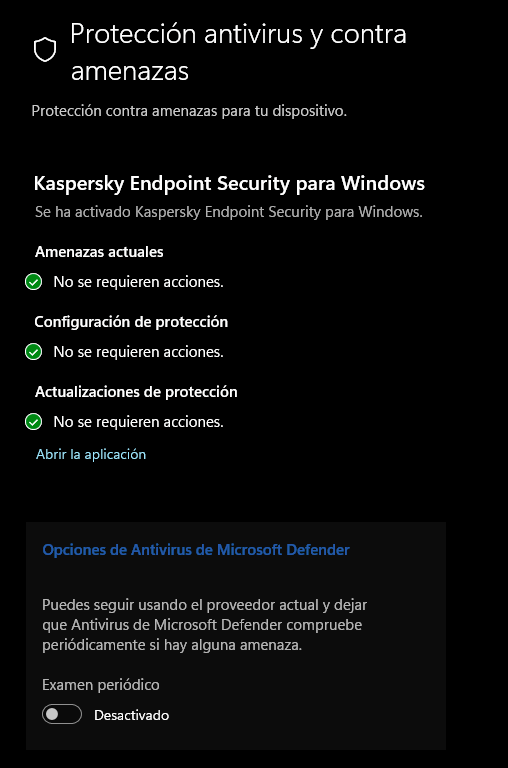
Buenos días, ¿Has instalado alguna actualización de Windows recientemente? Normalmente, Microsoft persiste en algunas de sus actualizaciones en activar Microsoft Defender. Ve a Actualización y Seguridad > Seguridad de Windows > Abrir seguridad de Windows > Protección Antivirus y contra amenazas, comprueba que te ponga Kaspersky y en opciones de Antivirus de Microsoft Defender comprueba que este desactivado, y sino desactívalo. Saludos -
windows 11 Kaspersky App caused Windows 11 apps go offline
Flood and Flood's wife replied to Inexperto's topic in Kaspersky Total Security
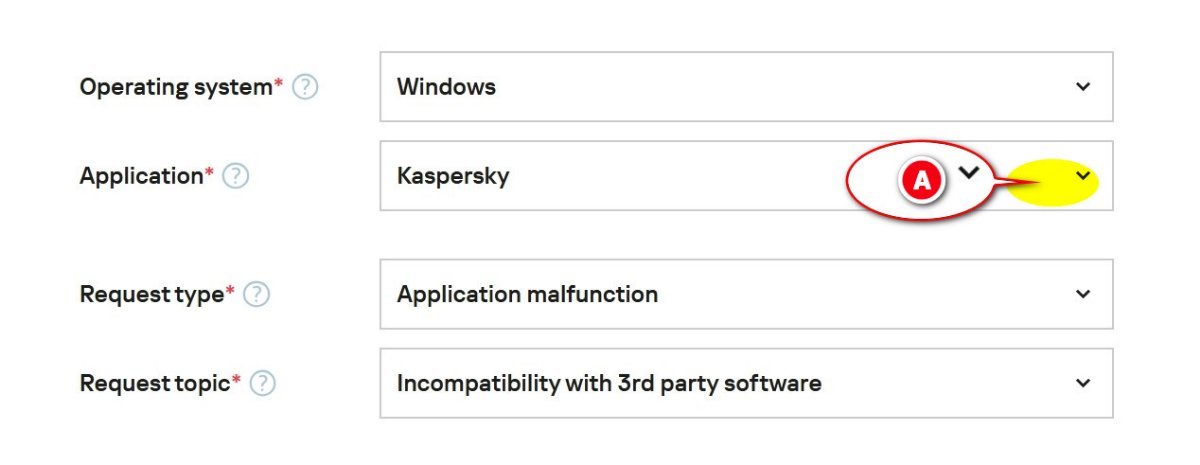
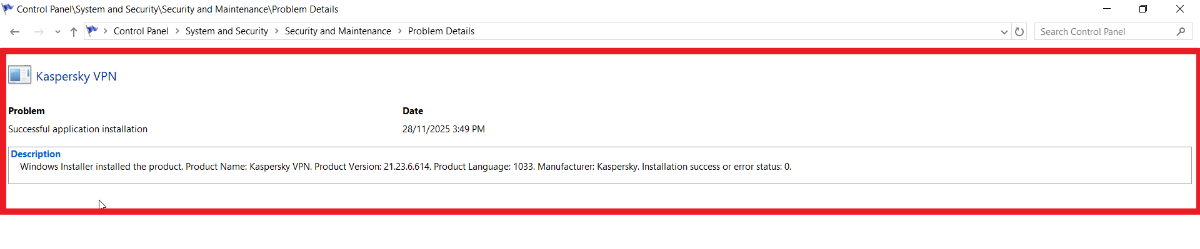
Hello @Inexperto, Thank you for posting back! A. Please share the *full* Win11 25H2 *version & build* information, in Windows *Search* type WINVER, open the WINVER app, post back the information shown in the WINVER popup please? Without *accurate* information it's difficult to assist *however* IF (you) had Kaspersky Total Security - KTS - (as the topic is logged under) & OR Kaspersky Internet Security - KIS - (as in yr current reply) *both* products are from Kaspersky's *old* Home range, *both* have been replaced, KIS by Kaspersky Standard & KTS by Kaspersky Plus -Kaspersky is offering a *free-like-for-like* upgrade, read: Kaspersky: Basic, Standard, Plus, Premium - info & FAQ, by Kaspersky Danila T. After reading the information, install the *new* Kaspersky software by downloading from (your) MyKaspersky account, then make sure: The Kaspersky application is signed into so it synchronises with (your) MyKaspersky account. A Full scan is run to completion. Run a manual Database update -> when these steps are complete - shutdown the computer, using SHUTDOWN - not Restart, then power ON by pressed the power button, login, recheck IF the original issue - Windows apps going OFFLINE persists? IF the problem continues: log a support request, on the Kaspersky Customer Service page: https://support.kaspersky.com/b2c/global#contacts, select Email & fill in the template as shown; provide a *detailed-history* || Select (your) Kaspersky software from the drop-down-list (A) *Note: do not select the AI-bot to log the case* Please share the outcome with the Community, when it's available? *also* - in the Control Panel\System and Security\Security and Maintenance\Reliability Monitor - which AlexeyK guided (you) too, there should be events similar to: Thank you🙏 Flood🐳+🐋
-
<Kaspersky Standard> Taskbar Icon Frozen to RED after PC Restart
Flood and Flood's wife replied to DigitFish's topic in Kaspersky: Basic, Standard, Plus, Premium
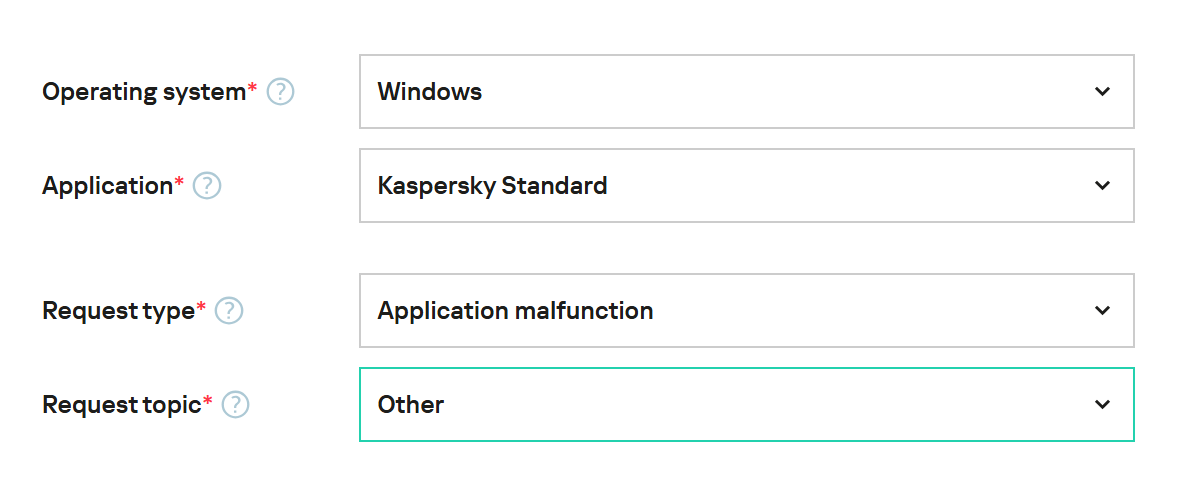
Hello @DigitFish, Welcome! Please share the *full* Win11 25H2 *version & build* information, in Windows *Search* type WINVER, open the WINVER app, post back the information shown in the WINVER popup please? In the troubleshooting & problem determination/steps to resolve - has the computer ever been SHUTDOWN - using the *Shutdown* option - not Restart, a time delay of at least five minutes - then the computer restarted by pressing the power button ON & logging in? For *our* clarity, when (you) say: "Actually when I use Kaspersky Internet Security, sometimes this problem appeared. " - does that mean the red-icon issue pre-existed the install of Kaspersky Standard? Has Kaspersky Standard been fully *uninstalled* using Windows - Add & remove programs, the computer shutdown, using SHUTDOWN - not Restart, powered ON by pressed the power button, logged into & a *new* Kaspersky Standard downloaded & installed from (your) MyKaspersky account? IF 'no', please do this procedure, after installing the *new* Kaspersky Standard, make sure: The Kaspersky Standard is signed into so it synchronises with (your) MyKaspersky account. A Full scan is run. Run a manual Database update -> -> when these steps are complete - shutdown the computer *again*, using SHUTDOWN - not Restart, then power ON by pressed the power button, login, recheck the red-icon? IF the red-icon persists OR returns within the next 48hours & is not related to an app or module-update, log a support request, on the Kaspersky Customer Service page: https://support.kaspersky.com/b2c/global#contacts, select Email & fill in the template as shown; provide a *detailed-history* *Note: do not select the AI-bot to log the case* Please share the outcome with the Community, when it's available? Thank you🙏 Flood🐳+🐋
-
 black_riot joined the community
 -

Невозможно нормально соединиться с FTP сервером.
andrew75 replied to Alexander70's topic in Kaspersky Free
Галочку на первом скриншоте "Всегда доверять этому сертификату в последующих сессиях" ставить не пробовали? -
Установщик не может подключиться к серверу для скачивания приложения
andrew75 replied to Кирилл Гр.'s topic in Kaspersky: Basic, Standard, Plus, Premium
Добрый день. Обратитесь в техподдержку. Нужны отчеты о системе, чтобы понять в чем проблема. На форуме мы не можем их запрашивать.- 1 reply
-
- 1
-

-
 我没有网名 joined the community
 -
<Kaspersky Standard> Taskbar Icon Frozen to RED after PC Restart
DigitFish posted a topic in Kaspersky: Basic, Standard, Plus, Premium
System Info Win11 25H2 Kaspersky Standard 21.23.6.614(a) Problem After restart my PC, the icon stays RED and never change to green. Have checked Kaspersky status --> everything OK and the GUI shows green when taskbar icon is red. (Weried) Press Win+Shift, icon turns GREEN. Or pause and resume computer protection, then restart again, icon shows green. Relative Problem https://forum.kaspersky.com/topic/kaspersky-protection-always-disabled-on-start-up-35843/ https://forum.kaspersky.com/topic/kaspersky-icon-appears-red-but-no-problems-detected-46656/ https://forum.kaspersky.com/topic/kaspersky-icon-29584/ Above relative links all indicate a restart could solve the problem. Actually when I use Kaspersky Internet Security, sometimes this problem appeared. However in my case, the only solution is what I write in <Problem> section. -
Hello, 你这个网站跟 支付宝 没有啥关系…… 检测没有问题。
-
Hello, 我想问下,你 通知 设置里面对于 入侵防御 的通知设置是否是默认的?
-
DigitFish joined the community
-
Das war mir bei der Bestellung klar. Aber, wenn in der Bestellbestätigung von Kaspersky ausschliesslich von Amazon-Gesschenkkarte die Rede ist: Anleitung zur Aktivierung von Amazon.de Geschenkkarte* im Wert von 20 € 20 € Amazon.de Geschenkkarte* Sie können die Amazon.de Geschenkkarte* 7 Kalendertage nach dem Kaufdatum auf kaspersky.de anfordern, indem Sie https://www.kaspersky-gifts.com/de/gutschein/?oid=4EY2RKUHY37 aufrufen und Ihre Bestellnummer im entsprechenden Feld eingeben, um Zugriff auf Ihre Geschenkkarte zu erhalten. Sie haben zwischen dem 7. und 14. Tag nach dem Kauf Zeit, um den Code einzulösen. Nach Ablauf dieses Zeitraums verfällt das Angebot und die Geschenkkarte ist nicht mehr verfügbar. Für die Geschenkkarte gibt es kein Ablaufdatum und keine Servicegebühren. *Es gelten Einschränkungen. Details unter: https://www.amazon.de/gc-legal. und auch in der dabei angehängten PDF-Rechnung ausdrücklich steht: Produkt: Amazon.de Geschenkkarte* im Wert von 20 € Artikelnummer: xxxxxxxx dann erwarte ich doch wohl, dass bei meiner Bestellung noch genügend Amazongutscheine vorrätig waren. Ich habe selbverständlich auch den Kaspersky-Support angeschrieben
-

windows 11 Kaspersky App caused Windows 11 apps go offline
Inexperto replied to Inexperto's topic in Kaspersky Total Security
Windows 11 home to the last november update, and Kaspersky Internet Security and Kaspersky VPN Secure Connection, -

The VPN for router option has disappeared
JaZ96 replied to Ogeday96's topic in Kaspersky VPN Secure Connection
I don’t have the router VPN option either. However, a router that was already configured before the change is still working for me, although there are noticeable performance and stability issues -
JaZ96 joined the community
-
 oRy joined the community
 -

Установщик не может подключиться к серверу для скачивания приложения
Кирилл Гр. posted a topic in Kaspersky: Basic, Standard, Plus, Premium
Доброго дня. Сегодня утром проявилась проблема в виде невозможности приложения установить актуальную версию антивируса. С утра обнаружил, что выбило аккаунт в приложении антивируса и никак не получалось зайти в него по новой. Ни с помощью учетных данных, ни с помощью кода активации. Удалил программу, некоторое время не мог зайти в профиль на сайте. В течении часа получилось, потом еще минут 30 не скачивался установщик - выдавал ошибку о невозможности подключения. Когда установщик все-таки скачался - не может подключиться к серверам и установиться. Пишет о недоступности и необходимости проверить интернет соединение. С другого ноутбука все корректно работает, из аккаунта программа не вылетала. Проверял Cureit Dr.Web и Kaspersky Virus Removal Tool. Dr.Web нашел угрозу в hosts и написал что вылечил, Касперский не нашел ничего и выдал сообщение о невозможности использования облачного сканирования. Как быть дальше?