All Activity
- Past hour
-
 OMARCONSULTOR joined the community
 -
 moskova06 joined the community
 -

kaspersky vpn Уничтожили VPN приложение обновлением
andrew75 replied to Хуже быть не может's topic in Kaspersky Secure Connection
Возврат же идет через ваш банк, поэтому это минимум сутки. Обычно больше. -
 kapich993 joined the community
 - Today
-
 Developer Soporte joined the community
 -

kaspersky vpn Уничтожили VPN приложение обновлением
Ryzen replied to Хуже быть не может's topic in Kaspersky Secure Connection
я вчера обратилась за возвратом, ну и со вчерашнего дня не получила пока что возврат средств(обещали в течении 3-7 дней) - надеюсь и жду, было обещано вернуть полностью всю сумму(2499.00рэ был чек на почту). -

kaspersky vpn Уничтожили VPN приложение обновлением
Danila T. replied to Хуже быть не может's topic in Kaspersky Secure Connection
Добрый день. Спасибо вам за привлечение внимания к проблеме. Эта неполадка связана с временными ограничениями технической мощности. Мы уже запланировали доработку, чтобы решение вне РФ работало соответственно вашим ожиданиям. -

Error al instalar Kaspersky Endpoint Security Cloud
David b replied to Arturo98's topic in Para empresas
El programa pidió reiniciarse pero ahora el computador no arranca de nuevo... Que paso? -
David b joined the community
-

15 year USA Kaspersky user and subscription about to run out. How exactly do I renew?
Berny replied to PhoenixRising's topic in Kaspersky: Basic, Standard, Plus, Premium
@PhoenixRising Please read this FAQ → Can I activate the application with an activation code bought in a different country? Once the product is activated with a code purchased in your own country you can use Kaspersky in any other region. Amazon Media EU SARL is an official Amazon company handling digital purchases in Europe, Amazon is the retailer who is selling Kaspersky products. ? ATP (At This Point) the crucial question is if VPN will skip all the obstacles 🤔 ? -
Kaspersky Secure Connectiоn не открывает сайты использующие Cloudflare
Danila T. replied to IvanIvan's topic in Kaspersky Secure Connection
Пост опубликовали. На будущее - пишите мне в личку, в случае проблем с модерацией. Спасибо. Уточню, и это написано в правилах также, модерация на форуме осуществляется в автоматическом режиме, а также участниками форума из группы "Модераторы", которые не являются сотрудниками "Лаборатории Касперского". -
Kaspersky Secure Connectiоn не открывает сайты использующие Cloudflare
kungfupadla replied to IvanIvan's topic in Kaspersky Secure Connection
Какое правило нарушал мой ответ о том, что РКН блокирует Cloudflare, а Kaspersky Secure Connection не обходит эти блокировки, а значит проблема не будет решена? Конкретный пункт укажите -
Kaspersky Secure Connectiоn не открывает сайты использующие Cloudflare
Danila T. replied to IvanIvan's topic in Kaspersky Secure Connection
Удаляется\редактируется все, что нарушает правила форума. Далее,в этой теме (и в других тоже), просьба писать по сути вопроса. Все, остальное будет удаляться. -
Hello, 下载指定产品的威胁数据库到本地指定文件夹内,进行离线更新的。
-
Kaspersky Secure Connectiоn не открывает сайты использующие Cloudflare
kungfupadla replied to IvanIvan's topic in Kaspersky Secure Connection
что там в правилах написано, что вы можете удалять адекватные ответы пользователей и заменять их на свою шаблонную простыню, которая на конкретный вопрос пользователя не отвечает, а только льет бесконечную воду? -
Kaspersky Secure Connectiоn не открывает сайты использующие Cloudflare
Danila T. replied to IvanIvan's topic in Kaspersky Secure Connection
Просьба уважительно относиться к друг другу и соблюдаем правила форума: https://forum.kaspersky.com/guidelines/ -
Kaspersky Secure Connectiоn не открывает сайты использующие Cloudflare
kungfupadla replied to IvanIvan's topic in Kaspersky Secure Connection
Нет, это ваша проблема. Проблема в том, что вы класть хотели на пользователей и не в состоянии дать вразумительный ответ на логичные вопросы, а если кто-то ответ дает за вас - вы посты удаляете или редактируете. Да-да, я помню почему, не нужно напоминать - потому что вы не работники касперского и не получаете деньги. Вот потому и пользы от вас столько, сколько от бесплатных неработников - меньше чем от табуретки, если ей задать такие же вопросы, как вам. -

Не открываются некоторые сайты после принятия нового пользовательского соглашения KSeC (10-17.03.2026)
Astafik replied to Embler's topic in Kaspersky Secure Connection
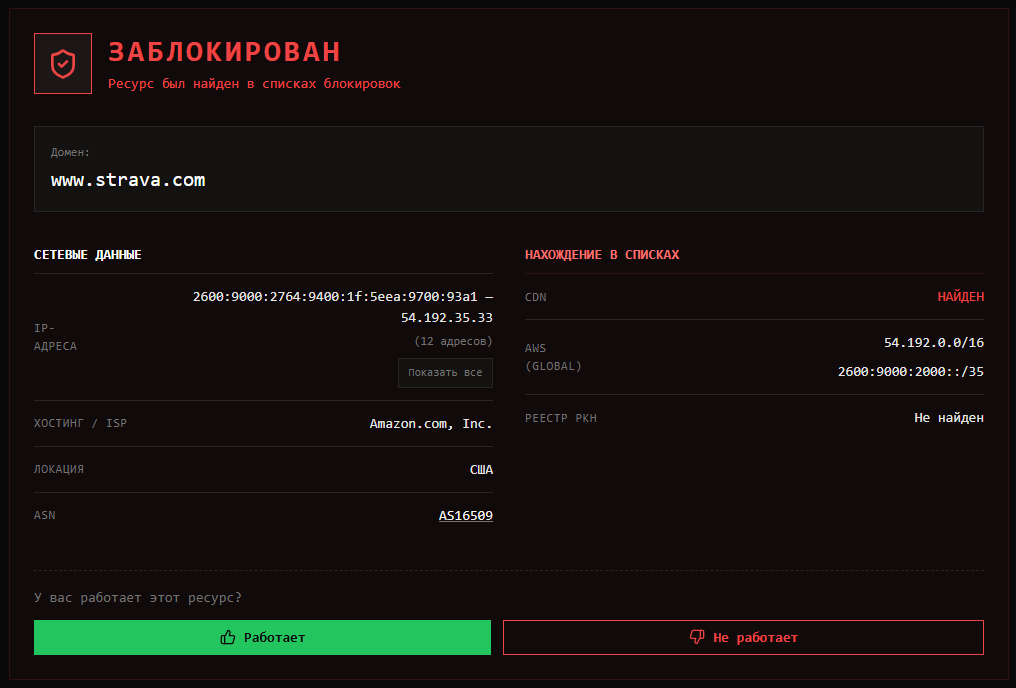
К сожалению тут снова РКН постарался забанив целиком подсеть датацентра, где расположен сайт(
-
Не открываются некоторые сайты после принятия нового пользовательского соглашения KSeC (10-17.03.2026)
Danila T. replied to Embler's topic in Kaspersky Secure Connection
@АндреичП спасибо, разберемся. -

Не открываются некоторые сайты после принятия нового пользовательского соглашения KSeC (10-17.03.2026)
АндреичП replied to Embler's topic in Kaspersky Secure Connection
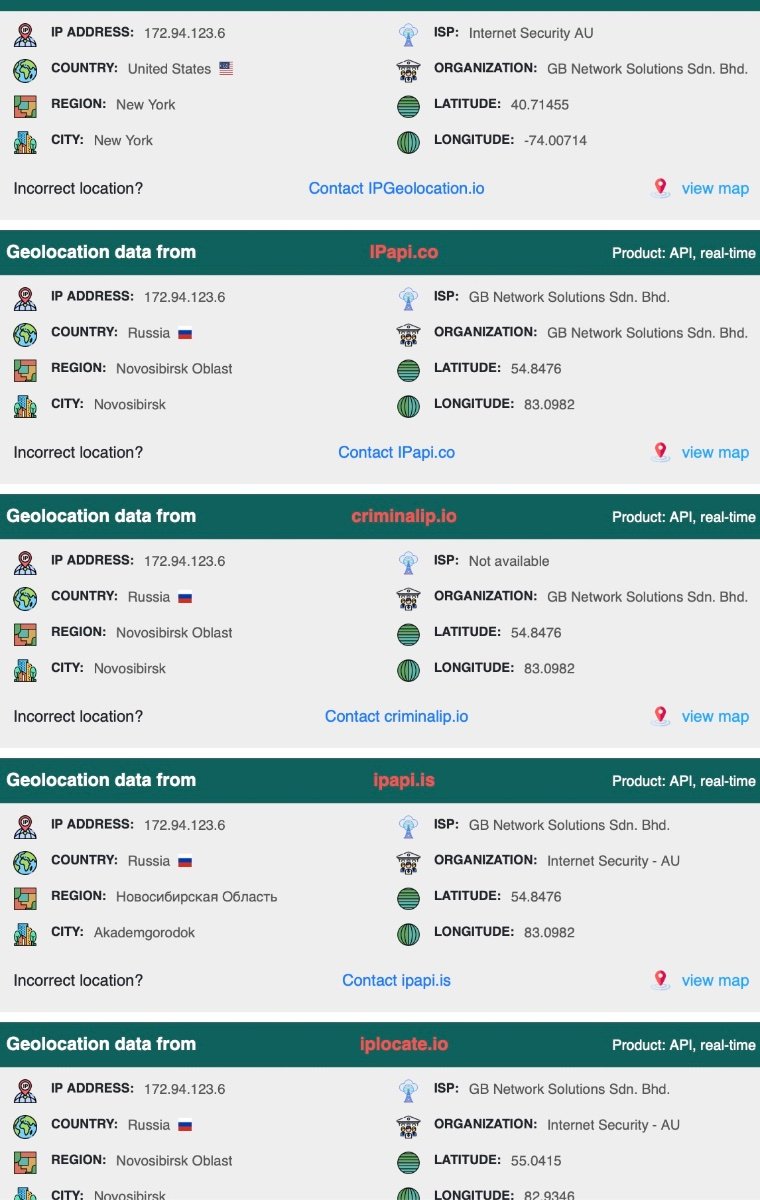
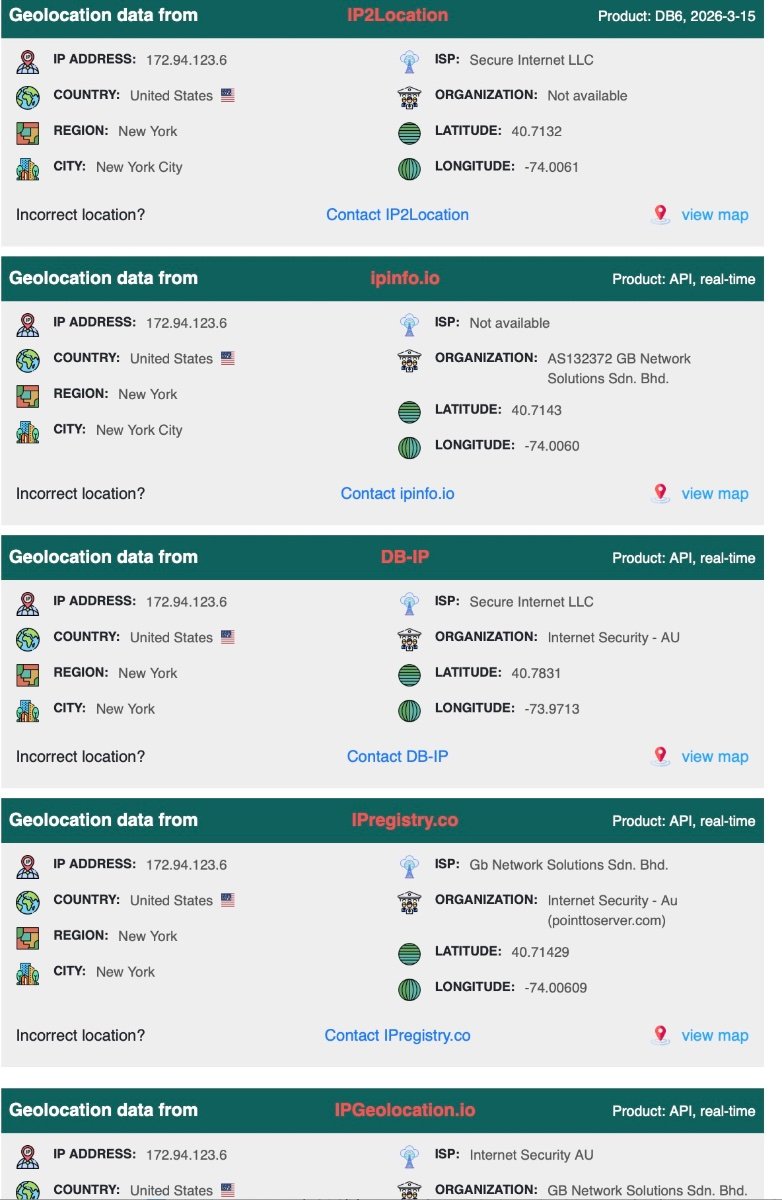
Ну и в дополнение: Вот аналитика IP с агрегата, часть пишут что Новосиб, часть что США, но при этом принадлежит компании которая расположена в Сиднее. Отсюда вопрос - каким образом и описанные выше сайты и онлайн-кинотеатр все таки определяют что данный IP имеет не Российское происхождение? Вопрос очень важный, поскольку как раз ради того для чего покупался данный пакет - не работает
-
Thanks
-
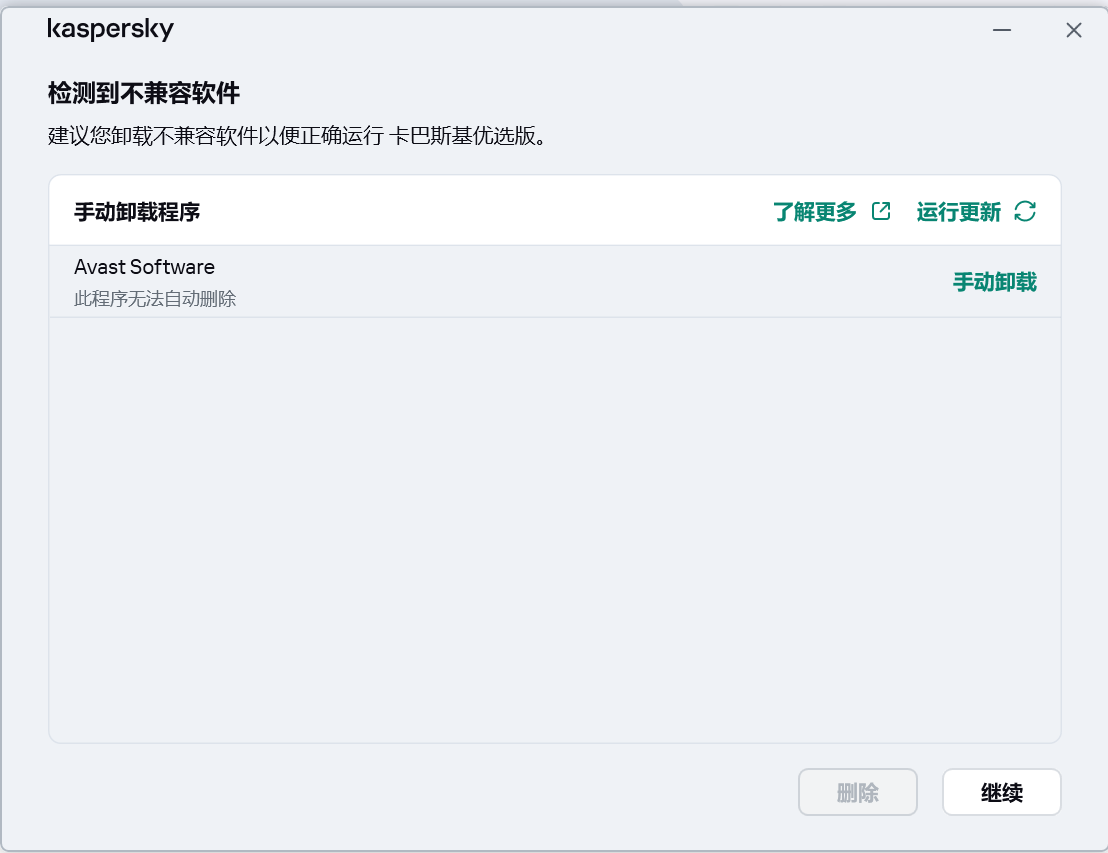
我之前安装了avast ultimate(全家桶, 包括 premium security, anti tracker, premium cleanup, 和 secureline VPN). 已经卸载了. 现在想安装卡巴斯基优选版, 请问怎么办?? 求助!!!
-
Не открываются некоторые сайты после принятия нового пользовательского соглашения KSeC (10-17.03.2026)
АндреичП replied to Embler's topic in Kaspersky Secure Connection
Должно наверное, но не работает. А где он так определяет? Ну чтобы далеко не ходить: https://login.mos.ru/sps/oauth/ https://lk.sogaz-life.ru Кроме того, обращаю внимание что у меня KSC для ЗАРУБЕЖНОГО рынка, и сейчас я по нему подключаюсь из-за границы. При проверке подключения сервисом 2ip я вижу что мой местный ip изменился, но вместо необходимого российского подставляет другой но тоже зарубежный. Проверка только одним другим сервисом показывает действительно Новосибирск. При этом как можно видеть на скринах компания, которой принадлежит IP везде указана одна и та же П.С. При этом переключение на Российскую версию KSC дает необходимый результат, сразу подставляется российский IP от компании CJSC Rascom и компьютер прекрасно сразу начинает работать со всеми российскими сайтами, онлайн кинотеатрами и тд
-

Kaspersky Secure Connectiоn не открывает сайты использующие Cloudflare
kmscom replied to IvanIvan's topic in Kaspersky Secure Connection
А ВПН это не одно и тоже по смыслу, что и обходить блокировки. То что вы используете технологию ВПН для этого, не означает, что Kaspersky Secure Connection не ВПН, так как он блокировки не обходит. В ответе дан ответ для чего Kaspersky Secure Connection, а то что он не отвечает вашим запросам, то это ваша проблема. -
Kaspersky Secure Connectiоn не открывает сайты использующие Cloudflare
kungfupadla replied to IvanIvan's topic in Kaspersky Secure Connection
проблема не у интернет ресурсов. это РКН банит Cloudflare. А каспер никакие блокировки не обходит, потому что это не впн. Вот и все. -
 Park joined the community
 -

Kaspersky Secure Connectiоn не открывает сайты использующие Cloudflare
IvanIvan replied to IvanIvan's topic in Kaspersky Secure Connection
В таком случае... сервера ваших новых "партнеров" забанены у большинства интернет ресурсов. -
Welcome to Kaspersky Community. If You installed KVPN app separately, uninstall it.
-

Dónde está la VPN en la versión móvil premium?
harlan4096 replied to calvarez21's topic in Para usuarios particulares
Me alegro! -
这个东西是用来解决反病毒数据库更新失败的吗?是什么原理(我本以为这个东西是直接更新反病毒数据库的源的,结果下下来使用后发现要好久)
-
 liyang joined the community
 -
15 year USA Kaspersky user and subscription about to run out. How exactly do I renew?
PhoenixRising replied to PhoenixRising's topic in Kaspersky: Basic, Standard, Plus, Premium
I apologize for another double post. I couldn't edit the above post as it was needing moderation, but I forgot to ask as I got confused and just wanted to clarify so "Region-Locked" means Kaspersky will only work in the region it's purchased in, and that's it? It will just not function if used outside of that region? You said Thank you, I appreciate your time and help!