All Activity
- Past hour
-
 HarBey joined the community
 - Today
-

Renewal
IOANNIS MAKRIS replied to IOANNIS MAKRIS's topic in Kaspersky: Basic, Standard, Plus, Premium
Will do so Thanks for the help m8 -

Renewal
Flood and Flood's wife replied to IOANNIS MAKRIS's topic in Kaspersky: Basic, Standard, Plus, Premium
Hello @IOANNIS MAKRIS, Thank you for the information! Please contact Kaspersky Customer Service, follow the guide on: Payment has been made, but no confirmation email received - they will help you. Please include in your request: Purchase date Full name and email address specified when making the purchase. *Please do not post that information here in the Forum* Thank you🙏 Flood🐳+🐋 -
Renewal
IOANNIS MAKRIS replied to IOANNIS MAKRIS's topic in Kaspersky: Basic, Standard, Plus, Premium
I had the old version that's no longer availanle, so I asked for the new one I really (my mistake) have no idea what I bought, and I can;t find i way to find out for which product i paid E 69.99 O n the subscriptions page it shows that a free version is active -
Renewal
Flood and Flood's wife replied to IOANNIS MAKRIS's topic in Kaspersky: Basic, Standard, Plus, Premium
Hello @IOANNIS MAKRIS, Welcome! *READ*: Payment has been made, but no confirmation email received *LOOK* in (your) MyKaspersky account on the Subscriptions page - the *renewed-subscription* may have been sent there automatically? OR is it that page that shows February 13th, 2026? Thank you🙏 Flood🐳+🐋 -
I renewed my subscription on Saturday, my account was charged €69.99 (?) and no email has come yet. The page shows a standard subscription that expires on February 13th.
-
IOANNIS MAKRIS joined the community
-
 Юрий Попов joined the community
 -
@UserV Добрый день, Насколько я вижу, то Вам уже ответила поддержка.
-

Когда сервис Kaspersky Secure Connection будет работать?Когда будет подключатся ко всем серверам?
Danila T. replied to Jand's topic in Kaspersky Secure Connection
Добрый день. Нашли 2 Ваших запроса. На первый Вы так и не подтвердили желание вернуть деньги и запрос закрылся. Во втором с Вами свяжутся по поводу решения вопросов. -

Klfoc Service Failed To Start On Windows Server 2025 Everytime After Reboot
Sang replied to Sang's topic in Kaspersky Security Center
Sorry, I don’t have any recordings yet. all materials are from Kaspersky’s documentation about Failover Cluster Deployment. I know few folks may feel confused at first, so here is the basic overview from my perspective: We have 6 servers in total in our deployment: 1 Domain Controller (DC) for AD DS and File Share, 2 servers for MSSQL (Always On clustering), and 2 servers for Kaspersky Security Center (KSC). On Active Directory, create an OU named KSC, then create a domain security group named KLAdmins inside that OU. After that, create two users under that OU named ksc and rightless, and add those users to the KLAdmins group. Create file shares on the Domain Controller: one for state (named ksc-state) and another for data (named ksc-data). Grant full control to the KLAdmins group on both the share permissions and NTFS permissions. On the Domain Controller, after the two KSC servers join the domain, move their computer name into the KSC OU and add them to the KLAdmins group (You will need to select section call Object and add Computer into it to find KSC Computer Host Name). On the KSC servers, create a redundancy interface or set up a load balancer (nginx for an instance), depending on your team’s decision. Map ksc-state and ksc-data as network drives. Then open Computer Management, create a local group named KLAdmins, and add domain\ksc and domain\rightless to that group. You also need to add domain\ksc to the local Administrators group on both KSC servers. After completing these preparations, you can install KSC as a Failover Cluster by following the official Kaspersky documentation. Good luck! Sorry, I don’t have any recordings yet. all materials are from Kaspersky’s documentation about Failover Cluster Deployment. I know few folks may feel confused at first, so here is the basic overview from my perspective: We have 6 servers in total in our deployment: 1 Domain Controller (DC) for AD DS and File Share, 2 servers for MSSQL (Always On clustering), and 2 servers for Kaspersky Security Center (KSC). On Active Directory, create an OU named KSC, then create a domain security group named KLAdmins inside that OU. After that, create two users under that OU named ksc and rightless, and add those users to the KLAdmins group. Create file shares on the Domain Controller: one for state (named ksc-state) and another for data (named ksc-data). Grant full control to the KLAdmins group on both the share permissions and NTFS permissions. On the Domain Controller, after the two KSC servers join the domain, move their computer name into the KSC OU and add them to the KLAdmins group (You will need to select section call Object and add Computer into it to find KSC Computer Host Name). On the KSC servers, create a redundancy interface or set up a load balancer (nginx for an instance), depending on your team’s decision. Map ksc-state and ksc-data as network drives. Then open Computer Management, create a local group named KLAdmins, and add domain\ksc and domain\rightless to that group. You also need to add domain\ksc to the local Administrators group on both KSC servers. After completing these preparations, you can install KSC as a Failover Cluster by following the official Kaspersky documentation. Good luck! -
 Mac air 13 azul joined the community
 -
 isa özel joined the community
 - Yesterday
-
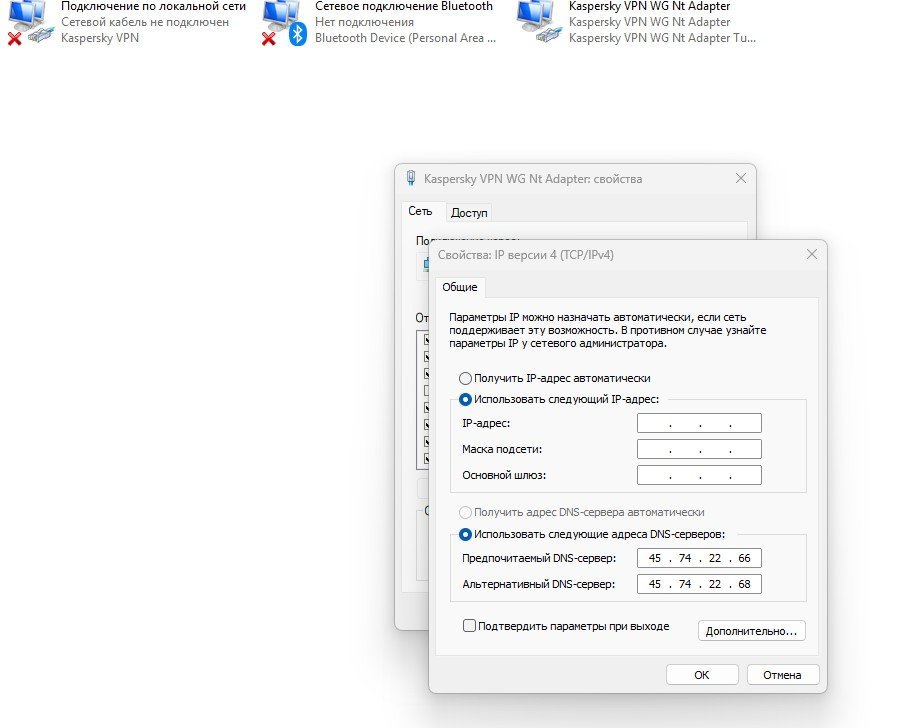
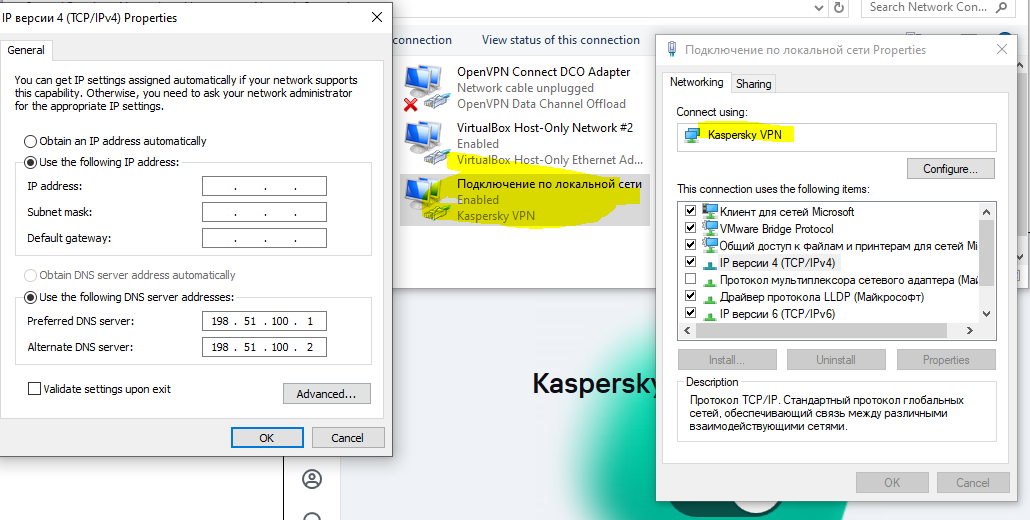
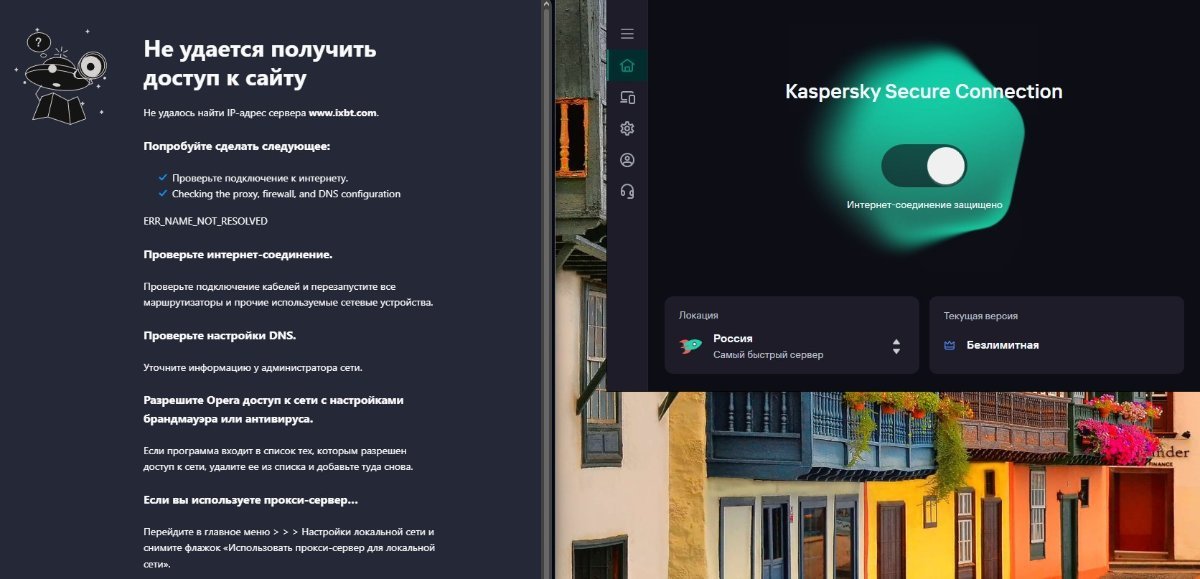
Появляется новое сетевое подключение (kaspersky vpn) при включении KSC. DNS предустановлены. После ручной правки всё равно не работает. После выключения KSC и нового включения восстанавливаются предустановленные DNS. В России. Писал им. Жду ответа.

-

weird behavior with vpn and game servers (only european servers show up with vpn on)
bababooey replied to bababooey's topic in Kaspersky VPN Secure Connection
yeah, kaspersky is limiting my vpn connection 100% for no good reason connecting to any non-euro server that is not on that list (like american servers), if I close the game, and rejoin the game again with kaspersky VPN on, the game wont let me connect. like something is blocking me to do so -

Когда сервис Kaspersky Secure Connection будет работать?Когда будет подключатся ко всем серверам?
Friend replied to Jand's topic in Kaspersky Secure Connection
Добрый вечер, @Jand, На большинство ваших вопросов вам могут ответить только в официальной поддержке, контакты: https://support.kaspersky.ru/b2c/#contacts. Точные сроки нам на форуме неизвестны, вся доступная официальная информация опубликована здесь: https://support.kaspersky.ru/faq/ksec-migration. По имеющимся данным официальная поддержка предоставляет временные решения. Почему так решили? Что вы у них спрашивали и что они вам ответили? Можете здесь указать номера ваших обращений в поддержку, возможно они вас неверно поняли или вы их. -
Нажмите комбинацию клавиш: Win+R и наберите команду: control ncpa.cpl Нажмите Enter и сделайте скриншот доступных подключений. А сейчас в каком регионе находитесь (страна, город)? Если на территории России, то работать не будет, нужно обращаться в поддержку: https://support.kaspersky.ru/b2c/#contacts, пусть предлагают вам доступные решения.
-
Kaspersky VPN есть в диспетчере устройств. В диспетчере не выставить dns. В списке подключений его нет. Как можно настроить DNS Kaspersky vpn? (win 11) 120 Продлялась автоматически осенью. Какая-то европейская была.
-
Сколько локаций (виртуальных серверов) доступно в программе? Где и когда приобретали лицензию?
-
21.24.8.522-2
-
Попробуйте указать в настройках самого виртуального подключения Kaspersky VPN. Укажите точную версию (цифрами).
-
Поставил DNS яндекса. Тот же эффект. Выключил KSC работает интернет. Включил, не работает.😕
-
 newton pires joined the community
 -
weird behavior with vpn and game servers (only european servers show up with vpn on)
bababooey posted a topic in Kaspersky VPN Secure Connection
No matter what country I select as a server, the game only detects a handful of european servers. Even if I switch to a server of my own country, only european servers show up. It was working fine the day before yesterday. Switching to Miami servers was placing me on the US east servers. Pic is with VPN on: (amsterdam, paris, stockholm servers) Playing with VPN on will always place me on those european servers. (even if im using any VPN servers but european) Pic bellow with VPN off: (lists servers from all around the globe) Its like Kaspersky is intentionally screwing me up and blocking connecting with certain servers. I have a """"unlimited""" vpn plan, but it looks like its limiting me. Game is Deadlock. (which uses same connection protocols as counter strike 2) please note that this behavior does not happen when using VPN from other companies -
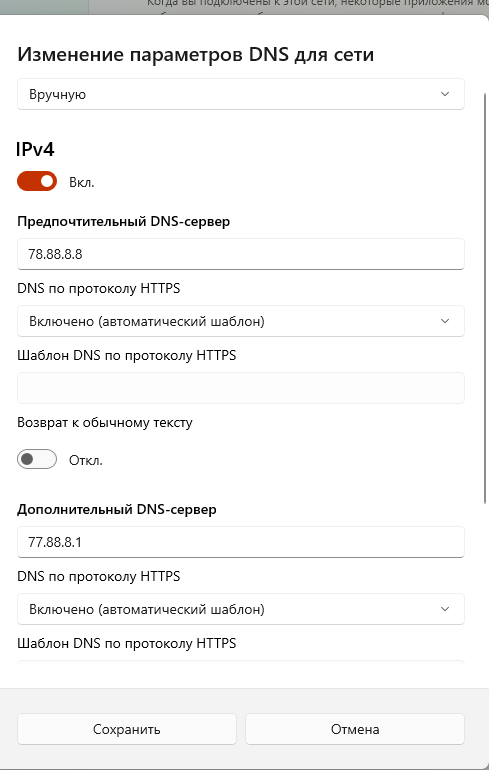
@UserV, эксперимента ради, измените на компьютере DNS на яндексовские, например (77.88.8.8 77.88.8.1), и попробуйте подключиться куда-нибудь.
-
bababooey joined the community
-
Та же самая проблема. Windows, android, мобильный оператор, проводной интернет, wi-fi. Как только включаешь подключение к любому серверу - все сайты перестают быть доступны. Выкулючаешь подключение к серверу, сразу всё работает. Печаль. Windows 11, android, мобильный оператор, проводной интернет, wi-fi. Всё перепробовал, ничего не работает. Ставил сегодня последнюю версию программы с сайта. Устройство, вид подключения, выбранный сервер - ничего не имеет значения. Сразу после подключения к серверу все сайты перестают быть доступны. Выключаешь подключение к серверу, сразу всё работает.
-
 UserV joined the community
 -
 AlexKon joined the community
 -
Mahlzeit, ich hätte mal eine Frage an die Profis in Bezug auf Browser. Ich benutze zur zeit den Brave und DuckDuckGo Browser, als Hauptbrowser, gelegentlich Google. Welchen davon würdet Ihr empfehlen ( Brave/DuckDuckGo) Mir geht es nur um " Sicherheit und Datenschutz " Grüße aus dem Bergischen
-

Klfoc Service Failed To Start On Windows Server 2025 Everytime After Reboot
Tahmeed702 replied to Sang's topic in Kaspersky Security Center
How do you deployed Failover cluster , can you share any video record or docs -
Благодарю за фидбэк!!!
-

Is the free version of Kaspersky free forever, and what happens when the program expires?
Berny replied to amralaa's topic in Kaspersky Free
It’s likely that the availability will also be removed in the other countries.
-
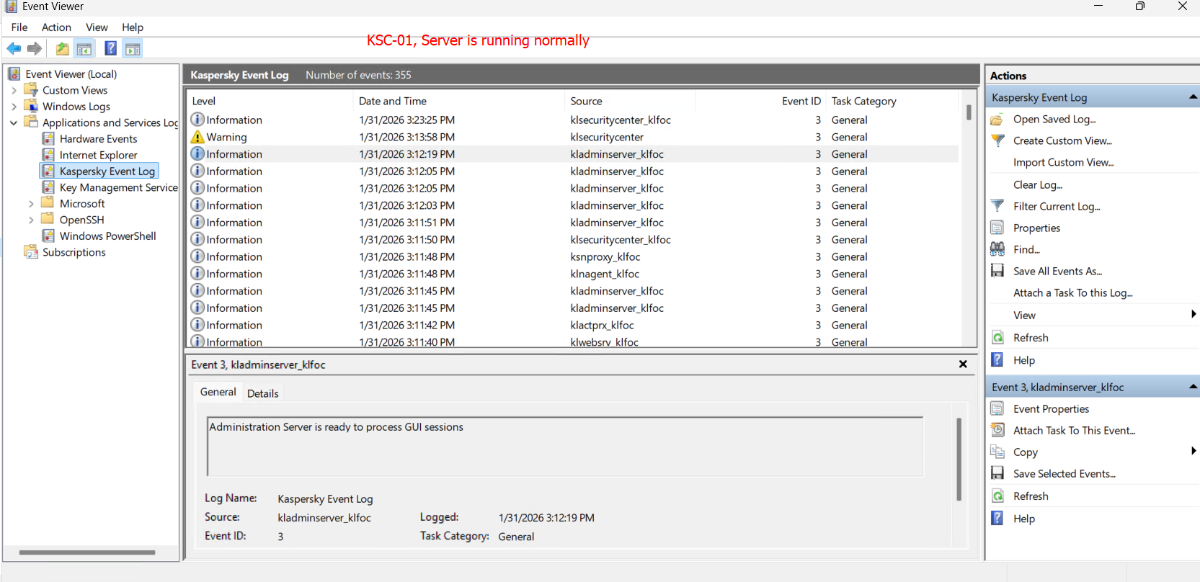
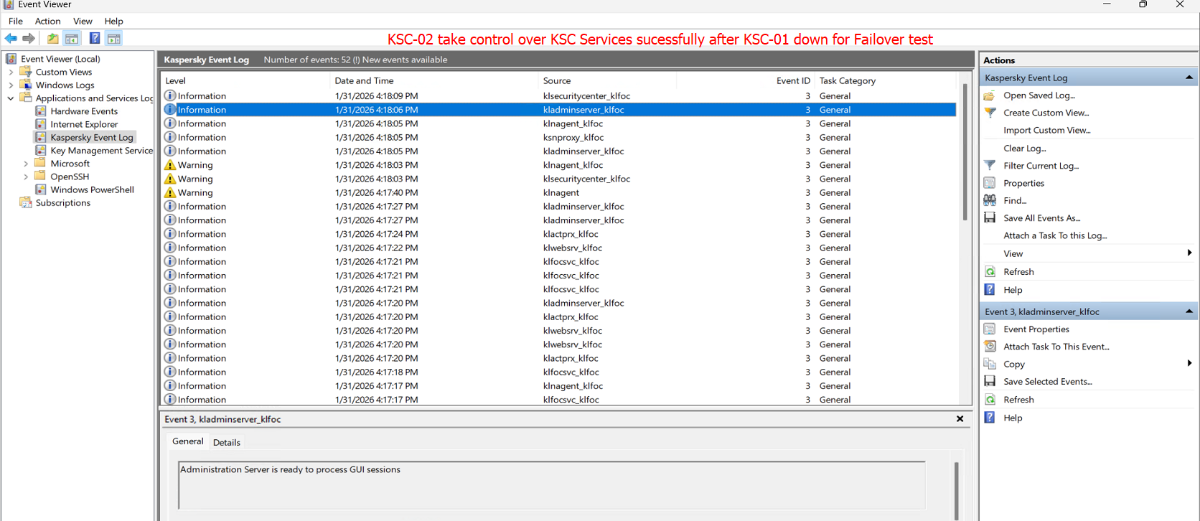
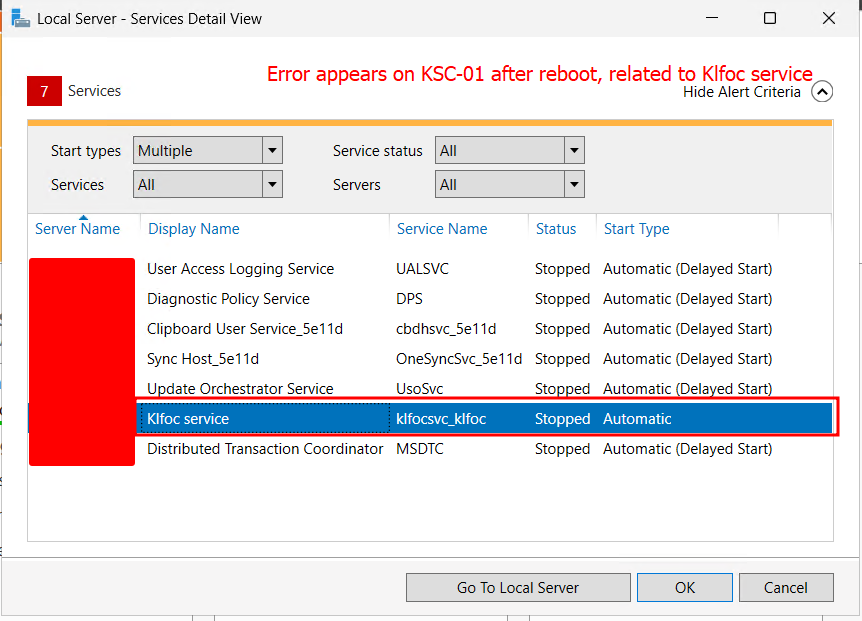
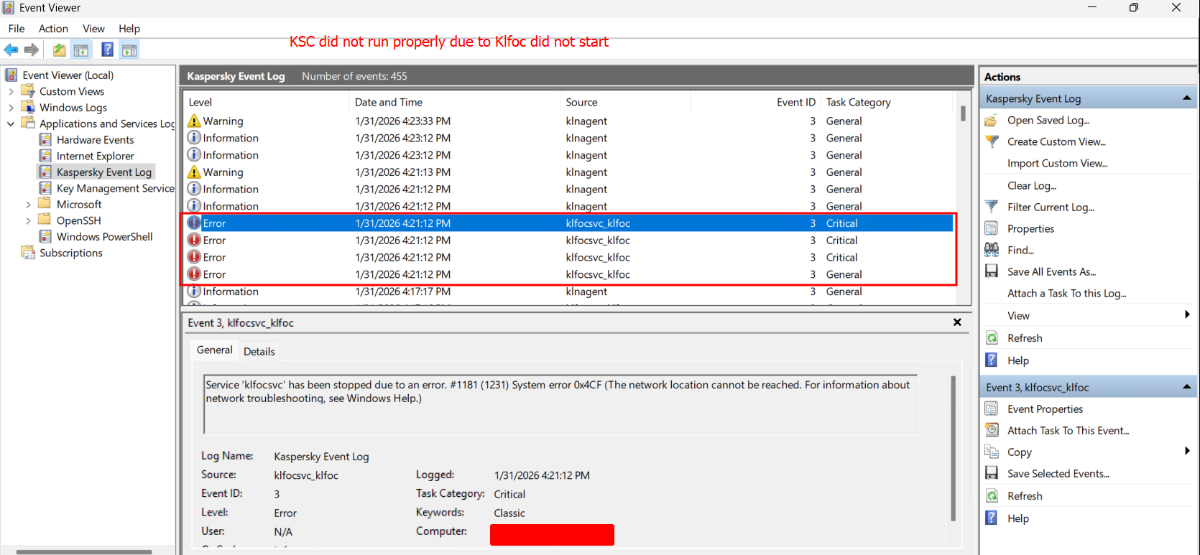
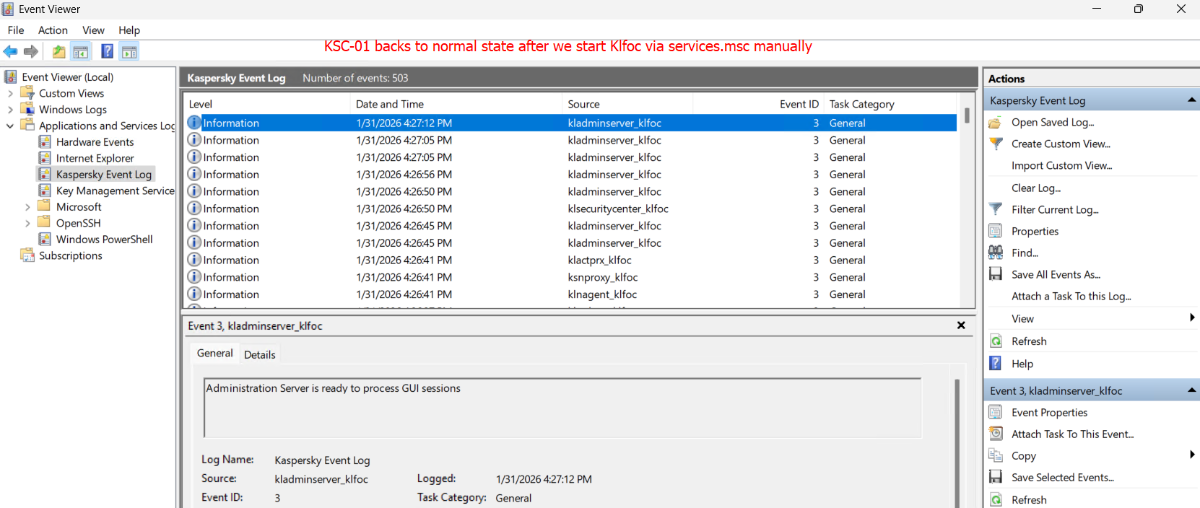
Hello fellows, we deployed a Kaspersky Security Center Failover Cluster following Kaspersky’s documentation, but we are encountering an issue related to the Klfoc service. The service does not start automatically even though its Startup Type is set to Automatic. We have to start it manually after each server reboot when testing failover. Reproduction Steps: Step 1: We turn off KSC-01 Server and failover switches to KSC-02 successfully. Step 2: After that, we turn on KSC-01, then turn off KSC-02 to test failover again, an error appears during server (KSC-01) startup. Step 3: We've to manually start the Klfoc service via services.msc, after that, the system returns to normal operation. I would like to know whether this issue is related to the OS or the Kaspersky service itself. Environment: Kaspersky Security Center: 15.1.0.22239 Network Agent: 15.1.0.22239 OS: Windows Server 2025 Database: MSSQL 2022 / SQL Server 16.0 Klfoc Service Log On: Local System Account running KSC core services: ksc Account running services like Web, Proxy,..: rightless