All Activity
- Past hour
-

Safe Kids not syncing with child’s PC – shows “No restrictions for today”
luckyboypl posted a topic in Kaspersky Safe Kids
Hello, Kaspersky Safe Kids is not connecting properly to my child’s PC. Instead of the scheduled screen time limits, it shows “No restrictions for today.” Additionally, in my parent mobile app, the used screen time is always shown as 0 h, even when the PC is being used. Because of this, screen time limits are not enforced and the device seems not to be syncing. I’ve checked the internet connection, restarted the PC and the app, and verified that limits are enabled, but the issue remains. Any ideas how to fix this? Thank you. -
You can install this below version https://box.kaspersky.com/seafhttp/files/c7fbbcbf-e352-4ae4-852a-c8546b1592a4/KSDE21.24.4.286_en-GB-xforum_full.exe This version also solves many issues related to Kaspersky VPN , you can give a try and share the update with us.

-
luckyboypl joined the community
-

Аппаратная виртуализация и Касперский
AlexeyK replied to Ramzes's topic in Kaspersky: Basic, Standard, Plus, Premium
Что-что я пытаюсь, навязать? Это форум, где пользователи высказывают свое мнение. Я это делаю не просто так, выдумывая про дырявую защиту и прочие небылицы, а пытаюсь агрументированно высказать точку зрения. Раз вас это не устраивает и требуется, чтобы точка зрения была только правильная, то есть ваша, то желаю удачи в нахождении достойных правильных собеседников. - Today
-

Как обновить KSC с версии 14.2 на 15.1 и также поменять базу размещения его данных с microsoft sql на mysql?
mike 1 replied to YuriVG's topic in Kaspersky Security Center
Здравствуйте. Я бы пошел по такому пути: 1. Создание резервной копии в 14.2 (базу данных не меняем); 2. Обновление поверх до 15.1 (update 2). Необходимо убедиться заранее, что версия MS SQL не ниже 2016 версии и с последним CU; 3. Создание резервной копии в 15.1 со сменой типа СУБД; 4. Удаление MS SQL, переустановка KSC, создание бустой базы в MySQL 5. Восстановление из резервной копии на шаге 3. -

Kaspersky remove executáveis legítimos (EnterplugBB) mesmo após exclusões – HEUR:Trojan.Win32.Inject.gen
DonKid replied to Marcus's topic in Para PMES e empresas
Por favor, abra um incidente, clicando aqui. -
Por favor, entre em contato com o suporte.
-
 Bella Master joined the community
 -

Problema durante a instalação remota
Gabriel Boettcher replied to Gabriel Boettcher's topic in Para PMES e empresas
Boa tarde, vou tentar ver via acesso remoto. Obrigado -

Аппаратная виртуализация и Касперский
Ramzes replied to Ramzes's topic in Kaspersky: Basic, Standard, Plus, Premium
Что и делаю в данный момент Так то пришёл за этим сюда Обсуждать масштаб этой проблемы - не проблемы что там работает или не работает и важно или нет - это мнение каждого. По мне.... если продукт сигнализирует неисправность и ведёт не к корректной защите то это нужно исправлять. Если вдруг какой нибудь другой компонент защиты будет неправильно работать то мы с вами опять будем обсуждать насколько это важно,а насколько - нет и это по вашей логике,которую вы пытаетесь навязать здесь. -
Am I going to get an actual response to my question? When will this be fixed? Will there be compensation/discount?
-
Damit es uns über Weihnachten nicht langweillig wird, hat Kaspersky die vierte Betaversion MR24 21.24.6.366 der Produkte Kaspersky Standard/Premium/VPN/KSOS zum Download und testen bereit gestellt. Die Fehlerberichte/Abstürze oder auch GUI-Bugs, sollen nun wieder im separaten Betabereich auf dem eap-Server gemeldet werden. Dafür ist eine erneute Anmeldung erforderlich. Der Download der Testversion und nähere Informationen dazu, gibt es hier im bereits genannten englischen Betabereich - https://eap.kaspersky.com/topic/6636/download-kaspersky-vpn-ksos-version-21.24.6.366 Nützliche Informationen: Um die Anwendung zu testen, aktiviert man diese mit der im Betabuild enthaltenen Lizenz. Wenn die kommerzielle Lizenz verwendet wird, um die Betaversion der Anwendung zu aktivieren, so wird die für den Betatest aufgewendete Lizenzdauer nicht vergütet/verrechnet. Bekannte Probleme: Der Netzwerkmonitor kann namenlose Gruppen für Systemprozesse enthalten Bitte sendet keine Probleme an den Premium Tech Support. Die Beta-Berichte sollen nur in dem externen Beta-Forum veröffentlicht werden.
-
 KES 11.5+ Just enable KES tracing and driver trace will also be running. It will be stored in C:\ProgramData\Kaspersky Lab\KES\Traces and have name like KES.%version%_MM.DD_HH.mm_PID.drivers.etl Batch scripts to run driver logs altogether ETW_drivers.zip On demand Download attached archive and extract it into desired folder. Run elevated CMD(as administrator. Otherwise you'll get an access denied error). CD to the folder where the script file drivers_on_demand.cmd resides and run it. Driver trace will start till you hit any key in the cmd and stop immediately. Driver logs should be present in the same folder where script was executed. On demand for long time (split log files) Download attached archive and extract it into desired folder. Run elevated CMD (as administrator. Otherwise you'll get an access denied error). CD to the folder where the script file drivers_on_demand_long_time.cmd resides and run it. Driver trace will start till you press any key in the cmd and stop if you press it again. Driver logs should be present in the same folder where script was executed. On boot Download attached archive and extract it into desired folder. Run elevated CMD(as administrator. Otherwise you'll get an access denied error). CD to the folder where the script file enable_drivers_boot.cmd resides and run it. Do not run it more than once, and do not try to run disable_drivers_boot.cmd before the reboot. Driver trace will start after reboot. To stop the capture, run disable_drivers_boot.cmd, also from elevated CMD.
 -
Description and cautions This article describes how to configure dump for capturing memory dumps, including application memory. Details The recommended text editor is nano, below is a quick tutorial on how to use it if you are using it for the first time. Configure kdump Altlinux There is no kdump-tools package in the default repository, so it has to be downloaded from the sisyphus repository: Go to https://packages.altlinux.org/en/sisyphus/srpms/kdump-tools/ In List of rpms provided by this srpm select the kdump-tools package for the required architecture (can be checked by running uname -m) Download the package from the Download link Install it by running apt-get update && apt-get install <path to the downloaded rpm> After that, follow the Debian instruction from Edit /etc/default/kdump-tools step Red Hat based distributions (tested on Fedora 38, Rocky Linux 9, Red OS) Install kexec-tools sudo dnf install kexec-tools Edit /etc/kdump.conf. In the configuration file edit the core_collector setting: option -d should be set to 17 instead of 31 Edit /etc/default/grub. Edit GRUB_CMDLINE_LINUX, add crashkernel=256M to reserve enough RAM for the dump kernel to run, and nmi_watchdog=1, to capture a dump in case of a system hang Run sudo grub2-mkconfig -o /boot/grub2/grub.cfg Reboot Enable kdump service sudo systemctl enable --now kdump.service Debian based distributions (tested on Debian, Astra CE, Alt Linux) Install kdump-tools sudo apt update && sudo apt install kdump-tools -y Edit /etc/default/kdump-tools. In the configuration file edit the MAKEDUMP_ARGS variable: option -d should be set to 17 instead of 31 Configure the bootloader In /etc/default/grub edit GRUB_CMDLINE_LINUX_DEFAULT, add nmi_watchdog=1 to capture a dump in case of a system hang In /etc/default/grub.d/kdump-tools.cfg change crashkernel value to 384M-:256M (default is 384M-:128M) Expected result: GRUB_CMDLINE_LINUX_DEFAULT="$GRUB_CMDLINE_LINUX_DEFAULT crashkernel=384M-:256M" ave and run sudo update-grub SUSE Linux Install kdump sudo zypper in kdump kexec-tools Edit /etc/sysconfig/kdump Change KDUMP_DUMPLEVEL variable to 17 Edit /etc/default/grub Edit GRUB_CMDLINE_LINUX_DEFAULT, add crashkernel=256M to reserve enough RAM for the dump kernel to run, and nmi_watchdog=1, to capture a dump in case of a system hang Update the bootloader configuration sudo grub2-mkconfig -o /boot/grub2/grub.cfg Reboot Enable kdump service sudo systemctl enable --now kdump.service Configure SysRq dump trigger To enable SysRq trigger, these key combinations 'kernel.sysrq = 8'(without quotes) has to be added to /etc/sysctl.conf. Reboot or run sudo sysctl --system After the set up above is complete, to manually trigger a dump press Alt+SysRq, Alt+C. Alternatively: echo 8 | sudo tee /proc/sys/kernel/sysrq (Command above is only needed if kernel.sysrq is not set in /etc/sysctl.conf) echo c | sudo tee /proc/sysrq-trigger Location of the dump files may vary between different Linux versions, it is configurable in the kdump configuration file. In Debian based distributions it is set by KDUMP_COREDIR variable. In Red Hat based distributions it is set by the path setting, generally the default location is /var/crash. Make sure that the dump folder has enough free space for the dump to be written. You may search by filemask: vmcore. Related Information
-
KESMobile installation or synchronization issue [KES Cloud]
svc_kms posted a blog entry in Kaspersky Endpoint Security Cloud's Kaspersky Endpoint Security Cloud
Problem When you install Kaspersky Security for Mobile on Android from Kaspersky Endpoint Security Cloud using the link sent via Send instructions, an error Installation package not found may appear. This happens when the Operating System installed on the device is not recognized. Solution Remove KESM from the affected device. Open KES Cloud & browse to Users. Find the User with the device that cannot synchronize with KES Cloud. Send instructions to this User. User will get an email with new link. Download KESM via link from KES Cloud invitation email. If the installation fails install it from an application store (Galaxy Store, Huawei AppGallery, RuStore, or Xiaomi GetApps) or from Kaspersky website https://www.kaspersky.com/small-to-medium-business-security/downloads/endpoint When KESM will request server address, open the KES Cloud email then copy the whole link from the email and paste it to the Server field. The copied link must look like: https://sXXX.cloud.kaspersky.com:8080/getPackage?vServerName=d8axxxxxxx0d7d2&packageID=CxxxczMzOC5jbG91ZC5rXXXXXXYUYYYYYYYYYFpbD1ZbTkxY21kdmRTNTZhV1ZrUUxxxxxU52YlE Provide all necessary permissions. Try to synchronize the device with KES Cloud. -
 opul_l_lka joined the community
 -
Wow to delete a device [KES Cloud]
svc_kms posted a blog entry in Kaspersky Endpoint Security Cloud's Kaspersky Endpoint Security Cloud
Description Sometimes procedure of computer removing from workspace can be not fully clear. In this article we described a full removal scenario. Standard removal Before deleting devices running Windows or macOS, make sure the devices are decrypted. After deletion, you will not be able to decrypt the device from the console. Put device into Marked for deletion list: https://support.kaspersky.com/kes-cloud/1.0/138147?version=latest If device still syncing with KES Cloud, automatic uninstallation will start. Wait till the uninstallation process will be performed or force it by the option Run uninstallation now in the device properties. Uninstallation of security applications starts on all of the devices on which uninstallation is scheduled: https://support.kaspersky.com/kes-cloud/1.0/138148?version=latest Permanently delete The Permanently delete option might be confusing. This option is used for removing the entry from the devices list. It can be useful when a device is not syncing with KES Cloud anymore, but the entry is still on the devices list. -
Ich habe mir vor ein paar Monaten den Kaspersky Premium installiert. Nun habe ich im Smart Home Monitor ein Gerät gefunden, dass definitiv nicht mir gehört. Ich habe es schon entfernt, es taucht aber immer wieder auf. Wie kann ich dieses Gerät dauerhaft löschen?
-
 CMeusling joined the community
 -
 Alen joined the community
 -
 Raguzin Anton joined the community
 -
 Guard joined the community
 -
 Son zamanlarda vpn iki bilgisayarım arasındaki bağlantıyı kesiyor ve açık olduğu zaman bilgisayarlar arası bağlantı yapamiyorum ve bir sorun da vpn açık olduğu sürece türkiyede bazı siteler bağlanamiyorum.uğraşmaktan işime zaman ayırama hale geldim.
 -
gaffar joined the community
-

Kaspersky Plus startet sporadisch nicht richtig
Longlife replied to Wahnfried1883's topic in Für Privatanwender
Dass Anliegen besteht schon länger und tauchte auch bei mir auf. -
 Caroleg joined the community
 -
 Tanim007 joined the community
 -
Fotoğrafı ben çektim başkasından almadım telefonumdan da denediğim zaman olmuyor bağlanmıyor hata veriyor vpn, fotoğraf ne diye upload edikmiş bilmiyorum ama bakarım tarihine, Deneme sürümü zaten premium sürümün deneme sürümü onun denemesi o yüzden sınırsız yazıyor aslında premium ama deneme sürecindeyim o yüzden o öyle, Deniyorum işte deniyorum yok sorunlar çözülmüyor kaç gündür hep aynı sürüm güncellenmiyor ki sürekli bu linkten indirip kuruyorum ama düzelmiyor bağlanılmıyor bir çözüm yok ama satışlar devam ediyor kullanamadıktan sonra neden satın alayım, evet bir tek ben yaşamıyorum da bu neden çözülmüyor neden çözülemiyor kaç gün oldu kaç gün geçti bu büyük bir sorun ve aciliyeti yüksek bu durumda bu sorunun çözülmesi maksimum 1 gün 24 saat sürmeli bundan sonrası kayıp olur ben deneme sürümümü adam akıllı kullanamadım şimdi kullanamadığım günler eklenecek mi benim hesabıma? Evet ilgilendirmez ama en azından rakiplerinizi bilin tanıyın önünüzü açın geliştirin kendinizi, Ürünün sorunları var ama bir çözüm yok üretilmiyor destek sağlanmıyor bir link atılmış buradan indirin deneyin diyorsunuz tamamdır denedim olmadı olmuyor ekstra ne yapıldı? Sürüm notları nedir? Çok uzun süredir aynı sürümde şu an gelişip güncelleme almıyor ki, Bir çözüm sağlanmıyor ama cevapların için çok teşekkür ederim
-

Is Kaspersky Free Version enough for Security
harlan4096 replied to Tahmeed702's topic in Kaspersky Free
I would say: it depends on Your surfing habits, installation of new apps from trusted sources, etc... -

Отсутствует задача "обновление баз программы" ksc
tyazhelnikov replied to anyk3y's topic in Kaspersky Endpoint Security для бизнеса
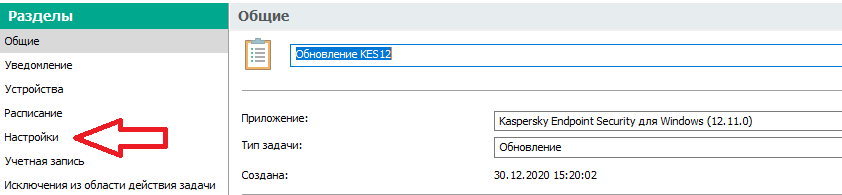
День добрый. Для KES базы обновляются задачей типа "Обновление". Обновлять модули приложения или нет указывается в настройках данной задачи.
- 1 reply
-
- 1
-

-

Отсутствует задача "обновление баз программы" ksc
anyk3y posted a topic in Kaspersky Endpoint Security для бизнеса
Всем добрый день! Прошу прощения, если вопрос глупый, но никак не могу разобраться. На сервере Kaspersky Security Center в разделе "Задачи" при создании задачи для приложения "Kaspersky Endpoint Security 12.11 для Windows" не вижу в списке доступных задачу "обновление баз программы", только "обновление", которое подразумевает обновление самого приложения и его модулей, но не баз. Хотя для того же "Kaspersky Security for Windows Servers" такая задача, "обновление баз программы", в списке имеется. Подскажите, в чем может быть проблема или же что я делаю не так? -
Deneme sürümü kullanıyorum denilip resimde sınırsız sürüm gözüküyor. Başkasının resmini mi kullanıyorsunuz? Son sürümü indirip deneyin denilmiyor orada güncellendikçe son sürümü indirdiğinizde sorunlar düzelecek diye belirtiliyor. Forumu takip ederseniz tek siz yaşamadığını anlayabilirsiniz. Neyi satın alıp almadığınız biiz ilgilendirmiyor. Burada ürünümüüzn sorunları varsa onları çözüm sağlamak için çalışıyoruz.
-

Kaspersky Plus startet sporadisch nicht richtig
Wahnfried1883 replied to Wahnfried1883's topic in Für Privatanwender
Schnellstart in Windows schalte ich grundsätzlich immer aus, daran wird es nicht liegen. Das Ganze scheint auch erst seit der neuesten Programmversion aufzutreten, denn früher hatte ich das Problem nie und ich nutze Kaspersky schon einige Jahre. Wie dem auch sei, ich habe jetzt beim Support ein Ticket aufgemacht, mal sehen was dabei rauskommt. -

VPN IP не соотвествует выбранной стране
Friend replied to Vas23's topic in Kaspersky Secure Connection
Может будет интересно: