Skip to content
View in the app

A better way to browse. Learn more.

Kaspersky Support Forum

A full-screen app on your home screen with push notifications, badges and more.

To install this app on iOS and iPadOS
  1. Tap the Share icon in Safari
  2. Scroll the menu and tap Add to Home Screen.
  3. Tap Add in the top-right corner.
To install this app on Android
  1. Tap the 3-dot menu (⋮) in the top-right corner of the browser.
  2. Tap Add to Home screen or Install app.
  3. Confirm by tapping Install.

TF卡使用数据保险箱加密后无法格式化

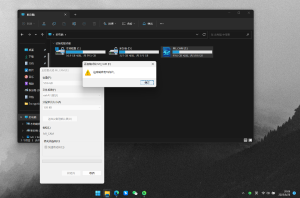
TF卡使用数据保险箱加密后无法被格式化,提示“磁盘存在写保护”,请问该如何解决。2023-08-26200811.thumb.png.27bad0a8da5e0eef915e467cbbb7a808.png

Featured Replies

尊敬的用户您好,

首先,当前保险箱是否可以正常输入密码进入访问。如可以,请将重要数据备份。

然后,在卡巴斯基程序界面中-删除数据保险箱(数据保险箱中的文件和文件夹将被永久删除)

完成以上操作之后,请您再尝试格式化试一下。


谢谢

  • The topic was locked
Guest
This topic is now closed to further replies.

Account

Navigation

Search

Search

Configure browser push notifications

Chrome (Android)
  1. Tap the lock icon next to the address bar.
  2. Tap Permissions → Notifications.
  3. Adjust your preference.
Chrome (Desktop)
  1. Click the padlock icon in the address bar.
  2. Select Site settings.
  3. Find Notifications and adjust your preference.