Skip to content
View in the app

A better way to browse. Learn more.

Kaspersky Support Forum

A full-screen app on your home screen with push notifications, badges and more.

To install this app on iOS and iPadOS
  1. Tap the Share icon in Safari
  2. Scroll the menu and tap Add to Home Screen.
  3. Tap Add in the top-right corner.
To install this app on Android
  1. Tap the 3-dot menu (⋮) in the top-right corner of the browser.
  2. Tap Add to Home screen or Install app.
  3. Confirm by tapping Install.

隔离区问题咨询&建议 [MOVED] [ 已解决 / Solved ] [ 已关闭 / Closed ]

  • Author
  1.  请问卡巴斯基的隔离的目录在哪里啊?
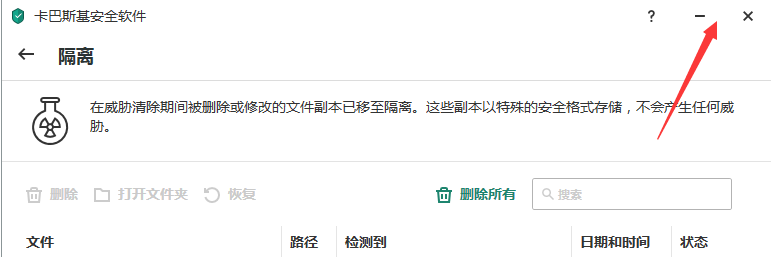
  2. 建议在卡巴斯基隔离区右上角现在只有最小化按钮,没有最大化按钮,增加一个最大化按钮,在隔离文件数量比较多的时候,便于全屏查看隔离区的内容,增强用户良好的使用体验。谢谢!

Solved by Wesly.Zhang

Featured Replies

Hello,

  1. 我没有明白什么叫做 隔离的目录 ?隔离区 内显示的所有内容(行)就是所隔离的对象以及文件路径。
  2. 你这个建议建议发送到 china-support@Kaspersky.com。不过不保证这个建议能够被采纳。

Regards.

  • Author

非常感谢您的回复!我说的隔离目录是指所隔离的对象是存放到哪个路径的哪个文件夹下面?这样我可以自己查看或者重新指定某个盘符的某个文件夹作为隔离目录的。谢谢您!

  • Solution

非常感谢您的回复!我说的隔离目录是指所隔离的对象是存放到哪个路径的哪个文件夹下面?这样我可以自己查看或者重新指定某个盘符的某个文件夹作为隔离目录的。谢谢您!


Hello,

C:\ProgramData\Kaspersky Lab\AVP21.3\QB,这是隔离文件所存放的地方。
  • Author

好的,明白了,非常感谢您!祝您身体安康、一切顺利!

Guest
This topic is now closed to further replies.

Account

Navigation

Search

Search

Configure browser push notifications

Chrome (Android)
  1. Tap the lock icon next to the address bar.
  2. Tap Permissions → Notifications.
  3. Adjust your preference.
Chrome (Desktop)
  1. Click the padlock icon in the address bar.
  2. Select Site settings.
  3. Find Notifications and adjust your preference.