Skip to content
View in the app

A better way to browse. Learn more.

Kaspersky Support Forum

A full-screen app on your home screen with push notifications, badges and more.

To install this app on iOS and iPadOS
  1. Tap the Share icon in Safari
  2. Scroll the menu and tap Add to Home Screen.
  3. Tap Add in the top-right corner.
To install this app on Android
  1. Tap the 3-dot menu (⋮) in the top-right corner of the browser.
  2. Tap Add to Home screen or Install app.
  3. Confirm by tapping Install.

使用Kaspersky VPN点击开启VPN一直显示链接失败

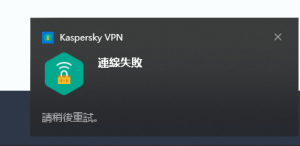
刚下的然后注册的免费版,想请问一下点击链接的时候一直显示链接失败,也没开别的加速器什么的,重启过电脑,给的管理权限,然后链接不上的过程中其他的网页也全部没有网络无法连接QQ20230222023908.thumb.png.62b0c96c8a2cab1f8096120be2fc93b9.png
Featured Replies

Hello,

如果你在中国大陆地区使用 VPN,由于 VPN IP 地址被墙,所以你不能够使用。

  • The topic was locked
Guest
This topic is now closed to further replies.

Account

Navigation

Search

Search

Configure browser push notifications

Chrome (Android)
  1. Tap the lock icon next to the address bar.
  2. Tap Permissions → Notifications.
  3. Adjust your preference.
Chrome (Desktop)
  1. Click the padlock icon in the address bar.
  2. Select Site settings.
  3. Find Notifications and adjust your preference.