Skip to content
View in the app

A better way to browse. Learn more.

Kaspersky Support Forum

A full-screen app on your home screen with push notifications, badges and more.

To install this app on iOS and iPadOS
  1. Tap the Share icon in Safari
  2. Scroll the menu and tap Add to Home Screen.
  3. Tap Add in the top-right corner.
To install this app on Android
  1. Tap the 3-dot menu (⋮) in the top-right corner of the browser.
  2. Tap Add to Home screen or Install app.
  3. Confirm by tapping Install.

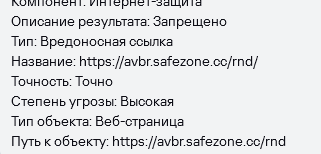
Касперский блокирует Av block remover

image.png.a0c0bb2ea96682c04eabc3221cd31e2c.png image.thumb.png.d4b0ff8266a4cd3e88537f84f1340161.png

Featured Replies

Такого не может быть, монитор активности не работает по ссылкам.

@pavel11234 Ложное срабатывание на ссылку и файл исправлено, проверьте.

Здесь детект был на файл, который распаковывается при запуске AVBR (скрины ниже).

Спойлер

1.thumb.png.d9cc044c864e94762a007e1d9d7cd52a.png2.thumb.png.9948fd9beeab00b7f58156c22009847f.png

@Maratka Детектировалось и веб-АВ, и МА (но не локально, это ответ от облака - Bazon.a). Через некоторое время, когда я запустил файл, уже был детект UDS. На скрине с Opentip это видно.
Please sign in to comment

You will be able to leave a comment after signing in

Sign In Now

Account

Navigation

Search

Search

Configure browser push notifications

Chrome (Android)
  1. Tap the lock icon next to the address bar.
  2. Tap Permissions → Notifications.
  3. Adjust your preference.
Chrome (Desktop)
  1. Click the padlock icon in the address bar.
  2. Select Site settings.
  3. Find Notifications and adjust your preference.