

How to renew the KSC certificate correctly [KSC for Windows]

Entry posted by svc_kms in How-to
872 views
This article is about Kaspersky Security Center for Windows (KSC for Windows)
Problem:
KSC certificate renewal or replacement is made incorrectly because the option to instantly replace the server certificate is used.
As a result, managed devices loose the connection with KSC and klmover command or re-installation of klnagent is required to restore the connectivity.
Cause:
After the certificate is renewed with "-t C" option, network agents do not receive a new certificate and have no connection to the server.
Solution:
In order to avoid such issues, run the certificate renewal script using the "-t CR" option (CR — Replace the common reserve certificate for ports 13000 and 13291) and the "-f" option in the <dd.mm.yyyy> format where we indicate the date 3–4 weeks ahead the current one.
The time we set aside for changing the certificate to a backup one will allow a new certificate to be distributed to all Kaspersky Network Agents (Nagent):

|
|
Type of certificate to be replaced. Possible values of the
|
|
|
Schedule for changing the certificate, using the format "DD-MM-YYYY hh:mm" (for ports 13000 and 13291). Use this parameter if you want to replace the common or reserve certificate before it expires. Specify the time when managed devices must synchronize with Administration Server on a new certificate. |
For example, consider the command "klsetsrvcert.exe -f "DD-MM-YYYY hh:mm" -t CR -g nb.loc". Since this command was used in October, a backup certificate would be created and distributed to all nagents within a month. Thus, the certificate should have been applied on November 1, 2022.

Checking the reserve certificate date
-
Run the Windows command prompt by using administrator rights, and then change your current directory to the directory with the
klsrvcertutility. The utility is located in the folder where Administration Server or Kaspersky Network agent is installed. The default installation path is<Disk>:\Program Files (x86)\Kaspersky Lab\Kaspersky Security Center\ or <Disk>:\Program Files (x86)\Kaspersky Lab\NetworkAgent\. -
Run
klscflag.exe -ssvget -pv 1103/1.0.0.0 -s KLNAG_SECTION_CERTDATA -n KLNAG_SSL_SERVER_CERT_RESERVE -ss '|ss_type = \"SS_LOCAL_MACHINE\";'
-
Enter the resulting number in a converter to see the human-readable date: https://www.epochconverter.com/


Verification of reserve certificate on managed hosts
Let's check if the backup certificate has applied to the host. To do this, using the klscflag utility, enter the command: klscflag.exe -ssvget -pv 1103/1.0.0.0 -s KLNAG_SECTION_CERTDATA -n KLNAG_SSL_SERVER_CERT_RESERVE -ss '|ss_type = \"SS_LOCAL_MACHINE\";'

The certificate has been delivered.
If the backup certificate is not yet delivered to the destination host, we will see the following result of this command:

Verification of reserve certificate on secondary administration servers
When the command to renew the certificate on primary server is issued, the activity is logged to C:\ProgramData\KasperskyLab\adminkit\logs\CertRenewSysLogName.syslog.
Open it on primary server and check the recent entry containing "Server reserve certificate", for example:
Цитата<142>1 2025-06-16T15:01:46.488Z ksc.ksctest.local CertRenewSysLogName 3228 - - Server reserve certificate is stored in global storage (certificate '2D2D2D2D2D424547494E2043455254494649434154452D2D2D2D2D0A4D494944766A434341716167417749424167495556424D7454645456614133346A5431467675743548365265784A45774451594A4B6F5A496876634E4151454C0A42514177484445614D426747413155454177775261334E6A4C6D747A5933526C633351756247396A595777774868634E4D6A55774E5445334D5455774D5451310A5768634E4D6A59774E6A45344D5455774D545131576A41634D526F7747415944565151444442467263324D7561334E6A6447567A6443357362324E68624443430A415349774451594A4B6F5A496876634E4151454242514144676745504144434341516F4367674542414C7651614E4273303436574D4C65696A42384D7656306F0A56346469776673486B6730303967524D4B75737A724A5130305746746C6B76743577493955414559467456756D30714E68447154354367476B5449716F4B514B0A315470336F52725047486F30534C694A6B6F6441416B346E6374597A634D33736352775533445735776F5946486E62344E7245744B7468433755344F587669620A464A2F766E65734A6E50556D4C4147503239726A5356456F2B6D5934354269666F4E3377654E497830392B6A32647753513176626B4A4C6942566A66777034370A68784D7230523845792F3334706F54505450346E49326E727759444B4547366259486A38746B6F72554A73706145562F496B42566C50664A2B7854566E666B4F0A2F445838567959324B4250534476736B3145384C666E444339534F704948755957614D6E5A644D766153625765396B6E447A785152706E682F737241795263430A4177454141614F42397A43423944416342674E5648524945465441546768467263324D7561334E6A6447567A6443357362324E686244416342674E56485245450A465441546768467263324D7561334E6A6447567A6443357362324E686244414C42674E564851384542414D4341615977485159445652304F42425945464D32750A4B7276667472324D56767147302F6168497270593652434B4D46634741315564497752514D453641464A56614A7352764757796958712F624461376C4D4B2F490A706D487A6F53436B486A41634D526F7747415944565151444442467263324D7561334E6A6447567A6443357362324E6862494955555A356B32544544676A78320A523562343041466A2B787A667770497745675944565230544151482F42416777426745422F7749424144416442674E5648535545466A415542676772426745460A42516344415159494B775...
This certificate should be propagated automatically to all secondary servers within the remaining time, before the common certificate expires.
In case there is at least one secondary KSC Server connected to the primary KSC, run the following sql query against the database used by each secondary server:
ms sql query to be run on secondary KSC Server
USE KAV;
select imgMasterReservedCert ReserveCertificatefrom from aksrv_server_props;
KAV is the name of database used by a secondary server.
The script will display the identifier of primary KSC reserve certificate received by the secondary administration server - it should party match the number from syslog displayed above:
Цитата0x2D2D2D2D2D424547494E2043455254494649434154452D2D2D2D2D0A4D494944766A434341716167417749424167495556424D7454645456614133346A5431467675743548365265784A45774451594A4B6F5A496876634E4151454C0A42514177484445614D426747413155454177775261334E6A4C6D747A5933526C633351756247396A595777774868634E4D6A55774E5445334D5455774D5451310A5768634E4D6A59774E6A45344D5455774D545131576A41634D526F7747415944565151444442467263324D7561334E6A6447567A6443357362324E68624443430A415349774451594A4B6F5A496876634E4151454242514144676745504144434341516F4367674542414C7651614E4273303436574D4C65696A42384D7656306F0A56346469776673486B6730303967524D4B75737A724A5130305746746C6B76743577493955414559467456756D30714E68447154354367476B5449716F4B514B0A315470336F52725047486F30534C694A6B6F6441416B346E6374597A634D33736352775533445735776F5946486E62344E7245744B7468433755344F587669620A464A2F766E65734A6E50556D4C4147503239726A5356456F2B6D5934354269666F4E3377654E497830392B6A32647753513176626B4A4C6942566A66777034370A68784D7230523845792F3334706F54505450346E49326E727759444B4547366259486A38746B6F72554A73706145562F496B42566C50664A2B7854566E666B4F0A2F445838567959324B4250534476736B3145384C666E444339534F704948755957614D6E5A644D766153625765396B6E447A785152706E682F737241795263430A4177454141614F42397A43423944416342674E5648524945465441546768467263324D7561334E6A6447567A6443357362324E686244416342674E56485245450A465441546768467263324D7561334E6A6447567A6443357362324E686244414C42674E564851384542414D4341615977485159445652304F42425945464D32750A4B7276667472324D56767147302F6168497270593652434B4D46634741315564497752514D453641464A56614A7352764757796958712F624461376C4D4B2F490A706D487A6F53436B486A41634D526F7747415944565151444442467263324D7561334E6A6447567A6443357362324E6862494955555A356B32544544676A78320A523562343041466A2B787A667770497745675944565230544151482F42416777426745422F7749424144416442674E5648535545466A415542676772426745460A42516344415159494B775........
In case there are secondary KSC Servers located in DMZ, KSC should be able to connect to them to download the certificate. If no info about secondary server's certificate is stored in the database of primary server, the automatic renewal of secondary server's certificate will not work properly. secondary server will be disconnected when the certificate expires and should be re-connected manually by KSC Administrator.
In order to avoid such situation, use the following sql query to make sure all certificates of secondary server have been received by primary KSC successfully:
Query to be run on primary KSC:
select Hosts.strDisplayName SecondaryServerName,
cast(cast(child_servers.imgCertificate as varbinary(max)) as varchar(max)) as SecSrvCurrentCert,
cast(cast(child_servers.imgReserveCert as varbinary(max)) as varchar(max)) as SecSrvReserveCert
from child_servers
inner join Hosts
on child_servers.nIdHost = Hosts.nId;
Current certificate is expected to be not NULL. Otherwise, re-connect secondary server to the primary manually and make sure there is no connectivity issue.
Example:
Цитата192.168.1.222
-----BEGIN CERTIFICATE-----
MIIDvjCCAqagAwIBAgIUJhZfMFZrF0rhoNA+wzPS5tEmj+8wDQYJKoZIhvcNAQEL BQAwHDEaMBgGA1UEAwwRZGMxLmtzY3Rlc3QubG9jYWwwHhcNMjQxMTA2MTIyNTUz WhcNMjUxMjA4MTIyNTUzWjAcMRowGAYDVQQDDBFkYzEua3NjdGVzdC5sb2NhbDCC ASIwDQYJKoZIhvcNAQEBBQADggEPADCCAQoCggEBAJ2sVnYNKWHEDO8HXkKksG9X WComiBWVYgpCwx9/i2yFfKmVgVhnT9Yg3mftgyYdZ2V2udCThC2ZxIkA5B3Dnaw/ RBlrRmhAeak5wQs12qTsbRJhOPcqmaoDDe0FZ0dZ4Dv60QLmS7vbi/AvZ1XLf106 3BHnakanGoBsvjF6Wsrg4BjR17sb3HjUYFWYd3iZ/fT4sWL4VbTYhspXM9VyJw/5 tQfReS2/84l7PA+7wE80fXD3y7K+dGljhp7kUqCUnGBkIq5vPPx8HD6mUCxZCKQB ZAn2w0MhDhTfiCpBuuYh0QWx6TxcMQ/TtSDvgRkfSZ8bMzT9zYw69DMOi9ukeuEC AwEAAaOB9zCB9DAcBgNVHRIEFTATghFkYzEua3NjdGVzdC5sb2NhbDAcBgNVHREE FTATghFkYzEua3NjdGVzdC5sb2NhbDALBgNVHQ8EBAMCAaYwHQYDVR0OBBYEFOGf wWoxj924mnaaF10douKwCLMbMFcGA1UdIwRQME6AFOQ5TL+pnURz1fq2pauJMik+ HY1KoSCkHjAcMRowGAYDVQQDDBFkYzEua3NjdGVzdC5sb2NhbIIUKWl0PMtThGoW 2P0wanMPNGlxlUYwEgYDVR0TAQH/BAgwBgEB/wIBADAdBgNVHSUEFjAUBggrBgEF BQcDAQYIKwYBBQUHAwIwDQYJKoZIhvcNAQELBQADggEBAGBN5qQowGROPlfkTjqJ 59UYhMSEdczMDkaBbeUb0+jzju9GD3rXXBZ47oPcn8Uu/3P1ZqYIXyK2pqTQaxN3 XUW5NPE03KAgBufDHTPUP5jDrjf3b5uUD1OhY20oz1kGODa6eSZG/mlRYfWqTdAb CceQ0GS39/6ZwX0yPrjuaoWh+IbTMuygPEH1AAs4VD55af1E59aOTtwL7s2y04ba 8NiFNAprHZeJtr5u2RUYN/LSVrt8Aze6wyGyG+9U4t/arWIh/VUWTKZk/4QOUIOp exhlRxtNu2S5ud6/TXtsUZ7RK9pzxqaqlbHXCvy01R3vwWRVwi55CFyJJ1hkNuUe UsE=
-----END CERTIFICATE-----
Please be advised that automatic renewal of secondary server certificate is supported since KSC 14.0. Older versions are not supported.
Known problem:
Problem with Webconsole login - incorrect user or password - see article
Error - Failed to establish connection with the remote device:

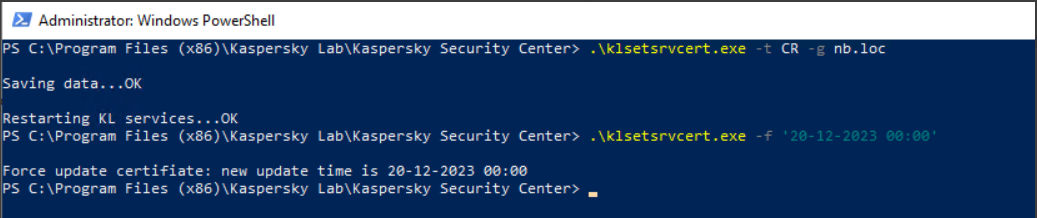
This error occurs because we are trying to execute 2 consecutive commands on the same line. The first command is "-t CR -g nb.loc" and the second is "-f '20-12-2023 00:00'". Since the administration server restarts after executing the first command, the second command waits for some timeout before executing. But since in some user configurations, restarting the service can take a long time, the second part is performed when the server has not started yet. Which leads to the above error.
In order to fix this behavior, you need to run the commands separately, according to this scenario:
- Run .\klsetsrvcert.exe -t CR -g nb.loc
- Wait until the administration server service starts completely (you can check by connecting the console).
- Run .\klsetsrvcert.exe -f '20-12-2023 00:00'






















0 Comments
Recommended Comments
There are no comments to display.
Please sign in to comment
You will be able to leave a comment after signing in
Sign In Now