Skip to content
View in the app

A better way to browse. Learn more.

Kaspersky Support Forum

A full-screen app on your home screen with push notifications, badges and more.

To install this app on iOS and iPadOS
  1. Tap the Share icon in Safari
  2. Scroll the menu and tap Add to Home Screen.
  3. Tap Add in the top-right corner.
To install this app on Android
  1. Tap the 3-dot menu (⋮) in the top-right corner of the browser.
  2. Tap Add to Home screen or Install app.
  3. Confirm by tapping Install.

My mouse keeps jumping to the left upper corner of the screen, and i founded some wierd driver on mouse.

My mouse keeps jumping to the left corner of the screen, my mouse is a superlight from logitech and i tried many other good brands mouses even NEW mouses and EVERY singles one does the same thing, as you can see in the following video. Trying to solve the problem i saw this on the mouse drivers image.thumb.png.6db77e1075b92e44b09f8b8d2faed5dd.png 
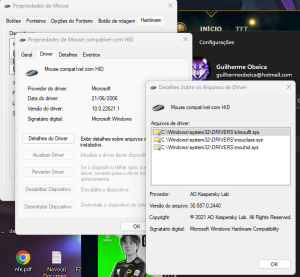
 

PLEASE HELP ME I DONT KNOW WHAT TO DO ANYMORE! 


Featured Replies

Welcome to Kaspersky Community.


Please provide version of K. product installed.

Hi, where can i see the version? I am using the security cloud image.thumb.png.62ef9ecccd6a43c414d56548d04860fd.png

That seems a KSCloud 21.3 as maximum.


Try this: uninstall KSCloud, go here: https://www.kaspersky.com/downloads#update-product


Scroll up a bit, and download Kaspersky Plus installer, install, reactivate with Your KSCloud activation code.

image.thumb.jpeg.e42bc88b107df7546b71fc48346b0216.jpeg  So this is what a get when i try to unistall KScloud, i had to repair the windows with a bootable pen drive, wtf is this 

Please sign in to comment

You will be able to leave a comment after signing in

Sign In Now

Account

Navigation

Search

Search

Configure browser push notifications

Chrome (Android)
  1. Tap the lock icon next to the address bar.
  2. Tap Permissions → Notifications.
  3. Adjust your preference.
Chrome (Desktop)
  1. Click the padlock icon in the address bar.
  2. Select Site settings.
  3. Find Notifications and adjust your preference.