Skip to content
View in the app

A better way to browse. Learn more.

Kaspersky Support Forum

A full-screen app on your home screen with push notifications, badges and more.

To install this app on iOS and iPadOS
  1. Tap the Share icon in Safari
  2. Scroll the menu and tap Add to Home Screen.
  3. Tap Add in the top-right corner.
To install this app on Android
  1. Tap the 3-dot menu (⋮) in the top-right corner of the browser.
  2. Tap Add to Home screen or Install app.
  3. Confirm by tapping Install.

El dispositivo no se ha conectado base de a datos desactualizada

 
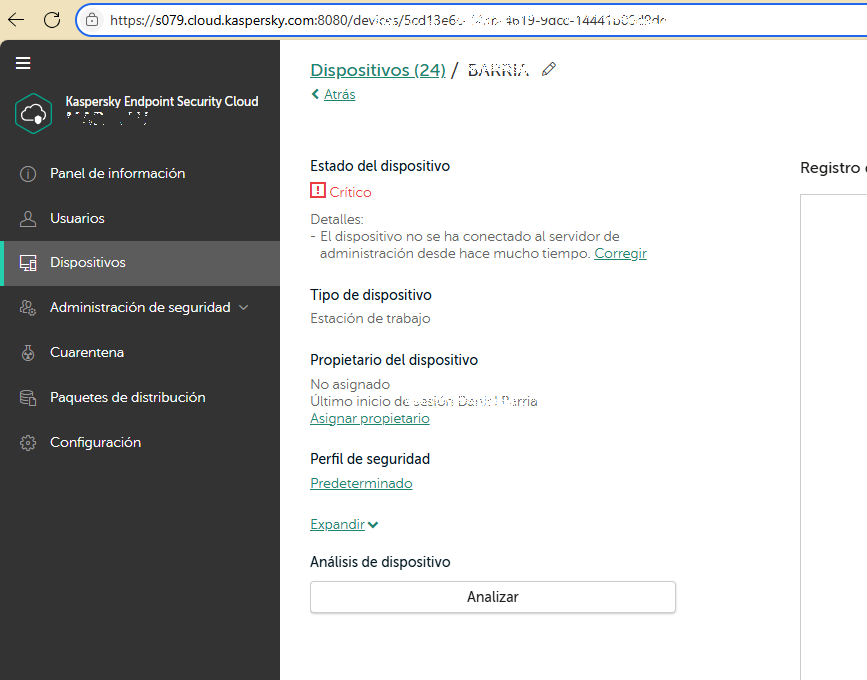
Tengo este error en varias computador
 
El dispositivo no se ha conectado al servidor de administración desde hace mucho tiempo.
 
 
Quote


Captura de pantalla 2025-08-11 090314.png

Featured Replies

Revise el (los) equipo(s), puede tratarse de restricciones de conexión vía proxy o firewall.

image.thumb.png.33172739ffa0603d710c66fadaee0e66.png

  • 1 month later...
  • Author

revisamos  proxy o firewall no existe restricciones 

el error persiste 

Hola,

Abre un ticket de soporte en Kaspersky Company Account para que lo revisen los técnicos de Kaspersky.

Parece como te han indicado un problema de conexión/firewall, que no tiene acceso dicho equipo a tu servidor cloud.

Saludos

Please sign in to comment

You will be able to leave a comment after signing in

Sign In Now

Account

Navigation

Search

Search

Configure browser push notifications

Chrome (Android)
  1. Tap the lock icon next to the address bar.
  2. Tap Permissions → Notifications.
  3. Adjust your preference.
Chrome (Desktop)
  1. Click the padlock icon in the address bar.
  2. Select Site settings.
  3. Find Notifications and adjust your preference.