Skip to content
View in the app

A better way to browse. Learn more.

Kaspersky Support Forum

A full-screen app on your home screen with push notifications, badges and more.

To install this app on iOS and iPadOS
  1. Tap the Share icon in Safari
  2. Scroll the menu and tap Add to Home Screen.
  3. Tap Add in the top-right corner.
To install this app on Android
  1. Tap the 3-dot menu (⋮) in the top-right corner of the browser.
  2. Tap Add to Home screen or Install app.
  3. Confirm by tapping Install.

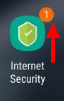
Значок уведомления у иконки

  • Author
Уже год не могу избавиться от Пролез все приложение по кругу несколько раз за год. Samsung S8 Не критично но напрягает. Помогите.
Solved by kmscom

Featured Replies

Версию KIS для Андроид озвучте https://support.kaspersky.ru/install/10195
  • Author
Версию KIS для Андроид озвучте https://support.kaspersky.ru/install/10195
11.18.4.735
  • Solution
Обновите версию приложения, сообщите о результате
  • Author
Обновил. Пока пропало уведомление

Please sign in to comment

You will be able to leave a comment after signing in

Sign In Now

Account

Navigation

Search

Search

Configure browser push notifications

Chrome (Android)
  1. Tap the lock icon next to the address bar.
  2. Tap Permissions → Notifications.
  3. Adjust your preference.
Chrome (Desktop)
  1. Click the padlock icon in the address bar.
  2. Select Site settings.
  3. Find Notifications and adjust your preference.