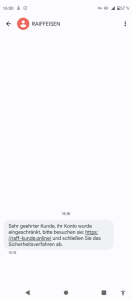
Ich habe gerade eben ein SMS von der "Raiffeisen" Bank bekommen. Die SMS ist aber ohne dass sie von Google oder auf Kaspersky als fehlerhaft oder "nicht vertraunenswürdig" eingestuft wurde eingegangen!
Zeigt dass die Website auf "namesilo" registriert wurde. ABER weder die AUT Version noch andere europäische Filialen nutzen diese Domain!! Alle Bank Domanes von Raiffeisen haben kein "...Kunde . Online" als Weiterleitung sondern "de/privatkunden.html" davor.
Und ganz wichtig die Website wurde bis 2024 schon bezahlt. Also werden sicher vermehrt solche SMS die nächsten Tage verschickt!!
Die SMS ist mit einer Warnung versehen und ich konnte leider nicht ermitteln wer die SMS verschickt hat...
Featured Replies
Please sign in to comment
You will be able to leave a comment after signing in
Ich habe gerade eben ein SMS von der "Raiffeisen" Bank bekommen. Die SMS ist aber ohne dass sie von Google oder auf Kaspersky als fehlerhaft oder "nicht vertraunenswürdig" eingestuft wurde eingegangen!
Ein kurzer Check auf https://opentip.kaspersky.com/https%3A%2F%2Fraff-kunde.online%2F/?tab=lookup
Zeigt dass die Website auf "namesilo" registriert wurde. ABER weder die AUT Version noch andere europäische Filialen nutzen diese Domain!! Alle Bank Domanes von Raiffeisen haben kein "...Kunde . Online" als Weiterleitung sondern "de/privatkunden.html" davor.
Und ganz wichtig die Website wurde bis 2024 schon bezahlt. Also werden sicher vermehrt solche SMS die nächsten Tage verschickt!!
Die SMS ist mit einer Warnung versehen und ich konnte leider nicht ermitteln wer die SMS verschickt hat...