Skip to content
View in the app

A better way to browse. Learn more.

Kaspersky Support Forum

A full-screen app on your home screen with push notifications, badges and more.

To install this app on iOS and iPadOS
  1. Tap the Share icon in Safari
  2. Scroll the menu and tap Add to Home Screen.
  3. Tap Add in the top-right corner.
To install this app on Android
  1. Tap the 3-dot menu (⋮) in the top-right corner of the browser.
  2. Tap Add to Home screen or Install app.
  3. Confirm by tapping Install.

AirExplorer false positive error

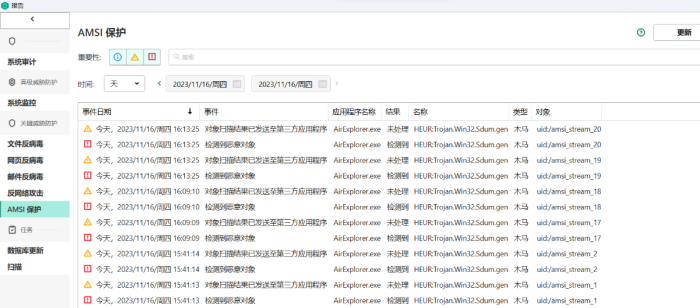
image.png.93e2fffaf8e4adc3588be6d658e3ec9f.png

卡巴斯基版本:21.3.10.391 (k)

以前可以正常打开AirExplorer软件,现在会出现image.thumb.png.e6da8aecba203e0a6c7e616fb940bae3.png的报错,

同时卡巴斯基通知image.thumb.png.2183802ef00674227d6c63fcd25b1297.png。联系了软件官方,对方表示为卡巴斯基误报

Featured Replies

尊敬的用户您好,

请提供一下相应的样本,压缩并设置一个密码 (infected),我们需要进行分析。


谢谢

  • The topic was locked
Guest
This topic is now closed to further replies.

Account

Navigation

Search

Search

Configure browser push notifications

Chrome (Android)
  1. Tap the lock icon next to the address bar.
  2. Tap Permissions → Notifications.
  3. Adjust your preference.
Chrome (Desktop)
  1. Click the padlock icon in the address bar.
  2. Select Site settings.
  3. Find Notifications and adjust your preference.