Search the Community
Showing results for tags 'kaspersky premium'.
Found 430 results
-
 xmtchl posted a topic in Kaspersky: Basic, Standard, Plus, PremiumВозможно ли изменить подписку (увеличить количество устройств) не отменяя подписку, или нужно отменить подписку и оформить новую с соответствующим количеством устройств?
-
 samet posted a topic in Ev içinmerhaba arkadaşımla kaspersky premium hesap üyeliği aldık bu üyeliğin içinde vpn de dahil ancak beni sistemden davet etmesine rağmen ben vpne erişim sağlayamıyorum bu konuda yardımcı olursanız sevinirim.
-
 Duke333 posted a topic in Para usuarios particularesBuenas. Dentro de poco me toca renovar licencia y estaba entre Plus y Premium y viendo la comparativa me ha asaltado una duda con lo siguiente: Detección de accesos remotos Identifica cualquier aplicación instalada en tu ordenador que los hackers puedan utilizar para tomar el control de tu dispositivo y robar tu información personal. ¿Que diferencia hay con la parte de Protección antivirus, antimalware y anti-ransomware si esas aplicaciones son malware?
-
 muhammad.moin posted a topic in Kaspersky Security CenterHEllo, I have been getting this error "DENYLIST OF KEYS IS CORRUPTED" on some of my Linux and Windows devices for a few days. I have searched different sources and found a solution that works rarely and is something that states that "with KESL, you need to update first before activating the program." So, I am hoping you will let me know about your views and solutions regarding this issue. I am using the following products: KSC 14 KESW 11.9 KESL 11.3 Thanks!
-
 ComputerGuy posted a topic in Kaspersky: Basic, Standard, Plus, PremiumThis is a Zoom question and a Kaspersky question: I run Kaspersky Total Security under Windows 10. My friend bought Kaspersky Premium under Windows 10 on my recommendation. So, we are running two different versions of Kaspersky. Under Kaspersky Total Security, I'm able to unblock the web camera under Zoom by going to Main Application Window > Privacy Protection > Webcam Protection > Off. In my case, this works each and every time. As soon as I turn webcam protection off, I'm able to see my image under Zoom and my friends are able to see my image as well. I've tried to help my friend do the same thing under Kaspersky Premium. From her description, it sounds like the interface is entirely re-designed. My experience with Kaspersky Total Security is not helping her under Kaspersky Premium. The problem? Turning off webcam protection under Kaspersky Premium does not seem to work. She still cannot see herself under Zoom and no one else can see her either. Furthermore, her microphone is not working. She believes her problem started when she installed Kaspersky Premium. Prior to installing Kaspersky Premium, she was able to participate in Zoom meetings and both her audio and video were working. It is difficult for me to diagnose her problem over the telephone since I cannot see exactly what she is doing. I suppose I could invite her to a Zoom session and have her show me what she is doing via Zoom. Not sure if that will work. Do you have any ideas? Is there a simple fix for her problem? Do you think it is Kaspersky Premium that is blocking both her web camera and her microphone? From the main window in Kaspersky Premium, I asked her to click on the tool icon in the lower left corner. We then went to privacy settings. From there we turned off a setting for blocking the web camera. While I could not see what she was doing, she told me that the privacy setting for her web camera had remained "off" after she turned it "off." Any help would be appreciated. She has tried getting into the settings for specific applications. I assume she set something for Zoom but I'm not sure what she did. Screen images would be particularly helpful. Since I can't see what she is doing, I'm having a hard time helping her. Thanks! Ed
-
 Guest posted a topic in Kaspersky: Basic, Standard, Plus, PremiumPlease add an antivirus for IOS like Bitdefender has so I can control my phone from my Kaspersky thanks!
-
Guest posted a topic in Kaspersky: Basic, Standard, Plus, PremiumPlease make some options like Spyhunter 5 such as url checking and deleting hidden malware such as from recent urls and edge preferences
-
 WingRaith posted a topic in Kaspersky: Basic, Standard, Plus, PremiumAt the moment, I still have 79 days left on my 2-year Kaspersky Total Security license. When it expires, I plan to purchase and switch to Kaspersky Premium because it will be more cost-effective than renewing my current subscription. However, there is something I want to know, which didn't seem to be answered in the FAQ: If I (hypothetically) decide to upgrade sooner rather than later, will my remaining Total Security license be carried over to Premium? Or will I have to purchase a new license? If I purchase Kaspersky Premium from a source other than the official site (typically, I buy licenses on Amazon), will I need to manually activate the license in my Kaspersky account, or is it automatically added? Can I import my KTS 23 settings into Premium? I don't want to lose the settings I've configured.
-
 muxa722 posted a topic in Kaspersky Anti-VirusПосле переустановки Windows не могу установить антивирус на этот же компьютер пишет не достаточно прав для установки , регистрирывался и покупал все с этого компьютера
-
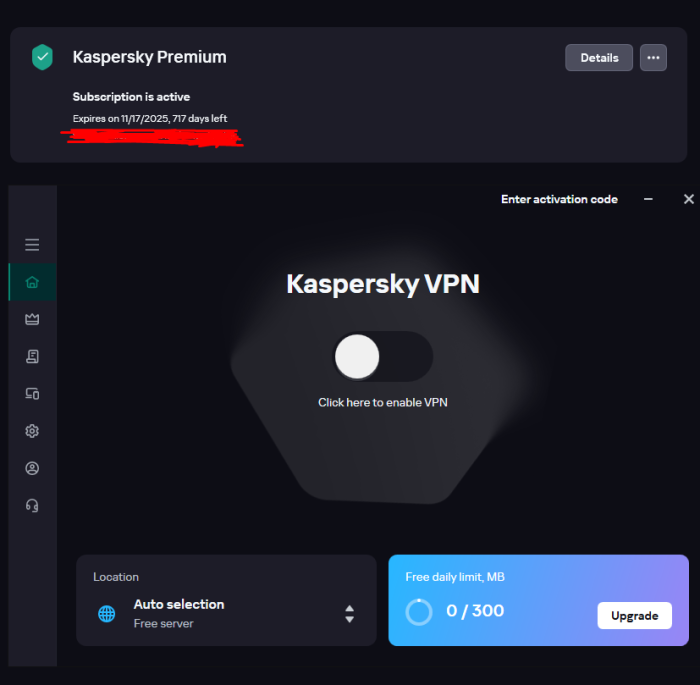
 G9-Royal posted a topic in Kaspersky VPNI purchased a Primum Kaspersky and VPN Premium features didn't activated In my secound Email, But first Email works fine. FYI I bought an account up for 20 Device.
-
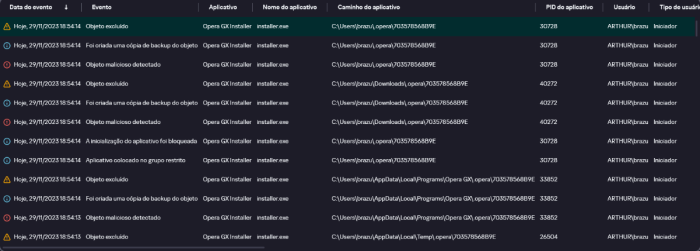
 Brazuka posted a topic in Virus and Ransomware related questionsToday when I clicked to enter Chrome, many notifications of the same detection started to appear, I found it very strange because a little before I was using it normally, I use Opera as a secondary browser, so in it I only use Instagram and Twitter, so I found it very strange that it was identifying a Trojan in the Opera installer, since I hardly use this browser. Evento: Objeto malicioso detectado Componente: Prevenção de intrusões Resultado da descrição: Detectado Tipo: Cavalo de Troia Nome: UDS:Trojan.Win32.Fsysna.iwdz Nível de ameaça: Alto Caminho do objeto.: C:\Users\brazu\AppData\Local\Temp\.opera\Opera GX Installer Nome do objeto: installer.exe Motivo: Proteção na Nuvem MD5: 283C1A2AA14E259A4C1A8CF1FC4BEB7E I tried to uninstall and Kaspersky was also blocking, after a while it stopped notifying, but I still can't uninstall Opera.
-
 Геморой петрович posted a topic in Kaspersky: Basic, Standard, Plus, PremiumЕсли я переустановлю windows с ssd на чистый m2 То новый windows будет воспринимать мой ПК как новое устройство? То есть у меня можно было подключить 3 устройства 1 подключил на старый ссд То при установке Касперского на новую windows на m2 у меня останется 2 устройства? (Которые можно будет подключить)?
-
 BrunoE posted a topic in Para casaSo, I recently bought a year of Kaspersky Premium. I have my account, and I added the Email of my wife as a second account on My Kaspersky (website). We both share 1 computer, but each one of us has it's own Windows 10 Profile. I first entered on my Windows profile, and used my Kaspersky account to log in on the windows app. Then I went to my wife's profile, and I noticed that my Kaspersky account was on her profile too. So I changed the Kaspersky account to her's. After that, I went to my Windows profile, and saw that the Kaspersky account that was logged in was hers. So the question is, how can I log in on my Windows Kaspersky account on my profile, and how can my wife log in on her Kaspersky account on her Windows Profile, without having to log in and log out each time I change my Windows profile?
-
 Valnei posted a topic in Para casaAdquiri recentemente o produto Kaspersky Premium para proteção de 10 dispositivos com 10 contas My Kaspersky. Gostaria de saber mais sobre como criar estas 10 contas, não encontrei nada no fórum e nem na ajuda. Pelo menos uma conta foi criada corretamente, pois na própria instalação, caso não tenha uma conta My Kaspersky, ele cria uma nova, até ai tudo bem. Consigo visualizar a Assinatura e já vinculei o meu dispositivo a esta conta. Gostaria de saber como posso proceder, pois tenho outro usuários a serem instalados, mas não sei se tenho que vincular estes novos usuários a esta minha conta My Kaspersky ou cada um dos meus usuários vai ter uma conta My Kaspersky independente da minha, para não haver relação de nenhuma informação. Estou meio perdido, pois não encontrei nenhuma informação a respeito. Grato a todos.
-
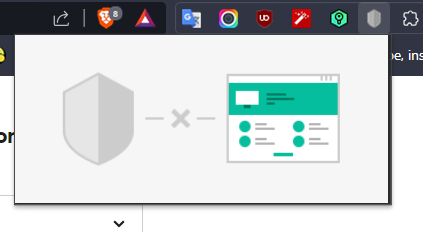
 Marcelo Seiji posted a topic in Para casaOlá, Estou com problema na extensão, e não consegui ativa-lo, qual seria o método passo a passo para ativar? O mesmo está ativado só no Edge, mas no Chrome e no Brave não está. Windows 11 Navegador Brave e Chrome Kaspersky Premium Processador 11th Gen Intel(R) Core (TM) i5-11400H @ 2.70GHz 2.69 GHz RAM instalada 16,0 GB (utilizável: 15,8 GB) Tipo de sistema Sistema operacional de 64 bits, processador baseado em x64 Placa de vídeo GTX 1650
-
 StePits posted a topic in Kaspersky: Basic, Standard, Plus, PremiumCan I buy a license now that has black Friday (or a discount period) and use it in 2 - 3 months when my active license expires?
-
 Bibiche98 posted a topic in Kaspersky: Basic, Standard, Plus, Premiumi have an account kaspersky with an email, i wanted to renew my license and i entered another email, is it possible to transfer data to the original kaspersky account?
-
Guest posted a topic in Kaspersky: Basic, Standard, Plus, PremiumI'm using Windows 11 Pro 23H2 (version 22631.2506) with Kaspersky Total Security Premium (version 21.15.8.493). Despite having enabled both notification sounds and on-screen notifications for all critical events in settings - I get nothing. I downloaded a few malware samples to test, they were all detected, but the only way I would know is if I glanced at Kasperky's tray icon which turned red. But there was no sound nor any notification of a malicious object being present on my PC. For obvious reasons, I'd like these notifications. I already tried checking if notifications for Kaspersky are not silenced, and they aren't. I tried going to Settings -> Notifications and enabling "Get notifications from other senders" - it was already enabled. Kaspersky is not in that list. "Do Not Disturb" mode is not enabled and neither is it set to auto enable - I never use it. So far, I only get notifications if new devices connect to my network. How do I fix them? Any help is appreciated.
-
 Buenas a todos, acabo de publicar en la sección Advice and Solutions de la Comunidad una nueva guía que intenta dar algunos consejos de cómo reforzar o endurecer el grupo de Restricción Mínima del módulo Prevención de Intrusiones, antiguamente llamado Control de Aplicaciones: Como podréis comprobar está en inglés, igual que mi anterior guía, para mí es más fácil directamente crearla en inglés, porque así puede llegar a más usuarios de Kaspersky. Para los que no entendáis nada de inglés y estéis interesados en aplicar dichos ajustes, siempre podéis cambiar el idioma de vuestro Kaspersky temporalmente a inglés con la combinación de teclado MAYÚSCULAS + F12, y una vez aplicados, volver a castellano con MAYÚSCULAS + F5. Si tenéis dudas, preguntas, etc. aquí me tenéis ? ¡Espero que os guste! Saludos.
-
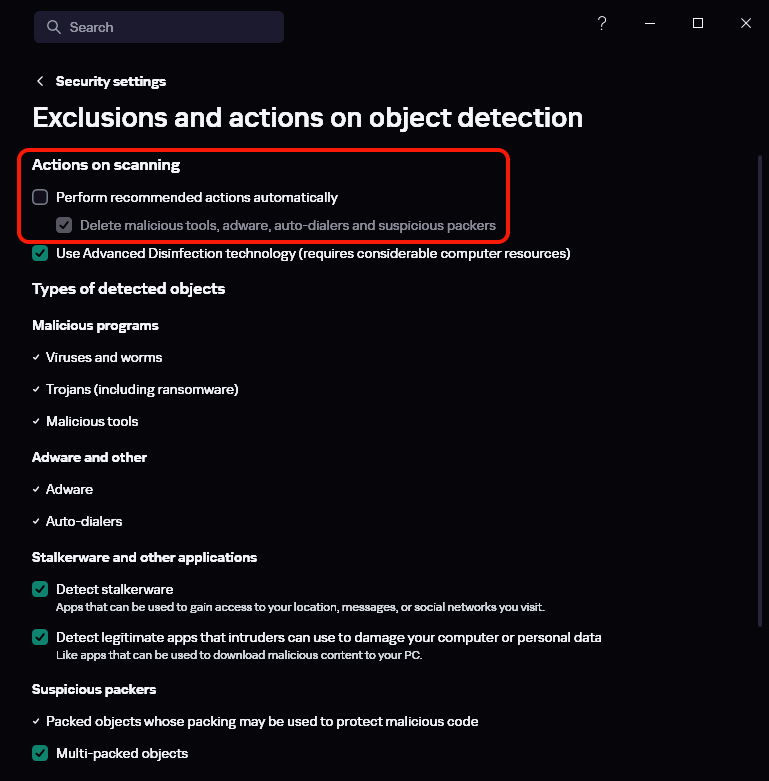
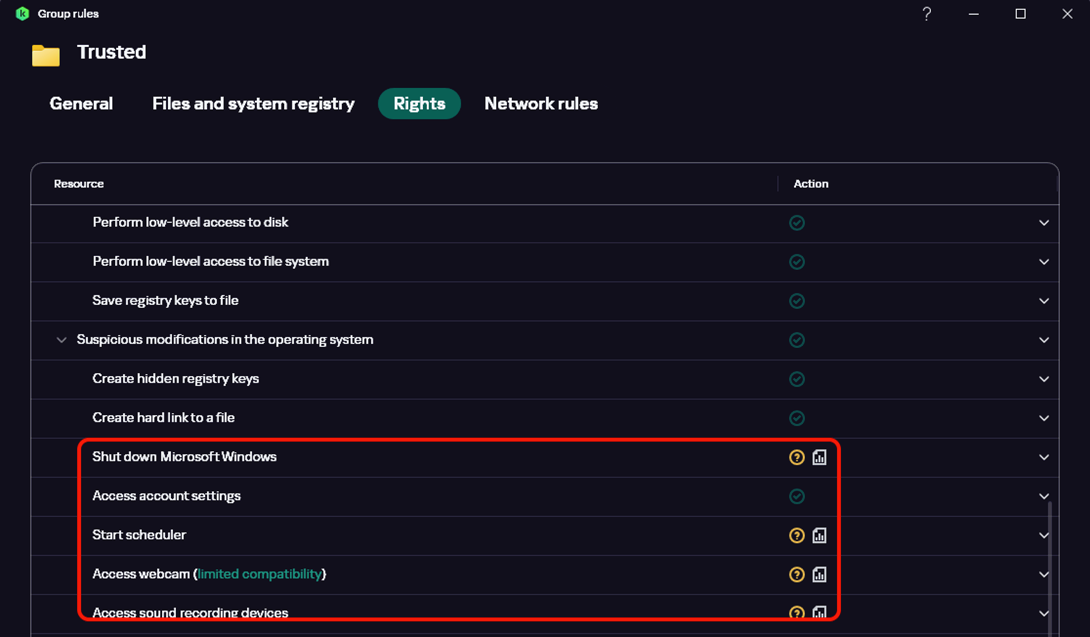
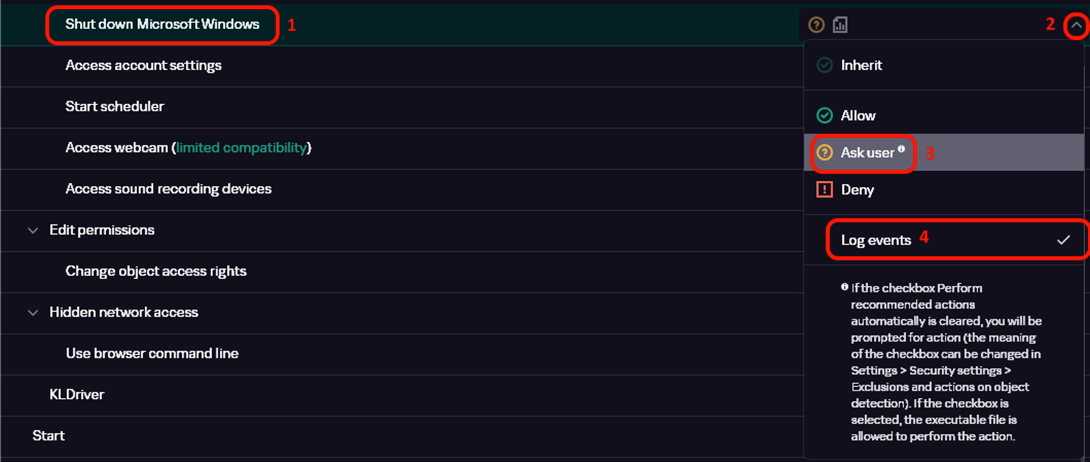
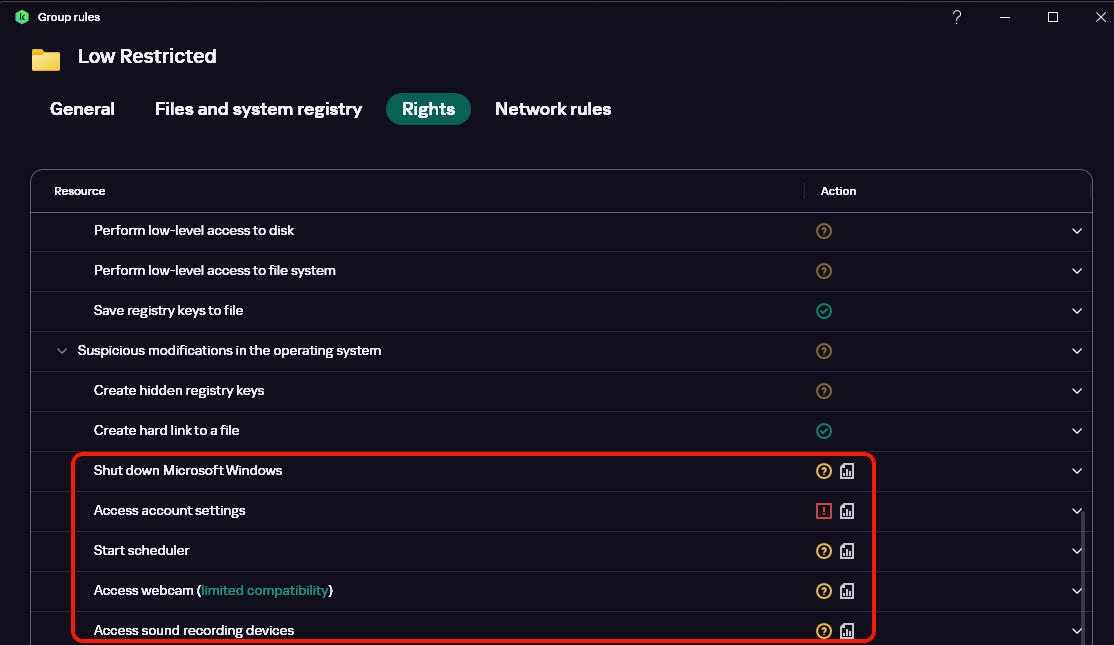
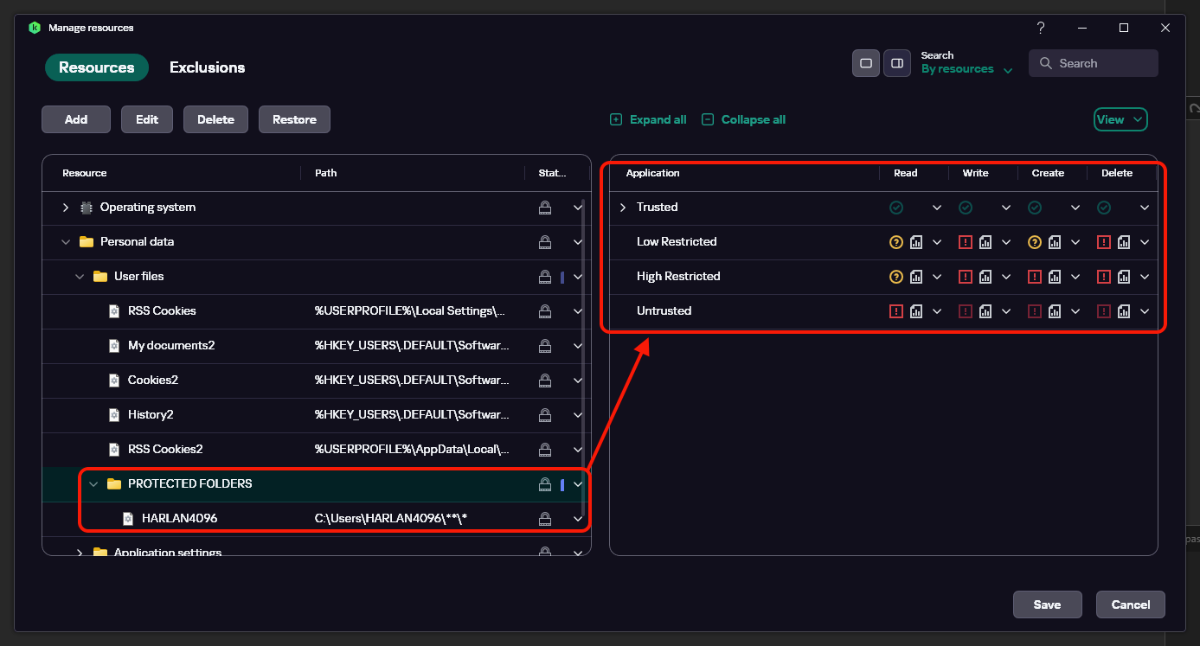
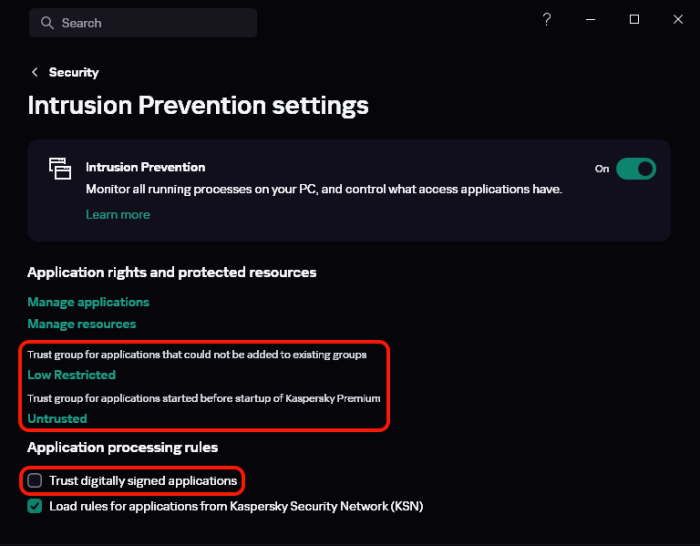
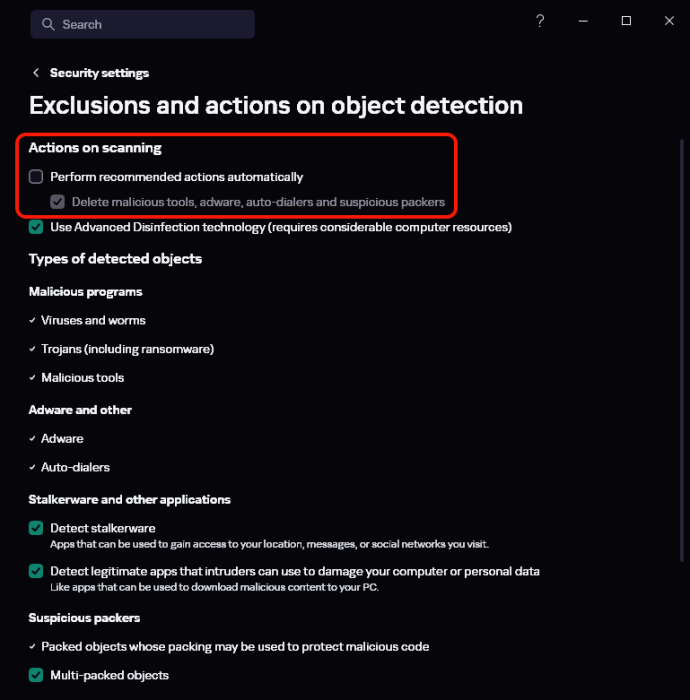
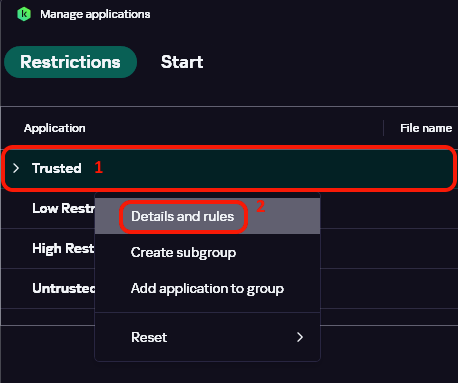
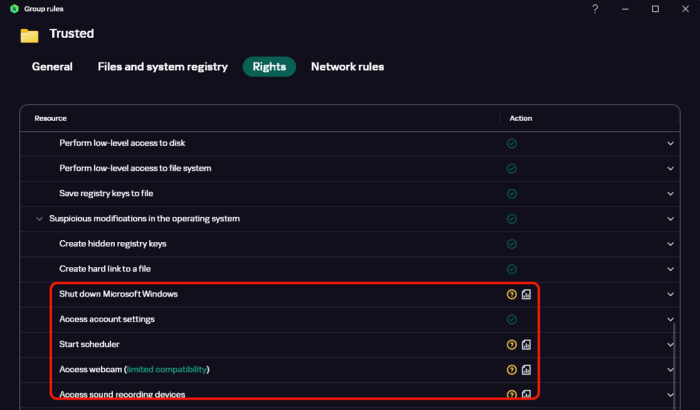
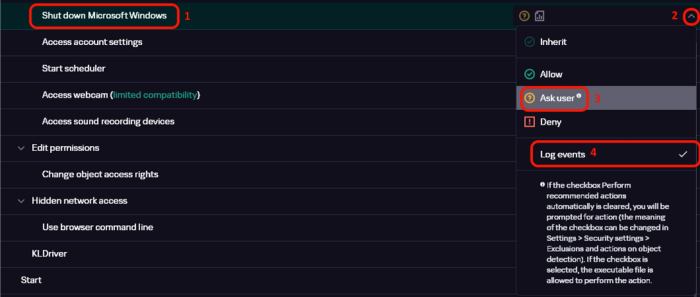
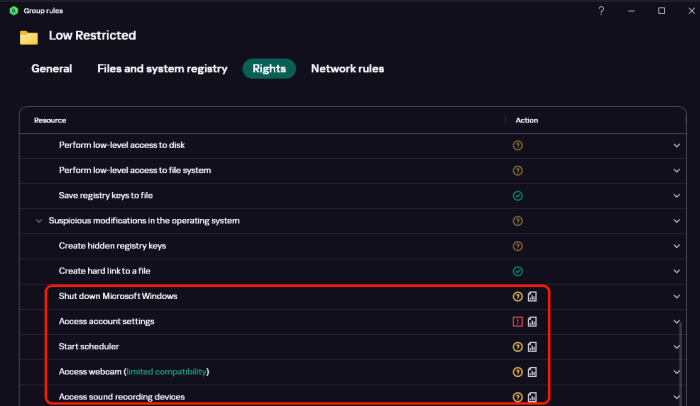
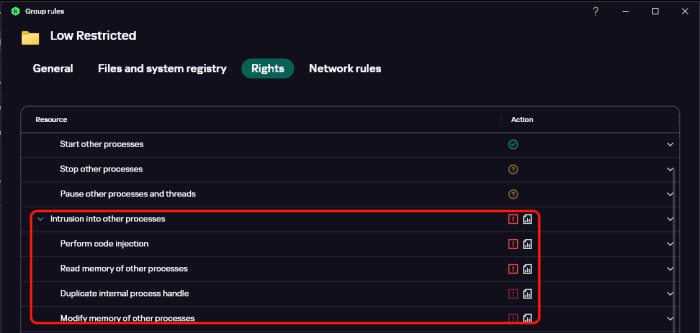
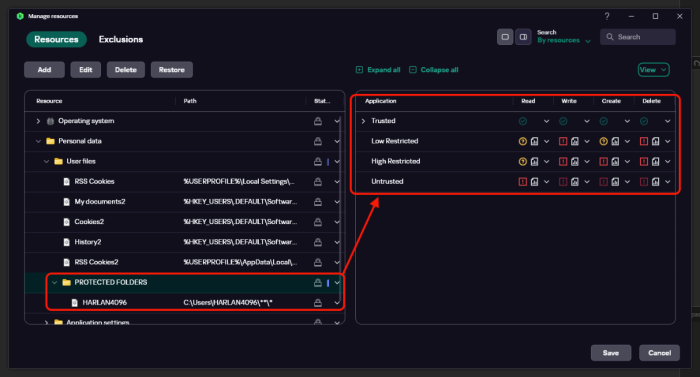
Hi guys! I'm back with a new guide, this time giving some tips of how to harden Low Restricted group. Without further delay, these are the steps to follow: 1.- Go to Settings -> Security Settings -> Advanced Protection -> Intrusion Prevention, and set: This may be a bit aggressive, so for newbies and / or standard users, probably better to leave Trust digitally signed applications enabled. That will lead to get less blocking in legit applications. 2.- Go to Settings -> Security Settings -> Advanced Settings -> Exclusions and actions on object detections, and set: 3.- Now We are going to hard a bit also Trusted group, so go to Settings -> Security Settings -> Advanced Protection -> Intrusion Prevention -> Manage Applications. Once Manage Applications window is open, select Trusted group with Your mouse pointer, then 1 click on mouse right button -> Details and Rules, and in the new window, go to tab Rights: In this new window We have to change the selected rights in orange color, to do so, again just select with Your mouse pointer in Shut down Microsoft Windows (1), then 1 click on the small arrow down on the right (2), then select Ask User (3), and later repeat the same to enable Log events (4): Repeat the same to change the remaining orange rights shows in previous capture, once ended, click on Save (and allow saving the changes in the next Kaspersky prompt window). 4.- And finally going to harden Low Restricted group. We are going to repeat all the steps in previous point to harden Trusted group, but this time with Low Restricted group: Go to Settings -> Security Settings -> Advanced Protection -> Intrusion Prevention -> Manage Applications. Once Manage Applications window is open, select Low Restricted group with Your mouse pointer, then 1 click on mouse right button -> Details and Rules, and in the new window, go to tab Rights: And then set all the changes in the rights inside red squares, don’t forget to click on Save once you're done. 5.- Additionally and to finish, I also added some restrictions in Intrusion Prevention -> Manage Resources: Added my user folder (Windows account located in C:\Users\<Your account>\) with those hardened restrictions, if you don’t know how to do so, check my previous guide, also in this community section: Implementing Protected Folders via Manage Resources + Anti-Exe / Default Deny Feel free to ask questions and / or doubts! Thanks all folks!!!! ?
-
Guest posted a topic in Kaspersky: Basic, Standard, Plus, PremiumI'm intrigued by these two things that are present in another anti-virus and want to know if Kaspersky also includes them. I read this, but that seems to do with Enterprise security and I'm not sure if the home products include it.
-
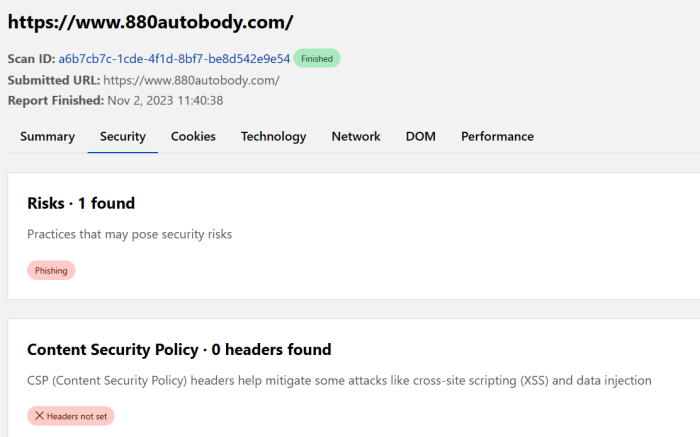
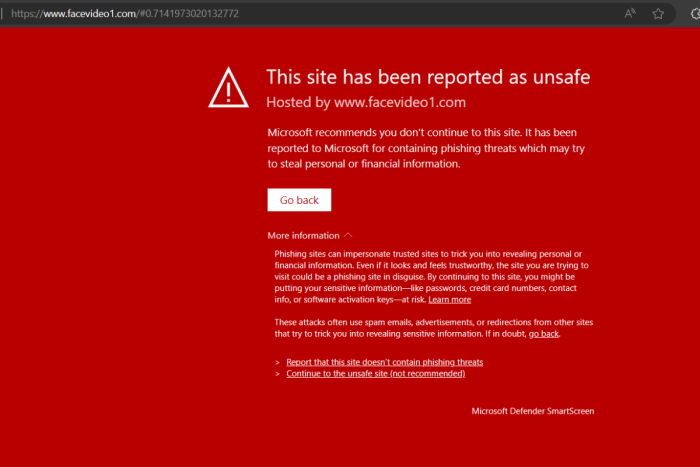
 HARIPRASATH posted a topic in Kaspersky: Basic, Standard, Plus, PremiumHi Team I'm using Kaspersky Premium Version, Kaspersky Protection Browser Extension not blocking Phishing Sites it allow me able to access I have check URL for Cloudflare Radar Scan I got Security Risk but Kaspersky not blocking those sites and not provide me any warning at all Also I tried another Phishing Site I got warning from Microsoft Defender SmartScreen instead of Kaspersky And when I download file from Browser it not getting Scanned in Real Time I'm not getting any notification when download file from internet Kaspersky scan completed or not I'm not sure may be it run in background task clarify me does it have a Real Time Scanning for Download File from Internet Kindly look into Phishing Site other AV blocks the Phishing Site when tries to Access when I using opentip.kaspersky.com it get notified me One URL Dangerous and other one it show Good
-
 XenoSpade posted a topic in Kaspersky: Basic, Standard, Plus, PremiumHi Guys, one of my friend owned the Kaspersky Antivirus Premium account which supported multiple devices. He told me currently he have 1 spot for my device to register under his licensed account. May I know is it safe? Will he able to gain control to my device if I install the Antivirus application is under his licensed account. I worried he will able to gain access to my device once my device is registered under his account. The application will be installed from the official site but I'm using the license code he provided to me. Kindly provide me some advices regarding on this. Thanks!
-
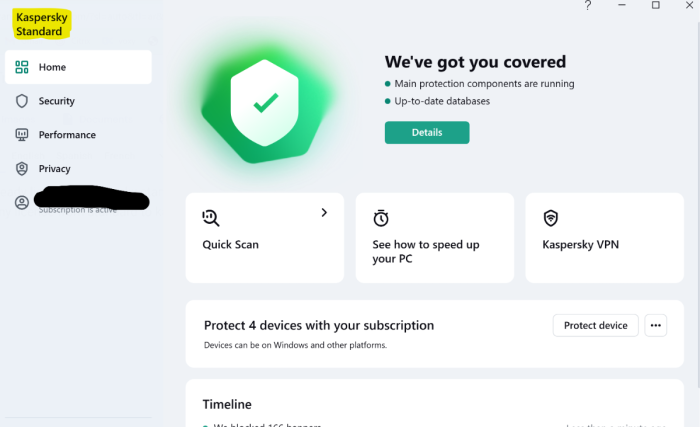
 alasry7 posted a topic in Kaspersky: Basic, Standard, Plus, PremiumHello, I have already licensed kaspersky standard. My question How can I upgrade my license from standard to kaspersky plus ? Thank you
-
 berry7009 posted a topic in Kaspersky: Basic, Standard, Plus, PremiumHello everyone, I bought Kaspersky Premium this morning and I received the receipt email. However, I did not receive the activation/license email, and there is nothing in MyKaspersky dashboard. Can you please advise what to do?