Search the Community
Showing results for tags 'kaspersky premium'.
Found 430 results
-
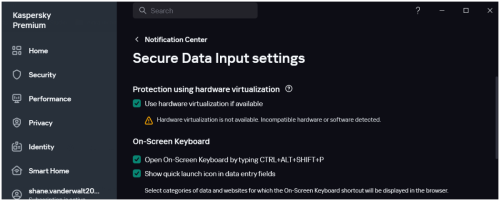
 Silver25 posted a topic in Kaspersky: Basic, Standard, Plus, PremiumHi Team, I'm reaching out because I'm encountering an issue with a virtualization error prompt. It keeps reminding me to activate the virtualization service. I've already checked my BIOS settings and CPU specifications, and both indicate that virtualization is enabled. However, the secure data input panel seems to have a conflicting message. Could you please advise on resolving this discrepancy and ensuring virtualization is fully activated? Any help or suggestions would be greatly appreciated. Thanks,
-
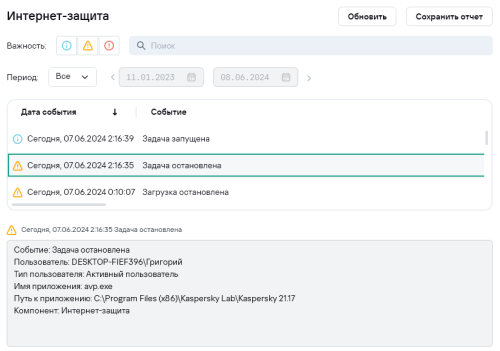
 Noft posted a topic in Kaspersky: Basic, Standard, Plus, PremiumДобрый день! Несколько недель назад у меня начало всплывать окошко в правом нижнем углу экрана с надписью "включение защиты от вирусов и угроз", в этот же момент я открываю касперского и вижу что он находится в состоянии запуска. Подскажите, пожалуйста, почему он сам отключается, и как это исправить. 1) Операционная система: Windows 10 pro 2) Kaspersky premium 21.17.7.539 3) В отчетах видно что он сам по себе отключился и через 4 секунды запустился.
-
 Adler Medrado posted a topic in Para casaApós instalar o Kaspersky Password Manager, o mesmo trava na inicialização. Tentei reiniciar o computador mas o problema persiste e eu preciso forçar o encerramento da aplicação. Alguém sabe como proceder? Já abri chamado no suporte e até agora nada, também. Desde já, agradeço.
-
 Rpatussi posted a topic in Para casaTenho 3 dispositivos, na residência, no escritório e no celular. Cada dispositivo se conecta na mesma assinatura Kaspersky Premium mas as senhas salvas em um dos dispositivos não aparecem nos outros. Ex. Se salvo uma senha no celular essa mesma senha não é sincronizada no dispositivo da residencia e do escritório. Como faço para ter a sincronização entre eles?
-
 Manuel Solis posted a topic in Para usuarios particularesBuenas tardes estimados, Sé que tengo mucho tiempo que no escribo por aqui, pero diario los veo. Les comento lo que ha pasado, hace tres dias adquiri Kaspersky Premium 10 licencias por 3 años "COMO RENOVACIÓN", por lo que tuve dolores de cabeza para vincular las suscripciones a mis otros familiares (que aún falta), abri primero un ticket porque al vincular mi licencia en mi PC, se bloqueó a los dos minutos... se resolvió al desinstalar con kavremover e instalar desde 0 todo. Luego abri un segundo ticket el mismo dia (diciendole al que me atendió que puede cerrar la consulta ya que abriré otra por los problemas que tengo con compartir suscripciones), comentandole lo terrible que me está resultando vincular las licencias con mis familiares, ya que quiero evitar darles mi usuario y contraseña para vincular los dispositivos con mi cuenta. El punto es que la primera persona que me atendió fue muy amable COMO SIEMPRE HAN SIDO y todo bien, la segunda persona que me respondió por el nuevo ticket, si fue una valdazo de agua fria por lo poco profesional y poco cortez que fue, practicamente me respondió de manera QUEJOSA de por qué abria un nuevo ticket, que todos estaban ocupados, y finalizó con una frase sarcastica. ? * Ahora, no sé si seria correcto colocar aqui el salvapantallas para que puedan ver lo que digo, lamentablemente, NO ha puesto su nombre como hacen todos los agentes de servicio técnico. El punto es que le respondí de forma bastante tajante y le he pedido su nombre porque no pienso pasar esta falta de respeto a mi persona como usuario de mas de una decada. Sé que aqui NO pueden hacer mucho, PERO si alguno de ustedes me pueden brindar algun correo o administrador para llevar mi queja con su respectivo salvapantallas, no es manera de tratar a los clientes asi, mucho menos a viejos compradores como yo. Espero que me puedan ayudar con ello para que otros usuarios no sean maltratados de esa manera. Saludos
-
 Duke333 posted a topic in Para usuarios particularesBuenas. Ayer se me actualizo mi Kaspersky Premium a la versión 21.17.7.539 y en principio no note nada raro pero hoy tras realizar un análisis completo he visto que en su sección si aparece luego en los informes no hay ni rastro. ¿Se ha podido cambiar alguna configuración al actualizarse de la 21.16 a la 21.17? ¿Debería revisarlas todas otra vez? Aparte también he visto que no me funcionaba el acceso directo en el escritorio y me había desaparecido el icono de pago seguro (he conseguido poner el de pago seguro de nuevo desde la opción del propio software pero no encuentro donde está la opción para el icono principal. Un saludo.
-
 Durren posted a topic in Kaspersky: Basic, Standard, Plus, PremiumKSK has sort of cancelled its VPN service in India. My query is, what happens if you go for auto renewal/buy Plus/Premium again? Does the VPN simply stop working when the current subscription ends or does it work as normal after auto-renewal/buying again? I'm looking for actual user experience, not tech support answers.
-
 mecit posted a topic in Ev içindün adığım aboneliğimle bu gün giriş yapmak istiyorum . aboneliğiniz yok diyor ne yapmam gerekiyor acaba aktif etmek için kos istiyor nerden bulabilirim
-
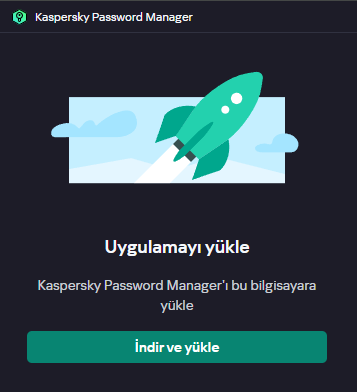
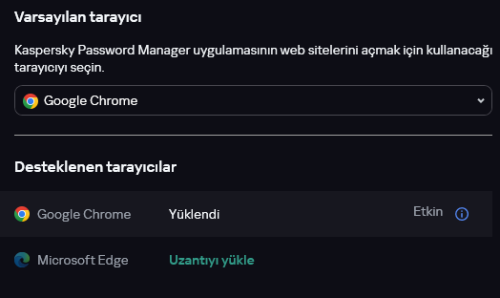
 ardakeremkoc posted a topic in Ev içinHello, The extensions cannot detect the kaspersky software. I am having this problem for kaspersky anti-virus and the kaspersky password manager. I tried everything such as re-installing the extensions, re-installing Google Chrome. Nothing worked so far. Any help would be appreciated. Update: Kaspersky Password Manager says that the extension is installed when the extension still gives the same error.

-
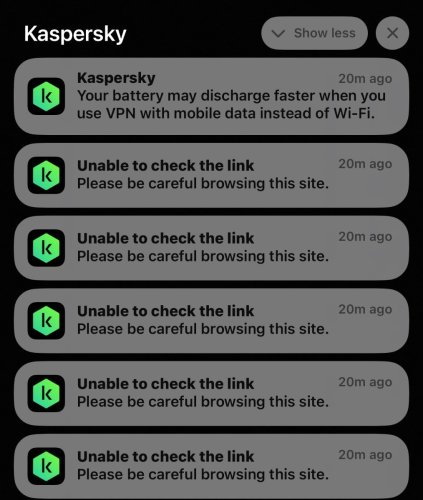
 Jweller posted a topic in Kaspersky VPNI am constantly getting this message in the title from my Kaspersky VPN. I cleared my browser cache and uninstalled reinstalled the VPN which I saw as a suggestion on your forumbut that is not solving the problem. Happens when I do not even have any browser or other app open Help
-
 Vasilevsa posted a topic in Kaspersky: Basic, Standard, Plus, PremiumДобрый день, подскажите пожалуйста, чем отличаются версии Kaspersky Total Security от Kaspersky Premium? На сайте написано, что премиум лучше, чем тотал. У меня сейчас Активирован тотал, при следующей покупке премиума, нужно будет ли переустанавливать ПО? (или автоматически активируются доп функции?)
-
 Ilya Ao posted a topic in Kaspersky: Basic, Standard, Plus, PremiumПри использовании Creative Cloud и любого софта от Adobe постоянно выскакивают проблемы с инициализацией лицензии. При выключении касперского все работает стабильно и я подключаюсь ко всем моим сетевым функциям приложений. Выдает сообщения формата "Please check your firewall settings, ensure that the time settings on your computer are correct, and try again" - в исключения папку adobe пытался добавить и не помогло, проблему решает только выключение касперского и это выглядит как костыль с моей стороны. Подскажите с решением проблемы и как решить эту несовместимость (прикрепляю файл ошибки для понимая проблемы. Напоминаю, что это связано именно с работой касперского и его фильтров, поэтому я и обращаюсь на форум сюда, а не в adobe)

-
 Os recordamos que ya está disponible para su descarga la nueva versión de productos Kaspersky Estándar, Plus, Premium y VPN, que podréis descargar en: Instaladores Kaspersky v21.17.7.539: Kaspersky Standard, Plus y Premium v21.17.7.539 España: Instalador: https://dm.s.kaspersky-labs.com/es-es/Kaspersky4Win/21.17.7.539/startup.exe Kaspersky VPN vv21.17.7.539 España: Instalador: https://dm.s.kaspersky-labs.com/es-es/KSDE/21.17.7.539/startup.exe Kaspersky Standard, Plus y Premium vv21.17.7.539 Latam: Instalador: https://dm.s.kaspersky-labs.com/es-mx/Kaspersky4Win/21.17.7.539/startup.exe Kaspersky VPN v21.17.7.539 Latam: Instalador: https://dm.s.kaspersky-labs.com/es-mx/KSDE/21.17.7.539/startup.exe Saludos.
-
 howtodothat posted a topic in Kaspersky: Basic, Standard, Plus, PremiumHello I need to block a website so I can't access it how can I achive this using kas firewall or other setting. I need to ban the entire URL and IP address of the website. Thank you.
-
 ourvorax posted a topic in Ev içinKaspersky premium aldım ancak vpn kullanımı sınırlı gözüküyor?
-
 Fadouse posted a topic in Kaspersky: Basic, Standard, Plus, PremiumRequest for kaspersky premium mr17(21.17) version installer.
-
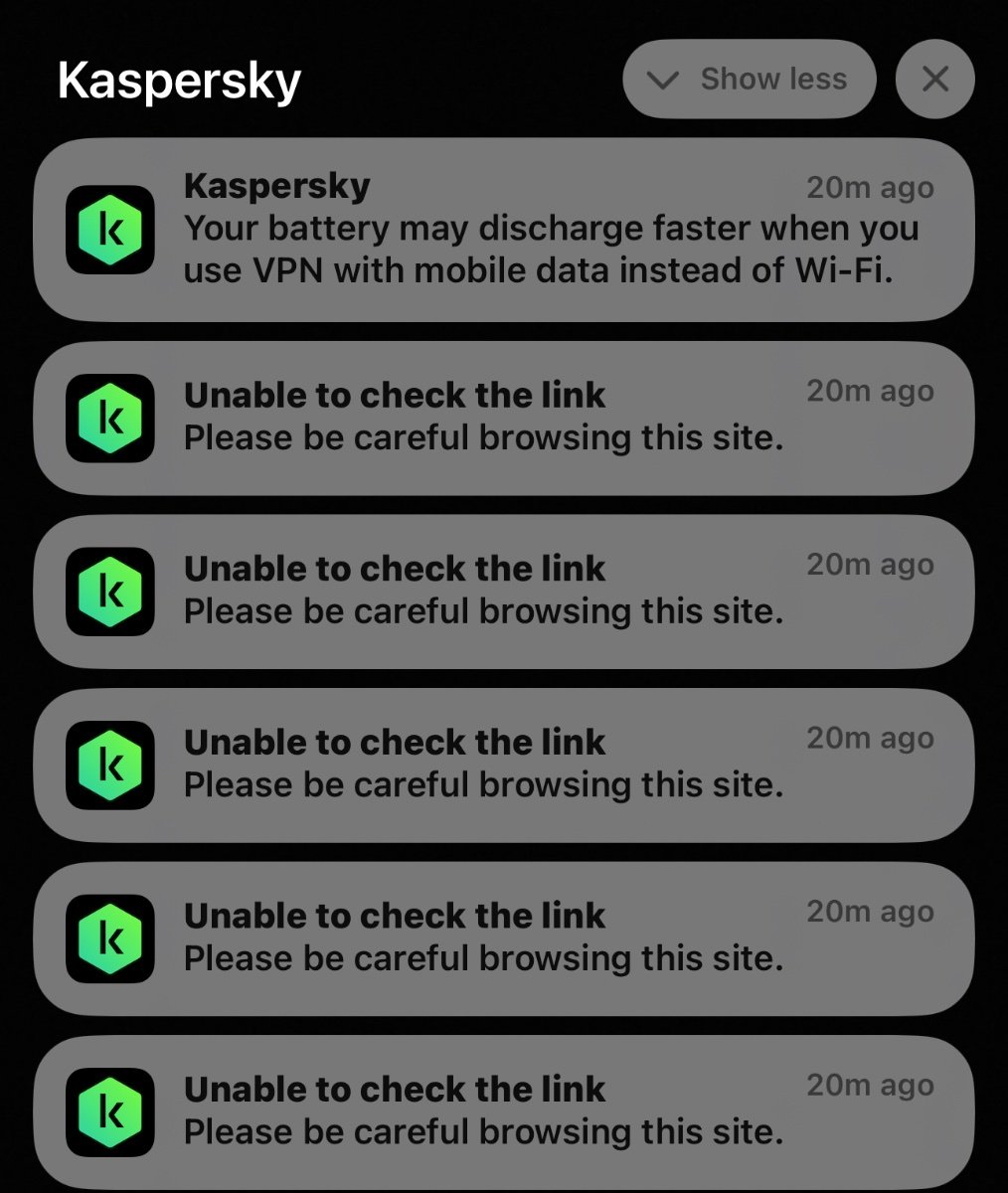
 SNH posted a topic in Kaspersky: Basic, Standard, Plus, PremiumThis makes it questionable protection, leaving one’s device vulnerable. I often find that my device was unprotected, possibly the whole night! I’ve observed this on various iOS devices (iPhones SE, 12, 13 mini) in our household, all of which are always fully up-to-date. We don’t have other security solutions installed. What a competitor product did with their mobile protection for iOS was to add a toggle in the VPN settings for the protection to re-enable itself on demand. That way it turns itself on when it’s shut down for some reason, possibly by a system process? I don’t know whether iOS behaves like Android in some regards.
-
 Ranjith posted a topic in Kaspersky Safe KidsHello, My son's device is not getting blocked after the daily time limit. The following are the settings Monitoring type: Block device Schedule: Weekdays Daily Limit: 0 h 30 m Downtime: 00:00 - 15:00 & 19:00 - 24:00 Weekend Daily Limit: 1 h 0 m Downtime: 00:00 - 8:00 & 19:00 - 24:00 Device & software details Device: Galaxy Tab S7 Android version: 13 One UI version: 5.1.1 Safe Kids 1.103.0.3 Premium version I have uninstalled and rebooted before installing again and all the requested permissions have been assigned. Please help to resolve the issue. Thanks RanS
-
 Utku13 posted a topic in Kaspersky: Basic, Standard, Plus, PremiumHello, I already own a Kaspersky Premium subscription, but my current membership covers only one device. I would like to upgrade my subscription to cover two devices because I recently purchased a new phone and I want to use Kaspersky antivirus and VPN services on it as well. Is there a way for me to update my membership?
-
 tuzruhu posted a topic in Ev içinMerhaba, Kaspersky Premium paketin 2 yıllık lisanslı sürümünü kullanıyorum. Lisansımın dolmasına daha var ama ülkenin durumu malum. Ekstradan birkaç yıl daha lisans süresi uzatabiliyor muyuz? Teşekkürler.
-
 omitron posted a topic in Kaspersky: Basic, Standard, Plus, PremiumЗдравствуйте. Пару дней назад я купил подписку Standart на 5 устройств на 3 года. Сейчас хотел бы поменять эту подписку на Premium на столько же устройств и такой же период. Можно ли это как то сделать? Или нужно опять покупать а деньги за эту уже не нужную мне подписку просто пропадут? Есть ли какой то инструмент для такого случая? Или, если переходить, то нужно например оформлять возврат денег, пока 30 дней не прошло и покупать заново? Если это вообще сработает... Какие есть варианты?
-
 pwi posted a topic in Für PrivatanwenderHallo, ich habe seit dem 21.03.24 keine Anzeige mehr von Foto-Downloads, sondern nur noch rote Striche. Dies ist nur auf dem PC mit Kaspersky. Auf einem PC OHNE Kaspersky, kein Problem. Hat jemand eine Idee, wie dies behoben werden kann? Kaspersky brauch, lt. Info 7 Tage.
-
tunathefish posted a topic in Kaspersky: Basic, Standard, Plus, PremiumSmart Home Monitor prompts me to connect to Wi-Fi or ethernet, despite the fact that I am completely able to connect to the internet. "Wi-Fi Analyzer" does not show any kind of activity.
-
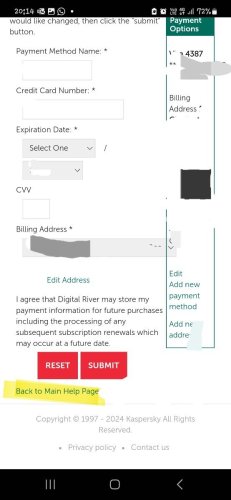
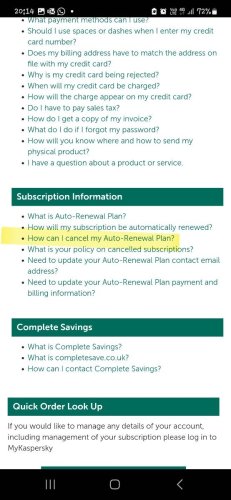
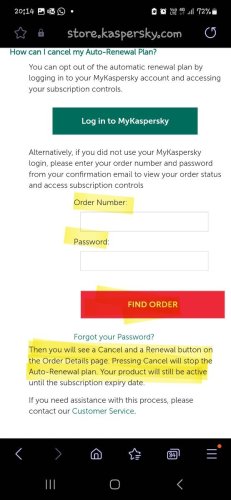
 RoseyEm posted a topic in Kaspersky Total SecurityAfter subscribing since 2018, and for the last couple of years just sucking up the auto-renewal, I was determined this year to put it to an end, and I have finally succeeded! I hope this information helps anyone else who is struggling to get rid of this payment. Please note this may only work if your payment is collected by Digital River... check your bank for last year's payment and if it is marked 'DR' or 'DRI' in the payment reference, this should hopefully work for you. When you get the renewal email reminder which provides an order number and password, click on the link for amending your payment details. You'll be taken to a page with your billing address and payment info. Underneath the 'reset' and 'Submit' buttons, there's a link for 'Back to main help page' - click it. This will take you to a FAQ page - select the cancel auto renewal heading. Now you'll be taken to another page where you need to re-input the Order Number and the Password from the email they sent. Once in there, click the cancel button (not manage subscriptions) and this will allow you to cancel the auto renewal. Seriously, the most ridiculous process ever, but it worked for me (after 2 years of unwanted renewals!). I've added screen shots to this in the hope I can help others who are struggling, and like me have ended up just letting the money go out each year. Good luck all.
-
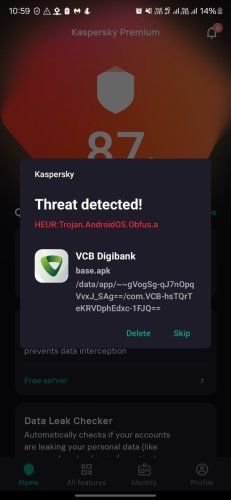
 TranDucThang posted a topic in Virus and Ransomware related questionsThis morning an official banking app was detect a Trojan, which is that possible? App was update in Play store, Samsung s24 ultral, and Android 14, and oneui6. 1