Search the Community
Showing results for tags 'kaspersky plus'.
Found 331 results
-
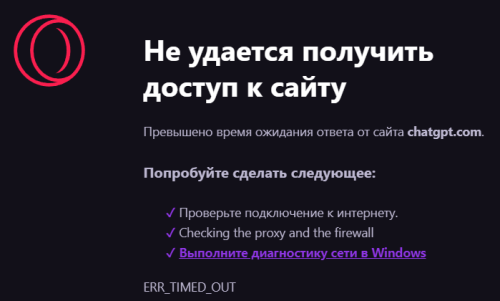
 in_Dail posted a topic in Kaspersky: Basic, Standard, Plus, PremiumНазвание приложения, операционная система и версия приложения: Итак, пользуюсь расширением Hola VPN (https://chromewebstore.google.com/detail/hola-vpn-your-website-unb/gkojfkhlekighikafcpjkiklfbnlmeio) и после установки касперского, оно резко перестало работать. При попытке зайти на сайт с включенным VPN выдает данную ошибку. Надеюсь на вашу помощь, спасибо ?
-
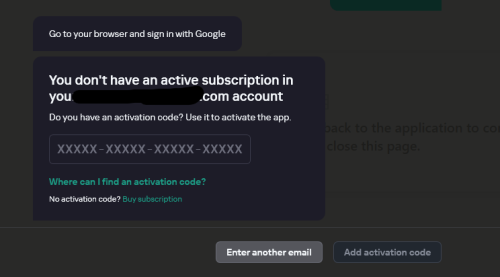
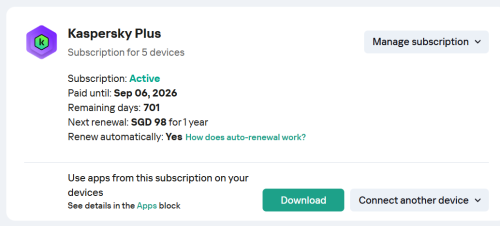
 g E L posted a topic in Kaspersky: Basic, Standard, Plus, PremiumI need help and this starting to get frustrating. I formatted my laptop to a clean state and when I tried to reinstall the Kaspersky Plus by downloading the installer through the MyKaspersky account. The Kaspersky App on desktop keeps saying this. - Even though I just recently bought the Kaspersky Plus last August. - I tried copying the License Key on the Additional Info on the MyKaspersky according to the guides. -But it doesn't work since It only asks for 20 codes but the License Key contains about 32 numbers/letters. - Since I bought the Subscription through online. I haven't received any Activation Code on my email. I need help to fix this.
-
 TheUndertaker posted a topic in Kaspersky: Basic, Standard, Plus, PremiumAsking for my customer. Correct me if I am wrong. From information given in Kaspersky sites, Total Security users can update to Plus for free as long as they still have valid licence. I don't know how the procedure goes. Does it require re-entering licence key? Or Is it supposed to be automatically done by signing in on new Plus app? I cannot find clear enough information. Sorry if this kind of questions have been asked already. I couldn't find answers in existing threads.
-
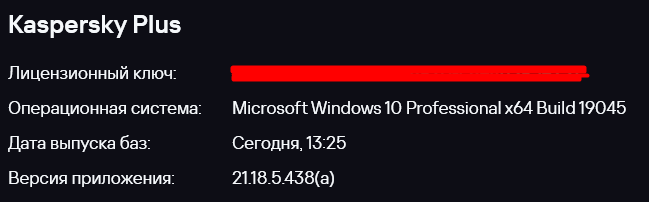
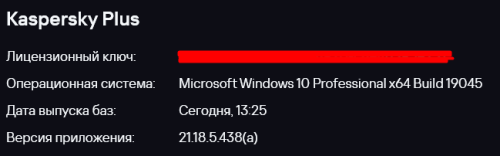
 Gamer667 posted a topic in Kaspersky: Basic, Standard, Plus, Premium1. Windows 10 версия 20H2 2. Kasperksy Plus 21.18.5.438(a) 3. После перехода с KIS на Plus заметил проблему: при открытии приложений на полный экран они просто сворачиваются. Перестаёт сворачивать при открытом окне касперского либо когда он полностью выключен. Кнопка "приостановка защиты" ничего не меняет, как и игровой режим, режим не беспокоить. Переустановка плюса тоже не помогла. Спасает смена разрешения экрана на более низкое. Хотелось бы узнать решение, которое не доставит много неудобств.
-
 Dani123 posted a topic in Kaspersky Anti-VirusHello, as the title says every time i run the full scan I get a prompt for a few files asking for a password, I tried my windows password or kaspersky password and it doesn't work. In this example it asked me for a Malwarebytes file which I installed myself, but there was other unknown files so I clicked "ok" without a password and deleted the file manually. What does clicking "ok" do? does that mean that kaspersky will scan and take care of the virus(if there is)? Or does clicking "ok" mean that that file is safe and it does not scan?Should i delete manually the unknown files raised?Should I click ignore? The notification is in portuguese, but it says " Enter password"; File; and then 3 options of "Ok", "Ignore", "Ignore everything" Thank you.

-
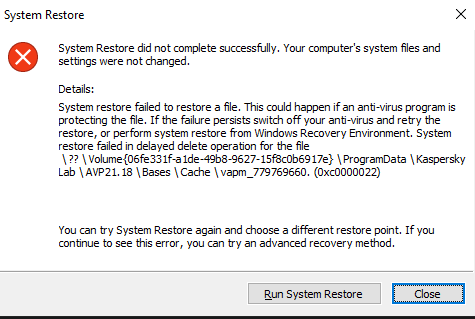
 snoop posted a topic in Kaspersky Total SecurityTried System restore to back 2 days ago, since i had an app bug out and i thought might as well do a restore so registry is all deleted too, but on boot up this shows, should i check for updates in kaspersky app? how to let the AV know to restore that corrupted file? would it lower the capability of AV? should i uninstall and reinstall kaspersky? so everything working properly? although system restore did its job, it removed the app but did it corrupt kaspersky? Thanks!
-
snoop posted a topic in Kaspersky Total SecurityI wanna try out a virtual machine like Hyper-V but I have a few questions in mind, first is I have the virtualization enabled in my bios for Kaspersky, should I disable it for Hyper-V? Should I install another Kaspersky app inside the VM? or is it not needed? since its already in the host machine? and can the Host AV detect and monitor inside the VM already? or would I need the Kaspersky Security Center Application that is for used for managing VM's? or is that only used for workspace environments. I looked up and Hyper-V seems to allow GPU passthrough, I'll try to play some games on it too, but I need to update gpu drivers on VM too right? Thanks for reading and your time, have a great day!
-
 Alyson Almeida posted a topic in Para casaOlá a todos(as), Possuo um controle pessoal financeiro e uma das coisas que sempre me deixa na mão é encontrar e saber dados financeiros do Kaspersky. Só é possível saber informações do valor sendo cobrado da assinatura quando chega o dia, porém, gostaria de saber se é possível ter acesso a essas informações correspondentes à minha assinatura, como assinaturas que já foram pagas e o valor previsto. Seria interessante também verificar se houve alguma eventual alteração no valor da cobrança. Sou usuário dos serviços da Kaspersky desde 2021, se não me falha a memória, e achei interessante compartilhar essa dúvida com os demais. Abraço!
-
DCODE5 posted a topic in Para usuarios particularesHola a todos, Tengo una duda sobre un comportamiento que he notado en mi PC. He visto que los procesos "Antimalware Service Executable" (parte de Windows Defender) y "Kaspersky Lab Launcher" están corriendo simultáneamente. Entiendo que el primero es el servicio antimalware de Windows, y el segundo pertenece a mi software de seguridad de Kaspersky. Me gustaría saber si es normal que ambos estén activos al mismo tiempo. ¿Debería desactivar Windows Defender al usar Kaspersky, o debería dejarlo activo? Si creéis que es mejor desactivarlo como lo hago, porque hay cosas que en la configuración de seguridad me aparecen que son controladas por Kaspersky y otras no me aparece nada de Kaspersky. Agradecería cualquier consejo o explicación al respecto. Gracias de antemano. Sistema operativo: Microsoft Windows 11 Professional x64 Build 22631 Versión de la aplicación: 21.18.5.438(a)
-
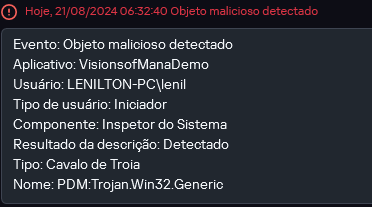
 Lenilton Freitas posted a topic in Para casaRecentemente navegando pela Steam encontrei o jogo Visions of Mana e resolvi instalar a demo para jogar. Hoje ao abrir o jogo para minha surpresa o antivirus detectou que havia um vírus nele, fechou o jogo demo antes mesmo de começar e excluiu o arquivo. É até estranho que uma empresa como a Steam permita que esse tipo de coisa aconteça e até denunciei. Mas também, qual seria a possibilidade disso ser apenas um falso positivo?


-
 Raj MJ posted a topic in Kaspersky: Basic, Standard, Plus, PremiumHello. I am new to Kaspersky. Recently installed Kaspersky plus on my laptop. I have following two questions- 1)is product version update automatic? My current product version is 21.18.5.438(a) 2) Can I unblock a website which is blocked as a "false positive" by Kaspersky? Thank you.
-
ghx12138 posted a topic in 家用产品支持之前通过客服渠道回应8月产品线更新,同步推出premium等版本
-
 cosmicforged posted a topic in Kaspersky Anti-VirusHello! I've seen this issue posted about before but I could not find a solution that solved my problem. My ability to scan a file (via File Explorer) has completely vanished. When I right-click, there is no option for anything relating to Kaspersky. The big reason I pay for the service is for that reason (to just make myself feel better honestly) and the fact I can't even do that is annoying. I've already done a clean uninstall (with the official program to do so) and reinstalled the program. It had vanished from my Windows 11 menu but was on the "see more" but now even that is gone. Are there any solutions or why this is happening? Windows 11 Version 21.18.5.438(a)
-
 44beater posted a topic in Ev için3 cihazlı Kaspersky Premium lisansım var yeni aldığım laptop için birde Kaspersky Plus satın aldım fakat beraberinde gelen VPN'i değil Premium lisansını kullanıyor ve cihaz sınırını aştınız diyor. Plus'ın kodu ile aktifleştirmeyi denedim yine aynı sorun var. Hiçbir şekilde çözemedim VPN içerisinde yok mu yoksa bir hata mı var ortada?
-
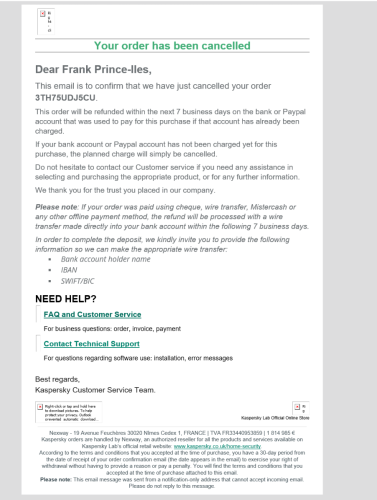
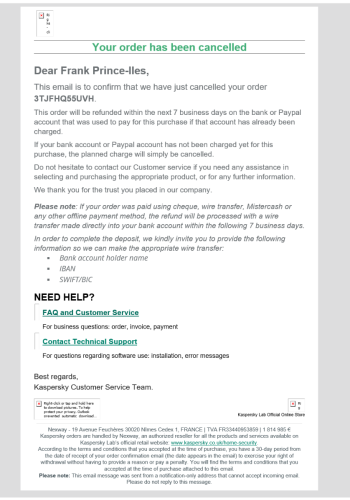
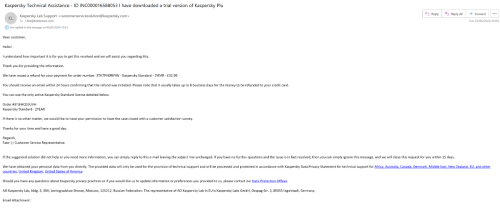
 fprinceiles posted a topic in Kaspersky: Basic, Standard, Plus, PremiumOn the 18th and 19th June, I downloaded and paid for two standard and one plus version. Having realised what had happened I cancelled the unwanted versions and requested a refund. Kaspersky acknowledged the cancellations and told me I would recieve my refunds within 7 days. That was nearly two moonths ago! They have told me that they do not know how to issue refunds but are working on a solution - would you believe! Since then I have exchanged numerous emails, but have not been offered any explaination as to why there is a problem and when I might receive my refunds. It is becoming clear that they are simply trying to stall and have no intention of giving any refunds - despite their 30-day refund guarantee. Is this fraudulent trading and should I now involve Trading Standards?
-
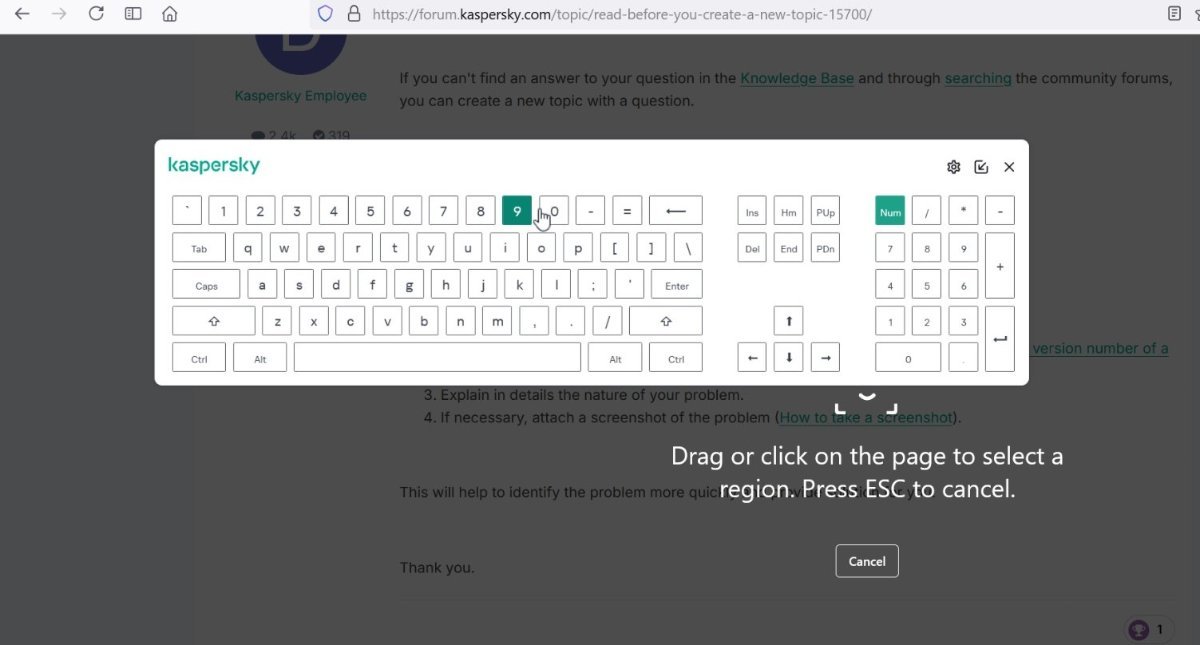
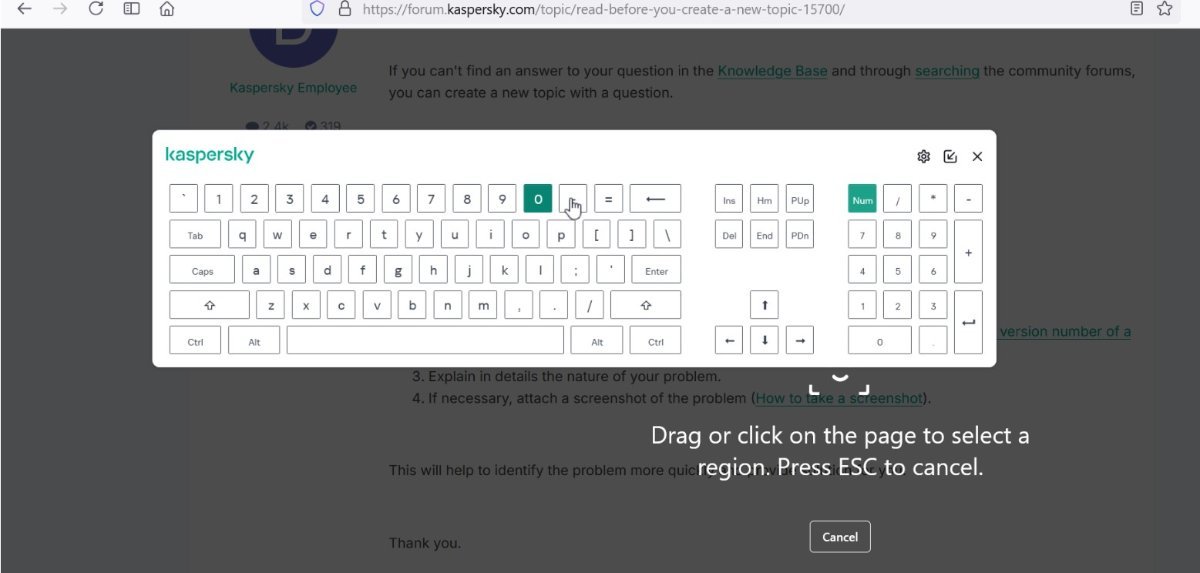
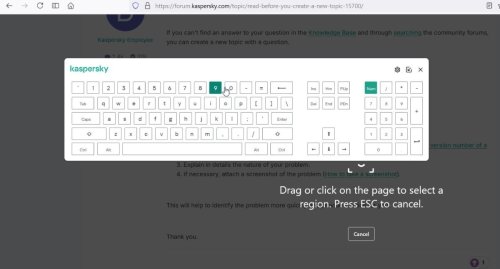
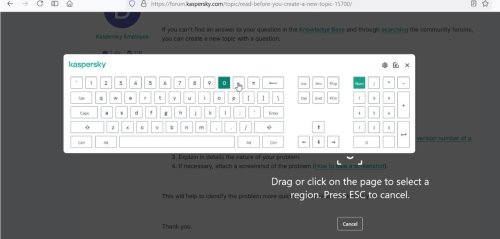
 Jamie Lee posted a topic in Kaspersky: Basic, Standard, Plus, PremiumMy Windows version: WIndows10 22H2 (OS Build 19045.4651) Kaspersky PLUS 21.18.5.438 The problem: After the lastest Kaspersky PLUS's Application update, my On-screen Keyboard becomes bugged. You can see from the 2 screenshots, my mouse cursor was positioned at Number 0, but it counts as Number9. I have been using Kaspersky for many years, and I use On-screen Keyboard for many years, this bug never happened to me before.
-
 Katarn posted a topic in Voor thuisGoedendag. Ik gebruik op dit moment nog Total Security en heb daarnaast ook de Password Manager in gebruik. Ik wil gaan overstappen naar de nieuwe abonnementsvorm Plus, met de bijbehorende applicaties. Doe ik er verstandig aan om eerst Total Security (en de Password Manager?) te verwijderen, voordat ik de nieuwe Plus applicatie installeer? En wellicht daarbij ook verstandig om extensies in browsers eerst te verwijderen? Dank alvast voor de hulp!
-
 sup3r93 posted a topic in Kaspersky: Basic, Standard, Plus, PremiumHow can I block internet access to an entire folder and its subfolders and programs in the blocked folder?
-
 berryhill posted a topic in Kaspersky: Basic, Standard, Plus, PremiumQuicken is able to connect with all my credit cards except Citi Visa. How do I get Kaspersky, Quicken, and Citi Visa to play well together?
-
 Vojt33w posted a topic in Kaspersky: Basic, Standard, Plus, PremiumFor example, if I use another VPN, Kaspersky antivirus monitors the websites I visit, so I wonder if it is worth paying for anoter VPN if I use Kaspersky antivirus? I don't know if it's worth paying for a VPN other than Kaspersky and if it would be better to just pay for Kaspersky Plus and save money. Is it true that Kaspersky antivirus can monitor sites on the Internet even if I use a VPN other than Kaspersky? Thank you for your answers.
-
 AlexanderB01 posted a topic in Kaspersky: Basic, Standard, Plus, PremiumWhy does the screen blink during the Performance stage of the Kaspersky installation??
-
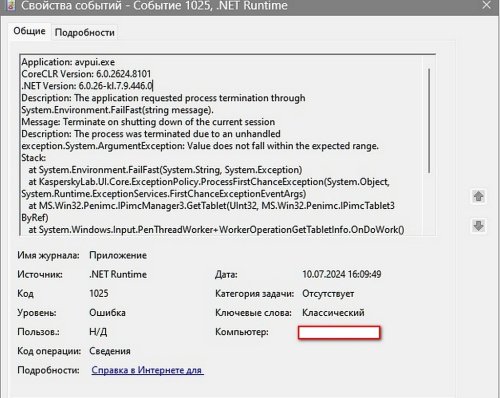
 Aleksis posted a topic in Kaspersky: Basic, Standard, Plus, PremiumДоброго всем дня. Постоянно в журнале событий появляется эта ошибка. Возможно кто-то сталкивался с этой проблемой.
-

windows 10 Вопрос о настройке "Спрашивать пользователя" в Предотвращении Вторжений при включённом параметре "Автоматически выполнять рекомендуемые действия".
Maker X posted a topic in Kaspersky: Basic, Standard, Plus, PremiumДобрый вечер, уважаемые участники Форума! Сегодня, для увеличения быстродействия антивируса и уменьшения кол-ва всплывающих окон, требующих принять решение "разрешить/запретить" для действий приложений, я включил настройку "Автоматически выполнять рекомендуемые действия". Теперь такие решения автоматизированы, у чего, несомненно, есть плюсы, (наверное, особенно они ощущаются в случае заражения). В настройках Предотвращения Вторжений заметил вот это уведомление: Означает ли это, что "Спрашивать пользователя" теперь равносильно "Разрешить", т.е. группа "Слабые ограничения" теперь равносильна группе "Доверенные"? Есть ли, в таком случае, способ настроить Касперского всё-таки спрашивать каждый раз, когда приложения собираются совершить определённые действия (например, для всех групп у меня было установлено "Спрашивать пользователя" в пункте "Завершение работы Microsoft Windows"), со включённым параметром "Автоматически выполнять рекомендуемые действия", чтобы все при этом все остальные решения (например, решения по компонентам "Интернет-защита", "Файловый антивирус", "Мониторинг активности" и "Сетевой экран") принимались автоматически? Не стесняйтесь просить пояснений, если в вопросе что-то не совсем понятно. Заранее спасибо!
-
 Schwarzyyy posted a topic in Kaspersky: Basic, Standard, Plus, PremiumStarting today I had problems with the program "FanControl" not reading CPU temperature after a few seconds and the RGB Control of my RAM through GigabyteControlCenter not working correctly anymore. Both problems are fixed by uninstalling Kaspersky Plus. Adding those programs to exceptions in Kaspersky doesnt work. Whatever got updated yesterday or this morning by Kaspersky caused those issues, since it was working fine before. I guess it has something to do with Kaspersky blocking access to hardware sensors and/or the SPD Hub of RAM. I got the hint from FanControl's issues tracker on github (https://github.com/Rem0o/FanControl.Releases/issues/2571), where another person had the same problem and fixed it by uninstalling Kaspersky. I hope this bug can be fixed asap or at least a workaround with exceptions for certain programs is made available.
-
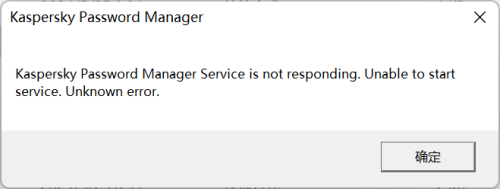
 成顔少一 posted a topic in 家用产品支持系统:Windows 11 专业版 21H2 22000.2538 卡巴斯基加强版:21.17.7.539 从卡巴斯基内安装密码管理器,后期频繁出错。今天安装后明天开机就报未知错误,且警告弹窗会间隔多次弹出,重装无效。