Search the Community
Showing results for 'update' in content posted in the last year.
Found 521 results
-

-
 Welcome to Kaspersky Community. 1st of all. I would update Your KTS to Kaspersky Plus. Please provide version of K. VPN installed. Also, check this link: https://support.kaspersky.com/faq/ksec-migration
-
 Tolja replied to Tolja's topic in Kaspersky VPNHello Berny, Thank you for your reply and for the links. I understand that as a forum moderator you cannot directly change VPN servers or technical settings. However, I wanted to kindly ask if you could check the IP geolocation yourself for the Taiwan server using a few common services: https://whatismyipaddress.com/ https://www.whatismyip.com/ https://2ip.io/ https://www.myip.com/ https://www.showmyip.com/ You will likely see different countries reported depending on the service (e.g., Pakistan, Germany, maybe Taiwan), which illustrates the issue with manual location selection after the recent VPN update. I thought it might be helpful for awareness and context, even if you cannot directly fix the problem. Thank you for your time and help. Best regards,
-
Tolja posted a topic in Kaspersky VPNAfter the latest Kaspersky VPN update, the service has become practically unusable for anyone who needs accurate manual location selection. Here is a concrete example: I manually select Taiwan as the VPN location whatismyipaddress.com identifies the IP as Pakistan ipinfo.io identifies the same IP as Taiwan Other services sometimes identify it as Germany This is not about “hiding my real location” — that part works fine and is obvious to everyone using a VPN. The real issue is that manual location selection no longer corresponds to a consistent or reliable IP geolocation. In practice, this means: different websites see me as being in different countries at the same time services that rely on strict geolocation either block access or behave unpredictably the selected country becomes more of a label than an actual location Support responded with a generic explanation of how VPNs hide real locations, which completely misses the point. What users actually need to know is: are these locations virtual locations? does Kaspersky VPN still guarantee country-accurate IP addresses when a user manually selects a country? If the answer is “no”, that should be stated clearly in the UI and documentation. At this point, the unfortunate conclusion is that Kaspersky VPN has significantly degraded after the update, while the Kaspersky Antivirus product remains excellent and reliable. I’m posting this here not to complain for the sake of complaining, but to get a clear technical explanation and hopefully prevent other users from wasting time troubleshooting something that is actually a design decision.
-
 jourbrainy replied to DiegoFretes's topic in Kaspersky Security for Mail ServerThe sending server connects and negotiates TLS correctly, but the connection is dropped during the DATA phase. Postfix is not rejecting the mail. The error points to a local SMTP proxy/security filter (klms-smtp_proxy) interrupting the SMTP stream. Check, update, or temporarily disable that proxy and its SMTP inspection settings.
-
 inbox posted a topic in Virus and Ransomware related questionsHello, I am writing to report a malicious sample currently circulating in pirated game distribution channels. It masquerades as the legitimate libEGL.dll file but contains a cryptocurrency miner. Currently, it has a very low detection rate on VirusTotal (detected only by Huorong and Rising), and it bypasses most major AV engines. Technical Details: Malicious File: libEGL.dll File Size: Approximately 525 KB (Note: Legitimate versions are typically around 377 KB). SHA256: 8bacb2082eb37fd7aed5bb6a7fc766d9937d9f3ed926ae82420d37af754a216c Behavioral Analysis: File Dropping: Creates a directory at: C:\Users\%USERNAME%\AppData\Local\syscacheapp. Drops a large executable named cacheapp64.exe (approx. 750 MB). Characteristics of dropped file: Compiled with GCC/MinGW, extremely high entropy (packed/obfuscated), accompanied by numerous fake DLLs. Persistence: Achieves auto-start by modifying the Registry: Key: HKCU\SOFTWARE\Microsoft\Windows NT\CurrentVersion\Winlogon\Shell Distribution & Context: Vector: Confirmed presence in unauthorized/pirated releases of games (specifically those using RPGMaker or TyranoScript engines). Sources: Widely distributed via major sharing communities such as anime-sharing, hentai-share, and ggbases. Origin: The widespread nature suggests a potential "supply chain" poisoning within the upper-level crack/distribution groups. Sample Download: Link: [ https://files.catbox.moe/jmn65o.7z ] Password: 123 Archive Structure: 1.7z contains libEGL.7z (The malware sample) and Attachment.7z (Screenshots and structural analysis). Please analyze this sample and update the database. Thank you. https://metadefender.com/results/file/bzI1MTIyOHM0RHlFWkdCazQ4emVMdGdZM2w https://www.virustotal.com/gui/file/021b7a9269bc251e66c4de170c7e81e7e9df482c386c84b7db6e86e986dcda10 https://www.virustotal.com/gui/file/8bacb2082eb37fd7aed5bb6a7fc766d9937d9f3ed926ae82420d37af754a216c https://forum.kaspersky.com/topic/游戏libegldll存在挖矿病毒-57734/
-
 dluckyrkl replied to dluckyrkl's topic in Kaspersky Small Office Security & Management ConsoleHow to know the exact version in the control panel, it shows 19.0.0.1088. As far as I know, it's KSOS 6 I will try to update now then I will let you know
-
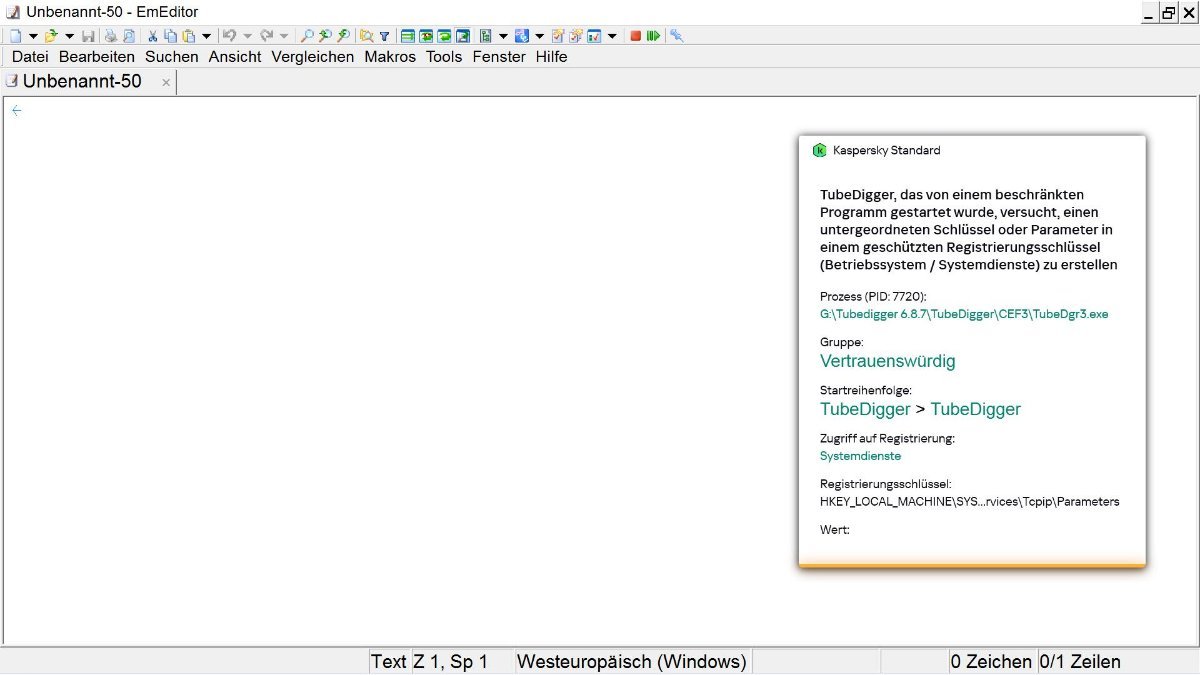
 borboleta posted a topic in Kaspersky: Basic, Standard, Plus, PremiumI read some threads about notifications and disabled ALL of them in the Kaspersky settings but problem still exists I am using Kaspersky Basic for one or two years and was happy about seeing nearly no notifications but this has changed some months ago by a Kaspersky update maybe and has become quite annoying, many times I get this kind of notifications which I do not need see the picture attached just using programs I trust and use for many years making a software report, searching for duplicate files and many other things and nearly always Kaspersky thinks that it must warn me but it just disturbs me. Even worse that I have to use a rather low screen resolution because of my old eyes so I often cannot close these windows even after changing to a higher resolution see the picture again, no OK, no ESC, no close button, I just have to wait if these Kaspersky windows close, sometimes they do, sometimes not, I even cannot stop the programs Kaspersky warns me about in these situations using Task Manager or System Informer etc. So is there a way to disable this kind of notifications completely ? I would be very happy about this

-
 Frank_L replied to Frank_L's topic in Für PrivatanwenderEs scheint wirklich wieder zu funktionieren mit dem neuen Update.
-
 mustafa13e09940 posted a topic in Für PrivatanwenderGibt es irgendwelche Möglichkeit, nach diesem neuem Update, das VPN zu erstellen, ohne den Standort mitzuteilen?
-
 TAE replied to TAE's topic in Kaspersky VPNI have reinstalled via the link in the red "update to the latest version" box at the top of the page and it has installed the same version (21.23.6.614-2)
-
 You can install this below version Kaspersky VPN Latest Version This version also solves many issues related to Kaspersky VPN , you can give a try and share the update with us.
-
 Здравствуйте. Я бы пошел по такому пути: 1. Создание резервной копии в 14.2 (базу данных не меняем); 2. Обновление поверх до 15.1 (update 2). Необходимо убедиться заранее, что версия MS SQL не ниже 2016 версии и с последним CU; 3. Создание резервной копии в 15.1 со сменой типа СУБД; 4. Удаление MS SQL, переустановка KSC, создание бустой базы в MySQL 5. Восстановление из резервной копии на шаге 3.
-
 Kommunity Knowledgebase posted a blog entry in General Advice's BlogDescription and cautionsThis article describes how to configure dump for capturing memory dumps, including application memory. DetailsThe recommended text editor is nano, below is a quick tutorial on how to use it if you are using it for the first time. Quick description of nano's basic functions Configure kdump Altlinux There is no kdump-tools package in the default repository, so it has to be downloaded from the sisyphus repository: Go to https://packages.altlinux.org/en/sisyphus/srpms/kdump-tools/ In List of rpms provided by this srpm select the kdump-tools package for the required architecture (can be checked by running uname -m) Download the package from the Download link Install it by running apt-get update && apt-get install <path to the downloaded rpm> After that, follow the Debian instruction from Edit /etc/default/kdump-tools step Red Hat based distributions (tested on Fedora 38, Rocky Linux 9, Red OS) Install kexec-tools sudo dnf install kexec-toolsEdit /etc/kdump.conf. In the configuration file edit the core_collector setting: option -d should be set to 17 instead of 31 Edit /etc/default/grub. Edit GRUB_CMDLINE_LINUX, add crashkernel=256M to reserve enough RAM for the dump kernel to run, and nmi_watchdog=1, to capture a dump in case of a system hang Run sudo grub2-mkconfig -o /boot/grub2/grub.cfgReboot Enable kdump service sudo systemctl enable --now kdump.service Debian based distributions (tested on Debian, Astra CE, Alt Linux) Install kdump-tools sudo apt update && sudo apt install kdump-tools -y Edit /etc/default/kdump-tools. In the configuration file edit the MAKEDUMP_ARGS variable: option -d should be set to 17 instead of 31 Configure the bootloader In /etc/default/grub edit GRUB_CMDLINE_LINUX_DEFAULT, add nmi_watchdog=1 to capture a dump in case of a system hang In /etc/default/grub.d/kdump-tools.cfg change crashkernel value to 384M-:256M (default is 384M-:128M) Expected result: GRUB_CMDLINE_LINUX_DEFAULT="$GRUB_CMDLINE_LINUX_DEFAULT crashkernel=384M-:256M" ave and run sudo update-grub SUSE Linux Install kdump sudo zypper in kdump kexec-toolsEdit /etc/sysconfig/kdump Change KDUMP_DUMPLEVEL variable to 17 Edit /etc/default/grub Edit GRUB_CMDLINE_LINUX_DEFAULT, add crashkernel=256M to reserve enough RAM for the dump kernel to run, and nmi_watchdog=1, to capture a dump in case of a system hang Update the bootloader configuration sudo grub2-mkconfig -o /boot/grub2/grub.cfgReboot Enable kdump service sudo systemctl enable --now kdump.serviceConfigure SysRq dump trigger To enable SysRq trigger, these key combinations 'kernel.sysrq = 8'(without quotes) has to be added to /etc/sysctl.conf. Reboot or run sudo sysctl --systemAfter the set up above is complete, to manually trigger a dump press Alt+SysRq, Alt+C. Alternatively: echo 8 | sudo tee /proc/sys/kernel/sysrq(Command above is only needed if kernel.sysrq is not set in /etc/sysctl.conf) echo c | sudo tee /proc/sysrq-trigger Location of the dump files may vary between different Linux versions, it is configurable in the kdump configuration file. In Debian based distributions it is set by KDUMP_COREDIR variable. In Red Hat based distributions it is set by the path setting, generally the default location is /var/crash. Make sure that the dump folder has enough free space for the dump to be written. You may search by filemask: vmcore. Related Information
-
TAE replied to TAE's topic in Kaspersky VPNI am on the latest Windows update, yes. Technical support will not help because the problem is with the servers/software and not my configuration. I have dealt with tech support. Their modus operadi is to make the user think that the problem lies with them and not the service. I'm not playing that game.
-
@TAE I understand your dissatisfaction but Kaspersky Technical Support is your best option. I assume that you are on the latest Windows update ?
-
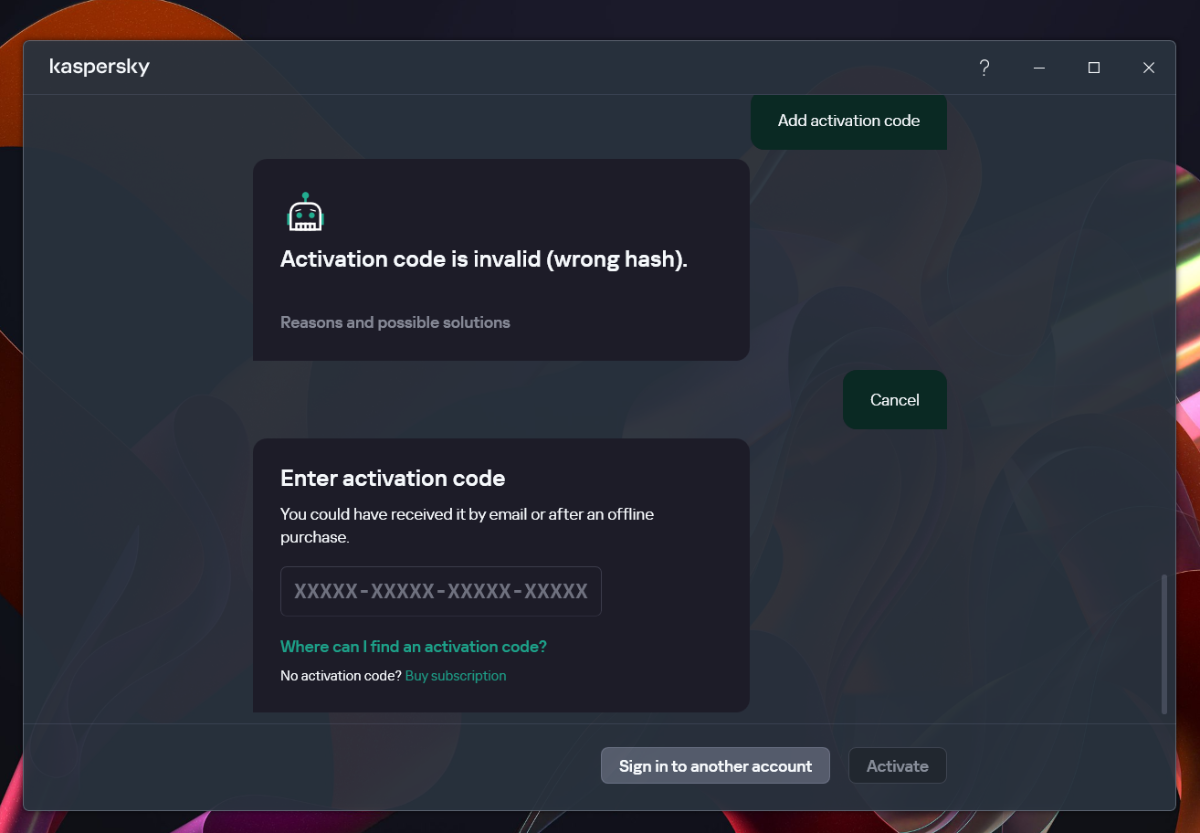
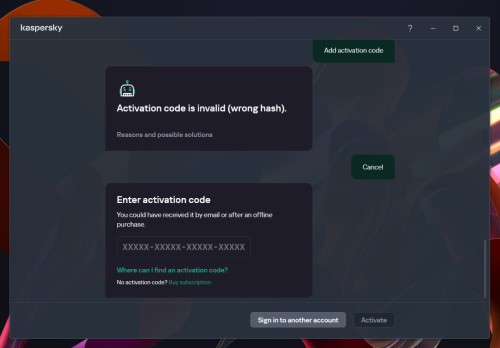
 Deepkamal posted a topic in Kaspersky: Basic, Standard, Plus, PremiumToday, I updated my laptops ssd and after installing windows I download the kaspersky antivirus from my sub window. when it get install it says buy subscription as I already have one year subscription in my antivirus
-
 MySelcuk posted a topic in Kaspersky VPNHello Why does Indonesian break after every update? Why do we experience this every time? I've been waiting for you to fix this for 3 days. Don't you test anything before updating? I only use it for Indonesian. But this is really starting to get annoying!!!!
-
 Bin noch auf 24h2. Es könnte gut sein dass sich beim Windows Update was verschluckt hat und ein Darüber installieren von Kaspersky es löst, war bei mir die Lösung damals.
-
 Good day, @Impulse9 and @mokaz, thank you for coming back with an update, and I appreciate you taking the time to explain your perspective so clearly. I understand why this situation is especially disappointing after many years of using the service without issues. When a product becomes part of someone’s daily routine, any major change can feel abrupt and unnecessary. Your feedback regarding transparency, troubleshooting guidance, and expectations management is very valuable, and I will make sure it is passed on to the relevant teams. Even when users decide not to continue with a service, these insights help us identify where we need to improve: not only technically, but also in how we communicate during major changes. I sincerely hope that we’ll be able to earn back your trust in the future, and thank you again for the years you spent with our service and for sharing such thoughtful feedback here. Good day, @Kyrillos.Zak, thank you for your question. I understand the confusion, and I’m happy to clarify. This does not mean that all global issues are fully resolved or that the problem is necessarily limited to your account or your PC. Additional information helps the technical team verify whether the behavior matches known service-side limitations or regional conditions, and check if there are any account or device-specific factors contributing to what you’re experiencing. In some cases, we may be able to provide a workaround or solution even while broader issues are still being addressed.
-
 jan.srn replied to chris h 1980's topic in Für PrivatanwenderBei mir funktioniert Kaspersky Premium VPN seit ende November 2025 nicht mehr: Ich habe ende November vom Kaspersky eine E-mail erhalten: __________________________________________________________________________________________________________________________ Wichtige Informationen über Ihr Kaspersky VPN Sehr geehrter Kunde, bitte beachten Sie, dass wir derzeit Kaspersky VPN auf eine neue Infrastruktur umstellen, um allen Benutzern ein reibungsloses und zuverlässiges Erlebnis zu gewährleisten. Während einer kurzen Übergangszeit können vorübergehende Probleme auftreten. Diese Probleme können Benutzer von Kaspersky VPN Secure Connection, Kaspersky Plus und Kaspersky Premium betreffen. Wir tun unser Bestes, um alle Probleme so schnell wie möglich zu lösen. Die meisten Benutzer erhalten das erforderliche Update automatisch. Sollten dennoch Probleme auftreten, aktualisieren Sie die App bitte auf allen Ihren Geräten auf die neueste Version. Die neueste Version können Sie hier herunterladen: Aktualisierung Wir möchten uns für eventuelle Unannehmlichkeiten entschuldigen und arbeiten mit Hochdruck an deren Lösung, Ihr Kaspersky-Team _______________________________________________________________________________________________________________ Ich habe die neueste Ver. installiert. Nicht nur einmal und auf allen meinen drei Windows Desktop PC. Nichts geht mer mit VPN. Habe support kontaktiert und mehrere Stunden und Tage am PC gesessen um die "Tipps" vom Support (Programme installieren, Aufzeichnungen zurück schicken, das und jenes aus- und einschalten). Auch das hat nichts gebracht. Dann kam eine E-mal: _____________________________________________________________________________________________ Sehr geehrter Kunde, Guten Tag. Vielen Dank für die Rückmeldung. Tut uns wirklich leid für die Unannehmlichkeiten. Als kleines Dankeschön für Ihre Treue, haben wir 14 Tage auf Ihre Lizenz hinzugefügt. Wir haben Ihre Anfrage an unseren Experten weitergeleitet, bitte warten Sie auf unsere Antwort. Für weitere Rückfragen stehen Ihnen unser Kaspersky-Support zur Verfügung. Ich wünsche Ihnen noch einen schönen Tag. ____________________________________________________________________________________________ Paar tage später kam eine weitere E-mail: _________________________________________________________________________________________ Sehr geehrter Kunde, Guten Tag. Wir erhielten die Rückmeldung von unseren Experten. 1. Da es sich hierbei um ein Problem seitens des Internetdienstanbieters handeln könnte, verbinden Sie sich bitte mit einem anderen Netzwerk, beispielsweise über eine mobile Hotspot-Verbindung: a. Android: https://support.google.com/android/answer/9059108?hl=de b. Apple iOS: https://support.apple.com/de-de/HT204023 ............ mit weiteren Punkten (ca. 20) die sich wiederholt haben mit denen, die ich schon frühe durchgegangen bin. _____________________________________________________________________________________ Mein Handy ist sehr alt und kann keine Hotspot-Verbindung herstellen. Apple habe ich nie gehabt. Und das wiederholen der selben procedur ist sinnlos. Ich war mit Kaspersky schon mehrere Jahre sehr zufrieden. Ich habe auch gute Erfahrungen mit Kaspersky VPN gemacht, bis die Umstellung auf die neue Infrastruktur kam. Für mich war VPN wichtig da ich meinem Besuch auch TV Streaming für deren Sprache anbieten konnte. Andersrum, ich habe für ein funktionierendes Paket von Kaspersky Premium bezahlt und jetzt soll ich mehrere Stunden und Tage meines Lebens am PC sitzen um die Probleme zu erörtern? Mein Abo läuft noch fast ein Jahr, trotzdem überlege ich, ob ich Kaspersky kündigen soll. Ich bin kein Informatiker, und ich möchte auch nicht mein PC mit mir vorgeschlagenen Programmen vermüllen. Ich bin sauer und von Kaspersky enttäuscht.
-
 Squally replied to Squally's topic in Kaspersky VPNOne of the latest messages I got... So, they are trying to offer me a downgraded version to use in the territory of the Russian Federation. What about when I'm abroad? Should I buy another VPN just because the one that they offer me now doesn't works abroad? When this problems started on November they patched and the VPN worked well till the next update on December 12th.
-
Good day, @Kyrillos.Zak, we understand how frustrating this situation can be. To continue the investigation and move it forward, our technical support team needs the additional information previously requested. As soon as we receive these details, we’ll be able to analyze the issue further and provide an update. Thank you for your cooperation, it will help us resolve this faster.
-
Follow this thread: https://forum.kaspersky.com/topic/latest-update-solved-all-vpn-issues-57529/#comment-223312 Regards Ahnaf Tahmeed
-
Squally posted a topic in Kaspersky VPNWe've been experiencing the same critical issue for almost a month, during this period you managed to fix it and broke it back again with the latest update, it's affecting multiple users, devices, networks and platforms. Support keep asking for the same, switch networks, try other locations, send screenshots of the same behavior, at this point all the info you're gathering for users don't move the investigation forward and only delay escalation. This issue is reproducible, affects all sites and services, affects multiple platform and has been ongoing for weeks. That clearly indicates a backend / infrastructure / core client issue not a configuration mistake. We respectfully ask Kaspersky to: Acknowledge the incident publicly, an provide with a timeline for a fix or a temporary workaround or at least an official status update. Many of us rely on this service daily and right now is unusable. We are asking for transparency, escalation an a real resolution.