Search the Community
Showing results for 'Quick Launch Keyboard'.
Found 1791 results
-
 ArHu replied to ArHu's topic in Kaspersky: Basic, Standard, Plus, Premiumwhat does virtualization do for kaspersly, it's only for the browser and on screen keyboard because I never use those anyway
-
 Hello @ArHu, Thank you for the information! We're not sure how (yr) formatting (your) *reply* to our post - however when we try to reply to (yr) reply all that populates the text box is (yr) last entry.... odd. ****When (you) next REPLY* - select QUOTE Print-screen - press the Print Screen (PrtSc) key on the keyboard to copy the full screen, then *paste* the output to Paint OR Paint3D or any other graphics editor - save the file as .png OR ,jpg - simple graphics format, in File Explorer - select copy - against the image - come to (yr) reply here in (yr) topic, position the cursor in the text box, right-click, select *paste* from the list of options. READ: How to take a screenshot Does 'info32' mean MSINFO32? Try & get a full-screen-screen-print - it will save a lot of grief IF everyone can clearly see what you see please? In (yr) Windows UPDATES - is Get the latest updates as soon as they’re available ON OR OFF? Thank you🙏 Flood🐳+🐋
-
 CK1 replied to CK1's topic in Kaspersky: Basic, Standard, Plus, PremiumJust wanted to post back that this resolved the issue I was having, apologies for the delayed reply, I had to use the system uninterrupted for a couple of day so wasn't able to troubleshoot until today and this update happened before I was able to test further, enabling memory testing on quick scan and background scans seem to be working as intended, I haven't had the chance to run a full scan as of yet but I don't imagine the result would be different. Thank you again all for your assistance everyone.
-
CK1 replied to CK1's topic in Kaspersky Internet SecurityJust wanted to post back that this resolved the issue I originally ran into, thanks again for the assistance, I did unfortunately run into other issues after the switch which I asked about in a separate thread here (https://forum.kaspersky.com/topic/full-scan-quick-scan-stays-at-1-fixed-58770/) but these have also been solved by a new update.
-
 pwbc posted a topic in Kaspersky: Basic, Standard, Plus, PremiumHaving upgraded to Premium from Total Security, the virtual keyboard in Safe Money no longer functions correctly. Clicking on the keys does not always register, so passworded files and websites are very difficult to access unless I resort to using the real keyboard, which defeats the point of having a virtual keyboard for security
-
 Tatanimar posted a topic in Kaspersky Security CenterHello everyone, I am experiencing an issue when running an administration task to restart endpoints from the console. When I launch the restart task, it works correctly for some endpoints. However, certain machines do not restart at all, without any apparent error in the console. Here are some details: The task is properly deployed and visible on all targeted endpoints The machines are online and reachable The administration agent appears to be functioning correctly No explicit error messages are reported I would like to know: What could be the possible causes of this behavior? Are there specific logs to check on the endpoint side or on the server side? Are there any prerequisites or restrictions (permissions, GPO, system state, etc.) that could prevent the restart from occurring? Thank you in advance for your help and feedback.
-
 Try to disable those settings, reboot the system en try a K. Quick Scan.
-
 Wayne K. posted a topic in Kaspersky: Basic, Standard, Plus, PremiumQuick startup keeps disabling some of my preferred startup items, I turn them back on thru the Kaspersky UI, It tells me to reboot. System then allows them all to run, but then Kaspersky Standard disables them again. How do I permanently turn OFF this **** and unwanted "Quick Startup" Lenovo kaptop, UEFI System AMD Ryzen cpu, 32gb ram, 2 x 512gb ssd, win 11 ver 2000.856
-
 Psiu47 posted a topic in Virus and Ransomware related questionsI pretty much log to internet and use It for gaming. Tonight after I already have logged into Steam, while I was waiting for daily task of rootkit scan to occurr before went to start playing something. I've looked in report page and was checking each component detailed report section when I've noticed 'file antivirus' category. It have displayed two 'processing error' on high alert (colored in red). Went to verify myself each of these files and 0 object could not be scanned. Object name: WmiPrvSE.exe gives the following error as 'Not processed' and object pathfind is: searchms:display=name=Resultados%20da%20Pesquisa%20em%20wbem&crumb=Qualquertexto%3AWmiPrvSE&crumb=location:C%3A%5CWindows%5CSysyem32%5Cwbem\WmiPrvSE.exe Object name: smartscreenps.dll gives the following error as 'Processing error' And the object pathfind is: C:\Windows\System32 I have looked inside quarantine section and there are no files whatsoever. I have started a series of procedure accordingly to 'KS Standard ender' articles like running a fullscan, to erasing manually these files (which I didn't since they have been normal for Yeats before Tonight) I hardly think my antivirus is corrupted because it is constantly searching for data bank updates. What I am doing in my reach is to restart the computer, and run Fullscan. However I have noticed Kaspersky Standard 21.24.8.522(b) did not gave the same alert while I am still running Fullscan. Only happen when I execute 'Selective scan' or 'mouse Quick action scan' to verify these files. My question is: These alerts were they false positives? Because these system files have been laying around since 2022-2024 and I don't know If I should be worried.

-
 Hello, I suppose it can be the known Bug 5657225: [SUPPORT] Mouse and keyboard does not work after reboot (patch i appliance) It is related to our filters, which write in registry its values - only Windows OS can be affected. In most cases there was desinfection procedure + patch appliance. The problem will be fixed in next product`s version. Here are the list of steps, which can help to resolve the problem(highest workaround is easiest one): 1. Use USB-Recover tool: https://support.kaspersky.com/14221 to restore default mouse/keyboard filters values. USB Recover tool is based on KRD18(Linux OS), so keyboard and mouse must work within BIOS and this OS, because they are not related to Windows and its registry filters. 2. Use System Restore. It can be run from Recovery mode: https://www.ubackup.com/backup-restore/windows-10-recovery-mode-1021.html Also you can run command prompt from this mode and delete keyboard and mouse filters manually: 3. Or manually delete Kaspersky values from registry: Reboot PC - Troubleshooting - CMD - open regedit - delete klkbdflt and klmouflt values in UpperFilters from the following path HKEY_LOCAL_MACHINE\SYSTEM1\ControlSet001\Control\Class\{4d36e96b-e325-11ce-bfc1-08002be10318} HKEY_LOCAL_MACHINE\SYSTEM1\ControlSet001\Control\Class\{4d36e96f-e325-11ce-bfc1-08002be10318} The last one - is the hardest way to restore keyboard and mouse and it is better to do not use it, if you are not Advanced user of PC(skills of work with Windows registry is required). Thanks. P.S. We have had the problem with keyboard and mouse filters before(in 2016 and after), but it were single cases, which were related to kavremover utility, improperly installation/uninstallation of Kaspersky products, customer`s registry problems etc.
-
 ahmad98 posted a topic in Kaspersky FreeHello everyone, After I updated Kaspersky Free to the latest version my keyboard stopped working. I tried many solutions but nothing worked. Please help.
-
 Сommunity Knowledgebase posted a blog entry in Kaspersky Endpoint Security's Kaspersky Endpoint SecurityProblem Some devices do not have keyboards, but still are detected with BadUSB. Step-by-step guide In order to allow them work properly use BadUSB on-screen keyboard, using other onscreen keyboards or physical ones is not recommended. To open BadUSB on-screen keyboard click on the highlighted text (example for Russian localization). Note that Prohibit use of On-Screen Keyboard for authorization of USB devices option should be turned off.
-
 Netz posted a topic in Kaspersky Internet SecurityHi All I have the same issue and I am using KIS (Kaspersky Internet Security) ?? Sorry for party crashing your topic. I am on a single computer using win11 updated a ASUS Keyboard (CERBERUS (K2)) USB - The "block" is random and from time to time?? - I just exit Kaspersky and turn him back on... But it is really frustrating - when I am typing and suddenly --- No reaction!! I don't have BADUSB attack and any of all those settings you showed here..? Hope for a solution Stay Frosty Netz
-
 Nick Og posted a topic in Kaspersky: Basic, Standard, Plus, PremiumHow can I disable the Kaspersky keyboard prompt in password fields using browsers on Windows 10 PCs? Nick
-
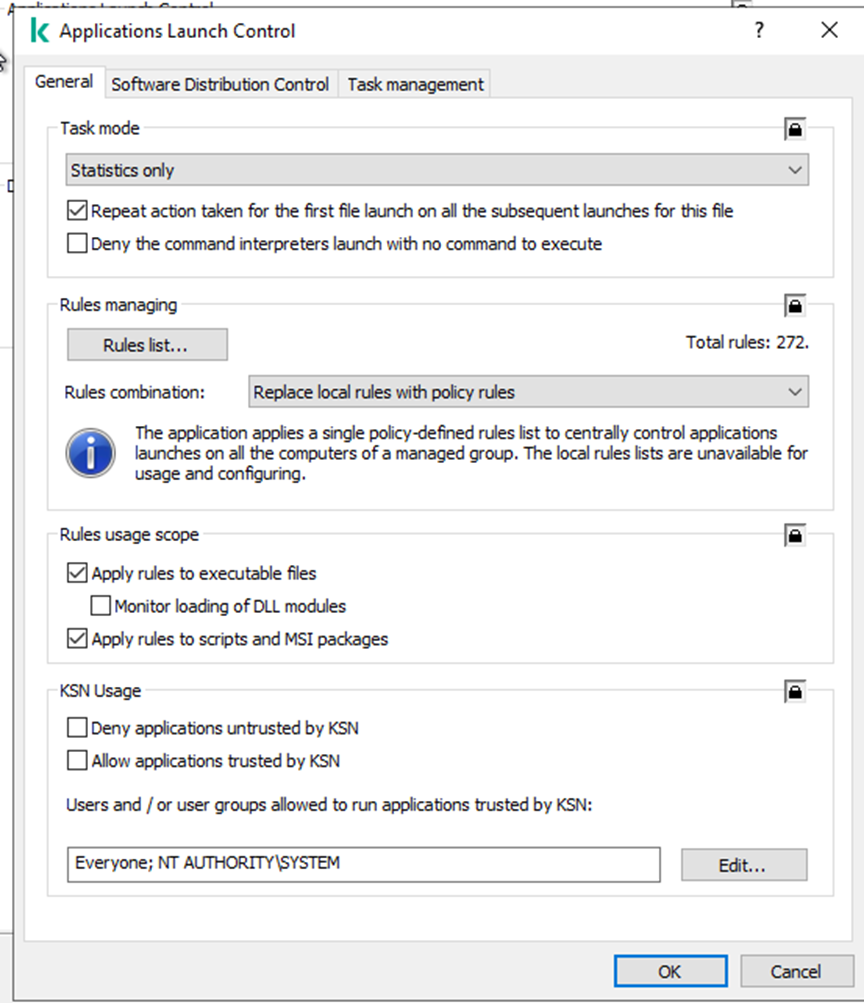
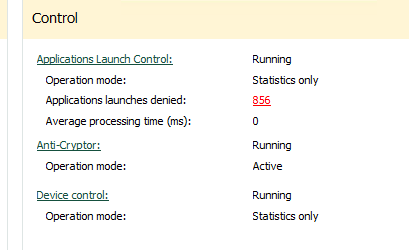
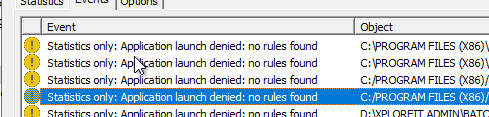
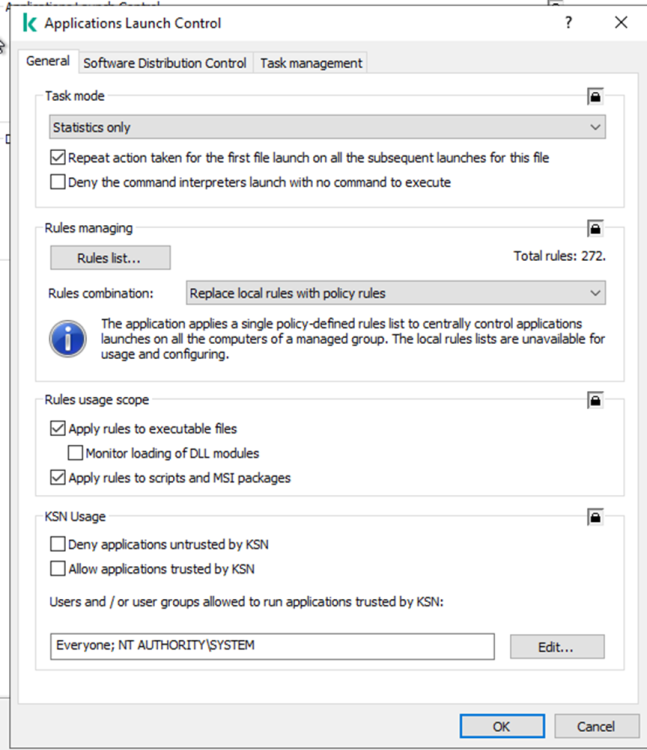
 Bobhond posted a topic in Kaspersky Endpoint Security for BusinessHi, I noticed that "Applications Launch Control" in task mode "Statistics only" does block (deny) applications from starting. I believed that "Statistics Only" wouldn't block anything but in this case the opposite seems to be true. Whenever I see that an application is being blocked I add it to the "Rules list..." under "Rules managing" after which the application runs without any problems. The events all say that there are no rules found for applications that are being blocked. Does this have something to do with the option "Replace local rules with policy rules" under "Rules managing"? Can someone please point out why task mode "Statistics only" does block applications in "Applications Launch Control? KSC: 13.2 Kaspersky Security for Windows Server: 11.0.0.480 Best regards
-
 Michelle04 posted a topic in Kaspersky Total SecurityI've been using Total Security for at least 10 years and never had an issue until recently. I have a 2.5 year old PC HP laptop running Windows 10 and a 2 year old Android phone running whatever the latest update is. I extended my Kaspersky licence to my phone. I use the Chrome browser on both devices. Over the past 2 to 3 months (it's sept. 4, 2022), both devices have suddenly shut off while I was in the middle of something. Re: my phone, it's happened in the middle of me writing a text and in the middle of a phone call. On my laptop, it has happened while I was working in an excel document and while I was shopping online and about to hit the checkout button. Those are just the examples I can remember. I have been able to restart my phone afterwards but my laptop doesn't want to power on afterwards. I sometimes can't use it for hours. Once it was about 2 days before it would start again. At the moment, I'm not able to power it up and I don't know how to resolve that. Perhaps this is just coincidence but lately, I've been getting the occasional pop-up that tells me I've exceeded my 300 MBs of VON protection and offers a button for extended protection. I followed it once to find out it's trying to sell me an add-on. I've told it to get lost every other time. Has anyone else experienced any of the above? Does Kaspersky know about it? When I'm able to get back into my laptop, is there anything I can do so that it won't happen again? Thanks
-
 hugop posted a topic in Kaspersky FreeI have windows 10 22h2 with Kaspersky free edition and the browser extension for Microsoft Edge, Google Chrome and Mozilla Firefox All the latest updates installed. Previously, i had to uninstall the antivirus and reinstall again. Now i am facing exactly the same problem. I Stopped the antivirus and started again. I test in more than one browser and doesn't work even. What more can i do to fix the problem!?
-
 Sang replied to Sang's topic in Kaspersky EDR OptimumProblem solved ! turned out it was badUSB attack prevention instead of device control, we've to authorize our keyboard for remote access via iDRAC
-
 emaranhao posted a topic in Kaspersky Security CloudFrom time to time my keyboard (not the virtual keyboard) freezes and I have to restart Kaspersky to fix the problem. This problem has been happening for more than a year. Windows 10 x64 build 19044 Kaspersky Security Cloud 21.3.10.391
-
Nicitel posted a topic in Kaspersky Internet SecurityOperating sysyem: Windows 11 but it was happening on Windows 10 as well Name: Kaspersky Internet Security Version: 21.3.10.391(i) Ever since I installed Kaspersky I'm having trouble launching Modern Warfare/Warzone. When I somehow get in after fiddling within Kaspersky exceptions and whatnot it doesn't let my game save, so it's blocking the game making changes on my PC I guess, and every time I restart PC I start having trouble again. Today it didn't even let me download an update for Warzone from Battle.net. No idea what to do anymore, I've put Warzone into exceptions or something, marked it as trustworthy, but none of it helped, and I'm stuck. Thank you for your replies in advance, hopefully someone else can find your information useful down the line.
-
 Egor Erastov posted a blog entry in Kaspersky Endpoint Security's Kaspersky Endpoint SecurityAdvice and Solutions (Community Knowledgebase) Disclaimer. Read before using materials. This article is about Kaspersky Endpoint Security for Windows (KES for Windows) Description FDE precheck is a utility used for advanced Full Disk Encryption compatibility testing. It contains latest drivers which will be implemented in future KES releases. FDE precheck also collects diagnostic data used to fix compatibility issues. Inability to use laptop keyboard and\or touch-pad is one of the most frequently met issues. Using FDE precheck you can understand if compatibility issue was already fixed and will be included in next release or it should be addressed. You can download latest FDE precheck utility using following links: For KES 12+ - https://support.kaspersky.com/14328 System requirements Single operating system should be installed on the test machine, FDE Precheck can't properly function on a host with multiple operating systems. Use administrative account to run the utility. Read before proceeding Decrypt the test host and remove Kaspersky Endpoint Security and AES module. Do a backup of the critical data on the test machine. Follow the test sequence exactly as stated below. Do not manually stop the execution of the utility. The system will automatically restart several times, it is an expected behavior. Plug in laptop. Do not run test on battery. Failure to comply with steps above may lead to unpredictable consequences. Test sequence Make sure machine decrypted does not have KES or AES module installed not running any KL drivers has no critical data plugged in Reboot. Copy and unpack fde_precheck.zip archive. Run elevated fde_precheck.exe (either by right-clicking and choosing Run as administrator or by starting it from an elevated command prompt). If the program will not find any incompatibilities the following message box will appear: Press Yes, to initiate installation of the encryption drivers and initiation of the test. Wait for the automatic reboot, then login using the administrative user as was done earlier. Press OK on the pop-up that will appear shortly after the reboot: Press Yes in the UAC window if it will appear shortly after. Wait for several minutes (up to 10-15 minutes) until next automatic reboot will occur. Do not initiate reboot manually! It will be done automatically. Manual reboot at this stage may result in corruption of the OS. All preparations are run in background, it is normal that there will be no indication of activity on the desktop. After automatic reboot you will see the preboot agent, and it will require human presence to complete those tests. If possible, record the whole process on a camera of smartphone. You will be asked to enter random keystrokes using the keyboard and mouse. In case of successful keystroke registration you will see something like that: Just follow the instructions that will appear on the screen and press "NEXT >" when done with each test. In case FDE Precheck Preboot agent will fail booting or will freeze at some point, please take photo of the error message, or record the whole process on a camera and reboot the machine if necessary. OS will boot either way. Login using the administrative account that was used earlier. At this point drivers will be removed in the background and host will be rebooted one last time automatically. Wait for several minutes (up to 10-15 minutes) until next automatic reboot will occur. Do not initiate reboot manually! It will be done automatically. Manual reboot at this stage may result in corruption of the OS. All preparations are run in background, it is normal that there will be no indication of activity on desktop. The following three files are always created. All three files are mandatory to provide for analysis. fde_precheck_report.txt fde_precheck.log (will be located in the folder with fde_precheck.exe) Description of what have happened during tests (with screenshots and video if possible).
-
 om richard posted a topic in Kaspersky: Basic, Standard, Plus, Premiumhow to disable kaspersky secure keyboard ?
-
Morphenius posted a topic in Kaspersky: Basic, Standard, Plus, PremiumHi everyone, I have a physical disability which means I have to use an xbox adaptive controller with software called JoyXOff to convert the inputs to Mouse and Keyboard. Unfortunately when I need to change settings for Kaspersky or create exclusions, I am unable to click on these popups to confirm. This then means my carer has to plug in a mouse every time to confirm. I have tried adding the relevant files and folders to the "Allow interaction with the Kaspersky Anti-Virus interface" setting in specify trusted applications but unfortunately it still does not work. Any help would be appreciated as I would like to keep using this software!
-
 Akarin posted a topic in Kaspersky Anti-Ransomware ToolI am writing to express my deep frustration and anger towards the Free Kaspersky Anti-Ransomware Tool (KART). For about a month, I have been experiencing abnormal behavior in some of my software applications. Upon investigation, I discovered that KART has replaced my system's HTTPS certificates with its own root certificate without my knowledge or consent. The certificate was generated approximately six months ago, but I am unsure if the replacement happened then or more recently. Replacing certificates equates to decrypting HTTPS encrypted traffic, effectively performing a man-in-the-middle (MITM) attack. This is a serious security concern because it allows KART to intercept and potentially manipulate all encrypted communications on my system. Such actions are intrusive and undermine the fundamental security guarantees that HTTPS is supposed to provide. Regardless of whether this HTTPS certificate replacement was an existing feature or part of a recent update, Kaspersky failed to inform users explicitly. There is no mention of this functionality on the official website (https://www.kaspersky.com/anti-ransomware-tool), during the installation's quick tour, or within the software settings. Moreover, there is no option provided to disable this intrusive feature. In contrast, other antivirus software, including various versions of Kaspersky Anti-Virus, offer users the choice to disable HTTPS traffic decryption. This unauthorized action poses significant security risks and invades user privacy. Even after uninstalling KART, the root certificate remains on the computer, continuing to present security vulnerabilities. This shows a blatant and disgraceful disregard for user autonomy and rights. I am beyond furious with Kaspersky's lack of transparency and respect for user consent. Such practices are absolutely unacceptable and undermine the trust users place in your products, potentially violating user privacy and rights. I am retaining all evidence of these actions and reserve the right to file formal complaints and reports against Kaspersky with relevant authorities and consumer protection agencies. I demand immediate action to address these issues and ensure that no further unauthorized changes are made to users' systems.
-
 Just a quick check: Could you please take a look at the ‘UpdateHostsFile’ task? Does a script run here? Unfortunately, I don't have Windows 11 available right now to verify this. I'm sure @harlan4096 can help with this... ... and then continue with the KRD.