Search the Community
Showing results for 'Quick Launch Keyboard'.
Found 1791 results
-
 Snowwolfboi posted a topic in Kaspersky FreeHi forum is it normal that when I use my windows 11 laptop with i5-10210u CPU, and Kaspersky lab launcher use 11% of the total CPU when I launch any Microsoft office apps or any adobe apps, but also any game my laptop can handle and when I just use my browser it use 6% of total CPU usage and the ran on the new 22.9 version is a bit higher then on Kaspersky free 22.3 version what is the thing that make Kaspersky free 22.9 use so much CPU and RAM then your older 22.3 version
-
 I just want ask you if it is okay use not officially released product. So on my local website kaspersky.cz is still version 21.3... And i have link for download czech version 21.8 and also for 21.9 newest version i thinkg. These versions are not released officially on kaspersky.cz (will be later). It is okay use it? And what about share this link with others? Or it is forbidden? Please only special statement from KL employee for example @Danila T. or @Igor Kurzin Thank you
-
 hknydn replied to hknydn's topic in Kaspersky Internet SecurityThanks @Flood and Flood's wife for the quick suggestion. I followed the steps but unfortunately it did not help. I tried twice afterwards and it's the same outcome: stuck at 87% and it kills my internet connection. try1 try2


-
 Netz replied to Netz's topic in Kaspersky Internet SecurityHi nexon, Thanks! 1: I will try to use another usb port. 2: I just shut down Kaspersky and restart it .... Then my keyboard works again! 3: I have 21.3.10.391 (j) 4: Did not try to reinstall ... Thx - I will try...
-
 Guest posted a topic in Kaspersky FreeHello, Something new as appeared with the last update of Kaspersky. I had never any issue with it, I was very happy, but until recently, Kaspersky window opens up without notice on my desktop for no apparent reasons. I tried to deactivated all notifications etc, through Kasperky app and windows, but it still opens up obstructing my desktop, which is fairly annoying. it usually happens after launch like 10-15 minutes after booting the PC. The new UI/UX of Kaspersky is less clear than the one before, and I can't find that option to let Kasperky running in the background without showing up. I'm strating to think to change to another antivirus if I can't solve this issue. Does anyone have a solution to that? Thank you.
-
Netz posted a topic in Kaspersky Internet SecurityHi All I have the same issue and I am using KIS (Kaspersky Internet Security) ?? Sorry for party crashing your topic. I am on a single computer using win11 updated a ASUS Keyboard (CERBERUS (K2)) USB - The "block" is random and from time to time?? - I just exit Kaspersky and turn him back on... But it is really frustrating - when I am typing and suddenly --- No reaction!! I don't have BADUSB attack and any of all those settings you showed here..? Hope for a solution Stay Frosty Netz
-
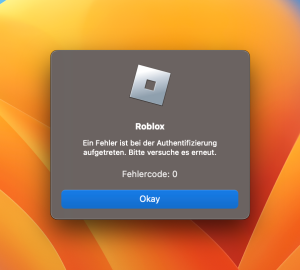
 mladek posted a topic in Kaspersky Internet SecurityHello everyone, when Kaspersky Internet Security is running, I am unable to launch ROBLOX, as it always returns an unknown error (which does not pop-up when I terminate Kaspersky). I've already added the website + their sub-domains to the exception list, however it did not change anything. The website itself works fine, however the app aka game won't start up. Information regards software: MacOS Ventura 13.2 Kaspersky Internet Security 21.1.0.150f.g Image translates to: An error occurred in the authentication. Please try again.
-
 Wallaby53 replied to Wallaby53's topic in Für PrivatanwenderMea culpa, mea maxima culpa... Nachdem eine weitere App Login Fehler gemeldet hat musste ich dem Problem nachgehen. Fazit: Das Problem sitzt VOR dem Bildschirm!! Es ist kein SW Problem! Firefox hat sich mit dem gespeicherten PW automatisch angemeldet. Alles OK. Das PW das ich in der Kaspersky SW Profil Anmeldung verwendet habe war zwar OK ... aber... das Keyboard war auf QWERTY gesetzt. Ergo: Wrong PW. Nach der Umstellung auf QWERTZ hat das PW funktioniert und ich bin...drin... Sorry for the hassle. Alles gut .. owe you one...?
-
Guest replied to Nick Og's topic in Kaspersky: Basic, Standard, Plus, PremiumMaybe this topic can help you whit that: https://forum.kaspersky.com/topic/turn-off-secure-keyboard-input-22633/
-
 Nick Og posted a topic in Kaspersky: Basic, Standard, Plus, PremiumHow can I disable the Kaspersky keyboard prompt in password fields using browsers on Windows 10 PCs? Nick
-
 Colin B posted a topic in Kaspersky: Basic, Standard, Plus, PremiumI left my computer alone for two weeks, When I returned my Kaspersky icons had disappeared from my desktop. Kaspersky still appears to be running but I cannot launch it from the apps list and get the same annoying dialogue as the original poster. Kaspersky also cannot open the secure browser to my Bank or other financial sites. I have tried downloading Microsoft.net framework and reinstalling it but this achieves nothing either. Is this some monkey business from Microsoft?
-
 SystemInfo replied to bug-finder-392374's topic in Kaspersky: Basic, Standard, Plus, PremiumSo far no one will answer, the business is difficult to know where the quality control is. What I'm finding is that KASPERSKY has grown a lot in the number of users installed the tool, which now it can't provide support in a quick time. Product update increasingly slow. the bugs we report always take a long time to respond with a fix for the problem.
-
 hugop replied to hugop's topic in Kaspersky FreeHello Berny, In the past i tested this version you suggested me to download but i had some problems with onscreen keyboard, and the issue was i can't put some accents on some fields from my Home Banking! My last name as an accent and my user name needs this accent to work. I asked some help in the topic bellow. "My onscreen keyboard doesn't work on my bank site i can't fill the user and password using onscreen keyboard." And the conclusion was i had to get back to previous version Kaspersky security cloud free because there was no European version available at that time! That's the reason why i asked if you know something. Best regards. Hugop
-
 Good day This issue has already been discussed in the Russian-speaking part of the forum. At the moment, this is a problem, and so far it is not possible to launch protection remotely (if it was set to pause). You can restrict the access of ordinary users to this function by setting a password on the application control, this will not allow them to stop, disable, delete the application.

-
SystemInfo replied to SystemInfo's topic in Kaspersky: Basic, Standard, Plus, PremiumI think the fix will take time as these fixes have never been quick. ?
-
 Hello @LRC, Welcome! Related information found after a 'quick' search is from one of Kaspersky's resident gurus @Igor Kurzinin topic: Kaspersky secure VPN blocks torrent by xma92, he said: Is torrenting allowed in your region/country? Please note, Kaspersky VPN respects the laws of the country you live in. You can download and upload torrents with Kaspersky VPN while connected to a server in a country where torrenting is not forbidden by law. *** Is INC000015065852 still open or did support close it immediately? Which errors show when the VPN & Torrent are used at the same time, post images or error detail please? Have you tried *other* remote virtual servers Kaspersky VPN, Locations - or is it one specific server that's an issue? Which *functions* are missing/not supported - iyo? Please post back? Thank you? Flood?+?
-
 LRC posted a topic in Kaspersky VPNI recently purchased Kaspersky VPN (yesterday, actually). Previously, I used Clear VPN. I'm having problems using TORRENT and VPN. Calling support, case INC000015065852, they informed that it is not possible to use Kaspersky VPN with any Torrent program. And not even opened a case, which I required after this quick answer. Is this information true? I changed my VPN provider because I trusted that Kaspersky was a company that offered better service than the small Clear VPN, but it seems that it has some functions that are important to me that are not supported. I use version 3.0.0.24 of Kaspersky VPN, macOS Monterey 12.4
-
 Pandas replied to Pandas's topic in Kaspersky Total Securitythank you for the quick response but sorry i think i might have incorrectly descibed about the issue i can launch steam or epic games but it doesn't have an internet connection. it says it cant reach the servers but after disabling it it can. the website of steam do work fine just the app doesn't so it doesn't let me launch games either
-
Hello @Pandas, Welcome! So we don't have to guess, please: Read before you create a new topic! & provide the information? When the games fail to launch, are there any errors, what are the errors, look in KTS Reports, post screen prints, we need to see what you see please? A. Does this solution from @Igor Kurzinwork: Please post back? Thank you? Flood?+?
-
Pandas posted a topic in Kaspersky Total Securityi am unable to launch any game apps while the program is active. After disabling it, i can launch it again. i have tried messing with the firewall but that doesn't seem to be the issue. How can i launch games while the program remains active
-
 Honor replied to Honor's topic in Kaspersky Safe KidsThank you for your quick and warm reply. As shown on the attaced captured picture, I allowed only 1 hours per day, and additional start time/end time is not assigned. I don't know why. Please heip me.


-
I'm sorry, this is my mistake, I somehow did not see that we were talking about android ... ok let's try again ? I will assume that you have a new installation KSC and you have not yet done any settings for working with mobile devices 1. Turn on the display of menu items for working with mobile devices, don't forget to restart the console after enabling 2. On the mobile devices tab, enable support for mobile devices, download the necessary distributions and management plugins, create and configure a certificate for connecting mobile devices (will be created during the execution of the wizard). You can manage the certificate settings using the last link in the screenshot 3. as a result of the wizard, the service for mobile devices will be enabled, the necessary ports will be opened and also created a certificate for mobile devices (you can reissue it right there) 4. if you are using a standalone package to install on your devices, check the address and ports for connecting to your server in the package properties. your connected devices will be grouped by default KSM10 (device discovery tab) now about connecting devices first of all, check that the necessary ports are open and listened to by your server, you can use the command as in my first post by connecting the laptop to the local WiFi network (for example) and executing the command tnc <IP or DNS> -port 13292 accordingly, you need to ensure that all the necessary routes are already in your network and your firewalls allow access on the necessary ports between the client and the server after connecting, your devices (for sure) will initially go to "unassigned" devices, you will need to create a separate group for them in "managed" devices and move devices there (you can use auto-move rules), also do not forget to create the necessary policies and necessary tasks. Also, if your clients connect via mobile internet on their devices, you must also ensure that your external firewall forwards all necessary packets on port 13292 (and 17100 for activation) to your KSC also you can get the app package for your device directly from the store for your android device (look for a client specifically for business, black icon, not green), and configure the connection to the server already at the time of installation and launch of the connection wizard.


-
 @jf grasset Concerning the blocked IP address please launch CMD as Admin and run command “ipconfig /renew”. I am currently on Clouflare DNS (8.8.8.8) but I don’t think this is the fix for your issue. Your next option is Kaspersky Technical Support, the link is available at the top of this webpage ?
-
 Hello, you are wrong. Such bugs are fixing by our developers quickly(if the root of the problem on our side), they have high or critical priority. It does not mean, that they reproduce on all customers` PCs - there is always some specific scenario for the bug reproduction(desinfection procedure + patch upgrade, some local hardware and software configuration, problems with registry on customer`s PC etc.) It does not mean, that the Kaspersky is always a culprit - it can be some third-party company software or registry/OS issue on customer`s PC. That is why we are analyzing every such case and providing quick fix, if the root of the problem is Kaspersky product. This is not a bug, which Kaspersky can`t fix for years:) I mean, that such problem periodically appears. Thank you.
-
 Atomahawk replied to MrBrandt's topic in Kaspersky Free" We have had the problem with keyboard and mouse filters before(in 2016 and after)" Wow and still having issues!! Not to revive an old thread but I'm having serious issues just after uninstalling Kapersky. Did a re-install same issue lagging mouse ...seriously lagging ..!!!! The computer is now unusable in this state. Congratulations you proved how immature your software really is ...pffft . Now I, not you have to jump through hoops to clean the garbage up. Sorry to say it this way but if your uninstall doesn't work Correctly and Messes up a computer and you admit it's been an issue since 2016 .... really ? That's basic computer software engineering ...no ? So here's what you should be doing ..fixing what you break ...no ?