Search the Community
Showing results for 'Quick Launch Keyboard'.
Found 1791 results
-
 Hello @ahmad98, Welcome! Not enough information, please share with us: OS version & build, refer: https://support.kaspersky.com/common/diagnostics/15026 Kaspersky Free version, refer: on the Windows Taskbar or hidden icons, rightclick the Kaspersky icon, select About? Error or errors when Keyboard does not work - post full-screen screen prints? In Windows Device Manager - what is the Keyboard status? In Windows Device Manager - has Scan for changes been run? Has the Windows Keyboard Troubleshooter been run - what are the results? Which solutions have been tried - provide details of each solution please? Read: keyboard stopped working topics. Please post back? Thank you? Flood?+?
-
 ahmad98 posted a topic in Kaspersky FreeHello everyone, After I updated Kaspersky Free to the latest version my keyboard stopped working. I tried many solutions but nothing worked. Please help.
-
 Vector V replied to Johl C.'s topic in Kaspersky VPNWell thats was quick. As soon as I have posted comment they fixed it ?. Now everything working fine.?
-
 picturevalve replied to picturevalve's topic in Kaspersky: Basic, Standard, Plus, PremiumI have found the bookmarks backups folder which contains KIS and PURE folders but neither contains a backup later than 24 Dec. 2020. I currently have Plus 21.9.6.465. Is this bookmarks backup stored elsewhere? Currently in Program data/kaspersky lab/safe browser file. When I launch Firefox in safe money I get the "Failed to launch..." etc. notice but I have 3 instances of firefox.exe running before I cancel the notice "Firefox is already running..."etc.
-
 Kortak replied to Nightmare's topic in Virus and Ransomware related questionsI just installed new World from Steam fresh and i get a launch denied error with a report on UDS:Trojan-PSW.Win32.Stealerc.kc in D:\Steam\steamapps\common\New World\Bin64\NewWorld.exe I dont think the file is actually infected.
-
 GhostFreak replied to GhostFreak's topic in Kaspersky Internet SecurityQuick update on this I uninstalled KIS and during uninstallation procedure from KIS selected the checkbox 'keep license information. And then installed KS and licence was automatically taken...no problem even signing to you kaspersky account Also the setting bug that i was concer with is also fixed in this new version
-
Hello @AntonyMagnus, Welcome back! ?Apart from re-installing the application - as per, Application "crashes", "freezes" or "lags"; the "Previous application launch failed" error message appears, have you followed: What to do if the error persists If the issue persists, contact Kaspersky Customer Service by choosing the topic and filling out the form. Attach to your request a Get System Info report and dump files from the following folder: C:\ProgramData\Kaspersky Lab\AVP<application version>\Traces ▶️ & have you received an automated Incident reference number beginning with INC0000? Thank you? Flood?+?
-
 AntonyMagnus posted a topic in Kaspersky: Basic, Standard, Plus, PremiumBeen having the same issue as this reddit poster has had recently, Also been having an issue with program freezing after restart as outlined here, Application "crashes", "freezes" or "lags"; the "Previous application launch failed" error message appears (kaspersky.com) I of course submitted all crash reports, question is Windows Defender has recently been updated I noticed and I am wondering if Kaspersky is not disabling Defender as it should. Windows 11 Pro 22H2 Kaspersky premium 21.9.6.465
-
 hugop posted a topic in Kaspersky FreeHello guys. It's me again Hugop, today i already published a topic asking for help with On-Screen Keyboard on Kaspersky Free. Now I did a Downgrade to the Kaspersky Security Cloud Free Version: 21.3.10.391 (j). Is it possible to stop automatic Updates not for the virus databases but for the software version itself? Because look if i get a problem with the newest antivirus free from Kaspersky i want to be able to keep the previous version until i find it's safe to upgrade to the newest version you Know! That's Why i am asking this kind of help to avoid facing the same issue as before. Thank you all for your possible help! Best Regards. Hugop
-
hugop posted a topic in Kaspersky FreeHello guys, Currently i am running Microsoft Windows 10 Pro 22H2 Build SO: 19045 with latest Microsoft Windows 10 updates. I was using Kaspersky Cloud Free as my antivirus. Yesterday i received an update for my anti-virus for the newest Version 21.9.6.465. I cannot open On-Screen Keyboard even if i press the shortcut keys CTRL+ALT+SHIFT+P. I also uninstall the antivirus completely and remove all leftovers. I also Uninstall only one of my web browsers Mozilla Firefox I downloaded the latest version available on the global website from Kaspersky and from My Kaspersky (Downloads). The version is the right one for European countries. If you remember well i already faced this problem in the past. But on that time Seem's there isn't any version available for European countries, so the resolution was removing completely Kaspersky free from my system and install the Kaspersky Security Cloud Free. I think I will make the same when you find a solution, please tell me OK! I did a Microsoft Windows Clean install on March 30, 2023. I am running out of ideas to fix the problem! I use Home Banking a Lot i need my On-Screen Keyboard to put the Password instead of Physical Keyboard. I think it's safer! But if nothing of this works in either Browser I will be forced to downgrade. But i also think that sooner or later my anti-virus will want to make the upgrade happen again. So, what can i do to avoid that? Thank you very much for the time that you will spend to try to find a solution. Best Regards. Hugop.
-
 Etoti replied to Buff Dad's topic in Kaspersky Safe KidsI had the same issue with both kids android phone. Both have 2hr usage limit, (0 hrs out of 2 hrs) but KSK says "child's device is blocked". The quick workaround was that i blocked and then unblocked the phone (Block device).
-
 In addition to my comment above “disable MBAM at startup” , launch and run a MBAM scan for a second opinion , close/exit MBAM when done. You can also exclude Kaspersky in MBAM.
-
 Lilly1000 posted a topic in Para casaDesde a instalação do K Standard perdi o uso do teclado do note PRESARIO CQ 18 que estava funcionando perfeitamente até então. Ao verificar o Status, li que ¨o dispositivo esta funcionando corretamente¨. Em Propriedades do Teclado consta ¨plugged into keyboard port¨. E em propriedades de 3rd Gen Core processor DRAM...não há como atuaizar o driver pois só existe acesso a Detalhes do Driver. O teclado virtual da Microsoft está acessível, e tem sido o salva-vidas, mas não é para o dia a dia de quem cria textos
-
 Quick update: @mstytn - you wrote about Bitdefender etc. Each AV have similar settings, each AV can block program etc... I saw Bitdefender settings. Are similar like kaspersky but kaspersky needs more click by mouse to set it up. I tried add (.exe program) to the UNTRUSTED zone by intrusion prevention and did restart. All was ok program was still there in Untrusted zone. Also i add into second method add program via firewall and rules into Untrusted zone and restart PC. All okay program was there. I did it on 2 versions of Kaspersky : 21.9.6.465 which is newest commercial released version. And also i did it on 21.13.5.452 which is not commercial released version. @Schulte - I assumed that he knows because he used kaspersky in the past (Tip for change language). I use it also like you because my primary language is not english and your primary language is maybe german?
-
 mstytn replied to mstytn's topic in Kaspersky: Basic, Standard, Plus, PremiumI've found a dummy solution. That is instead not a solution but some kind of hack: Go to Security > Network Monitor > Block All Network Traffic Then launch the desired app Wait for the app to spawn on the Firewall > Manage Apps list Then Set the desired settings in the network column like Deny Access. Then unblock Network Traffic with Security > Network Monitor > Block All Network Traffic Which is not applicable in most cases. Requires a proper solution. Sorry I am not confident about the setting titles mentioned above, because my Kaspersky is not in English which I expect Kaspersky to at least ask me the language preference when installing.
-
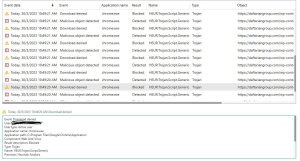
 CitrusPal posted a topic in Virus and Ransomware related questionsI'm using Windows 10 Version 21H2 OS Build 19044.2604 Kaspersky Security Cloud version 21.3.10.291 I was doing some research for work, which involved visiting different companies websites. I was using Google Chrome when I was doing my research and when I was viewing this website I received 11 notifications in a row saying Malicious Object Detected from chrome.exe, luckily all of them were Download denied by Kaspersky. I performed a quick scan, restarted my computer, and did a full scan and all came out cleaned. I even made sure to check Virustotal to see if the website is safe after conducting this and it came out clean. Since the results of all my scans are clean I was wondering if I have to be worried about anything. I'm not sure how to send reports, but I've attached screenshots of my Kaspersky reports:

-
 Xzz123 replied to Netz's topic in Kaspersky Internet SecurityHello disable secure keyboard function and safe money in K you will find this problem disappear forever
-
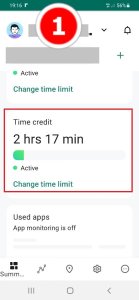
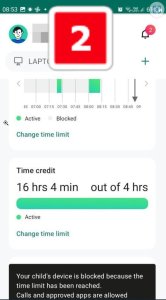
Hello @Buff Dad, Thank you for the information? Sorry for the delay, trying to get this information just uncovers more unknowns.. Screen widgets, no, if you mean Desktop icons, they could always be moved before this most recent KSK update. Quick switch, YES, *promised* but does not exist. Same for All your children on one map. Personalize main screen, place 'important' widgets at the top of the screen, less important ones at the bottom, hmmm, well that appears not to work too... Moving right along, Time Credits, support was not helpful, we showed them screen-image 1, the *supervisor* said: "This is basically the remaining time left that the kids can be used the device." We then presented (your) image 2, with Time Credit = 16 hrs., 4 minutes out of 4 hours & the device is blocked - all we got for a reply was a lot of muttering. Support acknowledged Time Credits is not documented, they were supposed to escalate the issue, we're still waiting. Re: "the app still block the child's device even though the child hasn't reached the allowed use time limit." Please log this with support, https://support.kaspersky.com/b2c#contacts - on the support page, select either Chat or Email, then fill in Application malfunction, Other template; please include any screen images of the error & a detailed history. Support may request logs, traces & other data; they will guide you. *Please share the outcome with the Community?* Out of curiosity, with this new version, on your child's android, do you *ever* see: Security policy restricts you from stopping this application - image 3? Again, child's android, when selecting the back icon 3 vertical bars, on the bottom of the screen, are there two persistent KSK screens open all the time - that can be closed but are open when the back icon is selected again - image 4? **The new version Survey sheds some light on where they're going with the changes; sadly it appears they've decided to road test an apparently unfinished app on paying customers** Thank you? Flood?+?
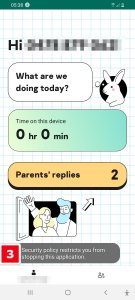
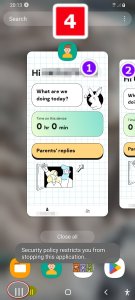
-
This is not pop up. It is in main window of the program. And informs you that all is okay. You can not remove or hide text : We've got you covered. Look at my screen below : Your protection is live now This is quick info that everything works.
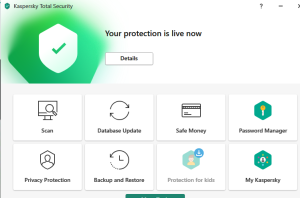
-
 Netz replied to Netz's topic in Kaspersky Internet SecurityHi Again, I did change the USB port - Didn't work (But I had to close my Office programs (Outlook) to get the keyboard back this time) KIS was innocent ... (for once) ? My next move... Reinstall KISS
-
 Buff Dad replied to Buff Dad's topic in Kaspersky Safe KidsHi, If by icons you mean main screen widgets, then yes, I can rearrange them up or down. Quick switch, is that the switch that turns off child's device? If I swipe the main screen down, I have three icons at the top that say "We are changing", "Contribute to the next u..." and "Personalize main screen". The "we are changing" bit promises the quick switch, but I haven't found it anywhere in the app. Anyway, the app still block the child's device even though the child hasn't reached the allowed use time limit. Cheers, G
-
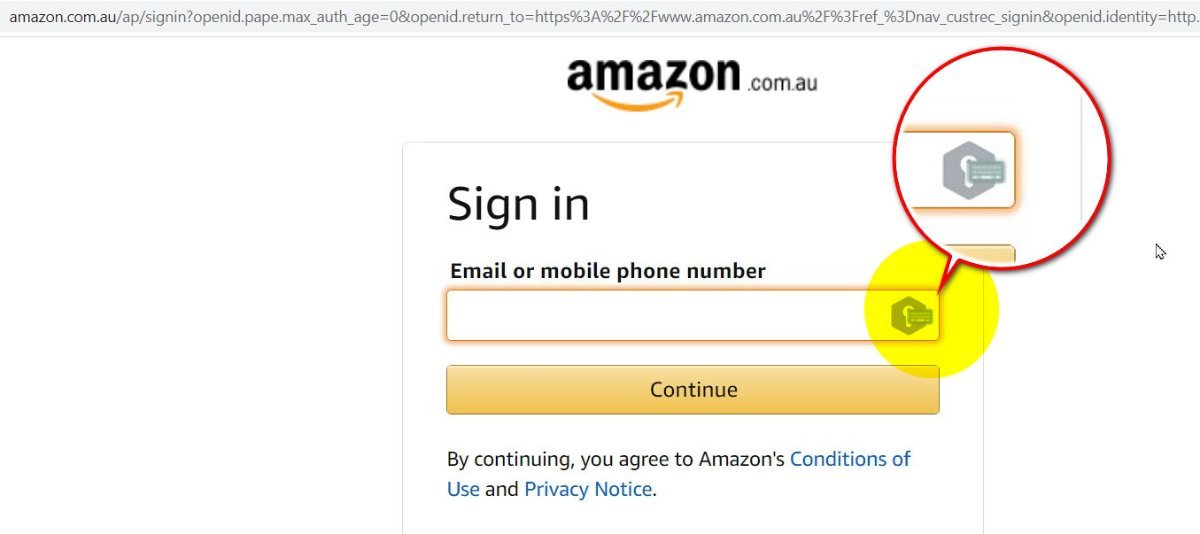
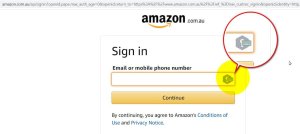
Hello @Nick Og, Welcome! (You) can't find the settings described in the topic raised by @booger, because it's for Kaspersky Internet Security, not Kaspersky Plus. Read: Show quick launch icon in data entry fields. If you mean the keyboard that overlays the KPM icon, uncheck Show quick launch icon in data entry fields, Shopping & payment systems (in this case for Amazon site; or select the filter that applies). ?(ioo) it's a very poor design? - if this is not the issue-> post an image of the icon\prompt that's concerning you; there's more than one icon/prompt - we need to see what you see, rather than guess; also, please make sure the image is of the full browser window, including the URL bar & the system date & time? Thank you? Flood?+? Resource: Read before you create a new topic!
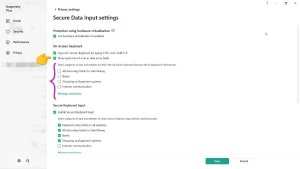
-
Hello @Buff Dad Thank you! We did a bit more digging, once again Kaspersky have processed changes but elected not to communicate those to subscribers & or update documentation apart from the following obscure paragraph in Google Play Store KSK app info that may be related: Hi parents! We’ve added a progress bar right on the main screen so you can track your child’s online-offline balance. If you have set daily time limits for your child’s device usage, the bar will show how much time is left against each of their gadgets. So now it’s easier to stay informed and enjoy greater peace of mind! Nothing in the https://support.kaspersky.com/KSK/Mob1.0-iOSTR87-AndroidTR88/en-US/94982.htm, Jan 23 || TR88 v1.89.0.15, no mention of Time Credit. Sure as night follows day, it will mean something to someone in Russia & they've blithely assumed that everyone else across the globe will be just peachy with the new feature. To give you some background, parents have been requesting - the "ability" to manage time across *all* devices" - we have no idea if this change is that, somehow, we doubt it; to us it looks like a reporting function only. We've logged a request with Support to find out - we'll update went they respond. *Apparently* there's also a new Quick switch feature - do you have this? Can you please test moving the icons - does it work? Thank you? Flood?+?
-
 mokaz posted a topic in Kaspersky Security Cloudhi there KL teams, As we already have the "Pause Protection" menu item, I'd really appreciate a "Pause Notifications" button as well. Thus completely silencing the app for a given amount of time (1h/2h/4h/1day).. It is a bit annoying when a popup show's up in a middle of an online meeting while you present something... Also there are some screen notifications from features like "Secure Keyboard Input" which, if possible, I'd like to "discrete". Let me know, Cheers, m.
-
 Sylver Cheetah 53 replied to Sylver Cheetah 53's topic in Kaspersky Security CloudHi and thanks for the quick reply! I wasn't able to activate the application with my usual e-mail adress. I had to use my FaceBook account. But other than that, all is fine. Thank you again! regards, DANIEL (Romania)