Search the Community
Showing results for 'Quick Launch Keyboard'.
Found 1791 results
-
 Hello @megala, Welcome! It's not necessarily a matter of 'better or worse', it's personal choice. About protection through hardware virtualization in Kaspersky applications. About protection using hardware virtualization. About protection of data entered on the computer keyboard. Thank you? Flood?+?
-
Hello @jpgoelz, Welcome! Recently @Zonnon raised topic: Keyboard shortcut blocked, Moderator @Schulte replied: qte For years there is the problem that KIS declares itself "not responsible" when the hotkey for the VK is deactivated, but does not pass the keyboard combination <Ctrl><Alt><Shift> "P" to the subsequent keyboard driver. It is up to the developers to find a satisfactory solution here. endqte Please log a case with Kaspersky support, either via Chat or Email, fill in Application malfunction, Other template. Support may request Logs, Traces & other Data, they will guide you. Also, it may help them if you provide a video of the issue. If selecting Chat option, we recommend you request a copy of the chat transcript, make sure you fill in your email address AFTER the chat is activated by the Chat agent & complete the Verify your email address email AFTER the chat completes. When it’s available, please share the outcome with the Community? Thank you🙏 Flood🐳+🐋
-
 pwbc replied to pwbc's topic in Kaspersky: Basic, Standard, Plus, PremiumI think it might related to display resolution, as it works fine on my sons computer, which is set at 1440. My computer is 2160 and the "i" key does not register at all. I boot use Ctrl-Alt-Shift-P to load, to close I have from the taskbar as the "X" does not register on the keyboard. As a work around I use the Microsoft Virtual Keyboard, which works but seems to cause the mouse to lag for a few seconds
-
Hello @pwbc & @Kishardon, Welcome! How are you accessing the Virtual Keyboard? ?Note, closing the Virtual Keyboard has been an ongoing issue, reported in the old version & still existing in this new version - relevant topics can be found in the Forum? Thank you? Flood?+?
-
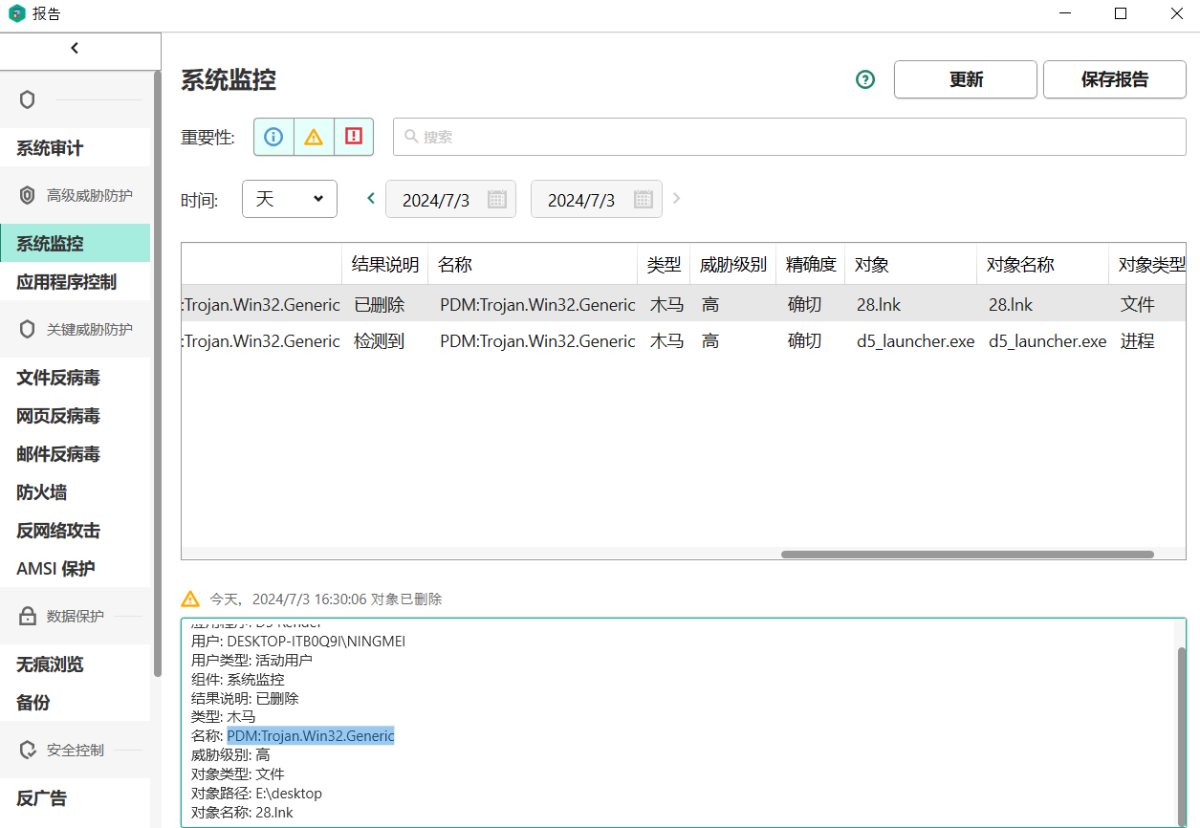
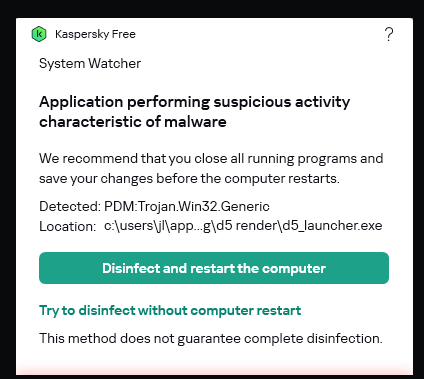
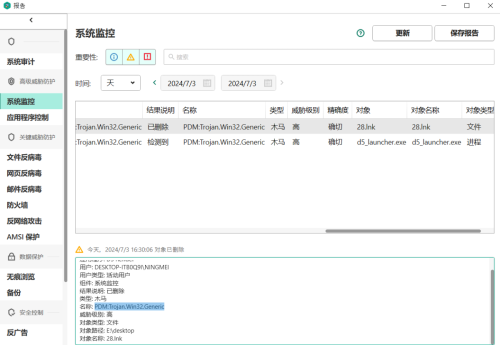
 D5 Render Oliver posted a topic in Virus and Ransomware related questionsHi there, There is a file called d5_launcher.exe in our software, and we used Kaspersky/OpenTip to scan this file, the result is safe and clean. However, sometimes when using our software D5 Render (a 3d rendering program for architecture, based on UE5), Kaspersky will suddenly start warning and deleting our file d5_launcher.exe. It said the file is Trojan.Win32.Generic. ( we did some searches, and maybe it is related to our keyboard shortcuts? The problem is that we cannot let all users to click Trust the file manually, which is inconvenient. So I'd like to ask you guys, is there a way to upload our files before we release our updates? so Kaspersky will trust those files and do not affect our users from using D5 Render. ( Avast and some other AV software provide us an address in FTP to upload files, and we upload files before we release a new version each time) Thanks in advance!
-
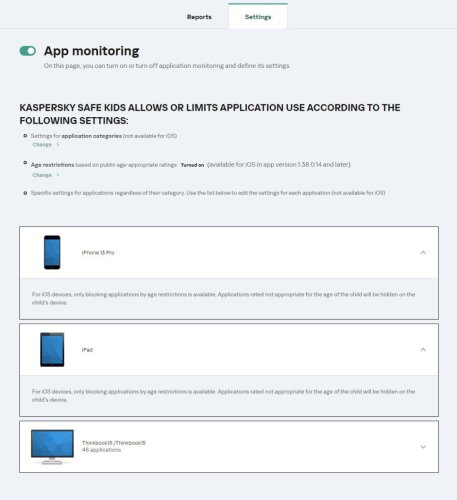
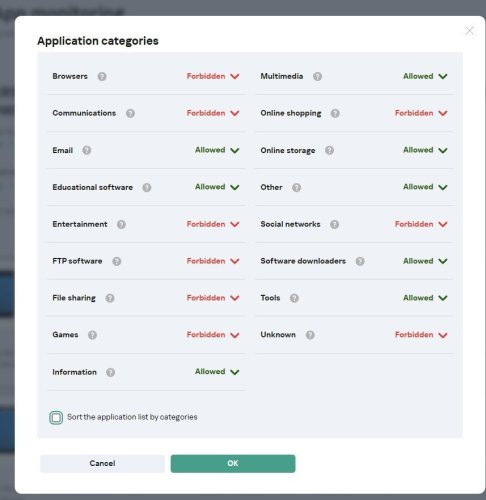
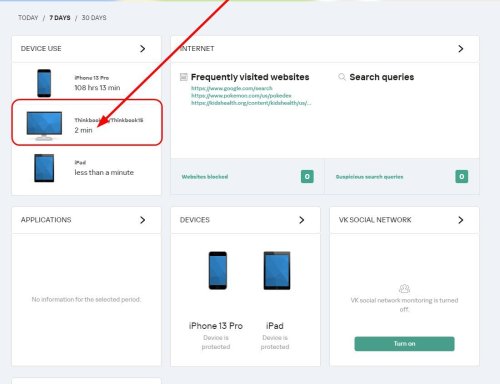
 5645 replied to Jonathan234's topic in Kaspersky Safe KidsHi Flood and Flood's wife, Thanks again and here is my comments with more details ? 1, Apologies, is Safari browser being used by *default*, IF no, it should be! (not Safe browser, we were working on a Safe browser issue at the same time as working on (your) issue, we're so sorry!). --- my kid does not use Sarari, he uses Chrome, OperGX etc. 2, We understand the reports may not be accurately reflecting time used but *to set your expectations - we are not at the end - yet* - It is not just not accurate, it is not working at all. I have tried to deleted the old profile, created a new "Kid" and set up from step one and as of today, the result remains the same, on the ThinkBook15 (windows 11 Pro) there is no record at all, but my kid told me he used the ThinkBook15 for over an hour for homework. This windows PC is actually my main concern as Safe Kids is all I have, unlike the IOS, I have screen time as back up. The main reason to purchase safe kids is mainly for Windows based system, and it gets really frustrating now ? 3, *Please answer from (our) previous post* - how is Settings -> in APPLICATION MONITORING configured - Allowed, Forbidden or Restricted? They are set up differently per category, a quick screenshot is below 4,For *iOS*, when the install was done & *Screen Time* was configured, was the instruction at the very bottom of the page followed: How to set up Kaspersky Safe Kids using the Screen Time API after updating to version 1.87.0.XXX ? IF *no* - it must be done! Thanks, I will go through these instructions, but for all IOS systems, I have no problems I will uninstall the safe kids on the ThinkBook and re-install again, see how it goes.
-
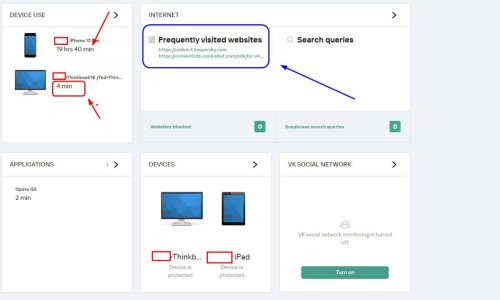
5645 replied to Jonathan234's topic in Kaspersky Safe KidsHi Flood and Flood's wife, Thank you so much for your reply, it explains very clearly. I think there is something wrong with my "safe Kids" Before I post the reply this morning, I did a manual updates via CMC command - sucessful I did a quick test with my child's account for few minutes, it seems correct. However, when I came back this evening and re-check something is wrong. Firstly, I connected my child's iPhone to safe kids - installed the app - signed in and chose "this device is used by children" now there is apparently an error for the usage time "19 Hours and 40 Min" that is impossible but I will come back to re-check, it could because the iPhone was just added in For the Thinkbook usage (4min) that is inaccurate as well because I know my child did his homework project for at least 30 minutes between 4pm - 5:30pm and that is not recorded. For the internet -> Frequently visited websites, I am pretty sure there should be more than 2 records and one of them is visited by myself in the morning testing
-
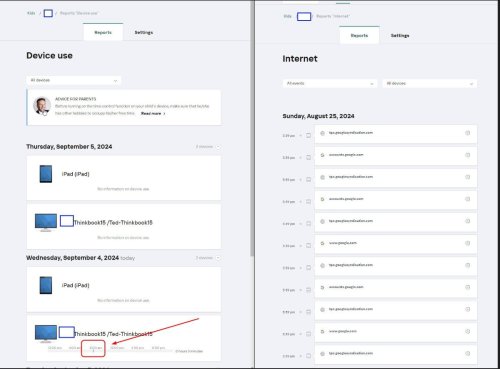
5645 replied to Jonathan234's topic in Kaspersky Safe Kidssame issue here, the reporting seems broken and very hard for parents to understand and use, I just manually updated safekids via CMD command 4th/Sep morning ( no idea why it cannot be done automatically) I have also did a quick test - using the kid's pc with kid's login (windows 11 laptop x64) and then the Internet report reports still stuck on 24/aug./2024 and there is no useful information at all, as I am sure kids visited much more websites than the report for his school report. When going to "Device use" - Reports page, the 3 min testing usage is there but no details of what webpages were visited
-
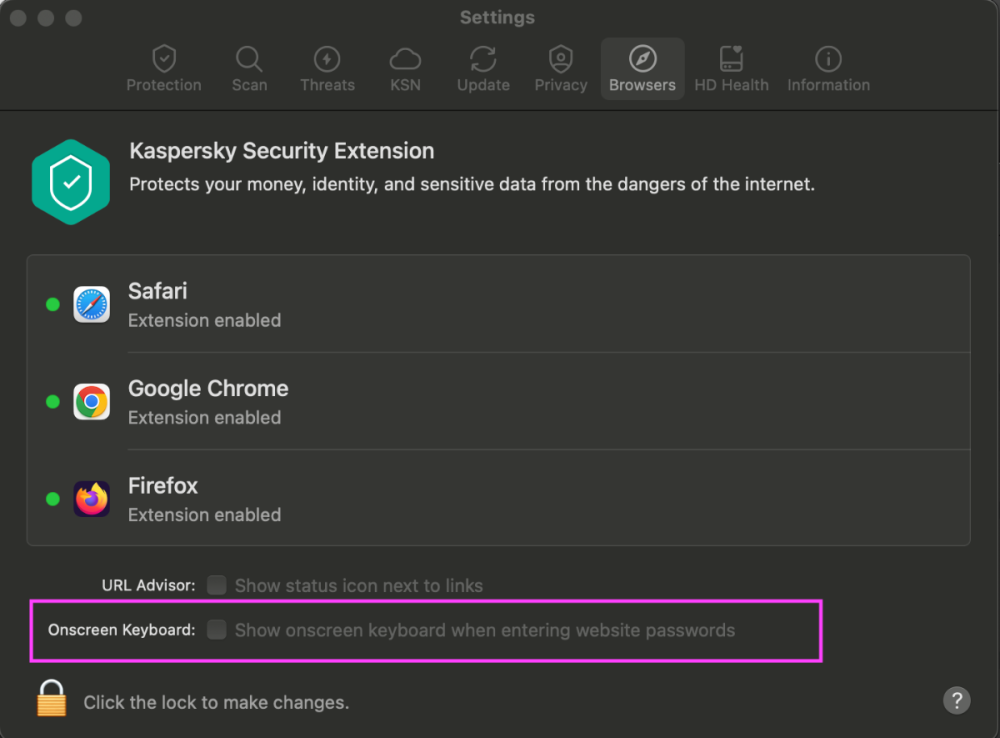
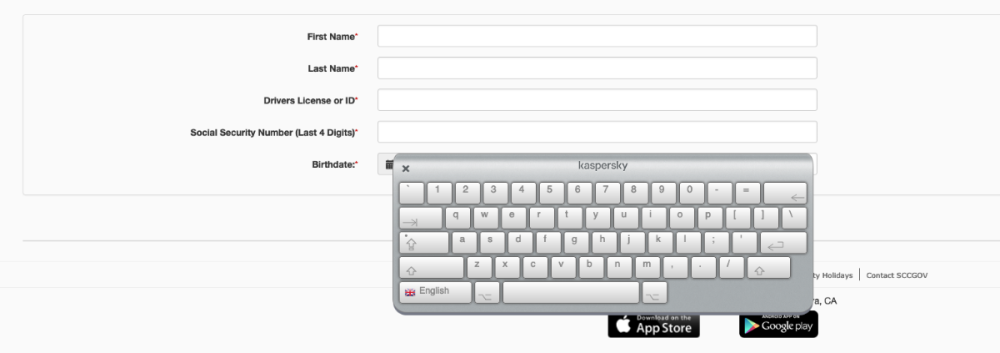
 ZeeKin replied to booger's topic in Kaspersky Internet SecurityHello! I wanted to write in as I am having similar issues and cannot get the On-Screen keyboard to not show up. I'm running Kaspersky Premium 23.0.0.179 on Ventura 13.2 with Firefox, and even though I have unchecked the "Show onscreen keyboard" setting, it still pops up. It's also strange that my issue doesn't always pop up with passwords either, but what appears to be "sensitive information." Please see screenshot of the page I've been able to replicate. One thing I'd like to note: When I click on Preferences within the Firefox extension, nothing happens. I've looked through the suggestions here, but my UI is a bit different and I'm wondering if I'm missing a setting. Thanks for the help!

-
 openurwindow posted a topic in Kaspersky: Basic, Standard, Plus, PremiumHello. I’m wondering if it’s possible to prevent an application from starting with Windows by double-clicking on it in the Kaspersky > Performance > Current Activity > Startup tab and then adjusting the application rules. The default options provided under Performance > Quick Startup have a limited list of applications to control, so I’m curious if it’s possible to manage applications through the Startup tab.
-
Hello @AugustsEve, Welcome back! There are two recent similar topics with very little information: I installed KS. After restarting my PC, I can’t login to my PC because I can’t type with my keyboard Laptop Keyboard Locked Confirm, before KIS was installed, the system was checked for incompatible software? Confirm the device meets KIS hardware & software requirements? Confirm the latest KIS patch(x) x=letter, is installed? Confirm Windows updates are all installed successfully? Has the Windows Keyboard drivers been refreshed? Has KIS been uninstalled saving the LICENSE key only & clean installed ? IF 1 to 6 are all OK, please contact Kaspersky customer service, either by Chat or Email, fill in Application malfunction, Other template; support may request Logs, Traces & other data, they will guide you. If selecting Chat option, we recommend you receive a copy of the chat transcript, make sure you fill in your email address AFTER the chat is activated by the Chat agent & complete the Verify your email address email AFTER the chat completes. When it’s available, please share the outcome with the Community? Thank you🙏 Flood🐳+🐋 Resource: (please) Read before you create a new topic! tutorial by @Danila T.
-
Hello @XM42, Welcome! Please let me know: (Child) Device operating system and version? Child age? KSK version? KSK Premium or Free? TouchPal Keyboard version? TouchPal Keyboard - where is it sourced from? May I have the source URL please? What application category has KSK defined for: TouchPal Keyboard? Do you wish for TouchPal Keyboard to be available for the child to use, but need it to have “Safe Search” capacity or you do not wish for the child to have access to the TouchPal Keyboard?Please post back? Thank you🙏
-
 Guest replied to a post in a topic in Kaspersky Security CloudThanks. My version is 21.1.15.500© so that sould mean 2021. Hello @lorcav123, You’re most welcome☺ ! Correct About this, I have one more question, it should be the last one😅 On reddit I have some security discussion and one guy who saw this topic told me that I didn’t understand you, that Kaspersky browser extension offer also phishing protection, not only (as I understood) On screen keyboard. He told me this: “If using Security Cloud Free Kaspersky Browser Extension 2020 = Phishing & malware protection + on-screen keyboard (only) If using Security Cloud Premium Kaspersky Browser Extension 2020 = Phishing & malware protection + on-screen keyboard + Anti-banner + Private Browsing That’s what Kaspersky meant by ‘only’. The browser extension communicates with Security Cloud Free and provides additional protection beyond Web Antivirus. It’s ‘not’ simply there for the on-screen keyboard.” So is he correct? Also for Brave and Vivaldi I just wanted to say regarding this test I posted, that download window appers and when I click save Kaspersky block it (Virus warning), so means it working 😉@Igor Kurzin’ is right.
-
Hello @George Whittle, Welcome! Read: Turn off/on automatic display of the onscreen keyboard - it needs to be *unchecked* Thank you? Flood?+?
-
 geek replied to Euphytose's topic in Kaspersky: Basic, Standard, Plus, PremiumSimple. In my case, switching between languages is done with Ctrl+Fn+F12 and Ctrl+Fn+F5 when you are on the main screen of Kaspersky Standard. (The official advice from Kaspersky was Ctrl+F12 and Ctrl+F5, but for my keyboard an additional "Fn" press was required). Please try this.
-
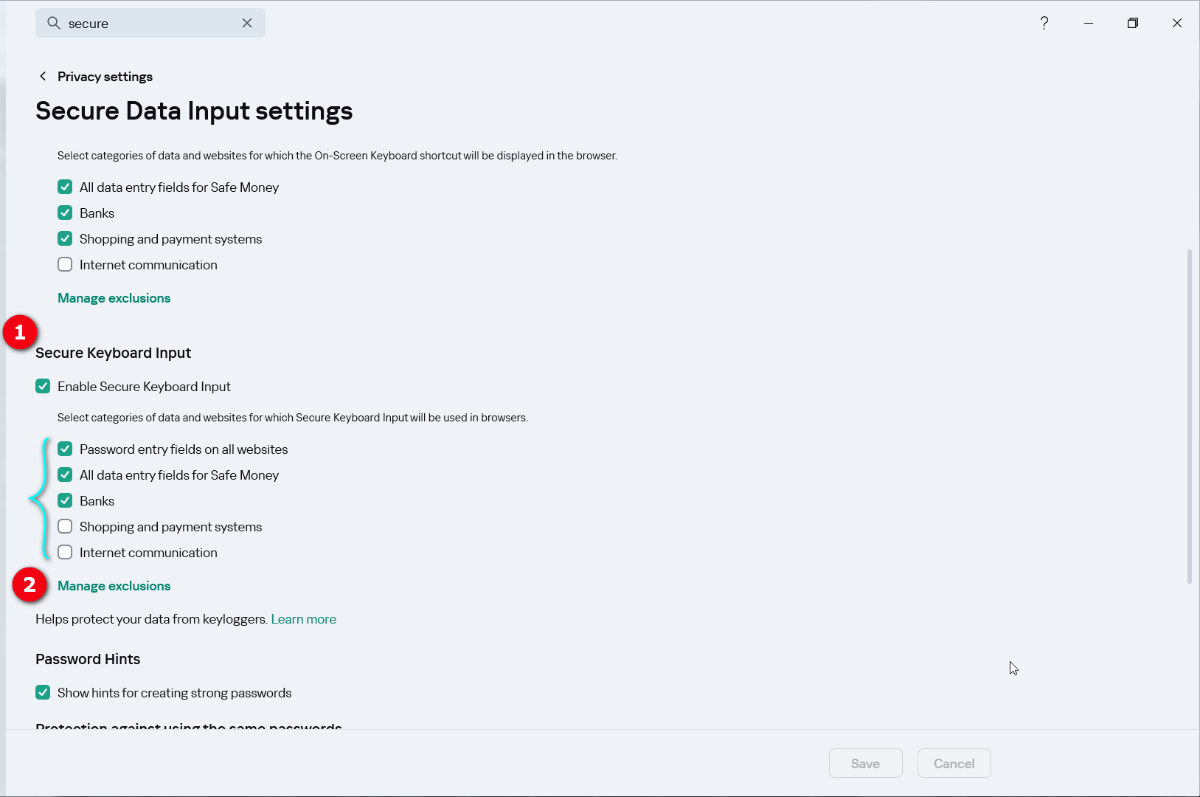
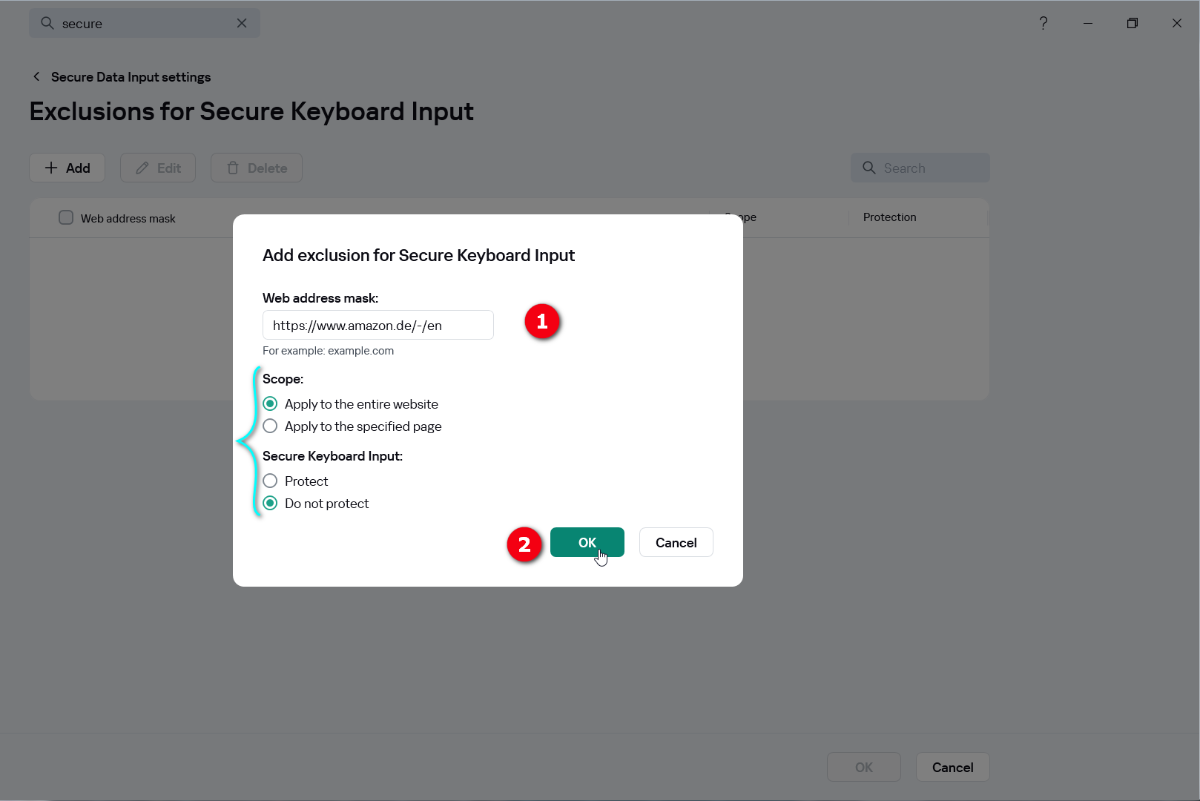
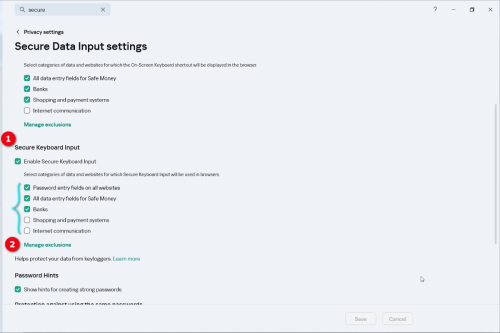
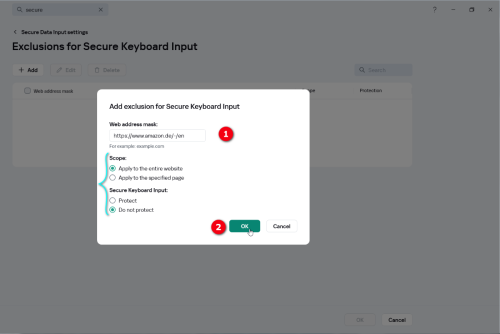
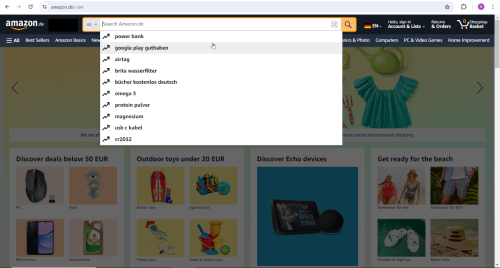
Hello @S.E., Welcome! Uncheck the options (you) require in: Secure Data Input settings - image 1 OR Add an exclusion for specific websites, see image 1 above & image 2 below Result: Any issues or concerns please post back? Thank you? Flood?+? Resource: How to configure protection of data entered on the computer keyboard
-
 mikethebike replied to mikethebike's topic in Kaspersky Internet SecurityIf I have the occasion to open the Secure Keyboard on sites other than those listed in Safe Money, it will open but will not operate and yet in my settings for Secure Keyboard in KIS I have ticked all internet media as well as banks etc I may be wrong but I feel that in the past I was able to use the Secure Keyboard whenever I wished to on sites that were not on Safe Money So, am I right or in fact is it only Safe Money sites where the Secure Keyboard will operate?. If so then that’s the answer and I accept that that ends the matter. However if it should work then what might be the problem? I have KIS 20.0.14.1085(m) running on Windows 7 Home Premium and the latest version of Google Chrome if that helps Thanks
-
 iuaFSIUNfyaUYF731 replied to MorSe Dude's topic in Kaspersky: Basic, Standard, Plus, PremiumIs there any update on the "MR17" update? I certainly have many, many large files on the filesystems being scanned if that's the case. I've been experiencing this issue for what feels like a year or more now. Exact same symptoms as commonly reported over the last year or two. Full scan will always cause an application crash however, even when manual. System idle for many days will eventually cause a crash. Sometimes application can recover, other times application will fail to launch due to what appears to be the Kaspersky windows service locking up and cannot be restarted or stopped due to security and requires a reboot. I'm not totally comfortable submitting traces and have been watching from the sidelines.
-
 Mpat Zanakh replied to Mpat Zanakh's topic in Virus and Ransomware related questionsThank you guys for your feed back. I already tried to find the delete the files / email s by selecting: Open containing folder, HOWEVER I can not see / find the emails in there. If I look directly in TB in the inbox or junk folder the emails are not there either. What does this all mean? Are these malicious files gone, as I can not find them and the Kasp[ersky Plus is just some kind of error message, showing malicious files, although they are not present anymore? What would be a quick fix? Just to click on: IGNORE?
-
 Darkness replied to Darkness's topic in Kaspersky VPNThank you very much for quick reply I have account before working . Now, it is not working. Kaspersky VPN Secure Connection Subscription: Active Remaining days:196 Kaspersky internet Security applications Subscription: Active Remaining days:331 It is clear, I will delete Kaspersky VPN Secure Connection and Kaspersky internet Security applications.
-
C. Additional @hugop, When the issue happens with the Kaspersky app, Virtual Keyboard, the bank site & Firefox, are you signed into your Firefox account? In Firefox, how is Control media via keyboard, headset, or virtual interface configured? Does "cannot input data into this field using OSK" happen on any other website or is the error only on the santander.pt site? Recreate the error, rightclick on the error. Select Inspect. Select Console Tab. Select Save all messages to file. Select Save -> to save the console export file. Upload the text file to any Cloud service of your choice & post the share link please? Thank you? Flood?+?
-
 amralaa replied to amralaa's topic in Kaspersky FreeI am really sorry for my similar questions. I was just calming my mind from worrying about the security because I trust the company. Thank you for your patience with me Do not deprive us of your support and quick response to my inquiry. Thank you very much.
-
 Egor Erastov posted a topic in Advice and solutions for Kaspersky Endpoint Security for BusinessSymptoms OS hang, sometimes with open file errors in journals Customer application degrades with errors "unable to open file", "too many open files" Hangs and third-party (compatibility) issues often require advanced data collection and are sophisticated to investigate. However, a quick check is possible: On a system where KESL has worked for some time (not immediately after reboot/restart), validate the output of the following command, ran as root, for numerous records of /usr/bin or /usr/sbin folders lsof | grep -E 'kesl.+DIR.+\/usr\/s?bin' Root Cause Under heavy load, KESL may display linear increase in file descriptors usage (sysctl - fs.file-nr) up to system-wide limit (sysctl - fs.file-max) and eventually degradation. Workaround Schedule restart of KESL service every week/day, depending on intensity of descriptors growth. NB: KESL restart will also reset progress of certain tasks like "malware scan" and "database update". Schedule KESL restart outside of tasks timeframes. Solution This issue was fixed in KESL 12.1.0.1274, so an update to that or newer version should fix it.
-
 Hello, Which version you use? Also after installing kaspersky is better do manual update database and restart pc. After restart pc is fully funktional virtual keyboard. Without restart you can not run virtual keyboard. EDIT: you are using Kaspersky free and there is limited protection and features. Please see : https://usa.kaspersky.com/free-antivirus#compare-table
-
@espresso I would turn on KSN on Kaspersky mobile Antivirus (for better and quick detection) and also for windows pc.. Simply with ksn enabled there is much more increased detection of viruses. I mean much more samples etc.... Because cloud.