Search the Community
Showing results for 'Quick Launch Keyboard'.
Found 1791 results
-
 Ray Jax posted a topic in Kaspersky: Basic, Standard, Plus, PremiumHi, I had run a quick scan about two days ago, and I hadn't noticed that the AV had found two (one?) corrupted objects and a missing file. Just wanted to know what I can do about it and what it means. The relevant part of the log: 10/14/2024 6:32:35 AM C:\Program Files (x86)\Windows Kits\10\bin\10.0.22621.0\x86\MsiInfo.exe\Obsidium Corrupted Object corrupted File C:\Program Files (x86)\Windows Kits\10\bin\10.0.22621.0\x86\MsiInfo.exe// Obsidium Corrupted OMNI\[redacted] Initiator 10/14/2024 6:32:35 AM C:\Program Files (x86)\Windows Kits\10\bin\10.0.22621.0\x86\MsiInfo.exe Corrupted Object corrupted File C:\Program Files (x86)\Windows Kits\10\bin\10.0.22621.0\x86 MsiInfo.exe Corrupted OMNI\[redacted] Initiator 10/14/2024 6:34:03 AM C:\Users\[redacted]\AppData\Local\VirtualStore\Program Files (x86) Not processed Object not processed File not found File C:\Users\[redacted]\AppData\Local\VirtualStore\Program Files (x86) Not processed OMNI\[redacted] Active user
-
Ray Jax replied to Ray Jax's topic in Kaspersky: Basic, Standard, Plus, Premium@harlan4096 The file (MsiInfo.exe) still shows up as corrupted when I do a quick scan. Also, I hadn't mentioned earlier, but there is also another thing that shows up: Event: Object not processed User: OMNI\[redacted] User type: Active user Component: Virus Scan Result: Not processed Result description: Not processed Object type: File Object path: C:\Users\[redacted]\AppData\Local\VirtualStore\Program Files (x86) Reason: File not found Anything I should do? Should I upload the file here(somehow)?
-
 @kdoiwu43n Welcome. Please see → "Previous application launch failed" error message appears
-
 ArseneL replied to Soletis's topic in Kaspersky Small Office Security & Management ConsoleHi guys, Thanks for the quick response. #3. Yes, it has been running on my system for almost a year but I always had issue with Gliffy and Draw.io in Confluence. They just did not work. Yesterday, after some months of quiet time, I gave another go to Confluence with Draw.io (a new temporary full license and added Draw.io to my space). I made my first diagram but after saving it, I got the error above, "Diagram Not Found". I tested this issue with Edge, Chrome and Firefox (including private browsing) on Windows 10 and I could not see my diagram in Confluence. Then I read the following case at the Atlassian Community website. So I de-installed Kaspersky Premium and surprisingly I could see my Draw.io diagram in all Internet browser platfroms. Then I re-installed Kaspersky Premium (it was a clear install", and installed/enabled Kaspersky Protection Extension for Firefox. This produced the original problem with reading my Draw.io diagram. I played with Kaspersky Protection Extension for Firefox but nothing worked (even disabling it). So I removed Kaspersky Protection Extension from Firefox, and restarted Firefox. Unfortunately, my Draw.io still did not work and Kaspersky Premium still showed that the Kaspersky Protection Extension for Firefox is ON. Then I stopped and started Kaspersky Premium again and finally it showed that Kaspersky Protection Extension for Firefox was not enabled. And my Draw.io diagram worked again. #2. I will test this and come back #1. I did not enabled Kaspersky Protection Extension, for Private Browsing. But I tested the issue on all the three Internet browser platform in Private (Firefox), Incognito (Chrome) and InPrivate (Edge) modes, none of them worked. The same happend in non private mode of these Internet browsers. I will set this up for Private browsing to see how it works.
-
 Maike13 replied to Maike13's topic in Kaspersky Internet SecurityI’m new to Kaspersky (Internet Security 2020) and have a couple of questions. Entering passwords securely. So, when I’m in the secured browser (Firefox in my case), and click in a password field, it says “Secure keyboard input is enabled”. Now, I can input my password in a variety of ways, using my laptop keyboard, using the Kaspersky onscreen keyboard, using the Windows onscreen keyboard, and even copy and pasting a password into the password field. Are all these input methods protected? I use a track pad on my laptop (no mouse), and with every other application I’ve ever seen, a tap on the track pad is interpreted as a mouse click. However this doesn’t seem to work with the Kaspersky onscreen keyboard. Is there some setting I don’t have set correctly? Thanks
-
 Hello @ LouisLewis To address the attack and improve your protection, I’ll walk you through several possible solutions to enhance your Kaspersky Endpoint Security (KES) configuration and bolster your network defenses. Since this attack caused a disruption, it indicates either a potential misconfiguration or an area where additional layers of protection are needed. Here’s a step-by-step approach to strengthen your setup: 1. Review Kaspersky Configuration and Policies Application Privilege Control: Ensure Application Control is fully enabled and configured. Set up Network Rules to restrict certain IP addresses or block applications that attempt suspicious outbound or inbound connections. Intrusion Detection and Prevention (IDS/IPS): Enable the Network Attack Blocker feature in KES if it’s not already active. This module can detect and prevent suspicious network behavior. Web Control: Use Web Control policies to block access to malicious sites or IPs flagged during the attack. Cross-check the IP in Kaspersky’s threat intelligence or an external source like VirusTotal to confirm its malicious intent. 2. Block the Attacking IP Address on the Firewall Even though KES offers endpoint protection, it is crucial to complement it with perimeter defenses. Add the IP to your firewall blocklist. Use Geo-blocking if the attack originates from a suspicious or irrelevant region. Implement Rate Limiting or Traffic Shaping on your firewall to mitigate DDoS or flood attacks. 3. Enable Firewall and Host Intrusion Prevention on Endpoints Make sure that KES Firewall is properly configured: Add a custom rule to block the specific IP address involved in the attack. Enable Host Intrusion Prevention (HIPS) to detect and block exploitation attempts on endpoints. 4. Update Threat Feeds and Indicators of Compromise (IoC) Use Kaspersky's Threat Intelligence feeds and any available IoCs to proactively block known bad IPs or domains. If your KES has EDR (Endpoint Detection and Response) or Threat Hunting capabilities, upload any indicators (e.g., the attack method or IP address) to block future attempts. 5. Advanced Logging and Alerts Setup Enable event logging and notifications in Kaspersky Security Center (KSC): Configure alerts for specific events such as repeated failed login attempts, new IP connections, or brute force attacks. Integrate KSC with your SIEM solution to get real-time monitoring and correlate logs for suspicious activity. 6. Check for Configuration Gaps Run a KES Policy Audit: Make sure all machines have the latest KES policies applied. Use Security Profile Reports in KSC to identify any endpoints with incorrect configurations. Install Kaspersky Network Agent (NA) on all endpoints to ensure real-time communication with KSC. This helps with quick policy updates and ensures accurate reporting. 7. Complementary Security Measures Implement Multi-Factor Authentication (MFA): This mitigates risks from unauthorized login attempts. Patch Management: Ensure all software on your endpoints is up-to-date to avoid vulnerabilities. Summary of Actions: KES Configuration: Ensure IDS/IPS and firewall rules are configured correctly. Add IP-specific block rules. Firewall Configuration: Block the attacker’s IP and implement rate limiting. Alerts & Notifications: Enable logging and alerts for suspicious activity in KSC. Threat Intelligence: Regularly update Kaspersky with IoCs and threat feeds to block known malicious IPs proactively. By reinforcing both KES and your network firewall, you’ll minimize the chances of a future attack causing service disruptions. If you need help auditing your Kaspersky setup or configuring any of the above features, let me know! Thank you
-
 Hello @Joefram80, Thank you for posting back, the extra questions & confirming the software version installed? Background scan/rootkits can be searched for manually via the Windows command prompt: "C:\Program Files (x86)\Kaspersky Lab\Kaspersky Total Security 21.3\avp.exe" start scan_qscan - when (you) start the cmd.exe, run it with administrator privileges = rightclick the cmd.exe & select Run as administrator, then enter the command to run the scan & allow the process to complete. The Background scan runs automatically once a day and after a computer restart. Also the Background scan runs as a part of Full Scan & or Quick Scan, so if (you) have executed a Full Scan, there's no need to run an additional Background scan - all of this is true unless there's a problem or the Background scan has been turned OFF. Other ways to find the version: On the Windows Taskbar or hidden icons, rightclick the Kaspersky icon, select About? Open the Kaspersky app, in the lower-left-hand-corner, select the Headset? icon, this opens the Support page which shows the (Kaspersky) application version on the fourth line from the top? In Kaspersky Scan Reports, all Scans are logged (we filtered ours to one week, just to show an example) The Kaspersky Background scan documentation states: A background scan is started in the following cases: After the anti-virus databases are updated. Thirty minutes after Kaspersky Total Security launch. Every six hours. If the computer remains idle for five or more minutes (after the screen saver is started). A background scan is interrupted when any of the following conditions is met: The computer becomes active again. If an Idle Scan has not been performed for more than ten days, then the scan will not be interrupted and allowed to finish. The computer (laptop) switches to battery mode. When running a background scan, Kaspersky Total Security does not scan files whose contents are located in OneDrive cloud storage. IF there's any issues or (you) have any concerns, please post back? Thank you? Flood?+?

-
 mborghi replied to MorSe Dude's topic in Kaspersky: Basic, Standard, Plus, PremiumAny news on this issue? I have the same problem after upgrading from KIS to KPlus. Sometimes the desktop icon does not appear in the taskbar and if I launch it manually it goes red and then quits.
-
 hanenksc posted a topic in Kaspersky Endpoint Security for BusinessI am trying to discover computers based on IP subnets. The administration server did not have active directory, are workgroup. I can't discover all the vlans knowing that I can't find network resctriction I have launched the ping in both directions (kaspersky & the client) it works perfectly I can launch the installation manually or with the klshare but not with the server automatically because I can't find the devices when I launch the network discovery from the kasperscy security center I have not found a solution I need help Ps: the kaspersky server (windows server 2012R2) and the other workstations (windows 7,10): they are workgroup
-
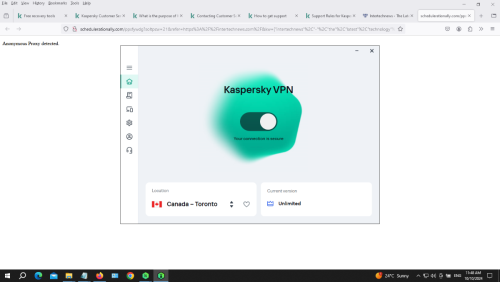
 GrantJay8 posted a topic in Kaspersky: Basic, Standard, Plus, PremiumWhy after installation of a new Kaspersky Premium my PC won't shut down? Takes ages and I switched off by force. With previous Kaspersky Total Security it used to start up and shut down very quick. OS is Windows 10. What is the problem of VPN Kaspersky Secure Connection? When I try to use it almost all websites open blank page with error: 'Anonymous Proxy detected'. As I understand the purpose of VPN Secure Connection is to hide my real IP and to avoid any proxy detection. I tested it with all servers list from countries A to Z.
-
 Treehouse replied to Treehouse's topic in Virus and Ransomware related questionsSorry for not answering timely. l don't have wifi or permanent internet access. 1. lt's 24.6.0.1874 (64-bit) 2. lt's 1.3.7.1 3. Yes 4. l installed it once upon a time from extension store iirc. l don't remember. lt became problematic recently. lt didn't give warnings before. 5. l can not get it to show me the warning now. lt is undeleteable though. l just deleted another extension and its gone but adlesse comes back. l open extensions folder in AppData\Local\Yandex\YandexBrowser\User Data\Default\Extensions and its folder literally manifest itself right in front of my eyes as i launch the browser.
-
Hello @maigor, Additional to @richbuff’s reply. On a daily basis, I use a number of Remote Desktop applications, with no adjustments to the Kaspersky software necessary & with no keyboard lag/delay evident. Which RD solution is used, name & version? Have you tried different RD solutions? When the keyboard lag/delay issue happens is a VPN active? If the system is run in SafeMode with Networking does keyboard lag/delay issue persist? May we have a video of the keyboard lag/delay issue please? Is the Keyboard physically attached? KIS version & patch(x)? x=letter Has a KIS Software compatibility check ever been run? Has a uninstall & clean install of KIS been done? Have the following Temp areas been cleaned up: C:\Windows\Temp C:\Users\YOURNAME\AppData\Local\Temp Please let us know? Thank you🙏 Flood🐳
-
 K0908 replied to K0908's topic in Kaspersky: Basic, Standard, Plus, PremiumHi Flood, I just did some quick research on this UltraAV, I can't trust it. If Kaspersky is out of the queue, I am switching back to bitdefender as my backup plan. Where can I process a partial refund? I am not using this garbage. Or as far as I know, they are banning the US license right? So can I just get a Euro key instead? So I can get my damn database updated?
-
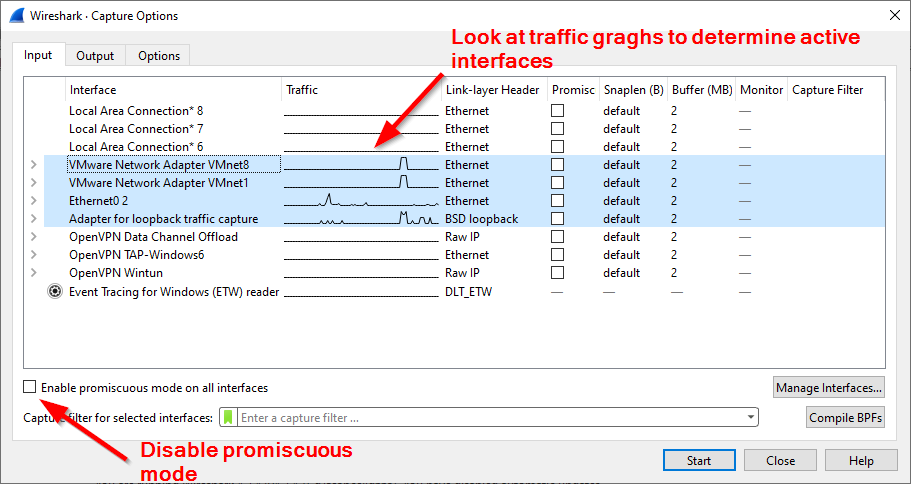
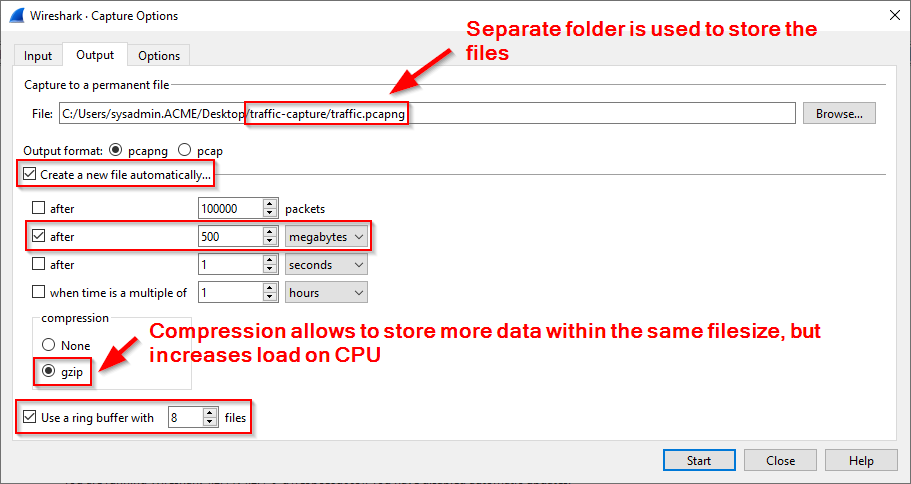
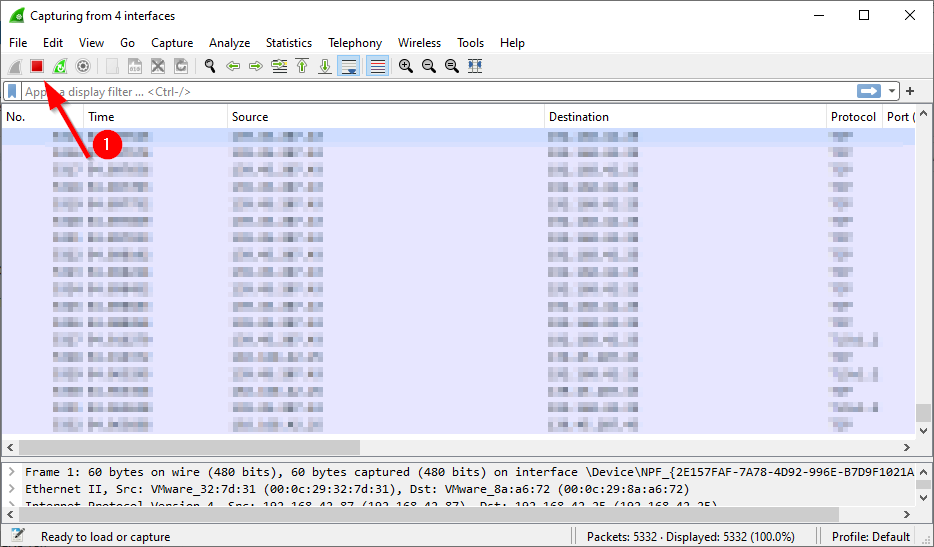
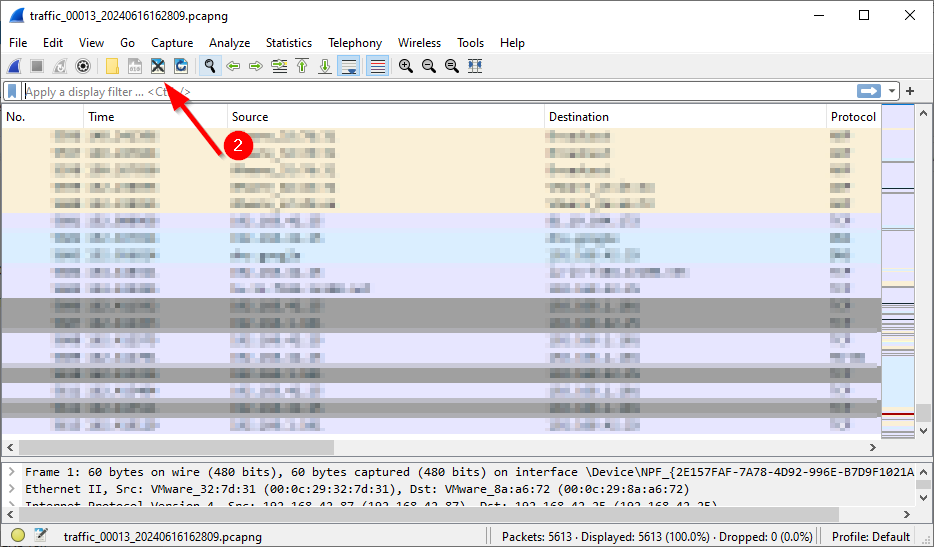
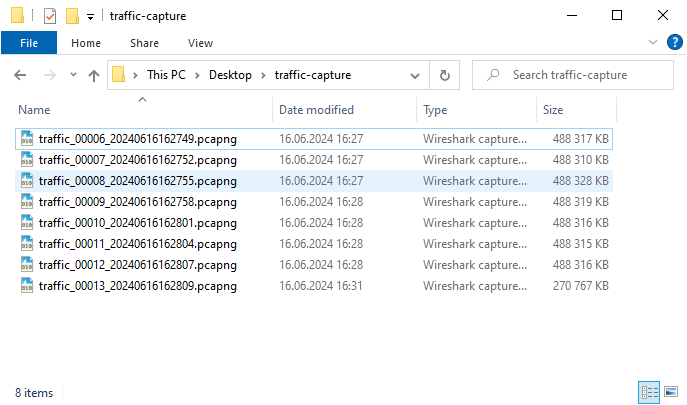
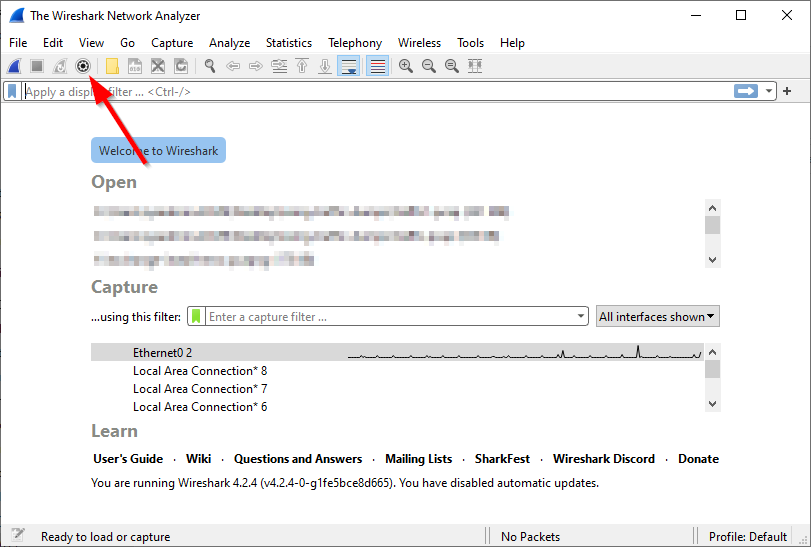
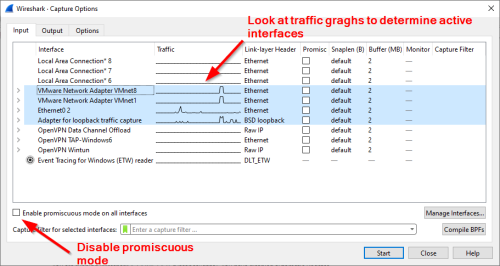
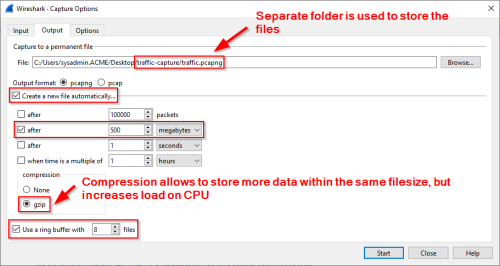
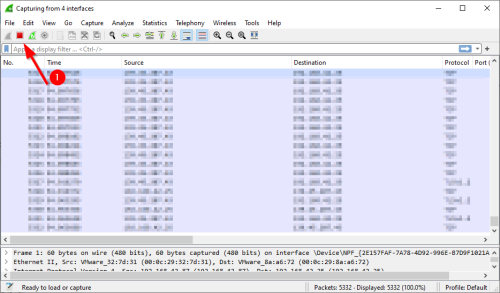
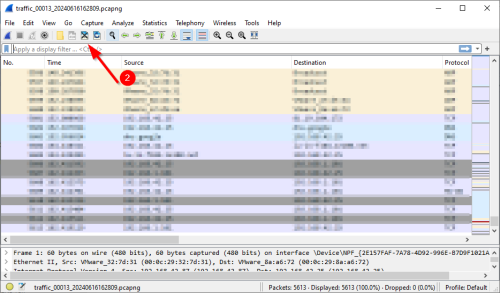
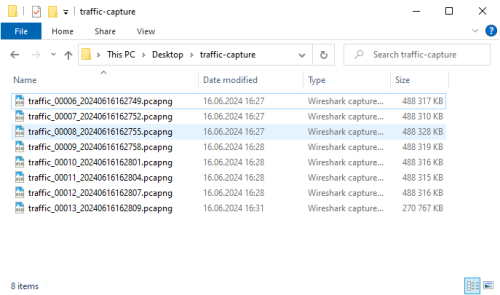
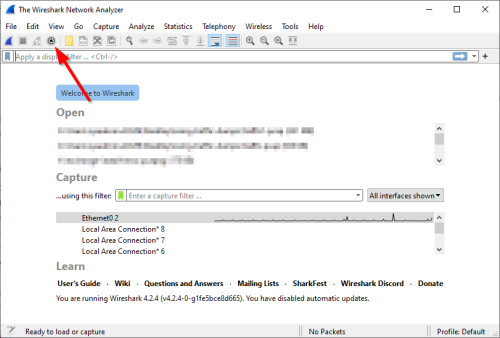
 Advice and Solutions (Forum Knowledgebase) Disclaimer. Read before using materials. In cases when you need to diagnose an intermittent network issue, or capture an event that occurs only once in a while, you may need to use ring-buffer mode in Wireshark. In this mode, the number and overall size of the capture files will be fixed and when the limit will be reached, the newest data will start continuously overwrite the oldest data in the capture buffer. Below, you will find instructions for how to configure this capture mode: Download and install Wireshark from the official website, if you have not done that already. Launch Wireshark and click Capture options. On the Input tab, uncheck option Enable promiscuous mode on all interfaces and select interfaces from which you want to capture traffic. If you are not sure which ones to select, look at the graphs in the Traffic column to determine which interfaces are active and select all of them. If you are completely lost, you can also select all interfaces. On the Output tab you configure where the resulting files will be saved, the ring buffer capture is also configured here. It's a good idea to create a separate folder to store the capture files. The screenshot below shows optimal configuration for the capture settings. Note that the space occupied by the capture files will be equal to the size of a single capture file multiplied by the number of files in the ring buffer. In our example it's 500 MB * 8 = 4000 MB, which is the optimal size to upload to Company Account portal. You can modify these parameters to allocate more or less space for the capture files, though we don't recommend making it less than 2 GB. Use of compression is optional. With it, more data can be stored within the same file size, but it also can increase load on the CPU. Disable this option in case of performance problems. When everything is configured, click Start to start the capture. Please, pay attention that when capturing traffic in the ring buffer mode, it's very important to monitor for the occurrence of the event that you need to record and disable capture as soon as possible after the event has occurred, otherwise the relevant part of the capture may be overwritten. The timing is especially important, when using smaller sizes of the buffer. When the capture is finished, click Stop capturing packets, then Close this capture file. Pack the resulting files into an archive and upload it to your Company Account.
-
 nwq posted a topic in Kaspersky Internet SecurityI've been experiencing this problem on Win7 x64 SP1 for a few weeks and I just discovered that it's caused by KIS 21.3.10.391 Every time I reboot, 5-10 secs after desktop appears, Windows becomes dead for 40 seconds. It does not respond to any keyboard or mouse commands. I can still move the mouse around and see taskbar respond to mouse position but none of the apps work. During that ~40 seconds of sleep, it takes all the commands in buffer though. For ex; I run Windows File Explorer during the first 5-10 seconds of startup while it's still responsive. Then it goes dead... I try to drag-move the File Explorer window and it does nothing... After 40 secs passes, it moves the window. (this is not due to slow HDD or swap file etc...it's running on SSDs, and it used to be very fast and responsive a few weeks ago). This buffering also works for keyboard entries too.. Somehow KIS pauses the system for 40 secs on every boot after desktop appears. It does not happen when i PAUSE the protection. Any ideas to fix this?
-
 Shorouq posted a topic in Virus and Ransomware related questionsI created a pdf file days ago by combining multiple images and compressing it using adobe acrobat PC ver. It looked fine at the time. Now when I open it, it's a completely different file. It has the content of another pdf file on my pc but has the size of the original one, and yet worse, it has a creepy cyphered message? It freaked the sh*t out of me. I scanned the file using Kaspersky, but the results were negative: "no threats". I ran a quick scan, also turned out negative. I'm currently running the full scan. Could there be a virus on my PC that Kaspersky isn't able to detect? What do I do?

-
 Psiu47 replied to Psiu47's topic in Kaspersky: Basic, Standard, Plus, PremiumApologize once again but this report should not be clarified as closed since this abnormal symptom with report window not registering rootkit or quick/complete scans still happening even with Kaspersky Standard 21.18.5.438(a). I can't record properly this bug because there are moments the scan will be registered and displayed and sometimes not. Ever since Kaspersky Standard 21.17.7.539 which I have firstly see happening on May untill September with actual version KS 21.18.5.438(a) this unknown behavior have been going and the company should be aware of it. Whenever I execute these scans if I don't keep report window opened, there is a chance the task is not being saved and registered with full detail on report window so with my last studies about this bug. Having opened and minimzed report window whenever scans are about to finish. The task will display as they are ongoing but at the end when is over. The scan is saved, being registered and display but if I close report window or click to update there is a %60 of chance that task will not be registered or displayed on report window. I'm annoyed to know that I have been facing this bug for a while and I would like revive the situation regarding this unknown bug which started at May 9th accordingly to my first post.
-
Psiu47 replied to Psiu47's topic in Kaspersky: Basic, Standard, Plus, PremiumWell I'm going wait till the company update the version and solve as they should because It have been recently I've installed KS onto my PC and I really not in the mood to uninstall or repair while protection gets disabled meanwhile I try to fix this functionality. There alternative method which I never used before is 'Selective/Selected scan' and if I want to verify a single file. All that I need is to copy the destination path and add '\xxx' at the end of destination. So I'm hanging on using this method to run quick scans onto singular files and not a subfolder. I'm going keep waiting till company fix this.
-
 disoster posted a topic in Virus and Ransomware related questionsHello, Im having a problem with a website, where i get an rerror code when trying to go to check out. Here is the rerror code: HEUR:Trojan-PSW.Script.Generic. I also get this message: Prevented the download of a malicious file or other object designed to infect your computer with malware that will slow it down, destroy your system, or cause other problems. We protected you from downloading this object. You can safely close this window. The problem is that i have never had an issue with website before. here is link to the page https://www.hijabhus.com/quick-order. Could this maybe be a false flag?
-
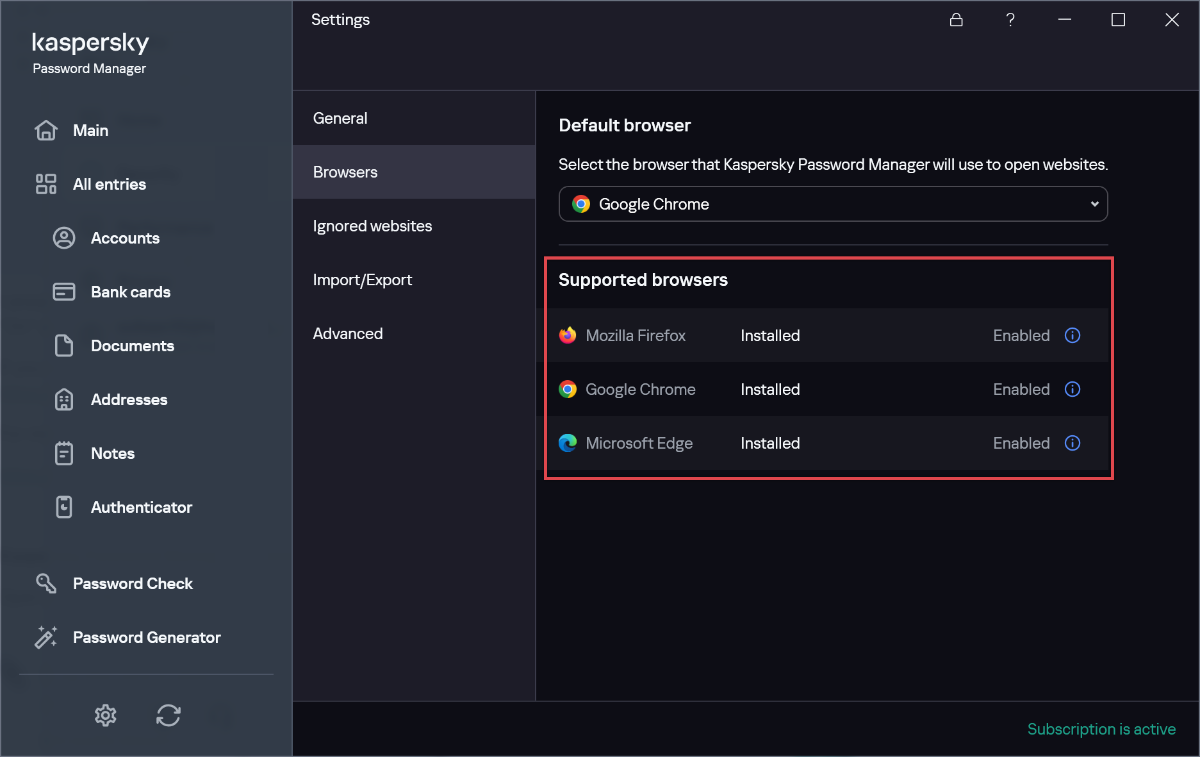
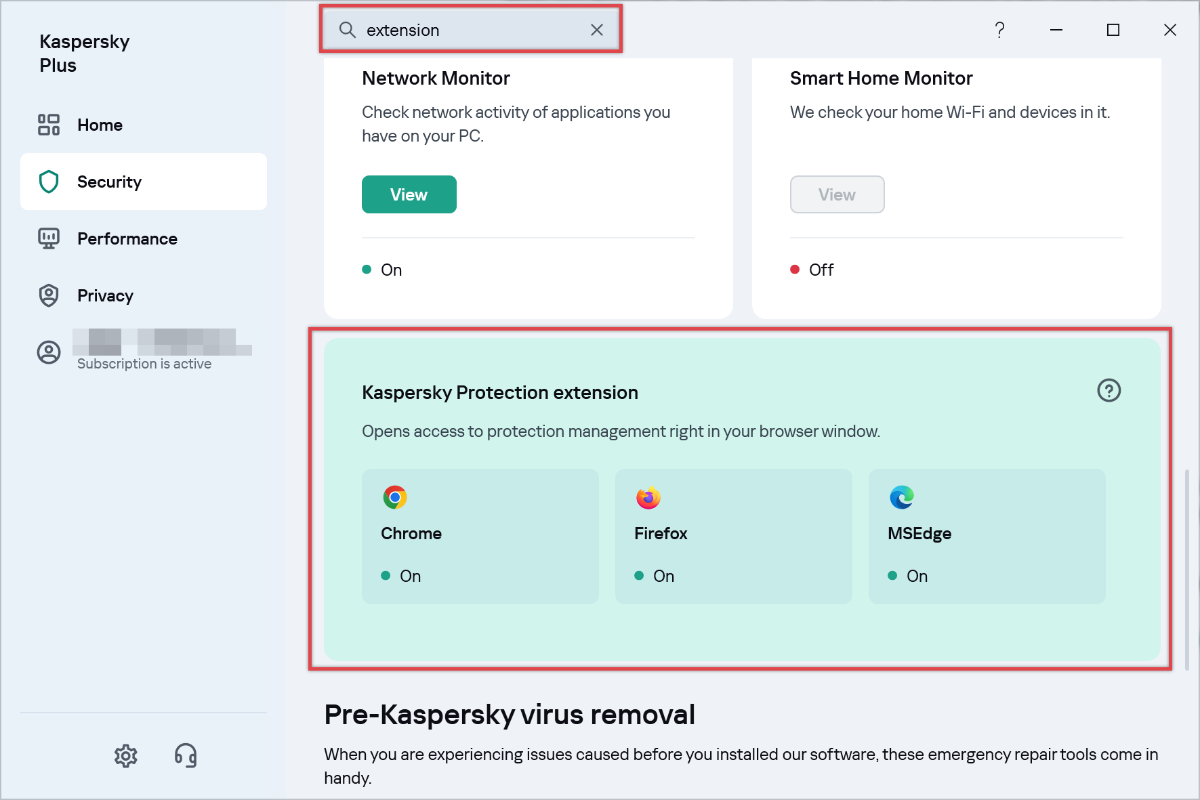
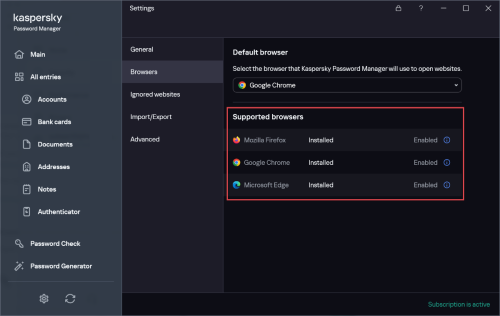
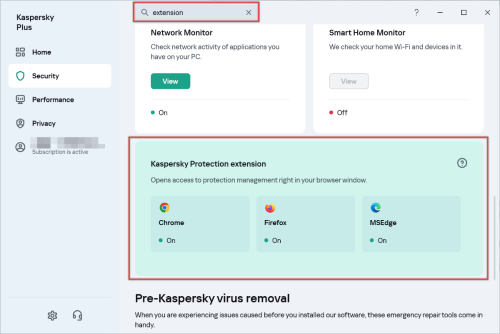
 BlackEdition replied to BlackEdition's topic in Kaspersky: Basic, Standard, Plus, PremiumIt appears that all Kaspersky extensions ✅ can in fact be installed without searching for them through the Chrome/Edge/Firefox extension stores! I was only aware of this now and I will explain it below since it wasn't very clear even to me who I've been using Kaspersky products for many years. To install Kaspersky Protection extension: Open your Kaspersky for Windows app, search for "extension" in the search box, and there you will find all the extension-related info. I already had all the extensions installed, so I made a quick test by deleting KP extension for Firefox, but it was still stuck to "On" even when I restarted Kaspersky Plus & Firefox. However, once I restarted both apps I got a Windows pop up from Kaspersky Plus asking to install the extension for Firefox. If you weren't successful with installing the extension this way, just install it through the link here (link is alive when writing this post): https://chromewebstore.google.com/detail/kaspersky-protection/ahkjpbeeocnddjkakilopmfdlnjdpcdm For more info: https://support.kaspersky.com/common/start/12782#block4 To install Kaspersky Password Manager extension: Open your KPM for Windows > Settings > Browsers, then just click on install from there. I tested it on Firefox by deleting my extension then re-installing it through here. It started downloading the extension by itself and I was able to install it like usual. Hopefully things will continue working nicely like this for all of us who are not living in USA! I can't verify if this will work for US-residents, so maybe someone try this and let us know? Thanks to everyone who tried to help. This thread is now solved.
-
 BRN169 replied to viper69's topic in Kaspersky Anti-VirusI woke up Thursday morning to find UltraAV on my PC and didn't know what it was or where it came from. A quick search of the name and I was able to figure out what happened from all the irate people that were in my same situation. To say I am beyond disappointed in Kaspersky is an understatement. I swore by your product for almost a decade and was pretty pissed off when I found out about the US forcing you out of the market. That said, this little stunt with UAV destroyed any sympathy or good will I had for you guys. My PC crashed 8 times in two days and locked-up or failed to reboot countless times. Attempts to roll back to restore points failed, attempts to restore a backup image failed. I lost 1/2 a day from work screwing with the PC until finally I was able to boot it into safe mode and remove that abomination of an AV utility. I now get to lose my Saturday tomorrow doing the same on my kids and wife's PCs. I cannot stress in any more plain English than this move royally pissed me off. Please fire any bone-headed executives or managers s that approved or followed orders to execute such a stupid action without so much as a popup asking people if they were OK with installing a third party's utility.
-
 testuser replied to testuser's topic in Virus and Ransomware related questionsThanks for the quick explanation but i did same steps like you. Downloaded to my Windows computer (Windows 10 - i don't think it's relevant with 10 or 11) and not detected. And then i copied that from Downloads to Desktop and still not detected. Not deleted. I wish i would record a video about this but i only took screenshot. By the way console_zero.exe needs some libraries like in that error. Malware is downloading some libraries and executing itself. If you want re-procedure the attack simulation i can help you. Also we prepared a report an analysis report about this malware type. Anyway, let's wait the final verdict and see how it's going. But as i said before i copied the malware and it didn't detect. My KP version is 21.18.5.438(a)
-
 viper69 replied to viper69's topic in Kaspersky Anti-VirusThank you for the quick reply. I work with customers. This is a bad handoff 100% that KAV doesn't know what to do. As the software is continuing to re-install on its own, despite deleting the files out of the UAV folder and Uninstall, how is it installing over and over? Are they coming through my connect with KAV in a sense? This is extremely suspicious, and not secure. Check here for others with the same issue https://www.reddit.com/r/antivirus/
-
Hello @viper69, Welcome! Unfortunately we don't have any guidelines for UltraAV, nor the total force silent migration, but, having a quick look at the UltraAV website they have: How to uninstall Ultra Antivirus on Windows 11 -> we have *no idea* if that will remove the software permanently - all we can suggest is to please follow it & if there's any issues please log a request with Kaspersky Customer Service - https://support.kaspersky.com/b2c#contacts , they have access to (your) subscription & private information, for privacy reasons, the Kaspersky Community doesn't -> on the support page, select either Email or Chat, then fill in the template as shown - *select (your) Kaspersky software (1) from the drop-down list*; (there's no templates available to address UltraAV issues); please include a *detailed history*: *Also - IF requesting Chat request the operator email (you) a copy of the chat transcript *before* ending the chat - otherwise (you'll) have no record of the chat* *IF they tell (you) to contact UltraAV, please do that as well, again, unfortunately we don't have any guidelines for their support system but the support link is: https://support.ultrasecureav.com/hc/en-us/requests/new. Please share the outcome with the Community, when it's available? Thank you? Flood?+?

-
 jpgoelz replied to jpgoelz's topic in Kaspersky Anti-VirusI got a reply from support: Dear Customer, Thank you for contacting Kaspersky technical support. This key combination launches the Kaspersky on-screen keyboard. Unfortunately, you cannot change the key combination for the on-screen keyboard, but you are welcome to disable this function by going to the Kaspersky application under: Kaspersky main window -> Gear bottom left -> Advanced -> uncheck "Open on-screen keyboard with Ctrl+Shift+Alt+P" and save the setting. Thanks a lot. However, this option does not exist (the only option is hardware virtualisiation): I was not able to respond in time due to the holidays and the ticket was closed. So, I have reopened another ticket and will update you with their response.