Search the Community
Showing results for 'Quick Launch Keyboard'.
Found 1791 results
-
 cilico posted a topic in Virus and Ransomware related questionsDear Support Team, Please I have my website https://www.cilico.com/ and https://new.cilico.com which does not have a Phishing now. I totally cleaned it but Kaspersky keeps flagging my domain and subdomain as dangerous. This scan shows that no threats were detected in our files, further indicating that these detections are likely false positives. ClamAV Scan Results: However, these domains are still flagged, and our newly developed temporary domain, new.cilico.com, which is scheduled for an upcoming launch, has also been flagged. Kindly reanalyze for me. Help me remove the blacklist. Thank you very much!

-
 Sam Black replied to Sam Black's topic in Virus and Ransomware related questionsDear Berny, thank you so much for your help with the website. You made the process so much easier, and I really appreciate your quick and clear support.
-
 gameboybin posted a topic in Kaspersky Total SecurityThis has happened with me so many times. It is making me sick. It happens during Teamviewer Remote Sessions. When using Teamviewer or any kind of Remote control. If Kaspersky founds a virus and you need to go select what to do with that virus. The pop up will make your remote control unusable. You cannot use any Keyboard keys or mouse clicks through Remote. It requires you to physically be there on the computer to be able to turn the pop up off Same as on web pages that says the web page might be harmful and you click to move forward, A kaspersky pop up will show up and you cannot use Computer remotely any more because of it Please provide me with a solution. Or fix this issue ASAP! Many Thanks!
-
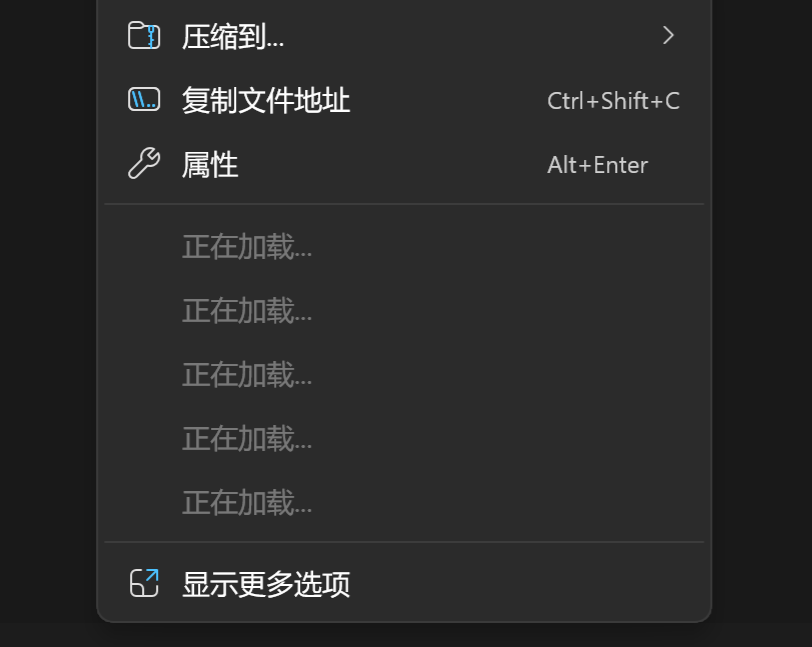
 SimpleName posted a topic in Kaspersky: Basic, Standard, Plus, PremiumMy Windows 11 device is currently suffering from a problem that makes Explorer to launch extremely slowly and making the context menu almost unusable. The symptom looks like Explorer is taking forever to load Kaspersky's context menu. Uninstalling Kaspersky solved the issue and re-installing it can reproduce the problem. The context menu looks like this if Kaspersky is installed ("正在加载..." means Loading...) When trying to show more options, Explorer will become unresponsive and must be killed using Task Manager. If you wait long enough, the context menu will eventually load. The version of Kaspersky Plus is 21.19.7.527(a). I didn't experience this problem before yesterday, and I haven't downloaded/installed any new software during this time. I checked all other context menu entries and tried to uninstall them, but it seems like it's Kaspersky that is causing the issue. Disabling Kaspersky has no effects, it must be uninstalled for Explorer to function properly again. The last Windows Update is on 10/26 and the patch is KB5044384. I've been using Kaspersky for years and never experienced problems like this. But I think I'll just uninstall Kaspersky for my PC to handle my work properly.
-
 SomebodyOx posted a topic in Virus and Ransomware related questionsOk, so a very old, pirated copy of cubase, had its executable detected by kaspersky, as not-a-virus:RiskTool.Win32.DefenderDisabler.k, is detected as a low risk item, there are no other trojans or viruses surrounding it, just the executable of the program that got detected, it did not get flagged under quick scan or real time protection, only in a full scan, it doesnt get deleted or quarantined automatically, I did install it, but I havent ran that program in at least around 5 years, is there any chance it actively puts my system in danger? Its not a keygen, or anything like that, is the actual cubase executable, which seems to be modified as its icon its different than the standart cubase icon, still I had not executed it in years, and windows defender did not detect it in a full scan before a installed kaspersky, should I be worried? I dont think I can upload the file since its more than 500mbs Am running kaspersky 21.20.8.505, in windows 10 pro ver 22h2Am
-
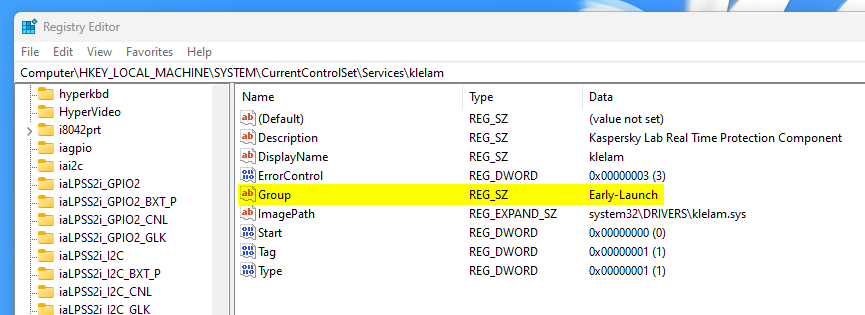
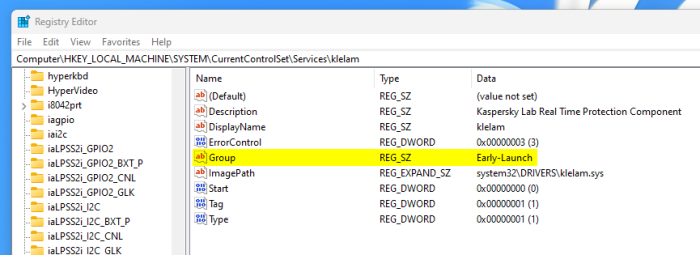
 Guest replied to a post in a topic in Kaspersky: Basic, Standard, Plus, PremiumOnce again I answer my own questions because I am too quick to post. After literally 5 minutes of research, I was able to find out that Kaspersky's drivers are indeed running as ELAM (Early Launch Anti-Malware) drivers: Probably obvious, but I wanted to make sure. And now anyone with the same question knows as well.
-
 Largadon replied to Largadon's topic in Kaspersky: Basic, Standard, Plus, PremiumThank you for a quick response. I've suspected this might be one of the possibilities. It infact updated to 21.20 today. Although I agree with @Gb2015 that there could be more controll over app version updates.
-
 Hello @Leo24 To investigate which process or application loaded this DLL and triggered the error, examining the Windows Event Logs and Process Monitor can be very effective. Here’s a step-by-step guide to help you track down the source of the load error: Step 1: Check the Windows Event Viewer The Event Viewer can reveal system or application errors related to DLL loading issues. Open Event Viewer: Press Win + R, type eventvwr, and press Enter. Navigate to System and Application Logs: In the left pane, expand Windows Logs and select System. Look for Error or Warning events that occurred around the same time as the DLL load error. Similarly, check under Application for any error entries related to DLL loading or system issues. Filter Event Logs: You can filter the logs to make it easier to find specific events. Right-click System or Application logs, select Filter Current Log…, and filter by Event level (select "Error" and "Warning") and the time range you suspect. Look for events with ID 1000 (Application Error) or ID 7000 (Service Control Manager). These may indicate specific errors related to failed DLL loads. Analyze the Event Details: Click on any relevant event and review its General and Details tabs. Note any filenames, process names, or paths related to the load error. Step 2: Use Process Monitor to Track DLL Loads Process Monitor (from Sysinternals) is invaluable for tracking file activity and pinpointing which process tried to load the DLL. Download and Launch Process Monitor: You can download Process Monitor from the Microsoft Sysinternals site. Run it as an administrator for full access to system events. Set a Filter for the DLL File: In Process Monitor, go to Filter > Filter…. Add a filter for Path that contains the name of the DLL (e.g., kernel32.dll). Click Add, then OK to apply the filter. Reproduce the Load Error: Try to reproduce the scenario that triggers the load error if possible. Process Monitor will capture the events related to this DLL. If the load error appears randomly, you can simply let Process Monitor run in the background while observing for the error. Analyze the Process Monitor Logs: Look for entries related to the DLL in question. Check the Process Name and PID (Process ID) to identify which application or service was attempting to load the DLL. Examine the Result and Details columns, especially for any entries marked with Path Not Found, File Not Found, or Access Denied errors. Investigate the Process Details: Once you have identified the process triggering the load error, you can investigate further by: Checking if this process has known issues with dependencies or compatibility on Windows 7. Verifying if updates or reinstallation are available for this application. Step 3: Review System Startup and Autoruns If the DLL load error occurs during startup, it may be linked to startup programs or services. Use Autoruns (Sysinternals Tool): Download and run Autoruns. Go to the Everything tab and search for entries related to the DLL or the process name. Disable any non-essential entries that reference the DLL, restart your computer, and see if the error persists. Summary These tools—Event Viewer, Process Monitor, and Autoruns—can give you a clearer picture of the process triggering the load error. Let me know if you discover any specifics, and I can help further analyze the findings. Thank you
-
 Viffergb replied to Viffergb's topic in Kaspersky Total SecurityWindows 10 Version 21H1 (OS Build 19043.1348) Kaspersky Total Security Application Version 21.3.10.391 For several weeks Full Scan on my HP Laptop gets stuck on 1% and trying to take any action results in a complete ‘lock up’ of the p.c. I then have to do a ‘hard reset’ (press power button for several seconds) to turn it off. ‘Do not unpack large compound files’ is set to max. file size of 100MB but it makes no difference. I can successfully run ‘Full Scan’ in ‘Safe Mode’!!! ‘Windows Defender’ Full Scan runs without any issues and I have ‘Acronis Cyber Protect Home Office’ installed, and that also can run a ‘Full Scan’ also without any issues. I have therefore decided to disable my automatic full scan schedule in Kaspersky and use these other scan methods instead until a solution can be found. All other Kaspersky scans run without any issues, e.g. Quick / Vulnerability etc,
-
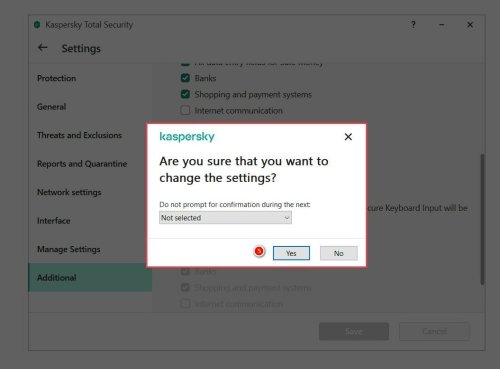
 Hello @tniou, Welcome! Thank you for your contribution👏 Agreed, there has been a lot of complaints about Secure Keyboard input is enabled popup, because, it’s a PIA😡! We think there’s an easy fix for this, similar to Kaspersky’s Protected browser, for any field where the Secure Keyboard input is enabled popup (apart from the fact the tiny keyboard icon is already present in the righthand side of all such fields, nothing like overkill Kaspersky!!); all they have to do is use a green border on all Secure Keyboard input is enabled protected fields → it’s not 🚀 science Kaspersky🙄 Thank you🙏 Flood🐳+🐋
-
 Bav replied to Bav's topic in Kaspersky: Basic, Standard, Plus, PremiumYour app is a disgrace Kaspersky. It has been quiet for 2 days, I thought that was it, and I was minding my own business watching a movie on amazon prime when what did I get? A big popup on the bottom right covering a quarter of the screen asking me if I wanted to install Kaspersky on my mobile. Sure, there was an option for "don't ask me this again" but I have no idea how many more different messages I am going to get before this stops happening, or if it WILL stop. I am going back to the combo of defender and Malwarebytes and getting a refund on Kaspersky for a second time. There won't be a third. I have compiled a list of grievances I have with the operation of the product, that I wanted to talk to support about, specifically how you can't enable outbound internet connection notifications without enabling the main app interaction notification which notifies you about EVERYTHING an app tries to do (launch, modify registry, access said folder, etc etc). All I want is an "this app is trying to access the internet, deny or allow" but I have to click 9 different allows just to get ONE game to run, it's crazy. So anyone who wants to keep their sanity just disables all outbound notifications. Sure you can trust an app but not even that is foolproof, I have trusted HD Sentinel 100 times and it disappears from trusted on every launch and I get registry access popups, so I just gave up and disabled those notifications. Why you don't have a "depth of notifications" and for example "alert on internet access only attempt" option, in SUCH a deep program, I have no idea. You've made the outbound notifications all but useless as it stands. And who wants to completely trust every app on their system anyway? I had been compiling all the data and how it could be made more user friendly but I don't think there's a point. At this stage the program is as bad as Mcafee and Norton in the spam department and doing the things I specifically want an AV app to NEVER do. I have no idea why someone like Kaspersky who I always trusted and respected would resort to these childish tactics, but, that's it for me. All I want to know is how to remove the program with NO trace in my registry and without messing anything up that would make me think I need to format and re install windows 11. Anyone with knowledge on that? How to truly and completely uninstall this adware? (it's adware by its very definition, as I have unticked all the notification popups and it's still behaving as adware would, as I have explained. Advertising the mobile app while I am on a PC, is adware. I took pics for proof also).
-
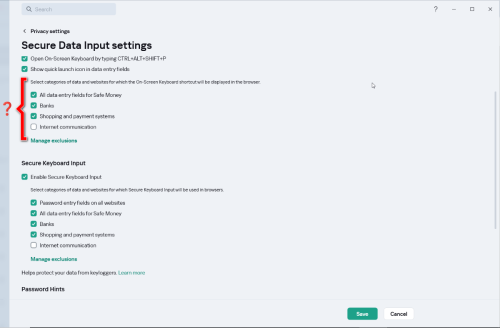
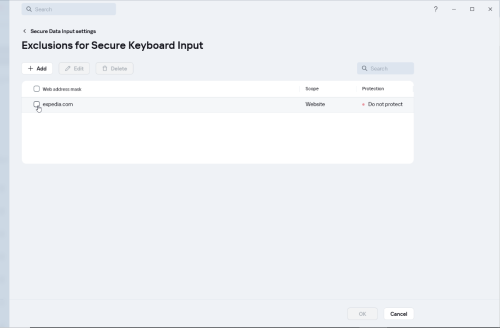
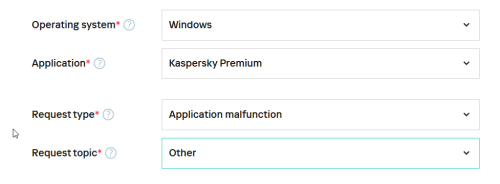
Hello @RDB, Welcome back! Doesn't happen for us - image 1, not *forced* to use SK: after *manually* starting SK, SK works with expedia, image 2 Please tell us: *which* computer OS version & build, Windows Search, type WINVER, open the WINVER app & post back the information OR macOS, read: Find the name and version number of a Kaspersky application? Which Secure keyboard input options are selected - image 3? Does adding an exclusion help - image 4? Try another browser or try the browser in Incognito / Private mode? Restore browser settings to the original defaults -> chrome://settings/reset & recheck? In Kaspersky Reports, Safe browsing - are there any Expedia errors? IF the issue persists -> log a request with Kaspersky Customer Service - https://support.kaspersky.com/b2c#contacts, on the support page, select either Email or Chat, then fill in the template as shown; please include a *detailed history*, include screen-prints & OR video IF they show the issue: *Also - IF using Chat - ask the operator to email (you) a copy of the chat transcript *before* ending the chat - otherwise (you'll) have no record of the chat* Thank you? Flood?+?


-
 Августин Берендеев replied to supportIV's topic in Kaspersky Password ManagerДобавьте пожалуйста шорт каты https://ru.wikipedia.org/wiki/Сочетание_клавиш keyboard shortcut, quick key, access key, hot key Сворачивание программы в трей, сворачивание программы в панель задач, закрытие (выход из программы, с завершением процесса и службы), блокировку базы, создание новой карточки, редактирование уже существующей карточки, листание разных учёток в одной карточке, создание новой "группы", открытие настроек, синхронизацию, копирование значений из полей user name, password,переход к определенной группе "аккаунты/банковские карты/заметки/документы/" Раздельные горячие клавиши для копирование значения из поля "логин" в буфер обмена и отдельной клавиши для копирования значения из поля "пароль" (не ctrl+c) в буфер обмена. Нужно для того чтобы можно было alt+tab'абаться между программой и менеджером паролей. И копировать конкретное поле сразу, а не водить мышкой. например открыл steam чтобы залогиниться atl+tab, появилось окно менеджера ctrl+f, вод пары символов для поиска, из активной карточки (если нужная карточка не активна, "активируешь её стрелочками") нажимаешь ctrl+z (копировал в буфер логин), alt+tab открылось окно ввода в стим ctrl+v, alt+tab ctrl+x (копировал в буфер пароль) alt+tab ctrl+v. можете даже их за хардкодить, без возможности что-то настроить не нужно отвечать на моё предложение формулировкой "функция мало востребованная, маловероятно добавим", это нужно было сделать много лет назад ещё до запроса от пользователей, простите меня конечно, но программе больше 12 лет, и в ней всё ещё нету базовых вещей. За двенадцать лет можно было уже и с дистрибутивом под линукса определиться, и обеспечивать работу только на одном конкретном дистрибутиве. Почему такие простые вещие нужно выпрашивать у разработчика который претендует на место среди лидеров рынка?
-
 Вячеслав sva posted a topic in Kaspersky Rescue Disk[code] System: Kernel: 5.15.0-57-generic x86_64 bits: 64 compiler: gcc v: 11.3.0 Desktop: Cinnamon 5.6.5 tk: GTK 3.24.33 wm: muffin dm: LightDM Distro: Linux Mint 21.1 Vera base: Ubuntu 22.04 jammy Machine: Type: Desktop System: Micro-Star product: MS-7D42 v: 1.0 serial: <superuser required> Mobo: Micro-Star model: MAG B660M MORTAR WIFI DDR4 (MS-7D42) v: 1.0 serial: <superuser required> UEFI: American Megatrends LLC. v: 1.40 date: 05/19/2022 Battery: Device-1: hidpp_battery_0 model: Logitech Wireless Mouse serial: <filter> charge: 55% (should be ignored) status: Discharging Device-2: hidpp_battery_1 model: Logitech Wireless Keyboard serial: <filter> charge: 55% (should be ignored) status: Discharging CPU: Info: quad core model: 12th Gen Intel Core i3-12100 bits: 64 type: MT MCP arch: Alder Lake rev: 5 cache: L1: 320 KiB L2: 5 MiB L3: 12 MiB Speed (MHz): avg: 4183 high: 4286 min/max: 800/5500 cores: 1: 4286 2: 4251 3: 4178 4: 4136 5: 4138 6: 4105 7: 4251 8: 4125 bogomips: 52838 Flags: avx avx2 ht lm nx pae sse sse2 sse3 sse4_1 sse4_2 ssse3 vmx Graphics: Device-1: Intel vendor: Micro-Star MSI driver: i915 v: kernel ports: active: HDMI-A-1 empty: DP-1, DP-2, HDMI-A-2, HDMI-A-3, HDMI-A-4 bus-ID: 00:02.0 chip-ID: 8086:4692 Display: x11 server: X.Org v: 1.21.1.3 driver: X: loaded: modesetting unloaded: fbdev,vesa gpu: i915 display-ID: :0 screens: 1 Screen-1: 0 s-res: 1920x1080 s-dpi: 96 Monitor-1: HDMI-1 mapped: HDMI-A-1 model: LG (GoldStar) W2363D res: 1920x1080 dpi: 96 diag: 587mm (23.1") OpenGL: renderer: Mesa Intel Graphics (ADL-S GT1) v: 4.6 Mesa 22.0.5 direct render: Yes Audio: Device-1: Intel vendor: Micro-Star MSI driver: snd_hda_intel v: kernel bus-ID: 00:1f.3 chip-ID: 8086:7ad0 Sound Server-1: ALSA v: k5.15.0-57-generic running: yes Sound Server-2: PulseAudio v: 15.99.1 running: yes Sound Server-3: PipeWire v: 0.3.48 running: yes Network: Device-1: Intel driver: iwlwifi v: kernel port: N/A bus-ID: 00:14.3 chip-ID: 8086:7af0 IF: wlo1 state: down mac: <filter> Device-2: Realtek RTL8125 2.5GbE vendor: Micro-Star MSI driver: r8169 v: kernel pcie: speed: 5 GT/s lanes: 1 port: 4000 bus-ID: 03:00.0 chip-ID: 10ec:8125 IF: enp3s0 state: up speed: 100 Mbps duplex: full mac: <filter> Bluetooth: Device-1: Intel type: USB driver: btusb v: 0.8 bus-ID: 1-14:7 chip-ID: 8087:0033 Report: hciconfig ID: hci0 rfk-id: 0 state: up address: <filter> Drives: Local Storage: total: 589.69 GiB used: 14.44 GiB (2.4%) ID-1: /dev/nvme0n1 vendor: Kingston model: SKC3000S512G size: 476.94 GiB speed: 63.2 Gb/s lanes: 4 serial: <filter> temp: 23.9 C ID-2: /dev/sda vendor: A-Data model: SU650NS38 size: 111.79 GiB speed: 6.0 Gb/s serial: <filter> ID-3: /dev/sdb type: USB vendor: Silicon Power model: silicon -power size: 983 MiB serial: <filter> Partition: ID-1: / size: 237.08 GiB used: 14.41 GiB (6.1%) fs: ext4 dev: /dev/nvme0n1p5 ID-2: /boot/efi size: 95 MiB used: 30.2 MiB (31.8%) fs: vfat dev: /dev/nvme0n1p2 Swap: ID-1: swap-1 type: file size: 2 GiB used: 0 KiB (0.0%) priority: -2 file: /swapfile USB: Hub-1: 1-0:1 info: Hi-speed hub with single TT ports: 16 rev: 2.0 speed: 480 Mb/s chip-ID: 1d6b:0002 Device-1: 1-2:2 info: Micro Star MYSTIC LIGHT type: HID driver: hid-generic,usbhid rev: 1.1 speed: 12 Mb/s chip-ID: 1462:7d42 Hub-2: 1-3:3 info: Genesys Logic Hub ports: 4 rev: 2.1 speed: 480 Mb/s chip-ID: 05e3:0610 Device-1: 1-3.4:5 info: Kingston PS2232 flash drive controller type: Mass Storage driver: usb-storage rev: 2.0 speed: 480 Mb/s chip-ID: 13fe:1f23 Device-2: 1-8:4 info: Logitech Unifying Receiver type: Keyboard,Mouse driver: logitech-djreceiver,usbhid rev: 2.0 speed: 12 Mb/s chip-ID: 046d:c534 Hub-3: 1-11:6 info: Genesys Logic Hub ports: 4 rev: 2.0 speed: 480 Mb/s chip-ID: 05e3:0608 Device-1: 1-14:7 info: Intel type: Bluetooth driver: btusb rev: 2.0 speed: 12 Mb/s chip-ID: 8087:0033 Hub-4: 2-0:1 info: Super-speed hub ports: 9 rev: 3.1 speed: 20 Gb/s chip-ID: 1d6b:0003 Hub-5: 2-2:2 info: Genesys Logic USB3.2 Hub ports: 4 rev: 3.2 speed: 10 Gb/s chip-ID: 05e3:0625 Sensors: System Temperatures: cpu: 27.8 C mobo: N/A Fan Speeds (RPM): N/A Repos: Packages: apt: 2632 No active apt repos in: /etc/apt/sources.list Active apt repos in: /etc/apt/sources.list.d/official-package-repositories.list 1: deb http: //mirrors.powernet.com.ru/mint/packages vera main upstream import backport 2: deb http: //mirror.docker.ru/ubuntu jammy main restricted universe multiverse 3: deb http: //mirror.docker.ru/ubuntu jammy-updates main restricted universe multiverse 4: deb http: //mirror.docker.ru/ubuntu jammy-backports main restricted universe multiverse 5: deb http: //security.ubuntu.com/ubuntu/ jammy-security main restricted universe multiverse Info: Processes: 277 Uptime: 5m Memory: 31.08 GiB used: 1.5 GiB (4.8%) Init: systemd v: 249 runlevel: 5 Compilers: gcc: 11.3.0 alt: 11 Client: Unknown python3.10 client inxi: 3.3.13 [/code]
-
Hello @booger, You’re most welcome! (ioo) the tiny Quick launch keyboard icon is fine, the Secure Keyboard Input is enabled popup it generates serves no purpose at all, (ioo & that of many others,) it’s something Kaspersky “should” fix, if they’d only listen to their subscriber feedback! Need to replicate & research, we’ll get back to you. Are KVPN & Kaspersky Security Data Escort Adapter both uninstalled - see images, let us know so we can again replicate & research? When the “desktop app continually tries to install the VPN” is there an alert that you can screenprint & post for us please? Thank you🙏 Flood🐳+🐋
-
 Joefram80 replied to Joefram80's topic in Kaspersky Total SecurityI read online that Disabling Enable Secure Keyboard Input would fix this issue? Also that kaspersky web protected browser. I have it turned on for a few banking sites. What I notice is when I have it on, my mouse lags a lot when moving it around my screen. Is this normal? I use this laptop with an external monitor and notice many times I can’t even move the mouse to the other monitor and I have it on EXTEND. But if I turn this off, is that fine? So would disabling both of these things be fine? Or would it jeopardize the internet security of kaspersky? Because I can’t even type on the address bar because of this no matter with the laptop keyboard, external keyboard or even the windows or kaspersky on screen keyboard.
-
 Antipova Anna posted a topic in Advice and solutions for Kaspersky Endpoint Security for BusinessAdvice and Solutions (Forum Knowledgebase) Disclaimer. Read before using materials. This article is about Kaspersky Endpoint Security for Windows (KES for Windows) Description FDE precheck is a utility used for advanced Full Disk Encryption compatibility testing. It contains latest drivers which will be implemented in future KES releases. FDE precheck also collects diagnostic data used to fix compatibility issues. Inability to use laptop keyboard and\or touch-pad is one of the most frequently met issues. Using FDE precheck you can understand if compatibility issue was already fixed and will be included in next release or it should be addressed. You can download latest FDE precheck utility using following links: For KES 11 - https://support.kaspersky.com/14328 System requirements Single operating system should be installed on the test machine, FDE Precheck can't properly function on a host with multiple operating systems. Use administrative account to run the utility. Read before proceeding Decrypt the test host and remove Kaspersky Endpoint Security and AES module. Do a backup of the critical data on the test machine. Follow the test sequence exactly as stated below. Do not manually stop the execution of the utility. The system will automatically restart several times, it is an expected behavior. Plug in laptop. Do not run test on battery. Failure to comply with steps above may lead to unpredictable consequences. Test sequence Make sure machine decrypted does not have KES or AES module installed not running any KL drivers has no critical data plugged in Reboot. Copy and unpack fde_precheck.zip archive. Run elevated fde_precheck.exe (either by right-clicking and choosing Run as administrator or by starting it from an elevated command prompt). If the program will not find any incompatibilities the following message box will appear: Press Yes, to initiate installation of the encryption drivers and initiation of the test. Wait for the automatic reboot, then login using the administrative user as was done earlier. Press OK on the pop-up that will appear shortly after the reboot: Press Yes in the UAC window if it will appear shortly after. Wait for several minutes (up to 10-15 minutes) until next automatic reboot will occur. Do not initiate reboot manually! It will be done automatically. Manual reboot at this stage may result in corruption of the OS. All preparations are run in background, it is normal that there will be no indication of activity on the desktop. After automatic reboot you will see the preboot agent, and it will require human presence to complete those tests. If possible, record the whole process on a camera of smartphone. You will be asked to enter random keystrokes using the keyboard and mouse. In case of successful keystroke registration you will see something like that: Just follow the instructions that will appear on the screen and press "NEXT >" when done with each test. In case FDE Precheck Preboot agent will fail booting or will freeze at some point, please take photo of the error message, or record the whole process on a camera and reboot the machine if necessary. OS will boot either way. Login using the administrative account that was used earlier. At this point drivers will be removed in the background and host will be rebooted one last time automatically. Wait for several minutes (up to 10-15 minutes) until next automatic reboot will occur. Do not initiate reboot manually! It will be done automatically. Manual reboot at this stage may result in corruption of the OS. All preparations are run in background, it is normal that there will be no indication of activity on desktop. The following three files are always created. All three files are mandatory to provide for analysis. fde_precheck_report.txt fde_precheck.log (will be located in the folder with fde_precheck.exe) Description of what have happened during tests (with screenshots and video if possible).
-
 Gevu200 replied to Gevu200's topic in Kaspersky: Basic, Standard, Plus, PremiumAppreciate quick reply. Marked it as solution. Unfortunately will have to buy non Kaspersky solution. Too bad can not buy a current product to extend KTS.
-
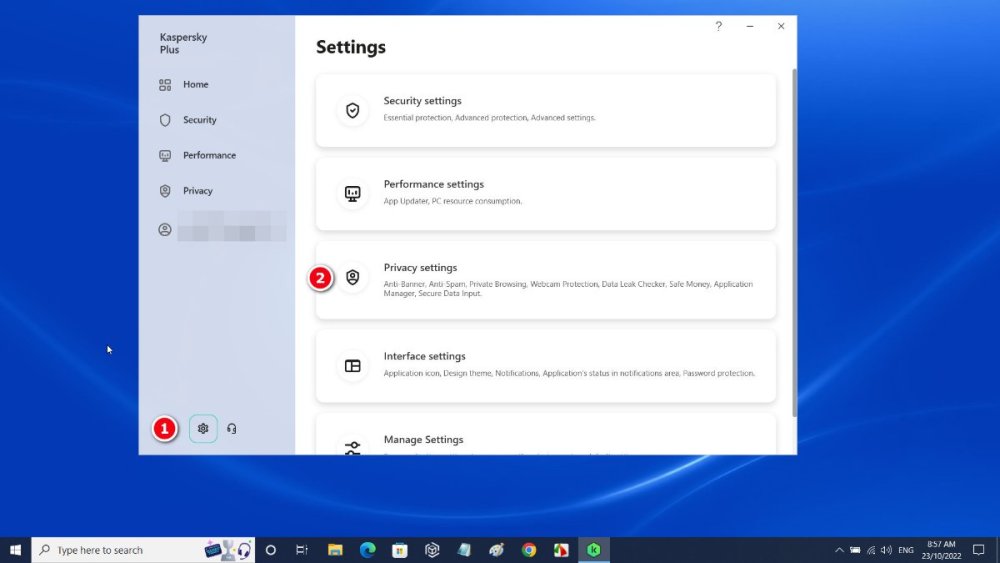
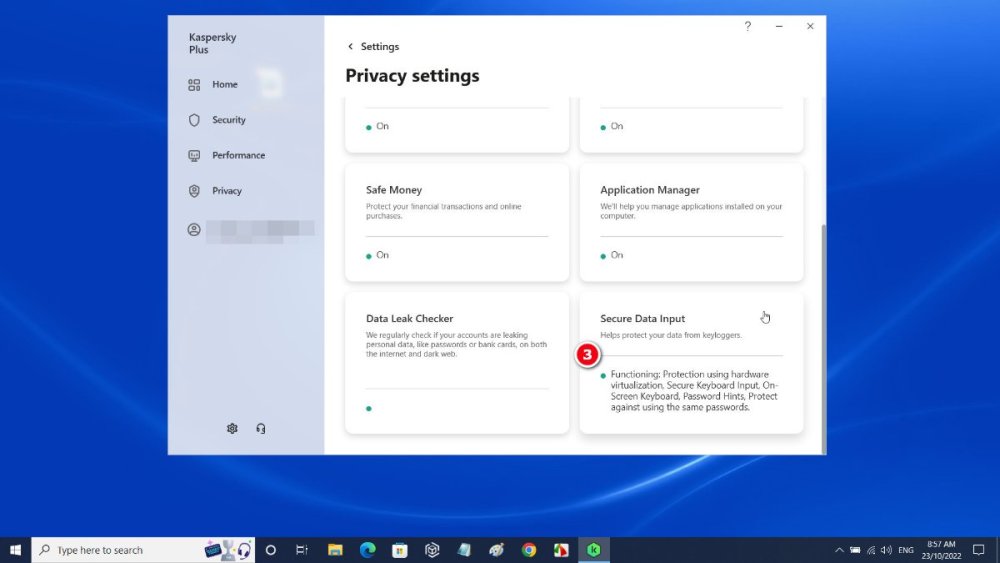
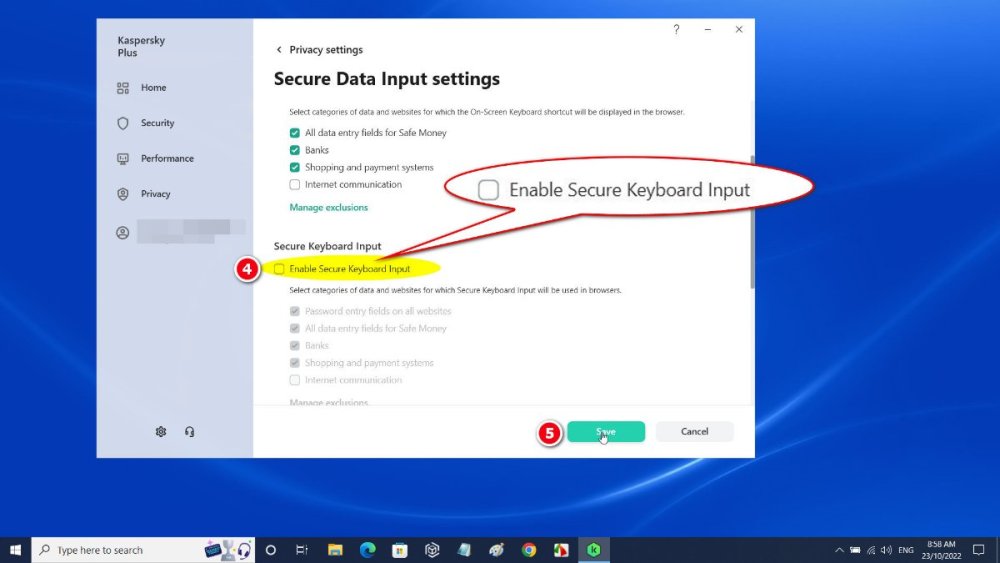
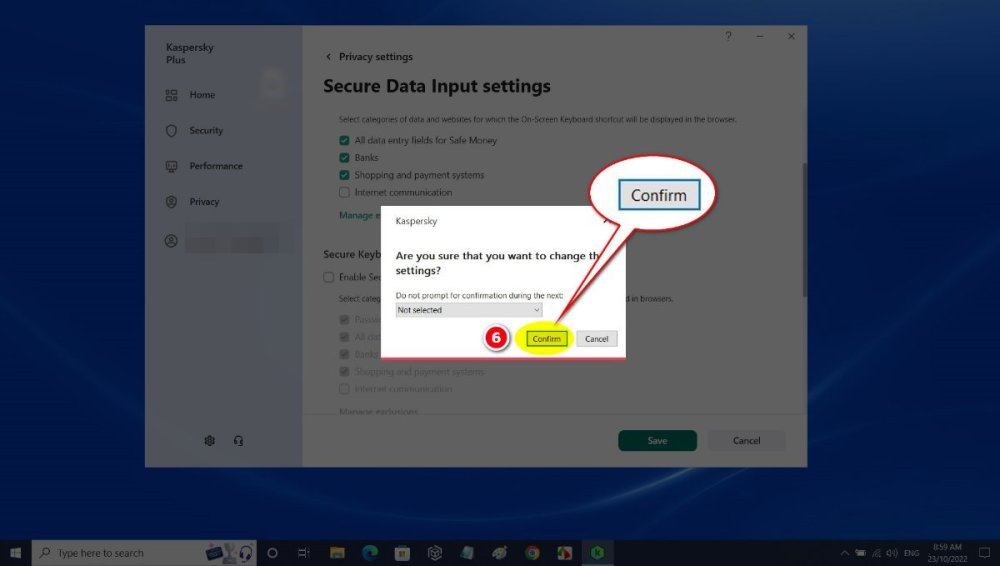
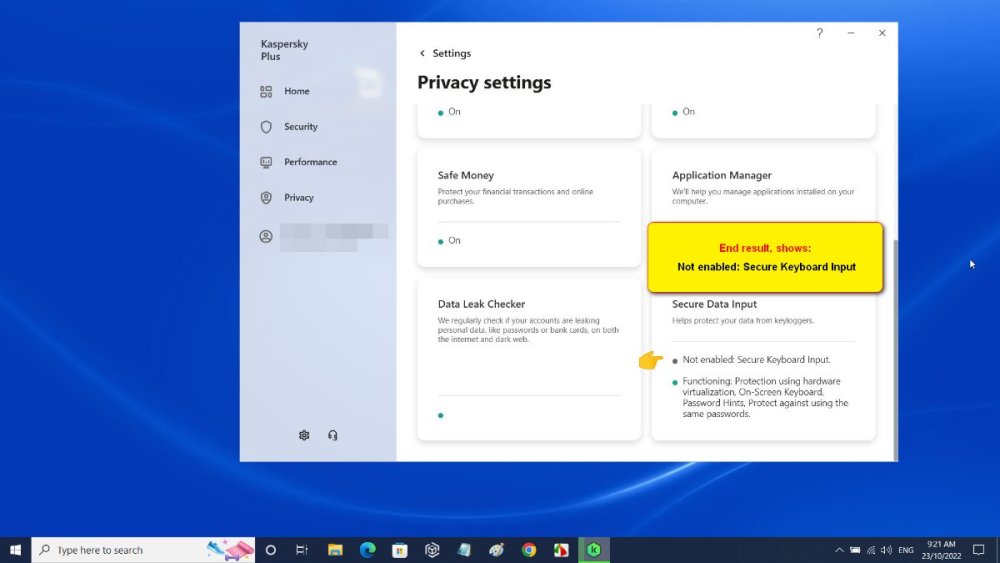
Hello @om richard, Welcome! Open the GUI, select Settings⚙, select Privacy settings, select Secure Data Input, uncheck Enable Secure Keyboard Input, select Save, select Confirm. Thank you? Flood?+? Resources: About protection of data entered on the computer keyboard How to configure protection of data entered on the computer keyboard
-
 Zied replied to NNT12's topic in Kaspersky Endpoint Security for BusinessHello, Please check this article for further details about adding an Applications Launch Control rule : https://support.kaspersky.com/KSWS/11.0.1/en-US/178908.htm
-
 booger replied to booger's topic in Kaspersky Internet SecurityThank you for the quick response. I did do, what you had suggested, prior to posting my question. That is disappointing to find out you cannot disable the tiny Quick Launch Keyboard. I also have had problems on the Android app where it continually insists I turn-off the Allow App Install from Unknown Sources option...even though I have told the app to IGNORE multiple times. Also, the desktop app continually tries to install the VPN. I DON’T WANT THE VPN!!! I ALREADY HAVE A VPN!!! I thought I would give Karpersky a try this year...BIG MISTAKE!!! Very disappointed!
-
Hello Rimanah, Welcome! Quick scan, scans the following objects by default: Objects loaded at the startup of the operating system System memory Disk boot sectors Quick scan can also be configured, via Advanced Settings In Additional settings of Quick Scan window, you can specify Quick Scan settings for various file types and Quick Scan optimization settings, and select Quick Scan methods and technologies. Thanks KIS-QUICK SCAN QUICK SCAN
-
Hello @emaranhao, Thank you for posting back & the information! So, for clarity, the steps to solve, have now changed from (1) restart Kaspersky to (2) deactivate Secure keyboard input - is that correct? Re Kaspersky Security Cloud (KSC) version 21.3.10.391(x), which patch(x), x = letter, on the Windows Taskbar or hidden icons, rightclick the Kaspersky icon, select About? Is Windows fully updated, with all Updates showing a Successfully applied status? Have the Keyboard drivers been updated / checked / refreshed? In the year the physical keyboard has been intermittently freezing, has KSC been fully uninstalled, saving License information *only*, leaving all other check-boxes unchecked / blank & clean installed? Is KSC Premium or Free? Please post back? Thank you? Flood?+?
-
 Gabriel Boettcher replied to Gabriel Boettcher's topic in Kaspersky Endpoint Security for BusinessWhat kind of adjustments? The domain polling settings are only related to configuring how often the quick and full polls are performed, as far as i know.
-
 Hello, these components are not supported by Server OS and therefore disabled by default. Please always refer to the Online Help or Knowledgebase before installing. Example here: Quick guide to installation and initial configuration of Kaspersky Endpoint Security for Linux There is no other Best Practice Guide for it. If you need to get your settings checked you can purchace a Health Check by Kaspersky Professional Services. More Iformation here: Kaspersky Professional Services Best Regards