Search the Community
Showing results for 'Hardware Virtualization' in content posted in Kaspersky: Basic, Standard, Plus, Premium.
Found 171 results
-
 Bearded posted a topic in Kaspersky: Basic, Standard, Plus, PremiumWhen I log in to My Kaspersky, the computer icon turns orange instead of green. This is due to the following notification: "To improve your protection, use a PC that supports hardware virtualization." Virtualization is enabled in the BIOS and shows as enabled in Task Manager under the CPU tab. Even when I select "Ignore," the problem persists. I'm not sure what the issue could be.

-
 Welcome to Kaspersky Community. Did You click in Ignore in My Kaspersky site or directly in Your K. product? Even having the Virtualization support in BIOS, if You are using Windows 11 with Core Isolation options enabled, as it can't be 2 Hypervisors enabled in the system, You should to disable the W11 Hypervisor to let Kaspersky one working. In my case, I prefer to keep those W11 Core Isolation options enabled, since They give You wider protection in the system, Kaspersky Virtualization only works for Safe Money sessions.
-
Bearded replied to Bearded's topic in Kaspersky: Basic, Standard, Plus, PremiumVirtualization is resolved, everything work fine, but, again, im MyKaspersky page, my PC device don't want turned green, I just see circle in the middle that's been spinning 2 hours. Any suggestions? I'll try refresh the page, situation is same.

-
 KasperskyUser13 posted a topic in Kaspersky: Basic, Standard, Plus, PremiumHi, I know in the last year was hard time for us to disabled windows 24h2 hardware virtualization to make Kaspersky use it. But now in windows 11 25h2 for me I can’t keep it disabled from the same way I was doing it in the past, but it enables itself after every restart; I’m frustrated because of this I just bought a license and I’m thinking of refund if this issue not resolve for me. I searched the web, chat with ai with no luck. Windows 11 25h2 clean install Kaspersky Standard 21.24.8.522 AMD Process
-
 fabiodanzetta posted a topic in Kaspersky: Basic, Standard, Plus, PremiumHi all, yesterday I formatted my pc to do a clean install of Windows 11 24H2 home edition . Once I finished installing the operating system, I did all the updates, installed more software, disabled the memory integrity check and smart app checking since I would install Kaspersky Plus 21.18.5.438 (a) after the reboot, and I wanted the product's hardware virtualization to work, but this time, even though I had disabled the necessary Windows components and did not have any other hypervisors installed either Microsoft or third-party, the product tells me that hardware virtualization is not available: incompatible hardware or software detected. I have also modified the entry in the registry at the following path HKEY_LOCAL_MACHINE\SYSTEM\CurrentControlSet\Control\DeviceGuard by setting “EnableVirtualizationBasedSecurity” with value 0 but nothing. With the previous version I had before formatting namely 23H2 the hardware virtualization with the same changes worked. In the BIOS the requirements are all enabled as it has always been but I checked anyway. The BIOS version has always been the same for a couple of years and has not been updated. What could prevent hardware virtualization from working? Anything with this new Windows release? Thanks soo mutch.
-
 ArHu posted a topic in Kaspersky: Basic, Standard, Plus, PremiumI am unable to disable Virtualization Based Security (VBS) on Win11 pro, I tried all the steps pertinent to win 11 in the guide below but it doesn't work (ryzen 9 8000 series cpu btw) https://support.kaspersky.co.uk/kaspersky-for-windows/21.24/troubleshooting/safemoney/13713?cid=KTS_21.3&utm_source=interceptor&utm_medium=product&utm_campaign=KTS_21.3#block1
-
 Guest posted a topic in Kaspersky: Basic, Standard, Plus, PremiumHello! I was wondering but can you add a recovery environment option for Kaspersky plus/premium? This would be able to remove the following: Worms Trojan Horses Ransomware Spyware Adware Keyloggers Rootkits Botnets Logic Bombs File Infectors Polymorphic Viruses Macro Viruses Boot Sector Viruses Browser Hijackers Mobile Malware Polymorphic Malware Multipartite Viruses Armored Viruses Memory Resident Viruses Macro-based Malware Stealth Viruses MBR (Master Boot Record) Viruses Browser Exploits Fileless Malware Scareware Cryptojacking Advanced Persistent Threats (APTs) Exploit Kits Social Engineering Attacks Internet of Things (IoT) Malware Man-in-the-Middle (MitM) Attacks Pharming Fake Antivirus Software Spyware Browser Redirect Virus Clickjacking Remote Access Trojans (RATs) Exploit Ransomware Scamware SMS or Text Message Malware Zero-day Attacks Dropper Malware Grayware Scareware BIOS/UEFI Rootkits DNS Changer Malware Watering Hole Attacks Crypto-Malware Steganographic Malware AI-Powered Malware Malvertising Form Grabbers IoT Botnets Sandbox-Evasion Malware Click Fraud Point-of-Sale (POS) Malware File Crypters Network Sniffers Firmware Malware Browser Password Stealers Memory Scrapers Extortionware Mac Malware Voice Phishing (Vishing) BIOS Infectors Firmware Infectors AI-Powered Attacks Browser Extension Malware Advanced Malware FrameworksMaldoc (Malicious Document) Camfecting (Webcam Hacking) Mobile Banking Trojans DNS Tunneling Stealer Trojans Crypto Stealers Formjacking POS RAM Scrappers SMS Trojans Banking Trojans Crypto Ransomware Drive-by Downloads Fake Apps SMS Worms Browser Helper Object (BHO) Malware Scareware Trojans Email Spamming Botnets SQL Injection Attacks Cross-Site Scripting (XSS) Attacks Password Cracking Tools Virtual Machine Escape Malware Bootkit Malware Mobile Spyware Clipboard Hijackers Browser Password Managers Exploitation Malicious Browser Toolbars File Encryption Malware IoT Firmware Vulnerabilities POS Keyloggers Biometric Spoofing Attacks Supply Chain AttacksJavaScript Malware DNS Hijacking Email Phishing APT (Advanced Persistent Threat) Macro Obfuscation Techniques Evasive Malware Memory Manipulation Malware HTTPS/SSL Stripping Credential Stuffing Malware Droppers Firmware Backdoors Wi-Fi Hacking Malware Web Shell Malware Fake Updates DNS Hijacking Reverse Engineering Malware Advanced Fileless Malware Memory Injection Attacks Malware Persistence Techniques Botnet-based DDoS Attacks Steganography-based Malware Crypto-Mining Malware Voice Assistant Exploits Malicious USB Devices DNS Poisoning Browser CryptojackingRAT (Remote Access Trojan) Keystroke Injection Attacks Crypto-Stealing Trojans Memory Scanning Malware Mobile Remote Access Trojans (MRATs) Cryptojacking Botnets Browser Crypto-Mining Worms Bluetooth Hacking Malware Social Media Malware POS Malware Frameworks Credential Harvesting Malware PowerShell-based Malware SMS Phishing (Smishing) Mac Firmware Malware IoT Botnet Command-and-Control (C&C) Servers In-memory Malware Audio Malware Man-in-the-Browser Attacks Malicious AI-generated Content Malware Droppers via Malvertising Mobile Spyware Frameworks Drone Hijacking Malware Wi-Fi Sniffing Malware Point-of-Sale Malware as a Service (MaaS) Ad Fraud Botnets Voice Recognition Malware Ransomworms Memory Cache Attacks Cryptojacking Trojans Wearable Device Malware Stealthy Hardware Implants Mac Sandbox Escapes Industrial Control System (ICS) Malware Bluetooth Worms Ad Fraud Malware Voice Assistant Eavesdropping GPS Spoofing Techniques Smart TV Malware AI-driven Spear Phishing Software Supply Chain Malware Drone Surveillance Malware Optical Malware Print Spooler Exploits Automotive Malware Cloud-based Malware Password-Stealing Botnets Phishing Kits Malware Sandbox Evasion Techniques GPS Spoofing MalwareVirtualization-based Malware Voice Assistant Manipulation Fitness Tracker Exploits Social Media Botnets Digital Wallet Malware Self-Replicating Mobile Malware Genetic Malware Variants SIM Card Hijacking Malware Data Exfiltration Malware E-commerce Platform Exploits Adware Bundlers Smart Home Device Hijacking Distributed Denial of Service (DDoS) Botnets Cryptocurrency Exchange Exploits AI-driven Deepfake Malware Web Skimming Malware Insider Threat Malware Machine-to-Machine (M2M) Malware Industrial Espionage Malware Banking Trojan Networks Mobile BotnetsMacro-less Malware Credential Stealing Malware Secure Boot Exploits Voice Assistant Voice Cloning Genetic Algorithm Malware Medical Device Malware Automated Malware Generation Tools Cloud Service Exploits Mobile App Code Injection Vehicle-to-Vehicle (V2V) Malware Digital Certificate Abuse Zero-Click Exploits Deep Packet Inspection (DPI) Malware Memory Residency Malware Anti-Analysis Techniques Social Engineering Malware IoT Device Firmware Backdoors IoT Botnet as a Service (BaaS) Infrastructure-as-Code (IaC) Malware Hidden Cryptocurrency Miners Malware Targeting Virtual Reality (VR) Platforms Malicious USB Rubber Ducky DNSSEC Attacks Electric Grid Malware Automated Botnet Creation Tools IoT Device Identity Spoofing Counter-AV Techniques Malware Campaign Automation Malware Targeting Cloud Containers Exploits Leveraging AI Models Voice Command Injection Attacks Malware Targeting Voice Assistants Supply Chain Manipulation Malware AI-based Polymorphic Malware Wearable Device Data Theft Covert Communication Channels Print Spooler Exploitation Techniques Machine Learning Poisoning Attacks Augmented Reality (AR) Malware Genome Data Exploitation Quantum Computing-based Malware Malware Evading Behavioural Analysis Adware as a Service (AaaS) Quantum Cryptography Exploits Cryptocurrency Malware Mining Pools Malware Leveraging Blockchain Technology Hardware-based BIOS Attacks Mobile Botnets for Cryptojacking Evasive Code Obfuscation Biometric Data Spoofing Phishing as a Service (PaaS) Web Scraping Malware Driver Exploits Unpatchable Zero-day Exploits And many many more! This would be an amazing feature to add please take this into consideration thanks for reading!
-
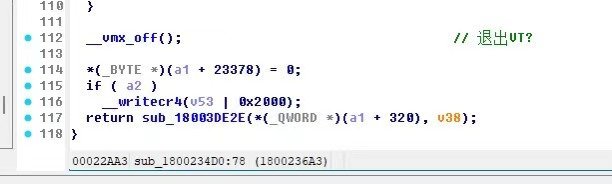
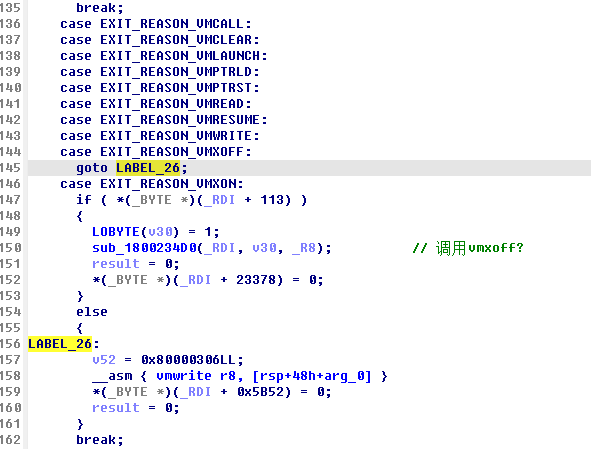
 Bin626 posted a topic in Kaspersky: Basic, Standard, Plus, PremiumExit on encountering the vmxon command No vt nesting Safety is about as good as nothing?😓
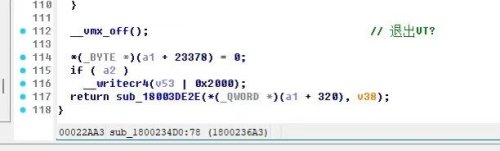
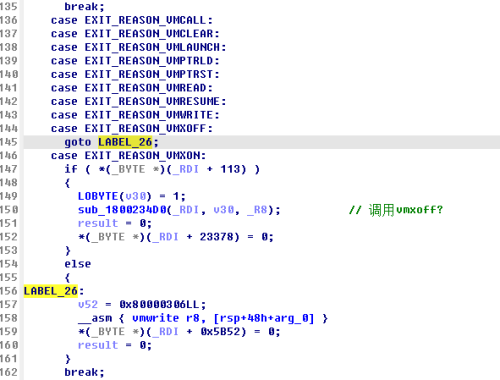
-
Kuser7985Sh posted a topic in Kaspersky: Basic, Standard, Plus, PremiumKaspersky shows in settings that "hardware virtualisation is not available. Incompatible hardware or software detected." Does this make my PC less secure compared to a PC that supports hardware virtualisation, or does this feature only affect the Safe Money component? By the way, I did enable hardware virtualisation in BIOS settings, but still Kaspersky shows the same message. And for the info, my previous computer also showed that same hardware virtualisation is not available text, so I honestly don't know what type of computer Kaspersky needs for this function to work. Clarification on this question would be great. Thank you for any assistance.
-
 Rafael Lino posted a topic in Kaspersky: Basic, Standard, Plus, PremiumHello, I am facing a compatibility issue between Kaspersky Premium and the Virtualization-Based Security (VBS) feature on my system. Kaspersky does not activate hardware virtualization protection, and the following message is displayed: "Hardware virtualization is not available: hardware or software incompatibility detected." After investigating, I realized that Kaspersky requires hardware virtualization to offer protection against advanced threats, but to enable this functionality, I had to disable VBS in the Windows settings. This caused the deactivation of a critical security layer in the system. System Details: - Processor: AMD Ryzen 7 9800X3D - Motherboard: Gigabyte X870 GAMING X WIFI7 - Operating System: Windows 11 Pro - Antivirus: Kaspersky Premium Actions Taken: - Disabled VBS in the system settings to allow Kaspersky to use hardware virtualization. - After disabling VBS, hardware virtualization protection was enabled in Kaspersky, and the error notification disappeared. Questions: - Security: Disabling VBS has resulted in a reduction of the system's security. VBS is an important layer of protection against advanced attacks (such as rootkits and exploits), and by disabling it, the system becomes more vulnerable to these types of threats. - Compatibility: Is there a way to configure Kaspersky to work with hardware virtualization without disabling VBS? Alternatively, is it possible for Kaspersky to offer a solution that works well with VBS enabled? I would appreciate any guidance or solutions to help me enable both or if there are any settings in Kaspersky that I can adjust to maintain the security layers intact while using hardware virtualization protection. Thank you for your help, and I look forward to your response. Best regards, Rafael Lino
-
 VashtiianWasTaken posted a topic in Kaspersky: Basic, Standard, Plus, PremiumHardware Virtualization says something's interfering or whatever. I turned off core isolation and every other program running, turned svm mode on and it still showed it couldn't work. It was working fine before I did a fresh Windows 11 install. Not sure what's blocking it. (Have reinstalled twice)
-
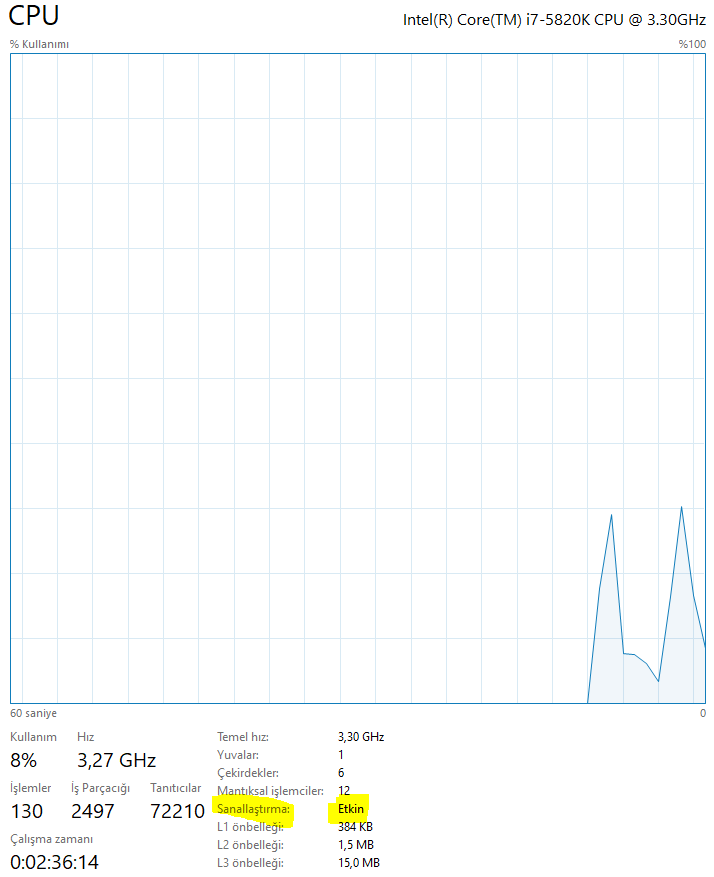
 BUG posted a topic in Kaspersky: Basic, Standard, Plus, PremiumI have an INTEL 5820K processor. I have been using Premium for a long time. At first, Hardware Virtualization was active and there were no problems. But then for some reason I get a warning “Hardware virtualization is not available. Incompatible hardware or software detected.” My processor supports hardware virtualization. It is active and on. I'm leaving pictures of the settings and support pictures below. What is the problem, how do I solve it, I would appreciate if anyone can help me.
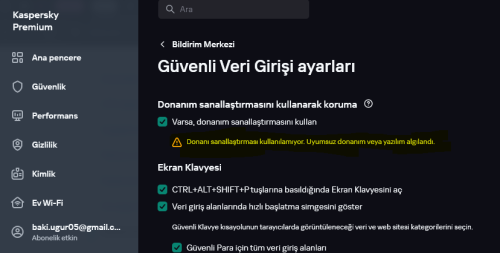
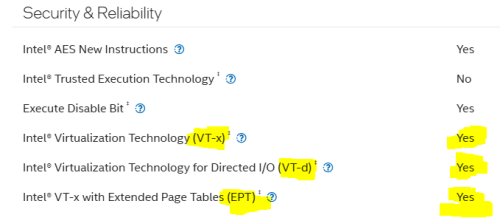
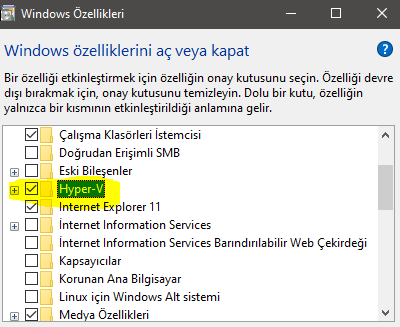
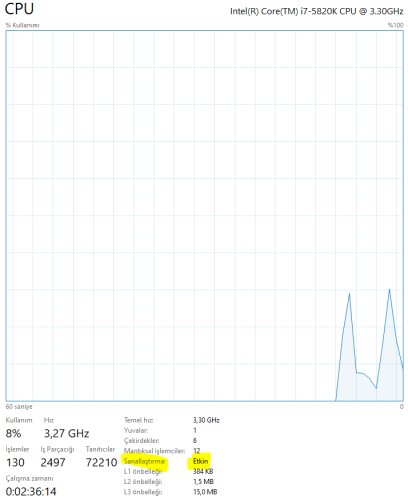
-
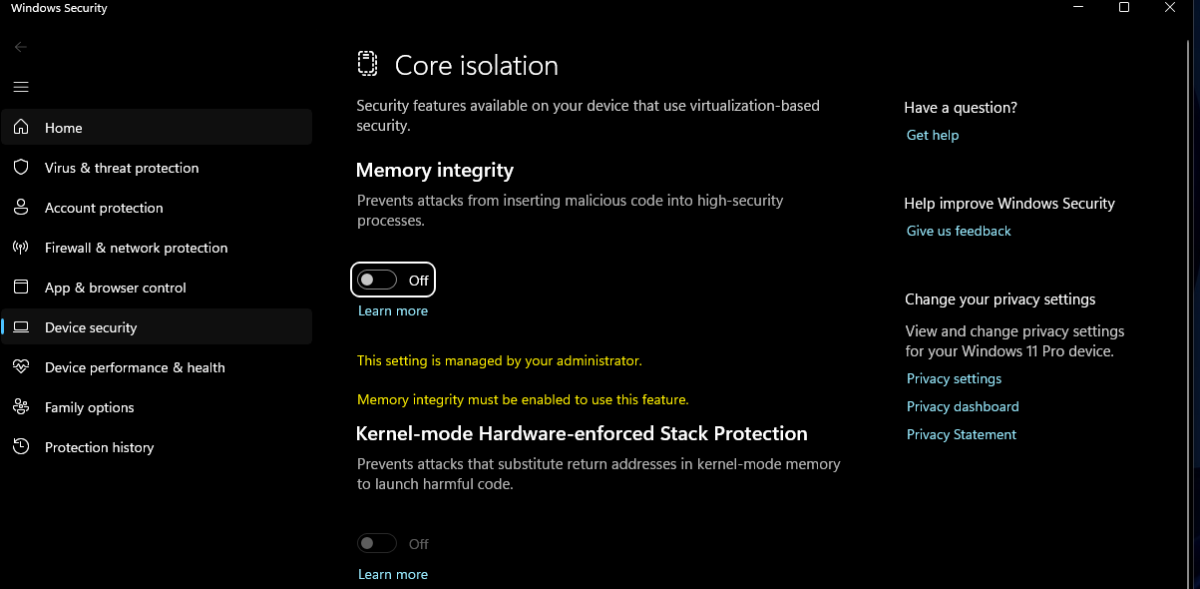
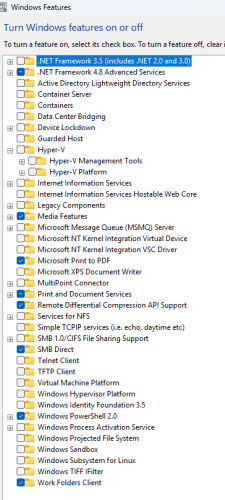
 karkas20 posted a topic in Kaspersky: Basic, Standard, Plus, PremiumHi there I don't why but I can't turn on Kaspersky hardware virtualization although I followed all the steps and did everything (I also enabled it in bios). I even turned off Windows Hyper-V and core isolation options (As they're visible in the attached images) and reinstalled Kaspersky but they didn't work neither. I assume that there's conflict or incompatible with new Windows 11 24h2 build. There wasn't any problem with 23h2 but again any solution for this?

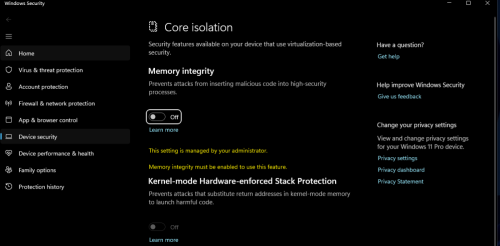
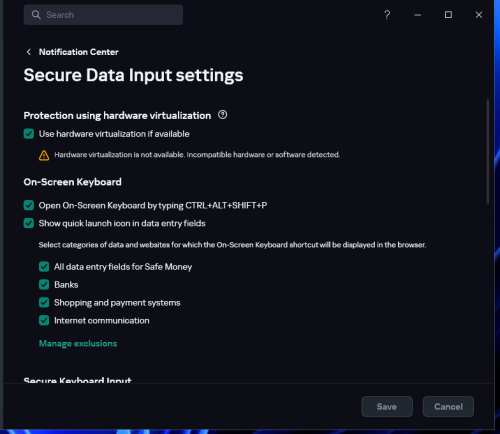
-
Check these 2 threads about the same issue: https://forum.kaspersky.com/topic/hardware-virtualization-is-not-available-error-51444/#comment-198672 https://forum.kaspersky.com/topic/windows-11-24h2-hardware-virtualization-is-not-available-incompatible-hardware-or-software-detected-i-made-all-the-changes-suggested-in-the-guide-but-nothing-51440/?page=2#comment-197434
-
fabiodanzetta posted a topic in Kaspersky: Basic, Standard, Plus, PremiumAs per the subject, is there any news regarding an automatic fix for the application so that the functionality can be available without manual workardound to perform? I have everything updated but I still don't find hardware virtualization available. Thanks to everyone.
-
 noone posted a topic in Kaspersky: Basic, Standard, Plus, PremiumI just uncovered something that completely undermines the entire purpose of Kaspersky’s Safe Browsing feature. Kaspersky claims Safe Browsing runs in a virtualized, isolated environment to keep user data secure. In reality? It dumps everything in plain sight at: C:\ProgramData\Kaspersky Lab\SafeBrowser\Common\ And here’s the worst part: That folder is wide open. Any third-party program (file managers, cleaners, erasers, even malware with standard privileges) can access it. There’s no encryption, no sandbox, no ACL protection. It’s just sitting there. On SSDs, once this data is written, you can’t even guarantee complete destruction. For someone like me, who always stores browsing profiles and user data inside VeraCrypt vaults with maximum security, this is beyond unacceptable. I used Safe Browsing for months, thinking it isolated data properly. Instead, all of it was on my C drive like nothing mattered. So much for “virtualization.” What’s the point of a so-called isolated environment if the data ends up exposed on disk? It’s basically just a Chromium shell with poor storage policies dressed up as security. SO If you think you’re safe using Kaspersky Safe Browsing — you’re not. It’s a false sense of security that actually makes you more vulnerable. This is not a minor oversight. It’s a fundamental design flaw that destroys trust in the product. Until Kaspersky fixes this, assume your browsing data is not secure and take your own precautions.
-
 EthanCarter replied to ArHu's topic in Kaspersky: Basic, Standard, Plus, PremiumHey, From what you’ve described, it looks like you’ve already tried pretty much everything on the Windows side (Core Isolation off, features disabled, etc.), so this is likely not something you’re missing — it’s more of a limitation or conflict. From what I understand, Kaspersky’s hardware virtualization is mainly used for Safe Money (secure browser) and the virtual keyboard, so if you don’t really use those features, you’re honestly not losing much by keeping it disabled. In fact, many users prefer keeping Windows security features like Core Isolation / Memory Integrity ON instead, since they provide broader system-level protection compared to Kaspersky’s limited virtualization use case. 👉 My suggestion: Don’t stress too much about enabling Kaspersky virtualization Keep your Windows security features optimized (even if you prefer some off for gaming) Focus on overall system stability and performance
-
Contact to K. Support In my case, if I have to select between disabling Kaspersky Hypervisor or Windows Hypervisor, I would keep the 2nd... both can't work at the same time, only 1 Hypervisor. Kaspersky virtualization is only used in Safe Money sessions... So, if we weigh up the security and protection/attack mitigation features provided by Windows Kernel Isolation against those provided by Kaspersky Hardware Virtualization, the balance tips in favor of the former... In my case, in my main I have KES 12.12 with W11 Kernel Isolation features enabled. Also, check this thread: https://forum.kaspersky.com/topic/hardware-virtualization-is-not-available-error-51444/#comment-198672
-
If it is a Ryzen 9, there should be an option for Hardware Virtualization in the BIOS of Your system, just check if enabled. I have also an AMD Ryzen 9 7940HS, and it supports Hardware Virtualization, and it has, of course, that setting in the BIOS to enable / disable.
-
 LQQ posted a topic in Kaspersky: Basic, Standard, Plus, PremiumI wanted to document an edge case I encountered in February 2025 that ultimately took many months to fully diagnose. I hope this helps Kaspersky support or anyone experiencing similar symptoms. Summary of the problem It started on a physical Windows 7 Professional x64 workstation. The workstation contains critical old software I still use. After performing, using a physical genuine Windows 7 DVD, an in-place repair installation (installing Windows 7 over an existing Windows 7 installation), Windows booted successfully, but the keyboard and mouse no longer functioned. No mouse and no keyboard actions were possible. I could not get past the screen that required entering the product key. I tried multiple physical (used and band new) USB keyboards and mice. They did not work. After exhausting all options I could think of, I concluded the PC hardware – 17 years old – has become faulty. Because I could not restore normal operation on the physical machine, I eventually converted the installation to a Hyper-V VHDX in an attempt to continue troubleshooting. The same keyboard and mouse problem remained in the virtual machine. Sequence of events The sequence was approximately: Existing Windows 7 Professional x64 installation with Kaspersky installed. Windows began reporting filesystem problems during integrity checks (chkdsk reported errors that could not be permanently resolved, among other problems). The system was also experiencing NVIDIA graphics driver issues. To repair both the Windows installation and the driver problems, I performed an in-place repair installation. After the repair, Windows booted, but the keyboard and mouse no longer functioned. After numerous unsuccessful attempts to repair the physical installation, I created a VHDX using Disk2VHD and migrated the system into Hyper-V. After resolving the some storage-controller boot issues in Hyper-V, the exact same problem was still present. This eventually led to examining the keyboard class driver stack in the offline registry. During investigation I loaded the offline SYSTEM hive and examined: HKLM\SYSTEM\CurrentControlSet\Control\Class\ {4D36E96B-E325-11CE-BFC1-08002BE10318} The UpperFilters value contained: kbdclass 0klmouflt.k4w-21-19 The same filter was also present in the fallback ControlSet. Probable root cause Windows repair installation left the Kaspersky keyboard filter registered in the keyboard device stack while something about the filter installation itself was no longer valid. Windows continued attempting to load the filter during keyboard initialization, resulting in the loss of keyboard and mouse. Solution A. Keyboard recovery — offline registry repair 1. Load the Windows SYSTEM hive Identify the Windows installation drive. In my case it was D:. reg load HKLM\TEMP D:\Windows\System32\Config\SYSTEM 2. Check the keyboard class driver's UpperFilters reg query "HKLM\TEMP\ControlSet001\Control\Class\{4D36E96B-E325-11CE-BFC1-08002BE10318}" /v UpperFilters Value: kbdclass 0klmouflt.k4w-21-19 The second entry was the Kaspersky keyboard filter. 3. Remove the existing UpperFilters value reg delete "HKLM\TEMP\ControlSet001\Control\Class\{4D36E96B-E325-11CE-BFC1-08002BE10318}" /v UpperFilters /f Check the fallback ControlSet and removed its UpperFilters value if it contained the Kaspersky filter: reg delete "HKLM\TEMP\ControlSet002\Control\Class\{4D36E96B-E325-11CE-BFC1-08002BE10318}" /v UpperFilters /f 4. Recreate UpperFilters with only kbdclass For ControlSet001: reg add "HKLM\TEMP\ControlSet001\Control\Class\{4D36E96B-E325-11CE-BFC1-08002BE10318}" /v UpperFilters /t REG_MULTI_SZ /d kbdclass /f For ControlSet002, if applicable: reg add "HKLM\TEMP\ControlSet002\Control\Class\{4D36E96B-E325-11CE-BFC1-08002BE10318}" /v UpperFilters /t REG_MULTI_SZ /d kbdclass /f 5. Unload the SYSTEM hive reg unload HKLM\TEMP Reboot Windows. Result: The keyboard began working normally. B. Mouse recovery — offline registry repair Similar approach. reg load HKLM\TEMP D:\Windows\System32\Config\SYSTEM reg query "HKLM\TEMP\ControlSet001\Control\Class\{4D36E96F-E325-11CE-BFC1-08002BE10318}" /v UpperFilters Value: mouclass 0klmouflt.k4w-21-19 reg delete "HKLM\TEMP\ControlSet001\Control\Class\{4D36E96F-E325-11CE-BFC1-08002BE10318}" /v UpperFilters /f reg delete "HKLM\TEMP\ControlSet002\Control\Class\{4D36E96F-E325-11CE-BFC1-08002BE10318}" /v UpperFilters /f For ControlSet001: reg add "HKLM\TEMP\ControlSet001\Control\Class\{4D36E96F-E325-11CE-BFC1-08002BE10318}" /v UpperFilters /t REG_MULTI_SZ /d mouclass /f For ControlSet002, if applicable: reg add "HKLM\TEMP\ControlSet002\Control\Class\{4D36E96F-E325-11CE-BFC1-08002BE10318}" /v UpperFilters /t REG_MULTI_SZ /d mouclass /f reg unload HKLM\TEMP Rreboot Windows. Result: The mouse function was restored. C. Physical-machine recovery I’d imagine the same approach would work on the physical machine. For now, I’m going to stick to the VM, and repurpose the PC for something else. If anyone from Kaspersky has seen this behavior after an in-place Windows repair installation, I would be interested in knowing whether this is a known issue with the keyboard filter driver or whether there is an official recovery procedure.
-
 megala posted a topic in Kaspersky: Basic, Standard, Plus, PremiumIn Kaspersky Premium there is an option for use hardware virtualization if available. I was wondering what exactly this feature does, the only public info I can find about it is that it helps protect your input when using Kaspersky safe browser, but is it worth it to disable Hyper-V and the Memory Integrity features in favor of Kaspersky hardware virtualization? Does it also provide some additional protection that makes it more viable than these options? I also use some Hyper-V specific features such as WSL2, but I can live without these if hardware virtualization is better.

-
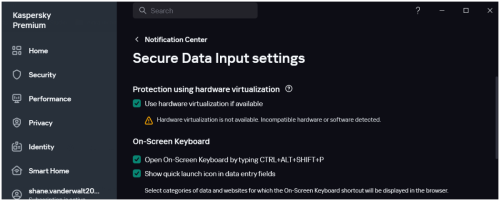
 Silver25 posted a topic in Kaspersky: Basic, Standard, Plus, PremiumHi Team, I'm reaching out because I'm encountering an issue with a virtualization error prompt. It keeps reminding me to activate the virtualization service. I've already checked my BIOS settings and CPU specifications, and both indicate that virtualization is enabled. However, the secure data input panel seems to have a conflicting message. Could you please advise on resolving this discrepancy and ensuring virtualization is fully activated? Any help or suggestions would be greatly appreciated. Thanks,
-
Is Kaspersky compatible with 'kernel mode hardware enforced stack protection' feature in windows 11?
Kuser7985Sh posted a topic in Kaspersky: Basic, Standard, Plus, PremiumFirst of all. Kernel mode hardware-enforced stack protection is turned off by default in Windows 11. However, Microsoft recommends users to turn it on if they need… um, I don't know – a little extra protection, maybe. My question is, does Kaspersky have compatibility issues with this optional Windows feature? Or is it okay to turn it on while you have Kaspersky installed? Thank you.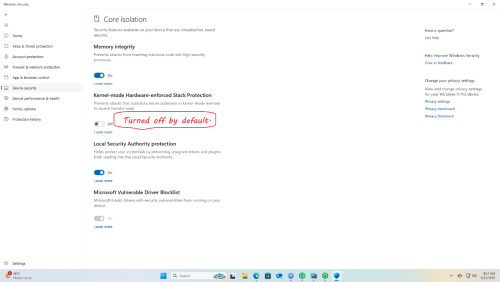
-
Yes, only for Safe Money and VK. https://support.kaspersky.com/help/Kaspersky/Win21.24/en-US/201595.htm In fact, I prefer the benefits of having all Windows 11 Core Isolation features enabled compared to the limited K. Hardware Virtualization, so I have it disabled:


-
ArHu replied to ArHu's topic in Kaspersky: Basic, Standard, Plus, PremiumWhich *options* in About protection through hardware virtualization in Kaspersky applications did you select to *disable* VBS? When ".....it doesn't work" happens -> what happens - what *errors* are displayed - take full-screen-screen-prints & post back, we need to see what (you) see please? Kaspersky Internet Security is Kaspersky's *old* software, it's been replaced by Kaspersky Standard, Kaspersky is offering a *free* upgrade: READ: Kaspersky: Basic, Standard, Plus, Premium - info & FAQ