Search the Community
Showing results for 'Hardware Virtualization' in content posted in Kaspersky: Basic, Standard, Plus, Premium.
Found 52 results
-
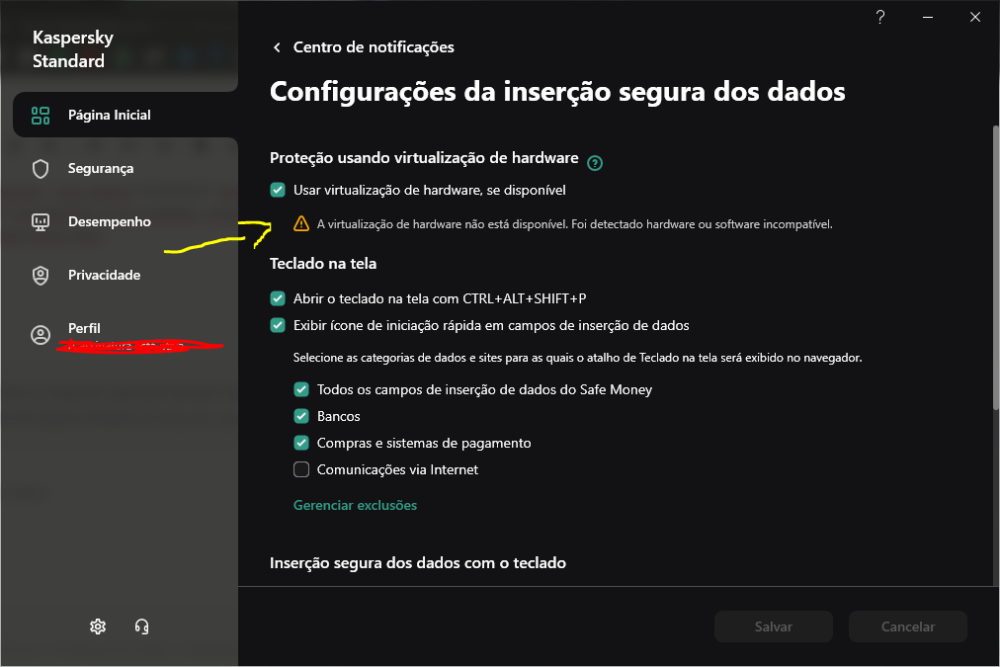
 SystemInfo posted a topic in Kaspersky: Basic, Standard, Plus, PremiumGood afternoon, I was seeing KASPERSKY installed on my machine and a message appears stating the following: "Hardware virtualization is not available. Incompatible Hardware or Software has been detected." ? As the image below says: The problem that my machine says I have virtualization enabled on my computer. the image below informs: What to do to fix this error that is appearing in Kaspersky? ?

-
 Hello @shadowtabby144 We know that Kaspersky has encountered issues with hardware virtualization on Windows 11, especially with the recent 24H2 update. As you know seems to be affecting many users, and the root of the issue likely lies in compatibility between Kaspersky’s virtualization drivers and the Windows 11 hypervisor changes or security features in the latest build. Did you try this? Current Workarounds for the Kaspersky Virtualization Bug on Windows 11 Ensure Complete Hyper-V and Virtualization-Based Security (VBS) Shutdown Disable Hyper-V using: Copy code bcdedit /set hypervisorlaunchtype off Disable Virtualization-Based Security (VBS) through Group Policy: Open Group Policy Editor (gpedit.msc). Go to Computer Configuration > Administrative Templates > System > Device Guard. Set Turn On Virtualization Based Security to Disabled. Reinstall Kaspersky in Compatibility Mode Uninstall Kaspersky completely using the Kaspersky Removal Tool. Reinstall the latest version but use Compatibility Mode (try Windows 10 compatibility) to mitigate any OS-specific issues. Check for Kaspersky and Windows Updates Kaspersky may release updates to address this compatibility issue with 24H2, as they frequently patch critical compatibility bugs. Force an update check in Kaspersky. Ensure Windows Update is set to automatic in case Microsoft releases a hotfix for this issue. Thank you
-
Hello @karkas20 Okay try this also. If enabling Location Services didn't solve the issue with Kaspersky's Smart Home Monitor or hardware virtualization, let’s try some additional steps to narrow down the problem. 1. Ensure No Hypervisor is Running Even if Hyper-V appears off, virtualization features might still be blocked. Let’s ensure no hypervisor or virtual components are running. Open Command Prompt (as Administrator) and run: Copy code systeminfo | findstr /i "hyper-v" If the result shows Hyper-V requirements are enabled, it indicates a hypervisor is still active. If so, run: Copy code dism /online /disable-feature /featurename:Microsoft-Hyper-V-All /norestart Reboot your system. 2. Disable Virtualization Conflicts via Group Policy Open the Local Group Policy Editor by typing gpedit.msc in the Start menu. Navigate to: Copy code Computer Configuration > Administrative Templates > System > Device Guard Disable: Turn On Virtualization Based Security Reboot your system and try again. 3. Check for Hidden Virtualization Software (VMWare/VirtualBox) If you’ve ever installed VMWare, VirtualBox, or other virtual machine software, ensure they are uninstalled or disabled as they can conflict with Kaspersky's virtualization. 4. Reinstall Kaspersky with Clean Install Uninstall Kaspersky using Kaspersky Removal Tool to ensure no leftover files or settings remain: Kaspersky Removal Tool Download After rebooting, download the latest version of Kaspersky and install it again. Check for any pending updates in Kaspersky after installation Let me know if anything improves! Thank you
-
 shandonfx replied to karkas20's topic in Kaspersky: Basic, Standard, Plus, PremiumFix for Kaspersky Virtualization Issue (Device Guard and Credential Guard) I was having issues enabling virtualization in Kaspersky, and I couldn’t get it to work with Kaspersky’s support team, as they weren’t able to provide a solution. I tried everything on Kaspersky's virtualization page and every suggestion I could find on the internet, including everything Kaspersky support advised, but nothing worked. I found a solution after reading a thread on Reddit, and after doing some more research, I applied the fix. Here’s what I did: I downloaded and ran the Device Guard and Credential Guard Hardware Readiness Tool from Microsoft: Download Link I ran the script from the tool with elevated permissions in PowerShell (I had to allow PowerShell to run as an administrator). The script prompted me to disable Device Guard and Credential Guard. After disabling them, I was asked to reboot my PC. After rebooting, I confirmed that Credential Guard was disabled, and Kaspersky no longer showed errors related to virtualization. Virtualization in Kaspersky is now working fine, and everything seems to be running smoothly! I think this fix worked for me, but since I don’t know much about advanced computer settings, I’m not 100% sure if it could cause any hidden issues. I just followed the tool’s instructions and rebooted. The system seems stable, and Kaspersky is working as expected now. If something I did is wrong or could cause issues later, please let me know.
-
 Hi @CrimsonGhost, thank you for your valueable input! Technical support representatives in their troubleshooting routine use "Device Guard and Credential Guard hardware readiness tool", running it with -Disable flag. Please note, on the 13th of December a fix for this issue was released via databases update. If someone still experiences this "Hardware virtualization is not available: incompatible hardware or software detected" issue, you can also try: 1. Running "Device Guard and Credential Guard hardware readiness tool" with -Disable flag. (See post above from CrimsonGhost) 2. Registry trick to disable VBS: Open Registry Editor (Press Win, then type 'redegit' and press Enter) Go to HKEY_LOCAL_MACHINE -> SYSTEM -> CurrentControlSet -> Control -> DeviceGuard On the right-hand side Right Click -> New -> DWORD (32-bit) Value Name it "EnableVirtualizationBasedSecurity" By default, it should be 0, Double click, and confirm the value 3. Disable HyperVisor: Open Command Prompt (Administrator) (via Win+s -> type and search for 'command prompt' -> right click Command Prompt in the search results and choose "run as administrator") and then execute the following command: bcdedit /set hypervisorlaunchtype off Reboot and recheck the issue.
-
 Stan_natS replied to Stan_natS's topic in Kaspersky: Basic, Standard, Plus, PremiumThere is another issue with hardware virtualization. I use the program Sandboxie, and when I create more than three virtual machines with its help, Kaspersky disables hardware virtualization. It disables it completely. And even with the virtual machines turned off, I can no longer enable hardware virtualization separately.
-
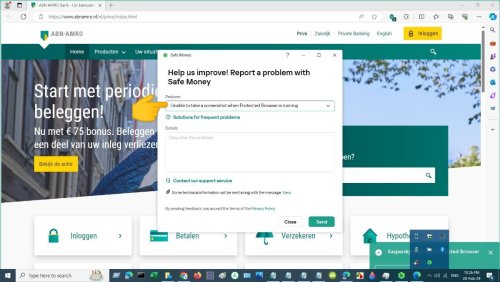
 @Stan_natS, The data transmitted via the Report a problem - Send feedback window - is as follows: OS Version Kaspersky Product Version Safe Browser Version HTTP Referer Url, website where the issue exists. To comply with Kaspersky's Privacy Policy, read: Privacy provisions for sending feedback on Safe Money performance - the user's email address is not recorded -> no reaction, no response is *as per design*, not an error. Regarding 'screenshots', read: Cannot take a screenshot when Protected Browser is running: Protected Browser does not have any known incompatibilities with built-in screenshot capturing tools. If you experience problems with taking screenshots using the Print Screen key, check the settings or the key combination for screen capturing or if any other screenshot-capturing tool is running. Please note that it is not possible to take a screenshot if hardware virtualization is enabled. For more information about hardware virtualization, refer: About protection through hardware virtualization in Kaspersky applications -> screen image captured using PrtScr key Using (Windows) Snipping tool: Thank you? Flood?+?

-
Hello @ColinQ, Welcome! How to enable protection using hardware virtualization: Open the main application window. Click the Settings ⚙️icon in the lower part of the main window >>the Settings window opens. Go to Security → Secure Data Input. Select the Use hardware virtualization if available check box. This check box is displayed when the application is installed on a 64-bit version of Windows 8, Windows 8.1 and Windows 10. Select the Use advanced features of hardware virtualization check box if you want to turn hardware virtualization on when the operating system starts. ?If hardware virtualization is disabled on your computer, protection using hardware virtualization will be disabled. For On Screen Keyboard, go to the Privacy settings section → Secure Data Input settings → Secure Keyboard Input block, Moderator @Berny has posted an image in his reply above & help documentation: How to configure the display of the On-Screen Keyboard icon. IF you get stuck, post back!! Thank you? Flood?+?
-
 CrimsonGhost replied to fabiodanzetta's topic in Kaspersky: Basic, Standard, Plus, PremiumHello guys, i noticed the same issue with my Kaspersky installation after upgrading to 24H2. I tried a CMOS Reset and enabled the virtualization settings in my BIOS, unfortunately without effect. I disabled the memory integrity but the Virtualization-based Security (VBS) in my windows system information was still running. Then i came across a MS Tool called "Device Guard and Credential Guard hardware readiness tool". It is a power shell script and i runned it with the "-Disable" Flag with elevated permissions and after a Reboot i got a BIOS prompt that asked me if i want to disable Device Guard and VBS. I disabled both and now the error is gone. I want to mention that i have absolutely no clue what these features are but i'm just into gaming so i dont care about the rest.
-
Hello @megala, Welcome! It's not necessarily a matter of 'better or worse', it's personal choice. About protection through hardware virtualization in Kaspersky applications. About protection using hardware virtualization. About protection of data entered on the computer keyboard. Thank you? Flood?+?
-

-
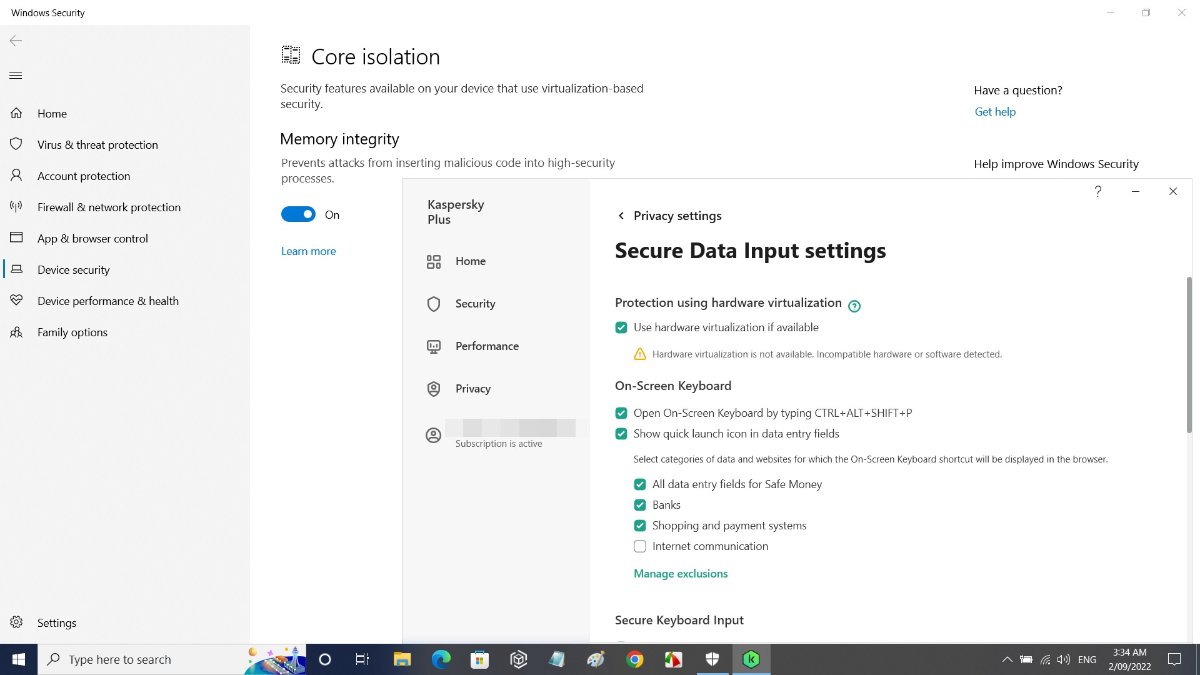
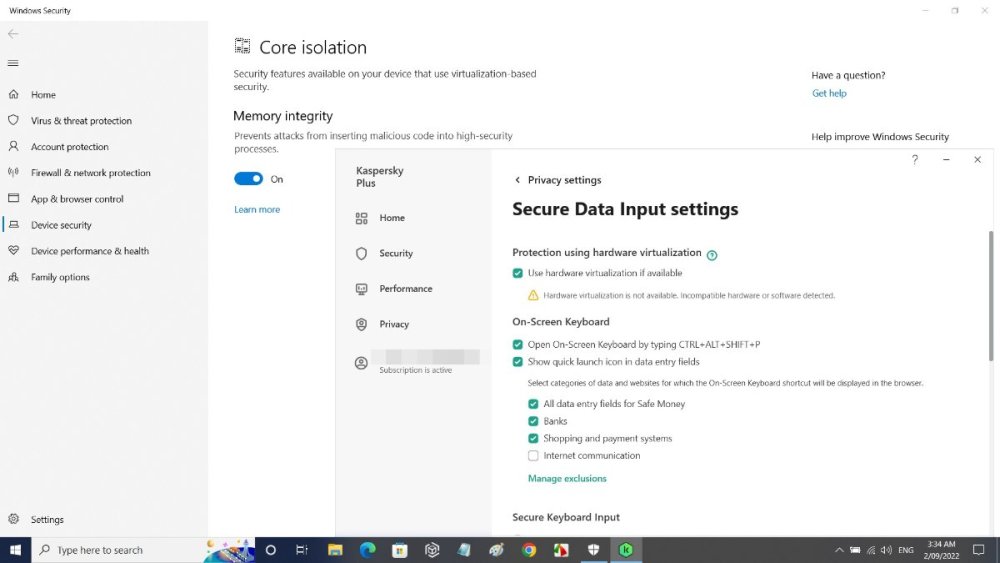
Hello @cc2150dx, Welcome back! Core isolation conflicts with Kaspersky's hardware virtualization technology - used by Protected Browser (Safe money), to provide additional protection against complex malware that could intercept your personal data by using the clipboard or phishing. Kaspersky recommends enabling hardware virtualization for additional protection if it is available. About protection through hardware virtualization in Kaspersky applications In the image below, Core isolation is on. In Kaspersky Plus, open Settings⚙ (lower left hand side of GUI), select Privacy settings, select Secure Data Input to see the status of Hardware virtualization Thank you? Flood? +? Also, the reference documentation does not mention Kaspersky's new product range, however, the advice is the same.
-
 fabiodanzetta replied to karkas20's topic in Kaspersky: Basic, Standard, Plus, PremiumHi @shandonfx, even with the last version 21.20 that I installed the problem was always present but I think I found the solution in a link of a discussion within Micorosft Learn, specifically in the last post within it the one with date 16 Jan 2025, 22:18 . However, I do not know what making the change related to Windows Hello might entail. It would be interesting to have an opinion from some employees/developers. I tried following the directions in the last post and it all worked. Also, it would be very useful for us users if always someone from Kaspersky could tell us in detail what is involved in having hardware virtualization not available and whether therefore all the protection components work well and what is lost in terms of security. Here is the link that got it working for me: https://learn.microsoft.com/en-gb/answers/questions/2113711/vbs-is-not-disabled-on-windows-11-version-24h2-os Thank you all for your cooperation.
-
fabiodanzetta replied to fabiodanzetta's topic in Kaspersky: Basic, Standard, Plus, PremiumHi all, even with the last version 21.20 that I installed the problem was always present but I think I found the solution in a link of a discussion within Micorosft Learn, specifically in the last post within it the one with date 16 Jan 2025, 22:18 . However, I do not know what making the change related to Windows Hello might entail. It would be interesting to have an opinion from some employees/developers. I tried following the directions in the last post and it all worked. Also, it would be very useful for us users if always someone from Kaspersky could tell us in detail what is involved in having hardware virtualization not available and whether therefore all the protection components work well and what is lost in terms of security. Here is the link that got it working for me: https://learn.microsoft.com/en-gb/answers/questions/2113711/vbs-is-not-disabled-on-windows-11-version-24h2-os Thank you all for your cooperation.
-
fabiodanzetta replied to karkas20's topic in Kaspersky: Basic, Standard, Plus, PremiumHi @shandonfx , thanks for your workaround but I did not make the changes because someone said that they were lost upon reboot and also because I would expect an automatic and working solution for everyone distributed by Kaspersky. At the moment I will remain without hardware virtualization enabled hoping that they solve the problem. If any Kaspersky employee reads us, can you please tell us when it will be definitively solved? Thanks anyway for your help.
-
fabiodanzetta replied to karkas20's topic in Kaspersky: Basic, Standard, Plus, PremiumI also confirm that hardware virtualization still does not work
-
fabiodanzetta replied to fabiodanzetta's topic in Kaspersky: Basic, Standard, Plus, PremiumI also confirm that hardware virtualization still does not work
-
 BlackEdition replied to fabiodanzetta's topic in Kaspersky: Basic, Standard, Plus, PremiumSame issue here (new PC) and I have the latest updates of everything that is available to me. My CPU is AMD 7950X3D & motherboard is Asus Strix X670E-A. Kaspersky Plus 21.19.7.527(a) Windows 11 Pro 23H2 22631.4460 I have hardware virtualization turned on in my BIOS. I did not try any of the mentioned solutions in this thread since people said it didn't work (also because im not sure if that'll break something in my system or leave me vulnerable). I forgot to look up this issue for a month. Is it safe to run without it?
-
 Hello, AMD CPUs cannot enable KL product hardware virtualization protection when Kva Shadow is enabled. It was learned that Kva Shadow is a special mitigation measure for Windows to deal with two major vulnerabilities, Ghost and Circuit Breaker, these measures are for Intel CPUs, but AMD CPUs are turned on on your computer. This issue was finally resolved after going to the HKEY_LOCAL_MACHINE\SYSTEM\CurrentControlSet\Control\Session Manager\Memory Management registry and modifying both FeatureSettingsOverride and FeatureSettingsOverrideMask to be 3. And reboot PC, Please check this issue and reply the result. Regards.
-
Hello @Stan_natS The Report a problem information transmitted does not include the sender's email address - what / how / whom is Kaspersky going to send an Incident request number to? IF (you're) running Sandboxie you will not be able to use SafeMoney - read: About protection through hardware virtualization in Kaspersky applications. IF (you're) unable to enable Kaspersky HV, export Kaspersky Settings - How to export settings - (so you have a backup of the current Kaspersky config), then Restore Kaspersky Settings - How to restore the default settings of the application - then shutdown the computer using SHUTDOWN, not Restart, power on by pressing the power button, login & continue to check on Kaspersky HV. Thank you? Flood?+?
-
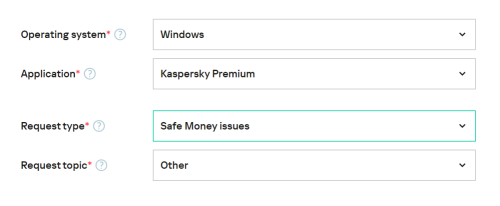
Hello @mistified, Welcome! Windows Memory integrity is *supposed* to be OFF, this is by design - as per the Kaspersky *expert* team. For Kaspersky to work correctly, the Kaspersky *experts* have *always* advised Windows Memory integrity & Core isolation should be OFF. Memory integrity & Core isolation should NOT be turned ON *unless* the user decides to not use Safe Money & Kaspersky's protection through hardware virtualization. Since *updating* to 21.16.6.467 has the computer been fully shutdown using *Shutdown*, not Restart, following by pressing the power button, to power on, login, recheck the SafeMoney browser - is the speed less than *30 seconds > 4 minutes*? IF the answer is 'no', is the Kaspersky Protection extension installed in the browser - if 'yes', disable it. Exit the browser & shutdown the computer again, power on, login, recheck? IF it's not improved, check if the issue persists in *another* browser? IF the answer is 'no', uninstall 21.16.6.467, followed by *another* computer shutdown, then download a new installer, install & recheck? As a Premium subscriber, you have, Premium Support Services - as part of the package, (ioo), the PC Health Check Services component may be useful? IF the issue persists, please contact Kaspersky Customer Service - https://support.kaspersky.com/b2c#contacts - on the support page, select either Email OR Chat, fill in the template as in the image below; make sure support *know* you're a Premium subscriber, i.e., tell them! Provide support with a *detailed* history; support may also request Logs, Traces & other data, they will guide you: Please share the outcome with the Community, when it's available? Thank you? Flood?+?
-
 Xzz123 replied to Hill-98's topic in Kaspersky: Basic, Standard, Plus, Premiumsad news? Clipboard data protection can only be achieved under safe money protected broswer though hardware virtualization technology. This mechanism is highly unlikely to be implemented to every process. There are huge technical difficulties and other compatibility concerns. same for protection against screenshots function.
-
Hello @ColinQ, Open Kaspersky app GUI, select Settings⚙, select Privacy Settings, scroll to the bottom of the page, on the right hand side, select: Secure Data Input: The first option available is: Use hardware virtualization if available. The second option is: Secure Keyboard Input. Additional documentation: Secure Data Input settings & How to configure protection of data entered on the computer keyboard. About protection through hardware virtualization in Kaspersky applications. Also, @ColinQ, in any Kaspersky software, if there's a ? at the top right hand corner of the GUI window, selecting that ? will open the HELP documentation, specific to the app window open at the time . Thank you? Flood?+?
-
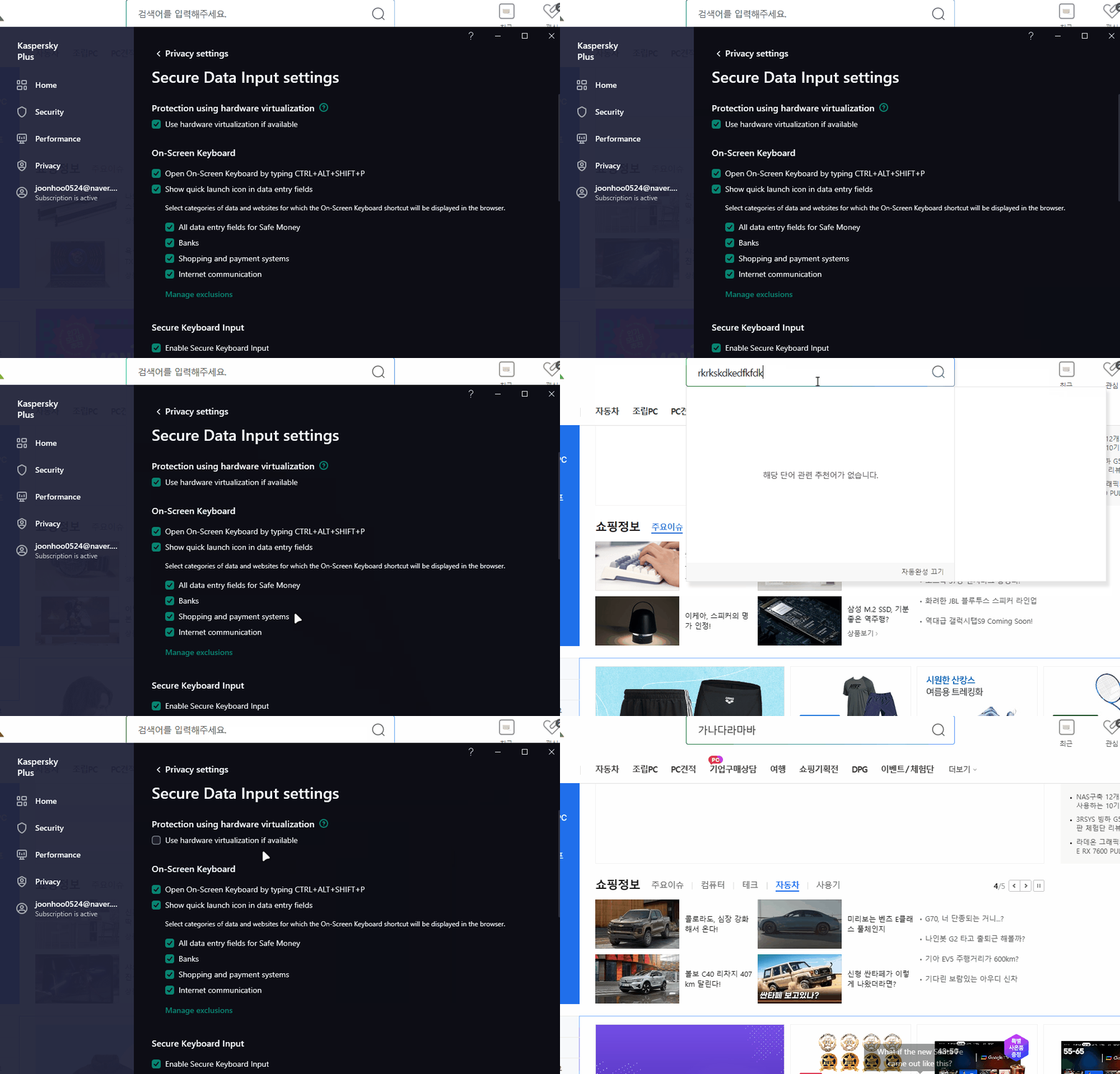
 Guest posted a topic in Kaspersky: Basic, Standard, Plus, PremiumI'm using Windows 11 with Korean IME. I tried turning off hardware virtualization didn't work. Only turning off the category worked but it loses the functionality.

-
 Alexandre Ferri replied to david_b_75's topic in Kaspersky: Basic, Standard, Plus, PremiumI found the origin of the problem in my case, I hope it helps them. It is related to hardware virtualization when activated in Microsoft Windows and Kaspersky at the same time. My computer has the option in the bios activated: And it was activated in the Windows security configuration and now Kaspersky must have also implemented this functionality generating conflict, see the Windows and Kaspersky screens when activated in Windows it says that my system is not compatible on Kaspersky: But when disabled on Windows, Kaspersky accepts and no longer displays the alert. Probably Kaspersky should fix this so that when it is active in Kaspersky it is automatically disabled in Windows so as not to generate a conflict. Aura Creator working again: https://youtube.com/shorts/I9RCZaz_gQU