Search the Community
Showing results for 'Hardware Virtualization' in content posted in Kaspersky: Basic, Standard, Plus, Premium.
Found 52 results
-
 Bearded posted a topic in Kaspersky: Basic, Standard, Plus, PremiumWhen I log in to My Kaspersky, the computer icon turns orange instead of green. This is due to the following notification: "To improve your protection, use a PC that supports hardware virtualization." Virtualization is enabled in the BIOS and shows as enabled in Task Manager under the CPU tab. Even when I select "Ignore," the problem persists. I'm not sure what the issue could be.

-
 EthanCarter replied to ArHu's topic in Kaspersky: Basic, Standard, Plus, PremiumHey, From what you’ve described, it looks like you’ve already tried pretty much everything on the Windows side (Core Isolation off, features disabled, etc.), so this is likely not something you’re missing — it’s more of a limitation or conflict. From what I understand, Kaspersky’s hardware virtualization is mainly used for Safe Money (secure browser) and the virtual keyboard, so if you don’t really use those features, you’re honestly not losing much by keeping it disabled. In fact, many users prefer keeping Windows security features like Core Isolation / Memory Integrity ON instead, since they provide broader system-level protection compared to Kaspersky’s limited virtualization use case. 👉 My suggestion: Don’t stress too much about enabling Kaspersky virtualization Keep your Windows security features optimized (even if you prefer some off for gaming) Focus on overall system stability and performance
-
 Yes, only for Safe Money and VK. https://support.kaspersky.com/help/Kaspersky/Win21.24/en-US/201595.htm In fact, I prefer the benefits of having all Windows 11 Core Isolation features enabled compared to the limited K. Hardware Virtualization, so I have it disabled:


-
Check these 2 threads about the same issue: https://forum.kaspersky.com/topic/hardware-virtualization-is-not-available-error-51444/#comment-198672 https://forum.kaspersky.com/topic/windows-11-24h2-hardware-virtualization-is-not-available-incompatible-hardware-or-software-detected-i-made-all-the-changes-suggested-in-the-guide-but-nothing-51440/?page=2#comment-197434
-
If it is a Ryzen 9, there should be an option for Hardware Virtualization in the BIOS of Your system, just check if enabled. I have also an AMD Ryzen 9 7940HS, and it supports Hardware Virtualization, and it has, of course, that setting in the BIOS to enable / disable.
-
 ArHu replied to ArHu's topic in Kaspersky: Basic, Standard, Plus, PremiumWhich *options* in About protection through hardware virtualization in Kaspersky applications did you select to *disable* VBS? When ".....it doesn't work" happens -> what happens - what *errors* are displayed - take full-screen-screen-prints & post back, we need to see what (you) see please? Kaspersky Internet Security is Kaspersky's *old* software, it's been replaced by Kaspersky Standard, Kaspersky is offering a *free* upgrade: READ: Kaspersky: Basic, Standard, Plus, Premium - info & FAQ
-
 Hello @ArHu, Welcome! Which Windows OS version & build - in Windows Search - type WINVER - apen the app, post back the results? Which *options* in About protection through hardware virtualization in Kaspersky applications did you select to *disable* VBS? When ".....it doesn't work" happens -> what happens - what *errors* are displayed - take full-screen-screen-prints & post back, we need to see what (you) see please? Kaspersky Internet Security is Kaspersky's *old* software, it's been replaced by Kaspersky Standard, Kaspersky is offering a *free* upgrade: READ: Kaspersky: Basic, Standard, Plus, Premium - info & FAQ Download is available here: https://www.kaspersky.com/downloads#update-product It's (yr) choice whether OR not to install / update a new version over the top OR do a clean install, IF doing a clean install - use Windows Add & Remove programs to remove Kaspersky Internet Security -> save LICENSE information only, when the uninstall is complete - shutdown the computer using SHUTDOWN, not Restart & power-on by pressing the power-button, login, download & install the new software - run a Database update followed by *another* shutdown & power-on of the computer - login & monitor for the original problem? IF it repeats log the issue with Kaspersky Customer Service (KCS): https://support.kaspersky.com/b2c#contacts, select Email, fill in the template as shown, provide a *detailed-history* *Do NOT use the AI-BOT to submit the incident* Please share the outcome with the Community when it's available? Thank you🙏 Flood🐳+🐋

-
Contact to K. Support In my case, if I have to select between disabling Kaspersky Hypervisor or Windows Hypervisor, I would keep the 2nd... both can't work at the same time, only 1 Hypervisor. Kaspersky virtualization is only used in Safe Money sessions... So, if we weigh up the security and protection/attack mitigation features provided by Windows Kernel Isolation against those provided by Kaspersky Hardware Virtualization, the balance tips in favor of the former... In my case, in my main I have KES 12.12 with W11 Kernel Isolation features enabled. Also, check this thread: https://forum.kaspersky.com/topic/hardware-virtualization-is-not-available-error-51444/#comment-198672
-
 KasperskyUser13 posted a topic in Kaspersky: Basic, Standard, Plus, PremiumHi, I know in the last year was hard time for us to disabled windows 24h2 hardware virtualization to make Kaspersky use it. But now in windows 11 25h2 for me I can’t keep it disabled from the same way I was doing it in the past, but it enables itself after every restart; I’m frustrated because of this I just bought a license and I’m thinking of refund if this issue not resolve for me. I searched the web, chat with ai with no luck. Windows 11 25h2 clean install Kaspersky Standard 21.24.8.522 AMD Process
-
Hello @steve33, Welcome back! If (you) use Kaspersky's Protected-Safe-Money-Browser & OR Secure Data Input, Kaspersky recommends *disabling* Core Isolation in Windows Security; If those Kaspersky features aren't used (you) can generally keep Core Isolation enabled and let Kaspersky use its own virtualization for its other security layers. We're not sure where / why (you) believe "Kaspersky still recommend setting Core Isolation i.e. Memory Integrity to ON?" The opposite is the case, Kaspersky's *general* recommendation is for Windows Core Isolation/Memory Integrity to be OFF due to a potential conflict of resources, resource reference: About protection through hardware virtualization in Kaspersky applications Thank you🙏 Flood🐳+🐋
-
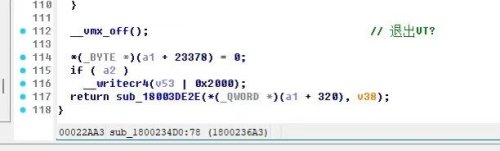
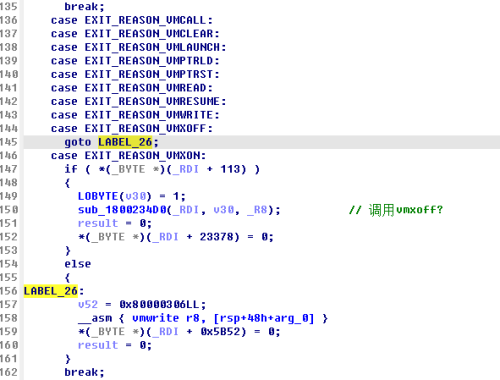
 Bin626 posted a topic in Kaspersky: Basic, Standard, Plus, PremiumExit on encountering the vmxon command No vt nesting Safety is about as good as nothing?😓
-
Kuser7985Sh posted a topic in Kaspersky: Basic, Standard, Plus, PremiumKaspersky shows in settings that "hardware virtualisation is not available. Incompatible hardware or software detected." Does this make my PC less secure compared to a PC that supports hardware virtualisation, or does this feature only affect the Safe Money component? By the way, I did enable hardware virtualisation in BIOS settings, but still Kaspersky shows the same message. And for the info, my previous computer also showed that same hardware virtualisation is not available text, so I honestly don't know what type of computer Kaspersky needs for this function to work. Clarification on this question would be great. Thank you for any assistance.
-
-
 VashtiianWasTaken posted a topic in Kaspersky: Basic, Standard, Plus, PremiumHardware Virtualization says something's interfering or whatever. I turned off core isolation and every other program running, turned svm mode on and it still showed it couldn't work. It was working fine before I did a fresh Windows 11 install. Not sure what's blocking it. (Have reinstalled twice)
-
 Rafael Lino posted a topic in Kaspersky: Basic, Standard, Plus, PremiumHello, I am facing a compatibility issue between Kaspersky Premium and the Virtualization-Based Security (VBS) feature on my system. Kaspersky does not activate hardware virtualization protection, and the following message is displayed: "Hardware virtualization is not available: hardware or software incompatibility detected." After investigating, I realized that Kaspersky requires hardware virtualization to offer protection against advanced threats, but to enable this functionality, I had to disable VBS in the Windows settings. This caused the deactivation of a critical security layer in the system. System Details: - Processor: AMD Ryzen 7 9800X3D - Motherboard: Gigabyte X870 GAMING X WIFI7 - Operating System: Windows 11 Pro - Antivirus: Kaspersky Premium Actions Taken: - Disabled VBS in the system settings to allow Kaspersky to use hardware virtualization. - After disabling VBS, hardware virtualization protection was enabled in Kaspersky, and the error notification disappeared. Questions: - Security: Disabling VBS has resulted in a reduction of the system's security. VBS is an important layer of protection against advanced attacks (such as rootkits and exploits), and by disabling it, the system becomes more vulnerable to these types of threats. - Compatibility: Is there a way to configure Kaspersky to work with hardware virtualization without disabling VBS? Alternatively, is it possible for Kaspersky to offer a solution that works well with VBS enabled? I would appreciate any guidance or solutions to help me enable both or if there are any settings in Kaspersky that I can adjust to maintain the security layers intact while using hardware virtualization protection. Thank you for your help, and I look forward to your response. Best regards, Rafael Lino
-
 fabiodanzetta replied to karkas20's topic in Kaspersky: Basic, Standard, Plus, PremiumHi @shandonfx, even with the last version 21.20 that I installed the problem was always present but I think I found the solution in a link of a discussion within Micorosft Learn, specifically in the last post within it the one with date 16 Jan 2025, 22:18 . However, I do not know what making the change related to Windows Hello might entail. It would be interesting to have an opinion from some employees/developers. I tried following the directions in the last post and it all worked. Also, it would be very useful for us users if always someone from Kaspersky could tell us in detail what is involved in having hardware virtualization not available and whether therefore all the protection components work well and what is lost in terms of security. Here is the link that got it working for me: https://learn.microsoft.com/en-gb/answers/questions/2113711/vbs-is-not-disabled-on-windows-11-version-24h2-os Thank you all for your cooperation.
-
fabiodanzetta replied to fabiodanzetta's topic in Kaspersky: Basic, Standard, Plus, PremiumHi all, even with the last version 21.20 that I installed the problem was always present but I think I found the solution in a link of a discussion within Micorosft Learn, specifically in the last post within it the one with date 16 Jan 2025, 22:18 . However, I do not know what making the change related to Windows Hello might entail. It would be interesting to have an opinion from some employees/developers. I tried following the directions in the last post and it all worked. Also, it would be very useful for us users if always someone from Kaspersky could tell us in detail what is involved in having hardware virtualization not available and whether therefore all the protection components work well and what is lost in terms of security. Here is the link that got it working for me: https://learn.microsoft.com/en-gb/answers/questions/2113711/vbs-is-not-disabled-on-windows-11-version-24h2-os Thank you all for your cooperation.
-
fabiodanzetta posted a topic in Kaspersky: Basic, Standard, Plus, PremiumAs per the subject, is there any news regarding an automatic fix for the application so that the functionality can be available without manual workardound to perform? I have everything updated but I still don't find hardware virtualization available. Thanks to everyone.
-
fabiodanzetta replied to karkas20's topic in Kaspersky: Basic, Standard, Plus, PremiumHi @shandonfx , thanks for your workaround but I did not make the changes because someone said that they were lost upon reboot and also because I would expect an automatic and working solution for everyone distributed by Kaspersky. At the moment I will remain without hardware virtualization enabled hoping that they solve the problem. If any Kaspersky employee reads us, can you please tell us when it will be definitively solved? Thanks anyway for your help.
-
 shandonfx replied to karkas20's topic in Kaspersky: Basic, Standard, Plus, PremiumFix for Kaspersky Virtualization Issue (Device Guard and Credential Guard) I was having issues enabling virtualization in Kaspersky, and I couldn’t get it to work with Kaspersky’s support team, as they weren’t able to provide a solution. I tried everything on Kaspersky's virtualization page and every suggestion I could find on the internet, including everything Kaspersky support advised, but nothing worked. I found a solution after reading a thread on Reddit, and after doing some more research, I applied the fix. Here’s what I did: I downloaded and ran the Device Guard and Credential Guard Hardware Readiness Tool from Microsoft: Download Link I ran the script from the tool with elevated permissions in PowerShell (I had to allow PowerShell to run as an administrator). The script prompted me to disable Device Guard and Credential Guard. After disabling them, I was asked to reboot my PC. After rebooting, I confirmed that Credential Guard was disabled, and Kaspersky no longer showed errors related to virtualization. Virtualization in Kaspersky is now working fine, and everything seems to be running smoothly! I think this fix worked for me, but since I don’t know much about advanced computer settings, I’m not 100% sure if it could cause any hidden issues. I just followed the tool’s instructions and rebooted. The system seems stable, and Kaspersky is working as expected now. If something I did is wrong or could cause issues later, please let me know.
-
 Hi @CrimsonGhost, thank you for your valueable input! Technical support representatives in their troubleshooting routine use "Device Guard and Credential Guard hardware readiness tool", running it with -Disable flag. Please note, on the 13th of December a fix for this issue was released via databases update. If someone still experiences this "Hardware virtualization is not available: incompatible hardware or software detected" issue, you can also try: 1. Running "Device Guard and Credential Guard hardware readiness tool" with -Disable flag. (See post above from CrimsonGhost) 2. Registry trick to disable VBS: Open Registry Editor (Press Win, then type 'redegit' and press Enter) Go to HKEY_LOCAL_MACHINE -> SYSTEM -> CurrentControlSet -> Control -> DeviceGuard On the right-hand side Right Click -> New -> DWORD (32-bit) Value Name it "EnableVirtualizationBasedSecurity" By default, it should be 0, Double click, and confirm the value 3. Disable HyperVisor: Open Command Prompt (Administrator) (via Win+s -> type and search for 'command prompt' -> right click Command Prompt in the search results and choose "run as administrator") and then execute the following command: bcdedit /set hypervisorlaunchtype off Reboot and recheck the issue.
-
 CrimsonGhost replied to fabiodanzetta's topic in Kaspersky: Basic, Standard, Plus, PremiumHello guys, i noticed the same issue with my Kaspersky installation after upgrading to 24H2. I tried a CMOS Reset and enabled the virtualization settings in my BIOS, unfortunately without effect. I disabled the memory integrity but the Virtualization-based Security (VBS) in my windows system information was still running. Then i came across a MS Tool called "Device Guard and Credential Guard hardware readiness tool". It is a power shell script and i runned it with the "-Disable" Flag with elevated permissions and after a Reboot i got a BIOS prompt that asked me if i want to disable Device Guard and VBS. I disabled both and now the error is gone. I want to mention that i have absolutely no clue what these features are but i'm just into gaming so i dont care about the rest.
-
fabiodanzetta replied to karkas20's topic in Kaspersky: Basic, Standard, Plus, PremiumI also confirm that hardware virtualization still does not work
-
fabiodanzetta replied to fabiodanzetta's topic in Kaspersky: Basic, Standard, Plus, PremiumI also confirm that hardware virtualization still does not work
-
 BlackEdition replied to fabiodanzetta's topic in Kaspersky: Basic, Standard, Plus, PremiumSame issue here (new PC) and I have the latest updates of everything that is available to me. My CPU is AMD 7950X3D & motherboard is Asus Strix X670E-A. Kaspersky Plus 21.19.7.527(a) Windows 11 Pro 23H2 22631.4460 I have hardware virtualization turned on in my BIOS. I did not try any of the mentioned solutions in this thread since people said it didn't work (also because im not sure if that'll break something in my system or leave me vulnerable). I forgot to look up this issue for a month. Is it safe to run without it?