Search the Community
Showing results for 'Secure Keyboard Input is enabled'.
Found 267 results
-
 Александр120 posted a topic in Kaspersky Secure ConnectionЗдравствуйте!Как добавить сайт в исключения в программе Касперский VPN
-
 Mpak posted a topic in Kaspersky Secure ConnectionOpenVPN скорость режет процентов на 75. Может я что не так сделал. Такой vpn на и даром не нужен.
-
 Slayer12242 posted a topic in Kaspersky: Basic, Standard, Plus, PremiumSo I have a Logitech-macro on my left mousebutton that I use in games and it worked fine before I installed kaspersky. Now whenever I'm ingame the macro does not work anymore, I've created exceptions for Logitech-GHUB and the game (Tarkov), but still the macro won't work. :(
-
 Alx_P posted a topic in Kaspersky Secure ConnectionПодскажите, Secure Connection можно оформить только отдельной подпиской? Или функционал доступен в других продуктах?
-
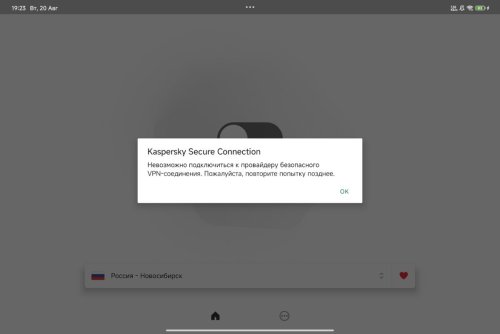
 ansouv posted a topic in Kaspersky Secure ConnectionСегодня не могу подключиться ни к одному серверу, включая российские. Подписка оплачена.
-
 aleksandrp posted a topic in Kaspersky Secure ConnectionПросьба помочь! На одном из 5 устройств (macbook pro) не работает подписка Kaspersky Secure Connection. Подписка оформлена до апреля 2025 года (для 5 устройств). Аппликацию перезагргужали с AppStore, но это не помогло. При запуске VPN появляется надпись "Free daily traffic finished. Upgrade to Unlimited version to get more VPN traffic".

-
 ClaudioAguiar posted a topic in Kaspersky Total SecurityWhen I open bank site in edge the site is open in normal window! do not go to open bank site in protect browser window. This behavior started after windows update. when I open bank site using Firefox browse the safe money is working as expected
-
Akalakakala posted a topic in Kaspersky Secure Connectionкупил месяц secure connection, но ничего не пришло. в чем fail?
-
 okay posted a topic in Kaspersky Secure ConnectionПрошу помощи. Можно объяснить очень подробно, как установить Kaspersky Secure Connection на Android TV?
-
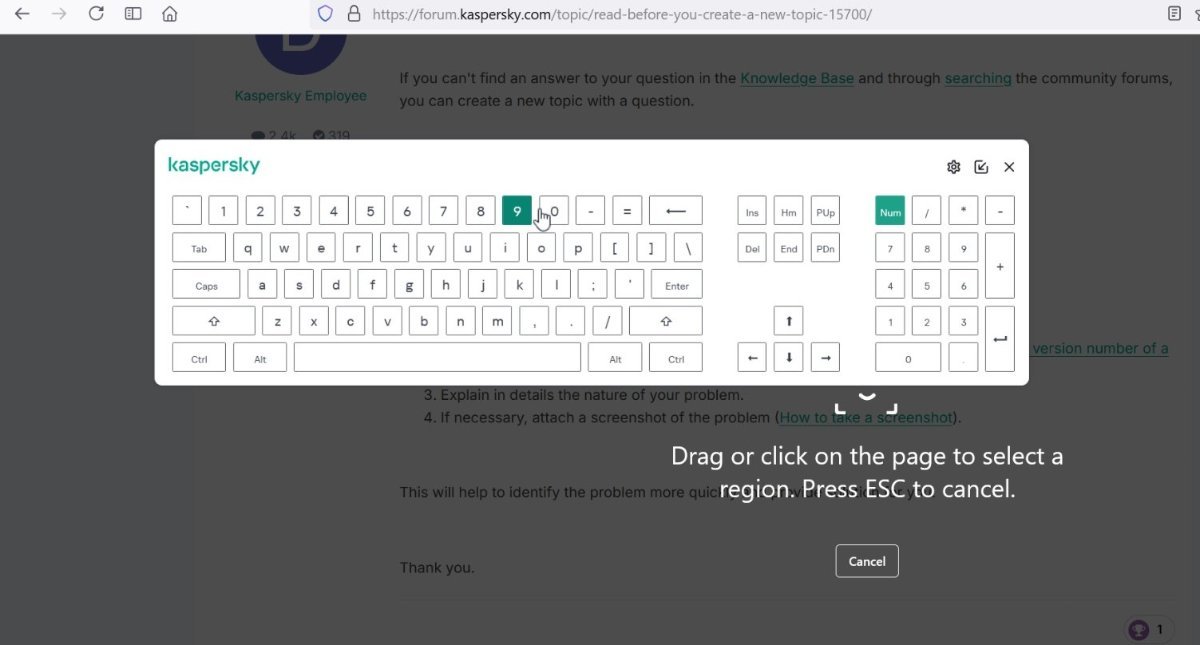
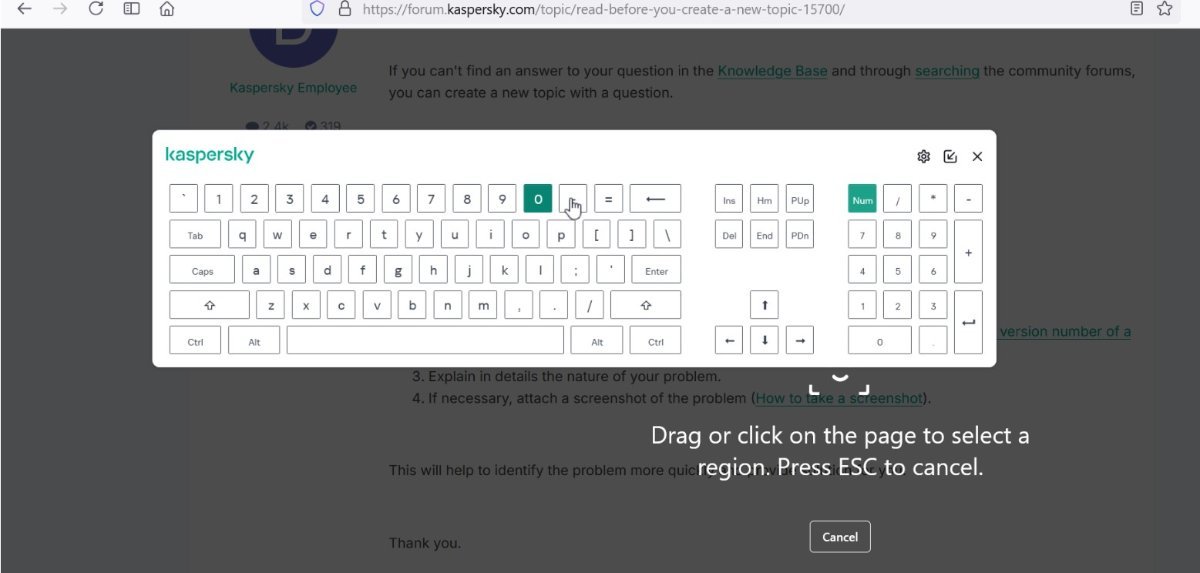
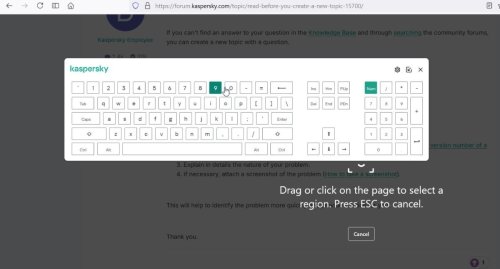
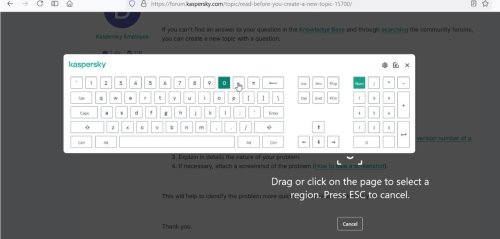
 Jamie Lee posted a topic in Kaspersky: Basic, Standard, Plus, PremiumMy Windows version: WIndows10 22H2 (OS Build 19045.4651) Kaspersky PLUS 21.18.5.438 The problem: After the lastest Kaspersky PLUS's Application update, my On-screen Keyboard becomes bugged. You can see from the 2 screenshots, my mouse cursor was positioned at Number 0, but it counts as Number9. I have been using Kaspersky for many years, and I use On-screen Keyboard for many years, this bug never happened to me before.
-
 8849 posted a topic in Kaspersky Secure ConnectionДобрый день. Версия ОС: Microsoft Windows 10 Professional x64 Build 19045 Версия приложения KSC: 21.17.7.539 (b) Буквально сегодня куплено (на один месяц) и установлено. Комп перезагружен разок на всякий. Настройки касперского: ВПН соединения для избранных приложений: вариант конфигурации где для указанных он ИСПОЛЬЗУЕТСЯ (тоесть для неуказанных - нет) и выбран один (из четырёх установленных браузеров) и больше нигде ничего не тыкалось. Визуально всё работает - 2ip в избранном браузере показывает вымышленный ip, 2ip в остальных браузерах показывает реальный. Проблема: В избранном браузере не могу зайти в админку роутера как с других; а так же, что очень важно - не запускаются приложения создающие на локалхосте на определённом порте свой сервис - нода тора, инстансы stablediffusion: automatic1111 и confyUI Тоесть я не просто не могу подключиться по адресу вида localhost:порт и 127.0.0.1:порт С ЛЮБОГО браузера пока активна защита (казалось бы только на избранном), но что то мешает приложению создать веб-сервер на этом локалхосте. Как только отключаю фильрацию - всё начинает работать вновь. Сталкивались? Лечится? Благодарю заранее. Не хотелось бы отказываться от сервиса - задачи ради которых приобреталась подписка решаются вроде вполне успешно.
-
 SamuelVR posted a topic in Kaspersky Anti-VirusA few days ago I wanted to use this emulator to play, but I don't know how safe it is, if it has a virus or something else that can damage my computer.

-
 Marcin Rak posted a topic in Kaspersky VPNI have noticed that sometimes after a windows update, Kaspersky VPN Secure Connection stop functioning "smoothly", requiring often re-connects. I wanted to know how I can update my Kaspersky VPN Secure Connection to the latest version in hopes of solving some of these problems?
-
S.E. posted a topic in Kaspersky: Basic, Standard, Plus, PremiumHi, I'm not sure wether this is the right forum or the right english term for it, but I have a problem with that little window that opens whenever I try to enter something into a searchbar. As seen in the screenshot, it completely blocks a large part underneath the searchbar for no apparent reason. A lot of the time it blocks auto completion or other stuff for several seconds, making the work process slower. I think I don't have to be reminded that the secure keyboard input is active everytime I want to enter something. Is there a means to have that box toggled off?

-
 Состоялся релиз Kaspersky Secure Mail Gateway 2.1 (версия 2.1.0.7854) [04.06.2024] В этой версии: — Реализована кластерная архитектура для масштабирования решения с возможностью централизованного управления всеми серверами из кластера через веб-интерфейс приложения. — Добавлена технология обнаружения спама на основе распознавания поддельных доменов (look-like). —Улучшен механизм поиска сложных атак, направленных на компрометацию корпоративной переписки (BEC-атак и спуфинговых атак Active Directory). И многое другое. Скачать > Обзор решения: Следующая версия >
-
 LAAN posted a topic in Para casa
 BobM posted a topic in Kaspersky VPNHello, I work for a major Healthcare system in NJ [USA]. Several days a week I work from home on my personal computer: I have Kaspersky Internet Security v21.3.10.391 (I) installed as well as Kaspersky VPN v21.17.7.539 Unlimited. Recently, our company has started enforcing a policy to prohibit access to our corporate email (Microsoft Office 365) and Microsoft Teams from outside of the USA. My VPN is configured to use a USA Server [Newark]. However, according to Microsoft, they see me as coming from Great Britain: Since Great Britain is outside of the USA, this is prohibiting me from using the VPN while working from home. I have to keep the VPN disabled in order to work which defeats the purpose of me having a VPN. My IPv6 Address (with VPN enabled) is what's highlighted in the image above. This is prohibiting me from accessing our corporate resources from my PC at home. Microsoft reports this as outside of the USA and is therefore enforcing our corporate security policy and blocking my access.



 mazen45 posted a topic in Kaspersky Total SecurityHello Kaspersky Community, I am facing an issue related to running the GeForce Nvidia program, where there is a problem with the login screen when Kaspersky protection is enabled. When I attempt to run the GeForce Nvidia program, I have difficulty accessing the login screen. It seems that Kaspersky protection causes the login screen to malfunction or not appear correctly. I have temporarily disabled Kaspersky protection and was able to access the login screen in the GeForce Nvidia program without any issues. However, after re-enabling Kaspersky protection, the problem reoccurs, and I am unable to access the login screen in the GeForce Nvidia program. I am using Windows 10, the latest version of GeForce Nvidia, and the latest version of Kaspersky. I have disabled the protection components one by one, but the problem persists. I also created an exception for the program, but the issue remains unresolved. Additionally, I have reinstalled the GeForce Nvidia program, but the problem continues. I would like to know if there are any other settings or exceptions I can apply in Kaspersky to allow the GeForce Nvidia program to function correctly without having to disable the protection entirely. Thank you in advance for your assistance and guidance.
 PhuBQ posted a topic in Kaspersky VPNDear all, I use the Transport Channel Separation feature for Microsoft Edge browser, only this browser can access the Internet via VPN, other browsers cannot access any website when the VPN and Separation feature is enabled. I really need everyone's help, thank you!

 TJS posted a topic in Kaspersky: Basic, Standard, Plus, PremiumHelp please! I'm an online trainer using Zoom (note a user not a tech guru!). I set up my new laptop today with Windows 11. I use Zoom via zoom.us login as the host. I added the new computer to Kaspersky Plus, went into Zoom us. and clicked on a Kaspersky "alert box" that has basically now stopped me being able to open my own meeting. I have gone into Kaspersky-security-intrusion prevention...can't see Zoom there. Waaah. What to do???
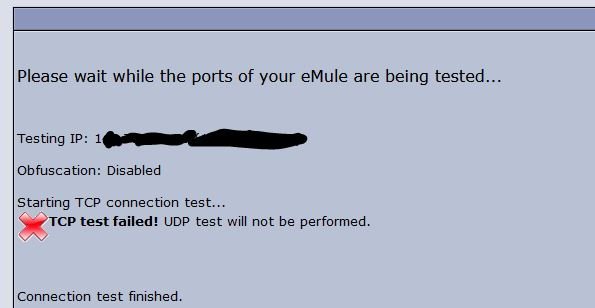
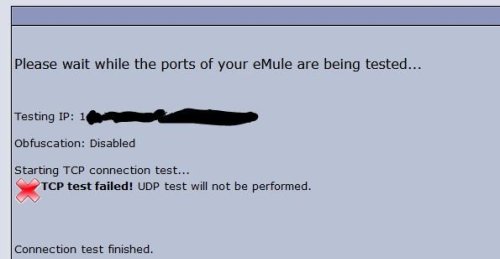
 Masterbibop posted a topic in Pour particuliersVersion VPN Secure 21.17.7.539 sur Microsoft Windows 10 Core x64 Build 19045 Bonjour, je viens d'installer l'application VPN Secure. Je souhaite utiliser le VPN uniquement pour utliser sereinement l'application Emule, avec le Kill Switch uniquement de Emule (pour que L'application Emule se ferme si le VPN est coupé, et se rallume quand le VPN se remet en route). L eproblème est que VPN Secure en marche, Emule n'arrive pus à se connecter à ses serveurs, le ports TCP ne se connecte pas. Comment faire ? En vous remerciant Masterbibop
 Guest posted a topic in Für PrivatanwenderIch hatte bis jetzt den Kaspersky Total Security (5 Geräte) und parallel den VPN Secure Connect (5 Geräte) aktiv. Nun habe ich ein Upgrade auf das neue Kaspersky Premium (5 Geräte) gemacht, dass ja den VPN als unlimitierte Version enthält. Das gesonderte VPN Abo läuft noch weiter. Nach meinen Verständnis habe ich dann 5 VPN Geräte aus Premium und 5 VPN Geräte aus dem VPN Abo - also in Summe 10. Sobald ich nun ein 6 Geräte bei VPN anmelden will, bekomme ich die Meldung, dass alle 5 Geräte schon vergeben sind und bekomme keine unlimitierte Lizenz. In der Abo-Übersicht sind alle Geräte bei den VPN Secure Connect aufgeführt. Ein Löschen des VPN Programms auf dem Gerät und VPN Neuinstallation über das Premium Programm hat auch keine Änderung gebracht. Das Gerät meldet sich trotzdem wieder über VPN Secure Connect an. Nun habe ich mal VPN Secure Connect komplett im Account deaktiviert. Jetzt wurden alle VPN Geräte unter Premium hinterlegt und funktionieren auch 5 unlimitiert und 1 begrenzt. Aktivere ich nun die Lizenz von VPN Secure Connect wieder im Account, dann werden alle Geräte automatisch wieder der VPN Secure Connect Lizenz zugeordnet. Gibt es eine Lösung wie ich die Geräte bzgl. VPN gezielt den Lizenzen Premium und VPN Secure Connect zuordnen kann, so dass ich dann auch die beiden gekauften Lizenzen vollständig nutzen kann? So wie es jetzt ist, ist die zusätzliche VPN Secure Connect Lizenz ja dann überflüssig. VG Wolfgang
 steve33 posted a topic in Kaspersky: Basic, Standard, Plus, PremiumI updated the software to Kaspersky Standard from KIS as you advised (20th March) and it started working again. I used it several times but now it will not start. I get the message "The secure Browser cannot be started". What's the problem now?
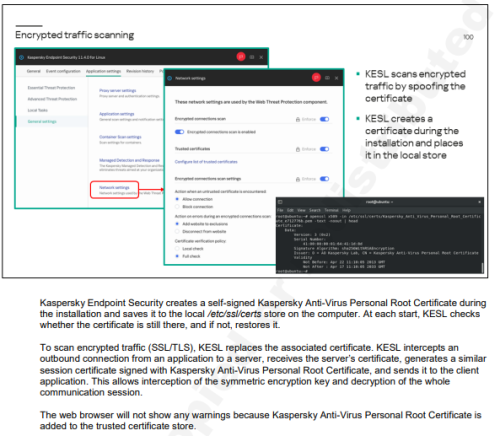
 iedco.cybertech posted a topic in Kaspersky Endpoint Security for BusinessHi I have readen thi Linux course of Kaspersky Endpoint Security and reached to the topic that was about "how kasperksy scan encrypted traffic?" and A question has arisen for me that how Kaspersky's Self-sign certificate participate in TLS/Handshake proccesses?How does it spoofed it self ?what contents does it have? I konw that it uses Man In The Middle to sacn the traffic but I have confused what role takes on the self-sign certificate in the whole proccess.