Search the Community
Showing results for 'Secure Keyboard Input is enabled'.
Found 267 results
-
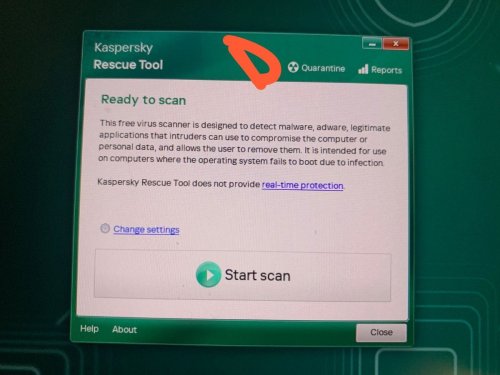
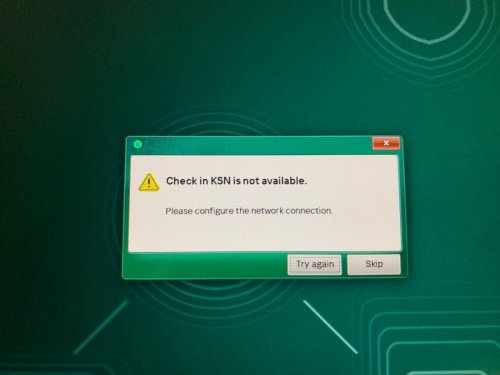
 dubailaptop posted a topic in Kaspersky Rescue DiskI'm trying to recover my keyboard, mouse, speakers, which aren't working after uninstalling kapersky. So i booted with kapersky rescue tool. But the tools option is just not showing I'm running windows 11 Please help, I've spent hours and hours on this with no luck this is 2024 kapersky rescue tool, the 2018 version was showing black screen on my laptop
-
 Bob69 posted a topic in Kaspersky Secure ConnectionДобрый день. Установил Kaspersky secure connection на смарт тв андроид. Устанавливал со своего аккаунта, скачал на устройство. При попытке зайти в профиль,подтвердить подписку приложение вылетает. Чистка кеша, переустановка не помогла.
-
 Radiant222 posted a topic in Kaspersky Secure ConnectionС сегодняшнего дня на Android(Samsung) выходит сообщение "Не возможно подключиться к провайдеру безопасного VPN-соединения". Проверял через двух провайдеров, результат одинаковый. P.S. У жены те же провайдеры, у нее все работает. Подписка активна. На компьютере все работает.
-
 Guest posted a topic in Kaspersky Secure ConnectionНедавно приобрел глобальную Premium подписку, в которую в том числе входит Kaspersky Secure Connection. Переплатил немного за глобальную версию, но надежный VPN мне нужен. Пользовался я ей в бесплатной пробной версии спокойно - иногда пропадала, но в целом работала. Сегодня, впервые купив полноценную подписку, вижу такую же ситуацию, как у пользователя "Blamba4400" - пропала вкладка VPN в самом приложении на Android, а в старом отдельном приложении требует его удалить и перейти на основное приложение Kaspersky. И перестановка приложения через .apk с оф. сайта уже не спасает. С ПК пришлось качать через глобальный сайт - kaspersky.com, но после этого все работает идеально, хоть и на английском. Однако, опять же, доступ есть и он неограниченный до конца действия подписки. Отсюда возникает вопрос: раз доступ у меня есть, подписка с VPN работает на ПК, то что мне мешает пользоваться Kaspersky Secure Connection на Android?
-
 henrique.c posted a topic in Para casaOlá, comunidade e equipe da Kaspersky! Me chamo Henrique, sou um assinante fiel do plano Kaspersky Premium, e uso o VPN Secure Connection há algum tempo para garantir minha privacidade online. O produto é ótimo em muitos aspectos, mas venho enfrentando uma limitação que afeta minha usabilidade: a falta de suporte nativo para tunelamento IPv6. Atualmente, quando a VPN está ativa, o tráfego IPv6 é bloqueado, o que impede o uso em redes que dependem desse protocolo. Isso é problemático para mim, pois utilizo IPv6 para aplicações que beneficiam de conexões diretas e de alta performance, como videochamadas colaborativas, acesso remoto seguro a dispositivos e serviços que exploram as vantagens do IPv6 sobre o IPv4 (como evitar restrições de NAT e port forwarding, resultando em latência menor e conectividade mais confiável em ambientes modernos). Como assinante Premium, esperava que o VPN estivesse alinhado com as tendências atuais, onde o IPv6 está se tornando padrão em muitas redes e provedores. Muitos concorrentes já oferecem suporte completo a IPv6, tunelando o tráfego de forma segura. Gostaria de sugerir à equipe de desenvolvimento que priorize essa implementação em atualizações futuras, o que tornaria o produto ainda mais robusto e atraente para usuários avançados. Alguém mais na comunidade enfrenta o mesmo problema? E à equipe da Kaspersky: há planos para adicionar esse recurso? Agradeço qualquer feedback ou atualização! Obrigado! Henrique
-
 Sergei Andreew posted a topic in Kaspersky Secure ConnectionЯ купил подписку на 1 год для 5 устройств Kaspersky Secure Connection, ключ для активации мне не предоставили. Бот пишет что типа сам ключь Касперского должен работать, но нифига это не работает Что делать?
-
 Сommunity Knowledgebase posted a blog entry in Kaspersky Endpoint Security's Kaspersky Endpoint SecurityScenario Enable Network Threat Protection Connect another Mac via a thunderbolt cable Try to send any data from one computer to another Connection times out Workaround & Solution Connect computers by other means or disable NTP when using Thunderbolt bridge. RCA This issue is caused by a bug in macOS' built-in packet filter and was reported to apple.
-
Сommunity Knowledgebase posted a blog entry in Kaspersky Security for Mail Server's Kaspersky Security for Mail ServerThere're only two known errors during KSMG installation. First one: ksmg.celeryd.service failed because a timeout was exceeded Above error means that DNS and/or DHCP servers are not accessible. Please reinstall and make sure that DNS and/or DHCP is configured properly. Second error: with error code=1 and msg=initdb: error: directory "/var/opt/kaspersky/ksmg/postgresql" exists but is not empty if you want to create a new database system, either remove or empty the directory "/var/opt/kaspersky/ksmg/postgresql" or run initdb with an argument other than "/var/opt/kaspersky/ksmg/postgresql" To fix the error just delete created VM and create a new one.
-
Сommunity Knowledgebase posted a blog entry in Kaspersky Security for Mail Server's Kaspersky Security for Mail ServerProblemMessaged are delayed for 50 minutes and in /var/log/maillog there are following entries: Dec 10 12:07:07 ksmg KSMG: put to asp quarantine: message-id="": relay-ip="10.10.1.1": action="Postponed": size=21958: mail-from="test@example2.com": rcpt-to="test@example.com" SolutionThis is a a feature which delays some suspicious messages for 50 minutes (by default) and then rescan them with newer bases and information in KSN. This can be turned off in Settings -> Protection -> Anti-Spam -> Use reputation filtering. The delay can be tweaked in Settings -> Protection -> Anti-Spam Quarantine. Delayed (quarantined) messages are visible in Message Queue section of KSMG and can be forced to be delivered from there with 'Flush' button. Which messages to delay or not to delay can be tweaked with bases, so if you get messages that are delayed but shouldn't, then please provide message samples to Kaspersky Support for investigation as 'false positives'. For KSMG 2.0 - 3.1 (Use Anti-Spam Quarantine and Maximum Quarantine duration options accordingly):
-
Сommunity Knowledgebase posted a blog entry in Kaspersky Endpoint Security's Kaspersky Endpoint SecurityAdvice and Solutions (Forum Knowledgebase) Disclaimer. Read before using materials. This article is about Kaspersky Endpoint Security for Windows (KES for Windows) Problem 3d party video monitoring solution from HIKVision and KES 11.3 or more recent version, up to 12.0 When you open the URL of video web server, for example, http://172.17.64.5/ the error Playback interrupted occurs. The problem occurs because video software does not comply with HTTP RFC. Use the following key words to identify the problem in KES SRV trace: rtsp://172.17.64.5/Streaming/ .......................................................................... GET /SDK/playback HTTP/1.1 ......................................................................... Incorrect HTTP header (replace the example IP with one of web server's) Solution Add the executable of the web browser to Trusted applications: Tick the option "Do not scan network traffic"; Specify the IP address of the web server in question (in our example, 172.17.64.5) . When adding Internet Explorer to Trusted applications, please make sure to add the x86 version, which is run by default: %ProgramFiles(x86)%\Internet Explorer\iexplore.exe Unfortunately, it is not possible to add an IP subnet or IP range to the list of excluded IP addresses in trusted applications settings. In recent versions of KES, the following event is logged to local reports: Event: Connection blocked Application name: chrome.exe Application path: C:\Program Files\Google\Chrome\Application Application PID: **** User name: **** User type: Active user Component: Protection Event date: **** IP address: 1.1.1.1 Protocol: HTTP or HTTPS Resource name: office365atwork.com Result: The HTTP connection is terminated. Resource name: office365atwork.com Reason: The format of transferred data does not allow to scan it for threats. If you trust this resource, add it to scan exclusions.
-
 stan4ever posted a topic in Kaspersky Secure Connectionпривет! у меня стоит windows 11, kaspersky plus и kaspersky secure connection(21.21.07.384(a)).. почему то не работает впн, блокируется трафик.. все это началось внезапно - сегодня все было нормально, завтра замучили глюки с впн.. переустановка kaspersky secure connection помогла ненадолго, снова начались те же проблемы..
-
Сommunity Knowledgebase posted a blog entry in Kaspersky Security for Mail Server's Kaspersky Security for Mail ServerIssue During initial deployments you may encounter errors like this: Jun 3 12:50:13 ksmg postfix/smtpd[841]: NOQUEUE: reject: RCPT from ksmg.example.com[10.10.10.1]: 450 4.1.2 <test@example.com>: Recipient address rejected: Domain not found; from=<test@example.com> to=<test@example.com> proto=ESMTP helo=<example.com> This means that the recipient domain could not be verified in DNS. Solution There are multiple ways to avoid it: create a proper DNS records for the mentioned domain on the DNS server that is used by KSMG configure to use a different DNS server that has proper records just disable this check in Settings -> MTA -> Advanced Settings -> Reject messages for unknown recipient domains When that check is enable, requests are rejected, when the RCPT TO domain has no DNS MX and no DNS A record a malformed MX record (a record with a zero-length MX hostname)
-
Сommunity Knowledgebase posted a blog entry in Kaspersky Security for Mail Server's Kaspersky Security for Mail ServerProblem Currently KSMG has IPv6 support enabled in Postfix: inet_protocols = all However, Postfix 2.6 has a known limitation: http://www.postfix.org/IPV6_README.html "Postfix SMTP clients before version 2.8 try to connect over IPv6 before trying IPv4. With more recent Postfix versions, the order of IPv6 versus IPv4 outgoing connection attempts is configurable with the smtp_address_preference parameter. " http://www.postfix.org/postconf.5.html#inet_protocols "Postfix versions before 2.8 attempt to connect via IPv6 before attempting to use IPv4. " Solution Disable IPv6 to evade limitation by configuring: KSMG1.1 inet_protocols = ipv4 in both /opt/kaspersky/klms-appliance-addon/share/templates/main.cf.template and /etc/postfix/main.cf and restarting Postfix afterwards: systemctl restart postfix KSMG2.*/3.* inet_protocols = ipv4 in /opt/kaspersky/ksmg-appliance-addon/share/templates/main.cf.template Then change any setting in Web-UI Settings - Build-In MTA - Basic settings. You can change value of Message size limit (bytes) by 1
-
 Артём1ё2312 posted a topic in Kaspersky Secure Connectionдико тупит дико очень.Нервов моих не хватает даже просто поискать что-нибудь на ютубе. Сделайте что-нибудь.впн стал говно! Меня не волнует что у вас там с работой,меня волнует качетство работы приложения как потребителя. Давайте решайте
-
 kitakita posted a topic in Kaspersky: Basic, Standard, Plus, PremiumHello, Application: Kaspersky Premium (25.0.0.332d.e) Environment: MacBook Air M4 (MacOS Sequoia Version 15.5) When protection is enabled, sometimes after my Mac enters sleep mode and then wakes up, the network connection stops working. Currently, the only workaround I found is: System Settings -> Network -> VPN -> Filters & Proxies Then disable Kaspersky IDS & Filter, and it will automatically enable again, and the network starts working. However, this issue keeps happening repeatedly and is quite inconvenient. Is there any other solution or a fix for this problem? Thank you.
-
 kinigos posted a topic in Kaspersky Secure ConnectionСобственно вчера на пк все работало отлично, а сегодня просто при включении как будто нет интернета, при этом на телефоне все работает нормально версия 21.21.7.384-1 (a)
-
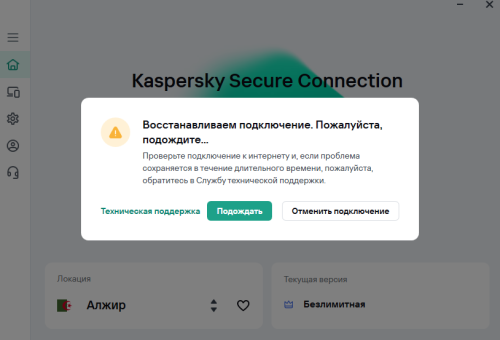
 AltaGA posted a topic in Kaspersky Secure ConnectionДоброго! Третий день устанавливается соединение ни через какую страну. Последнее что делал перед возникновением проблемы - обновил Bitrix24. Перезагрузился уже несколько раз, не помогло. Microsoft Windows 10 Professional x64 Build 19045 21.21.7.384-1 (a)
-
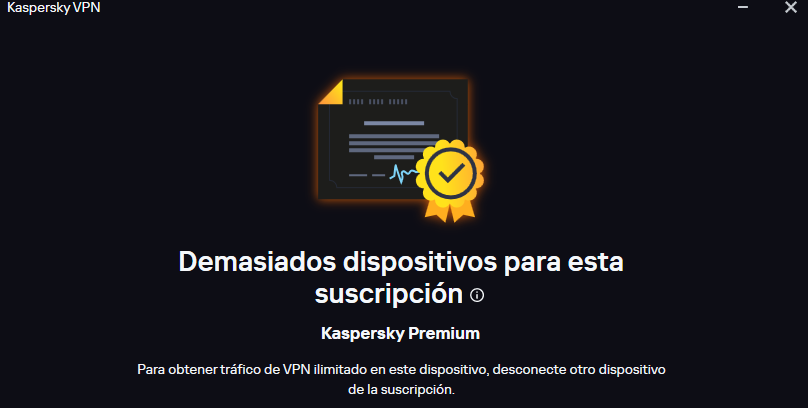
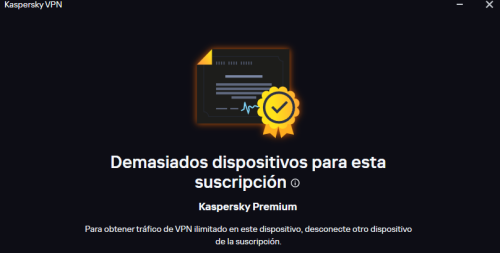
 marioarthur posted a topic in Para usuarios particularesHola. Buenos días. Tardes o noches. me podrían ayudar a activar VPN Secure Connection. compre la suscrición Kaspersky Premium al momento de querer activar vpn me dice demasiados dispositivos para esta suscrición. LA ACABO DE COMPRAR (ANTES ERA MIEMBRO FREE)
-
 влад21413 posted a topic in Kaspersky Secure ConnectionПереустановил приложение а он всё равно включается и выключается сам по себе не идёт подключение версия приложения 21.21.7.284-1 а
-
 Meiso posted a topic in Kaspersky Secure ConnectionПри включении отключается интернет, смена региона не помогает
-
 Kuser7985Sh posted a topic in Kaspersky: Basic, Standard, Plus, PremiumI've been trying to ask this question for a while now. Does restoring all Kaspersky settings to default/factory settings have any bad effect on the system? For example, what happens to applications that you put into high restricted category? Also applications that you deny the internet access? And what would happen to quarantined items? Will restoring Kaspersky application settings to default values after you have so many programs (Let's say some of them not exactly trusted) running on the computer make the antivirus less effective at handling those apps after the program reset? Will there be any potential risks for doing this? Thank you.
-
 Miki posted a topic in Kaspersky: Basic, Standard, Plus, PremiumI enabled virtualisation in UEFI BIOS and in kaspersky premium it still says that virutalisation is not avalible
-
 Banna6699 posted a topic in Kaspersky: Basic, Standard, Plus, PremiumHello all, My Kaspersky subscription is expiring soon and I was about to make a purchase for a new license however I hit a snag. I reside in Thailand, however all my finances like banks and credit cards are all US based. When I tried to enter my billing information there was no option to choose the US as the region for the credit card origin. Is there a way to resolve this? I tried doing this for the global store. Thank you for your time
-
 Dopler posted a topic in Kaspersky Secure ConnectionВ локальной сети есть устройство, доступное через имя leonardo.local. При включенном Kaspersky Secure Connection доступ к нему по имени пропадает, только по ip.
-
 petr_v_v posted a topic in Kaspersky Secure ConnectionНадо в разделе proxy настройках программы прописать сервер. В настройках Kaspersky Secure Connection видел, что есть пункт пропускать трафик для выбранной программы через vpn, но это не то что нужно. Если ли такое решение? Если есть, то где взять настройки?