Search the Community
Showing results for 'Secure Keyboard Input is enabled'.
Found 267 results
-
 drakomut posted a topic in Für PrivatanwenderHallo, ich habe das porblehm das alle Internetbrowser gehen bis auf Chrome. da Wirt mir angezeigt da keinen Verbindung aufgebaut werden kann. ich habe kaspersky vpn deinstalliert und neu installiert. es hat nicht geklappt. Kann mir einer sagen was ich bei Chrome einstellen muss damit es geht? ich glaube das es mit dem Einstellungen zutuen hat.
-
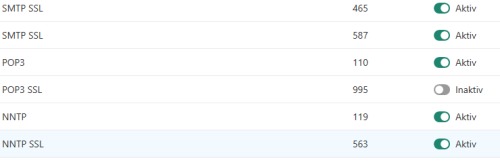
 Martin kolba posted a topic in Kaspersky Internet SecurityI have noticed that recently Port 995 is being blocked by Kaspersky Internet Security, without any changes being made to the settings. This leads to the error message 0x800ccc1a when retrieving emails via the SMTP port 995. Since this is a Secure Socket Layer (SSL) port and it is suddenly being blocked, although the application has not been changed, I wonder: What adjustments have been made to Kaspersky Internet Security that caused this port to be blocked? The goal cannot be to disable Port 995 in the settings just to make Outlook work again. Therefore, I am reporting this issue in case there is not already a thread about it.
-
 maike posted a topic in Kaspersky Secure ConnectionДобрый день, Подскажите пожалуйста, использую Kaspersky Secure Connect и хочу установить его как клиент openvpn на роутер Asus RT-AC57U V3 Делаю все как описано в этой статье. Создаю конфигурацию OpenVPN, выбираю страну, сохраняю логин, пароль и файл конфигурации .ovpn Перехожу в настройки роутера - ввожу логин, пароль, загружаю файл конфигурации, сохраняю, включаю, но соединение не устанавливается. Появляется ошибка (на скриншоте) Подскажите пожалуйста в чем может быть дело? Заранее спасибо


-
 77Front1r posted a topic in Kaspersky Secure ConnectionЧто я только не пробовал и переустановку приложения 22.11.2024 последний раз делал не помогло и долго ждал подключения так же не помогает просто показывает, что вроде как подключено но интернета вообще нет и потом опять приложение само пытается подключиться и так по кругу, это настоящие издевательство над пользователями за что я оплачиваю годовую подписку когда в версии на ПК ВПН просто не подключается ни к каким серверам.
-
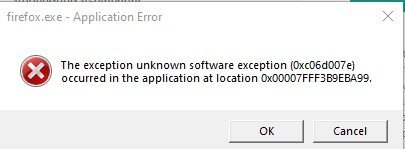
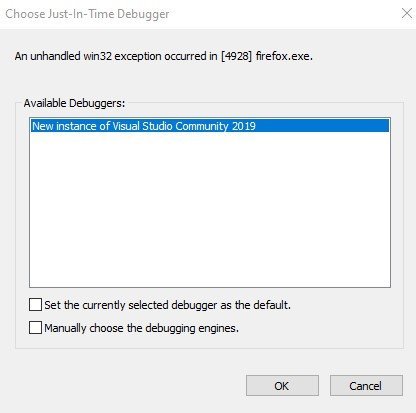
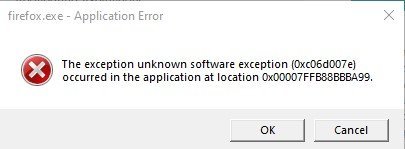
 fankaseri posted a topic in Kaspersky Total SecurityWhenever I try to use the Secure Bank Transactions feature (browser is Firefox 132.0.1) I get the following popup message, when I select the site I want to visit: "The exception unknown exception (0xc06d007e) occurred in the application at location 0x00007FFB88BBBA99" (or some similar location. It always starts with 00007FF. If I select cancel it brings me to another message for selecting a debugger and the cycle ends with Failed running Protected browser. Any ideas about what is going on? It used to work perfectly ever since I installed KTS (a long time ago) until about 5 days ago. I use KTS ver 21.3.10.391, Win 10 22H2 (OS Build 19045.5073), Firefox 132.0.1
-
 Watar posted a topic in Kaspersky Secure ConnectionДобрый день! Не работают ссылки для загрузки приложения для Android. Вручную найти приложение в PlayMarket и RuStore не удалось. Подскажите, пожалуйста, где скачать приложение для Android?
-
 Состоялся релиз Kaspersky Secure Mail Gateway 2.1.1 (версия 2.1.1.8310) [04.06.2024] В этой версии: — Добавлена поддержка новых версий операционных систем. — Расширена функциональность проверки подлинности отправителей сообщения, условий контентной фильтрации и уведомлений. — Добавлена новая технология: сопоставление доменов отправителя. — Добавлен журнал событий аудита. И многое другое. Скачать > < Предыдущая версия
-

-
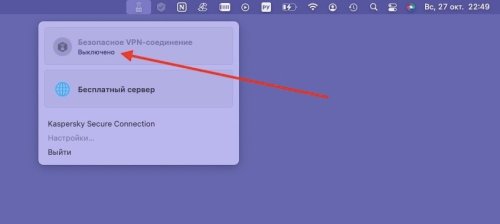
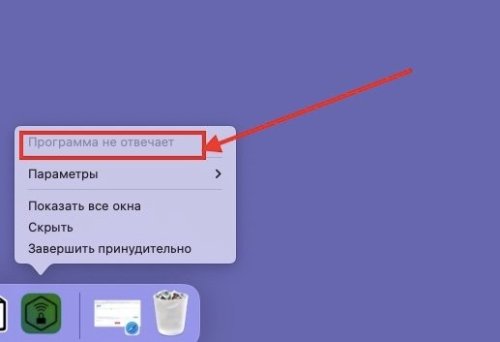
 Humel posted a topic in Kaspersky Secure ConnectionПосле оплаты лицензии на очередной год, перестало запускаться приложение Kaspersky Secure Connection. Удалили, установили заново, но проблема сохраняется. Установленное заново не запускается тоже. Перезагружать пробовали. Снова удалить и снова загрузить – тоже. Ничего не помогает. «Программа не отвечает» и все. Что делать?
-
 tjean posted a topic in Ev içinSelamlar, Kaspersky Plus'ta yerleşik olarak gelen VPN servisiyle, ayrı olarak satılan Kaspersky VPN Secure Connection arasındaki fark nedir? Birincisinde limit mi var?
-
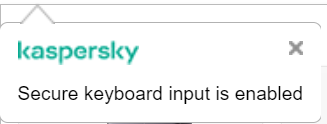
 BlackEdition posted a topic in Kaspersky: Basic, Standard, Plus, PremiumHow hard is it to give us an option to disable that very annoying popup? Your users have been suffering for years and have been asking for a way to get rid of the secure keyboard input popup while still having the feature ENABLED and working in the background, but things are the same even with your latest editions (Kaspersky Plus). I think whoever thought it was a smart idea to remind the user about it every single time shouldn't have the power to manage and develop your software. Im a paying customer since 2006 and I had to turn off this feature and live without it whenever it came out (it's definitely been 5+ years). I just moved to a new computer and I've been configuring my settings and guess I will still need to disable it and live without that feature for many years to come...
-
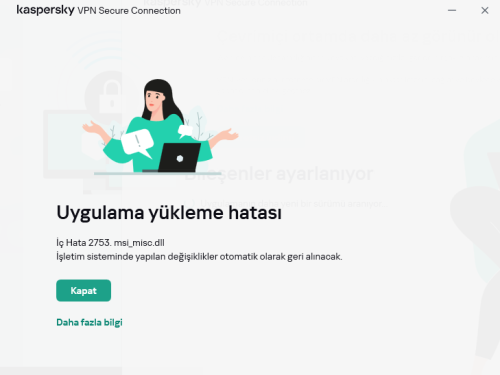
 AlanHetfield posted a topic in Kaspersky VPNHello everyone, today i have a problem. I can't download Kaspersky VPN. I'm opening Kaspersky Privacy tab, and click the "Download" button on Kaspersky VPN. And opening a Download wizard. When downloading percentage came to 20, Kaspersky giving to me and error. I restarted my system and tried again, but it was the same. Can anybody help me? Türkçe: Merhaba arkadaşlar, Kaspersky VPN ile ilgili bir problemim var. Kaspersky VPN'i indiremiyorum. Kaspersky'ı açıp gizlilik sekmesinde VPN bölümüne gelip "Yükle" dediğimde, indirme şeyi açılıyor ve kurulum başlıyor. Ancak %20'ye geldiğinde Kaspersky bir hata veriyor. Sistemi yeniden başlattım, temp, %temp% klasörlerini temizleyip defalarca kez baştan denedim ama her seferinde aynı sorun yaşanıyor. Hata ektedir. Daha önceden Kaspersky VPN bilgisayarımda yüklüydü. Program kaldırdan kaldır dediğimde belirli bir kısımda takılı kalmıştı ve iptal et dememe rağmen tepki vermiyordu. Ben de mecburen görev yöneticisinden kaldırma programını kapattım. Daha sonrasında VPN yüklüydü ama program kaldır menüsünde gözükmüyordu. Ben de Revo Uninstaller ile kaldırmayı denedim. Ancak yanlışlıkla bazı Regedit kayıtlarını silmeyi unutarak ileri dedim ve kaldırdım. Sanırım sorun bundan kaynaklanıyor. Nasıl düzeltebilirim?
-
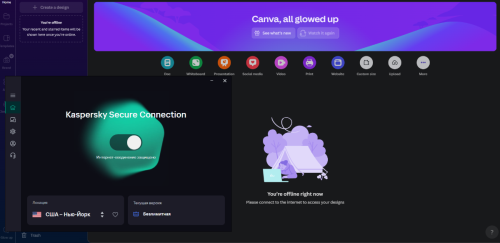
 anylvv posted a topic in Kaspersky Secure ConnectionЗдравствуйте! Недавно я приобрёл платную подписку на год и решил воспользоваться привычным для меня сервисом для работы — Canva. Однако у меня возникли проблемы с подключением. Я безуспешно пытался подключиться через множество серверов, но ни один из них не работал. Я заметил, что через другие сервисы VPN — всё работает стабильно. Но я потратил деньги на подписку Kaspersky и хочу видеть соответствующий результат. Прошу помочь мне решить эту проблему как можно скорее. Заранее спасибо за вашу помощь! Версия приложения: 21.18.5.438 (a)
-
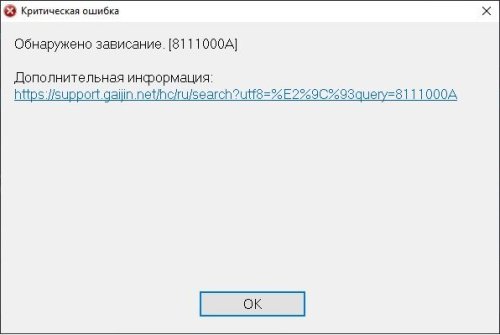
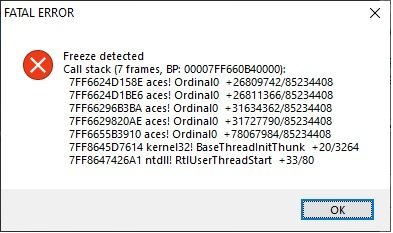
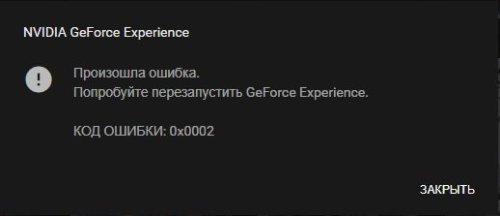
 Seraphim posted a topic in Kaspersky Secure ConnectionДобавил Discord и Яндекс браузер(из-за ютуба) в список "Использовать безопасное VPN-соединение" и включил VPN. Discord и Яндекс браузер(ютуб) - стали работать(включатся, грузиться) но при этом перестали запускаться Nvidia Geforce experience (выдаёт код ошибки: 0x0002), игры War Thunder, Калибр(просто перестал запускаться) игры запускались через Steam. Если запустить сначала игру а после vpn то игры нормально работает(ping без изменений(нормальный как без VPN)), Discord и Яндекс браузер(ютуб) так же работать начинают, а вот Nvidia Geforce experience вылетает через некоторое время с ошибкой: 0x0002. Если же выйти из игр(с вкл VPN) и опять их запустить снова вылетают ошибки. Как это починить? ОС: Microsoft Windows 10 Professional x64 Build 19045 Версия KSC: 21.18.5.438 (a)
-
Memfise posted a topic in Kaspersky Endpoint Security для бизнесадобрый день. Столкнулся с такой проблемой, что после полнодискового шифрования на ноутбуках (Lenovo) до загрузки выскакивают такие сообщения "Windows Boot Manager has been blocked by the current security". после отключения в BIOS ноутбука Secure BOOT проблема исчезает и загрузка происходит корректно. У моих коллег целый зоопарк ПК - и HP, и Acer, и Lenovo, но других моделей При этом в настройке политики шифрования не активирован режим "использовать legasy usb support не рекомендуется" совместимость с Secure BOOt указана что есть в инструкции про активацию Legacy USB Support указано лишь про USB-устройства (например, токен) на этапе загрузки компьютера до запуска операционной системы если активирован такой флаг. на сколько будет снижена безопасность при активации такого флага, а так же сохранится ли проблема (сами не проверяли. т.к. в связи с появлением проблемы шифрование приостановлено) с загрузкой ПК и блокировкой Windows Boot Manager?
-
 Aleksey_Mi posted a topic in Kaspersky Secure ConnectionПросто виснет при запуске и пишет "Программа не отвечает". Переустановка не помогает.
-
MrInfro posted a topic in Kaspersky: Basic, Standard, Plus, PremiumHello, for few months now I have been encountering really annoying situation which I have managed to track down to interactions between Kaspersky and Opera/ Opera GX The situation manifests in two ways. First, quite bothersome: If webpage has search bar to search something in site, it will take AGES to show the result (for reference, using Firefox doesn't have this issue) all the while Network console gets spammed by from?get&nocache records for several seconds to in worse case up to few minutes. Second, less bothersome: youtube. Usually, it will take either several minutes or several page refreshes/or application restarts to get the page to load. I have contacted the Opera developers and we did several troubleshooting steps, but with other users, we have pinpointed the one common thing to using Kaspersky product. If I disable the protection, the issue goes away. Is there a way to troubleshoot this? Thank you
-
 piesesti posted a topic in Ev içinMerhabalar. Kaspersky'nin VPN'ini araştırınca log tutmadığına dair yazılar okudum kendi resmi sayfanızda. Ancak My Kaspersky'de VPN kısmında ve Kaspersky'nin gizlilik kısmında ekte eklediğim görselleri okuyunca aklıma birkaç şey takıldı. Şimdi Türkiye'de yaşayan birisi olarak bu konudaki yerel yasalara hakim değilim. Şimdi siz log tutup, kişisel verileri işleyip bunu paylaşmakta mısınız yoksa Kaspersky'nin VPN'ini kullanırken size güvenip güvenli hissedebilir miyiz? Çünkü geçenlerde eski internet sağlayıcımla yaptığım konuşmada düzenli olarak trafiğimi BTK'ya aktardıklarını söylemişlerdi. Şimdi bu da internet sağlayıcılarının bizi görmesini engellerken sizin bu işlevi yerine getirip bunu paylaşıyor olmanız VPN'i tamamen anlamsız kılıyor. O yüzden bu durumu detaylı bir şekilde öğrenmek istedim.


-
 calao58 posted a topic in Para casaBoa tarde, solicito ajuda de como fazer pedido de cancelar KasperskyVPN Secure Connection comprei errado era para comprar o Kasperky internet seguro.
-
 Egor Erastov posted a topic in Advice and solutions for Kaspersky Security for Mail ServerAdvice and Solutions (Forum Knowledgebase) Disclaimer. Read before using materials. Which TLS protocols are allowed by default By default, the following TLS protocols are allowed in Kaspersky Secure Mail Gateway 2.1 for SMTP data transfer: TLS security mode Protocols Attempt TLS Encryption Crypto-Policy = DEFAULT (by default) TLS 1.2, TLS 1.3 are allowed. TLS 1.0, TLS 1.1, SSL 2.0/3.0 protocols are not allowed. The possibility of unencrypted data transfer in SMTP sessions (plain text) is also allowed. in SMTP-session (plain text). The sender decides whether to encrypt or not. Crypto-Policy = LEGACY TLS 1.0, TLS 1.1, TLS 1.2, TLS 1.3 are allowed. SSL 2.0/3.0 protocols are not permitted. The possibility of unencrypted data transfer in SMTP sessions (plain text) is also allowed. in SMTP-session (plain text). The sender decides whether to encrypt or not. Configuration file parameters smtpd_tls_protocols, smtpd_tls_exclude_ciphers smtp_tls_protocols, smtp_tls_exclude_ciphers Require TLS Encryption Crypto-Policy = DEFAULT (by default) TLS 1.2, TLS 1.3 are allowed. TLS 1.0, TLS 1.1, SSL 2.0/3.0 protocols are not allowed. The use of unencrypted data mode is not allowed. Crypto-Policy = LEGACY TLS 1.2, TLS 1.3 are allowed. TLS 1.0, TLS 1.1, SSL 2.0/3.0 protocols are not allowed. The use of unencrypted data mode is not allowed. Configuration file parameters smtpd_tls_mandatory_protocols, smtpd_tls_mandatory_exclude_ciphers smtp_tls_mandatory_protocols, smtp_tls_mandatory_exclude_ciphers TLS-security mode is configured separately for receiving and for transmitting messages in the parameters of the built-in MTA, more details in the documentation: Configuring TLS for KSMG (kaspersky.com) If necessary, you can change the list of forbidden protocols and encryption algorithms for Attempt TLS Encryption mode by manually modifying the configuration files of the built-in MTA from the technical support mode. It is not recommended to change the list of allowed protocols for the strict mode. By default, Rocky Linux 9 has a DEFAULT policy that prohibits the use of protocols below TLS 1.2. If you want to allow such protocols, you must first change the policy to LEGACY. In addition to protocols, the system policy limits the minimum key length and the list of encryption algorithms, more details in the documentation. Procedure for changing the system encryption policy To change the system encryption policy, perform the following procedure: 1) Connect to the cluster node via SSH to access technical support mode. 2) Check the current encryption policy set at the operating system level: update-crypto-policies --show 3) If necessary, change the policy to LEGACY, using the command: update-crypto-policies --set LEGACY 4) To apply the system policy on the embedded MTA, restart the service using the command: systemctl restart postfix 5) Check the status of the postfix service, it should be running: systemctl status postfix This completes the procedure. The described steps must be repeated on each node in the cluster. Note: If you want to switch back to the DEFAULT policy, perform the same procedure by specifying DEFAULT instead of LEGACY in step 3 of the command. How to change the list of prohibited TLS protocols To change the list of forbidden TLS protocols for Offer TLS encryption mode, perform the following procedure: 1) Connect to the cluster node via SSH to access technical support mode. 2) Navigate to the directory where the embedded MTA configuration file templates are located: cd /opt/kaspersky/ksmg-appliance-addon/share/templates 3) Back up the main.cf.template file if you haven't done so before: cp -p main.cf.template main.cf.template.backup 4) Open the main.cf.template file for editing with a text editor: vim main.cf.template 5) Configure parameters for receiving messages - find lines with directives smtpd_tls_protocols and smtpd_tls_exclude_ciphers, add protocols and algorithms you want to exclude to the list: Example: If you want to disallow the use of TLS 1.0: smtpd_tls_protocols = !SSLv2, !SSLv3, !TLSv1 Example: If you want to prohibit the use of TLS 1.0 and TLS 1.1: smtpd_tls_protocols = !SSLv2, !SSLv3, !TLSv1, !TLSv1.1 Example: If you want to prohibit the use of anonymous ciphers: smtpd_tls_exclude_ciphers = EXP, MEDIUM, LOW, DES, 3DES, SSLv2, aNULL Example: If you want to prohibit the use of anonymous ciphers and the RC4 encryption algorithm: smtpd_tls_exclude_ciphers = EXP, MEDIUM, LOW, DES, 3DES, SSLv2, aNULL, RC4 6) Configure parameters for sending messages - find lines with directives smtp_tls_protocols and smtp_tls_exclude_ciphers, add protocols and algorithms you want to exclude to the list: Example: If you want to prohbit the use of TLS 1.0: smtp_tls_protocols = !SSLv2, !SSLv3, !TLSv1 Example: If you want to prohibit the use of TLS 1.0 and TLS 1.1: smtp_tls_protocols = !SSLv2, !SSLv3, !TLSv1, !TLSv1.1 Example: If you want to prohibit the use of anonymous ciphers: smtp_tls_exclude_ciphers = EXP, MEDIUM, LOW, DES, 3DES, SSLv2, aNULL Example: If you want to prohibit the use of anonymous ciphers and the RC4 encryption algorithm: smtp_tls_exclude_ciphers = EXP, MEDIUM, LOW, DES, 3DES, SSLv2, aNULL, RC4 7) Save the changes in the main.cf.template file ? To apply the changes to the template, change some setting of the built-in MTA via the web interface. For example, you can increase the value of the Message Size Limit setting by one (Options - Embedded MTA - Main Settings), save the changes, and then revert the previous value back. 9) Verify that the changes are in the main configuration file of the embedded MTA by running the command: postconf smtpd_tls_protocols smtpd_tls_exclude_ciphers smtp_tls_protocols smtp_tls_exclude_ciphers 10) Check the status of the postfix service, it should be running: systemctl status postfix This completes the procedure. The described steps should be repeated on each node of the cluster.
-
 Екатерина11 posted a topic in Kaspersky Secure ConnectionДобрый день. Подписка есть и на Kaspersky Secure Connection, и на Kaspersky Total Security, версия Виндовс 10. В последнее время Secure Connection не подключался ни к одному серверу, следуя инструкциям в программе, решила удалить приложение и заново установить. Скачала актуальную версию на сайте касперского, а установочный файл просто не открывается. При чем процесс появляется в диспетчере задач, но ничего не происходит. Пробовала и от имени администратора запускать, не помогает.
-
 tanıl posted a topic in Ev içinmart 2025 'te süresi bitecek total security ile beraber 08 ekim 2024 te lisans süreci dolacak olan VPN secure connection kullanıyorum. yeni ürün olan premium da VPN'in verildiğini gördüm. VPN'i ayrı bir uygulama olarak almak gerekir mi yoksa secure connectionda olan tüm özellikler premium'un içerisinde gelen VPN'de var mı? acil destek lütfen. çok teşekkürler.
-
 Dmitry777 posted a topic in Kaspersky Secure Connection1) Прошу добавить горячие клавиши для включения и выключения VPN Поскольку возможности привязать VPN к определенному сайте нет, прошу добавить горячие клавиши для вкл вкл VPN 2) Также была бы полезна функция, когда можно быстро Вкл/Выкл от VPN только браузер, например, не затрагивая другие программы требующие VPN
-
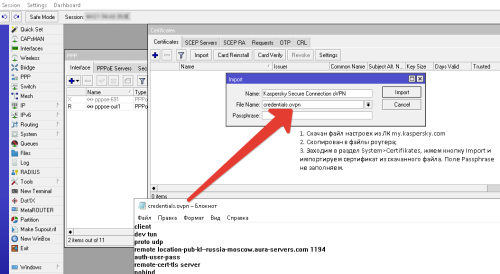
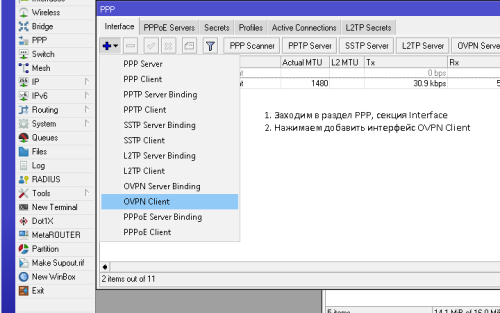
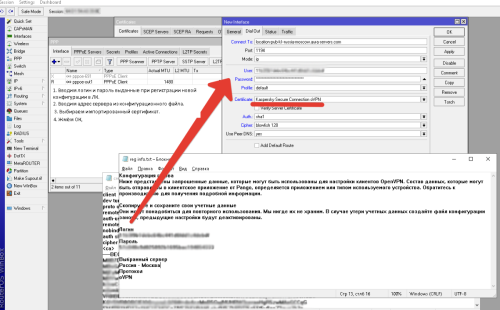
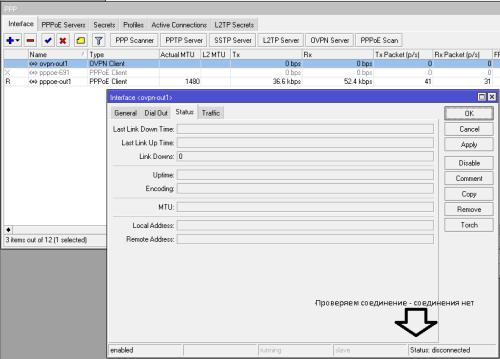
 yorik25 posted a topic in Kaspersky Secure ConnectionЗдравствуйте, прошу помочь настроить доступ к Kaspersky Secure Connection в роутере Microtik. Не могу настроить подключение через oVPN клиент - не подключается. Данные роутера: Модель: Mikrotik 951Ui-2nD Версия ПО: 6.49.13 Присутствует поддержка oVPN Мои действия пошагово высылаю вам в прилагаемых скриншотах. Свободные лицензии на Kaspersky Secure Connection в ЛК на момент настройки присутствуют. Поиск по форуму не дал ответа на вопрос как решить проблему.

-
 petrofalex posted a topic in Kaspersky Secure ConnectionЕсть ли опыт настройки на pfSense? Например как клиента OpenVpn.





