Search the Community
Showing results for 'Secure Keyboard Input is enabled'.
Found 267 results
-
 Toño posted a topic in Kaspersky: Basic, Standard, Plus, PremiumHello, I purchased a Kaspersky Premium license, and one of the devices where I installed the application is a Mac. The problem I'm having is when using a digital certificate for an electronic ID card. When I try to use it to sign something or check something, the certificate doesn't work without disabling the antivirus protection. Where can I configure the antivirus settings to allow me to use the electronic ID card without disabling the antivirus protection? Thank you.
-
 Egor Erastov posted a topic in Advice and solutions for Kaspersky Endpoint Security for BusinessAdvice and Solutions (Forum Knowledgebase) Disclaimer. Read before using materials. Scenario Enable Network Threat Protection Connect another Mac via a thunderbolt cable Try to send any data from one computer to another Connection times out Workaround & Solution Connect computers by other means or disable NTP when using Thunderbolt bridge. RCA This issue is caused by a bug in macOS' built-in packet filter and was reported to apple.
-
tylen posted a topic in Kaspersky Secure ConnectionЗдравствуйте, решил скачать конфиг для телевизора. У меня подключена подписка Kaspersky secure connection, раньше я без проблем скачивал конфиг для телевизора от kaspersky, но вчера вечером я зашëл на сайт, выбрал конфиг и я скачал готовый текст, а не готовый конфиг. Я не смог использователь vpn пробавал всë, скачивать конфиги от openvpn до wireguard, но без успешно. Я скачиваю текстовый документ, хотя должен скачать .conf естественно что openvpn что wireguard не могут принимать текстовый документ как конфиг, именно нужен файл с расширением .conf а мне скачивается .txt может я что то не так делаю? Помогите решить проблему.
-
 Msport23 posted a topic in Kaspersky Secure ConnectionДобрый день! Хочу приобрети Kaspersky Secure Connection, прочитал все но не могу понять заработает ли эта программа для моих условий. Итак приобретаться будет на учетную запись, в которой активен Kaspersky Premium на 10 устройств, но Kaspersky Secure Connection нужно установить только на 2 из них, так нужно установить Kaspersky Secure Connection на 1 смартфон на Андроид на котором активен Kaspersky Premium но на другую учетную запись и еще на 1 смартфон на Андроид в котором вообще нет активных подписок Kaspersky, там нужен только Kaspersky Secure Connection. Возможно ли такое подключение?
-
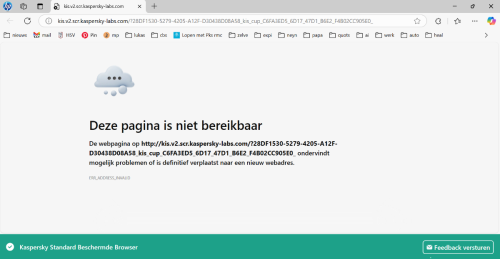
 Vinceres posted a topic in Kaspersky: Basic, Standard, Plus, PremiumHello, I am running on windows 11, and my Kaspersky is Standard version 21.20.8.505. Whenever I am in the securebrowser, I cannot load the webpage of lets say a banking account. I than tried closing of VPN and on again it works. However I am not sure if the connection is than secure, seeying it can already have been trespassed than, whereas he is still on me while I turn VPN on again. Turning off VPN is ofcourse not great... I provided a screenshot. With regards, Vincent
-
 Что ему нужно, чем мой коннекшн не нравится ему?

-
 suitsandmore24 posted a topic in KasperskyOS, DevelopmentHi everyone, I’m exploring how KasperskyOS could potentially support highly secure e-commerce platforms, especially for niche markets like ours. Given the increasing security concerns around customer data, transaction safety, and supply chain integrity, would KasperskyOS be a viable option for developing a secure online store? Has anyone here used KasperskyOS for web-based or e-commerce applications? What challenges should we expect if we consider it for a fashion retail platform? Is it overkill for this type of business, or could its microkernel architecture be a smart long-term investment? I’d love to hear your insights or any experiences you’ve had applying KasperskyOS outside of industrial or IoT environments. Thanks in advance!
-
 ford posted a topic in Kaspersky Secure ConnectionНе работает ВПН, не подключается, при подключении постоянно выбивает интернет и не чего не грузит
-
 Sergey Shulga posted a topic in Kaspersky Secure ConnectionДень добрый, Нахожусь в Италии, и сейчас мне необходимо получить доступ к сайту https://enpf-otbasy.kz/ Сайт недоступен нигде за исключением Казахстана, о причинах остается только гадать. Приобрел Kaspersky VPN, но он подключается ко всем серверам за исключением Казахстана. "Подключение в процессе....." и так бесконечно. Заранее благодарю за ответ.
-
 hega333 posted a topic in Kaspersky Total SecurityAfter installing Kaspersky, all USB input devices (keyboard & mouse) stopped working immediately after booting into Windows. Windows itself boots fine, but since no input devices work, I cannot log in. The issue started after attempting to install Kaspersky. During installation, it gave a message stating that Avira was still installed, even though it had been removed two years ago. I manually checked the registry and deleted two Avira-related entries, but one entry could not be removed. I continued with the Kaspersky installation anyway, and then both of my monitors went gray, and several DLL errors appeared. After restarting the PC, USB devices stopped working completely in Windows, even though they still work in BIOS and in the Windows Recovery menu. Steps Already Attempted (None Worked): 1. BIOS & Hardware Checks: - Keyboard and mouse work in BIOS, so this is not a hardware issue. - Legacy USB Support is already enabled in BIOS, so USB ports are not blocked at the motherboard level. - Tried multiple USB ports (front, back, USB 2.0, USB 3.0), but none work in Windows. - No PS/2 ports available, so that option is ruled out. 2. Windows Recovery & Safe Mode Attempts: - Booted into Advanced Startup (Recovery Mode), and USB devices work there. - Booted into Safe Mode (F4), but USB devices do not work. - Booted into Safe Mode with Networking (F5), but USB devices do not work. - Booted into Safe Mode with Command Prompt (F6), but USB devices do not work. - Attempted “Startup Repair” in Recovery Mode, but it did nothing. - Tried “Reset This PC” with “Keep My Files,” but it failed with the error “Could not reset this PC, no changes were made.” 3. Kaspersky Removal Attempts (Failed Due to No Input): - Tried opening Command Prompt in Safe Mode to uninstall Kaspersky, but no input devices work, so I couldn’t type commands. - Manually checked Kaspersky’s installation folders using Command Prompt in Recovery Mode: - C:\Program Files\Kaspersky Lab does not exist. - C:\ProgramData\Kaspersky Lab does not exist. - Manually checked Windows registry for Kaspersky-related services (klflt, klkbdflt, klmouflt, avp, etc.), but none were found. 4. USB Driver Repair Attempts (Did Not Work): - Tried enabling USB drivers manually via Registry in Command Prompt: reg add "HKEY_LOCAL_MACHINE\SYSTEM\CurrentControlSet\Services\USBHUB3" /v Start /t REG_DWORD /d 3 /f reg add "HKEY_LOCAL_MACHINE\SYSTEM\CurrentControlSet\Services\usbhub" /v Start /t REG_DWORD /d 3 /f reg add "HKEY_LOCAL_MACHINE\SYSTEM\CurrentControlSet\Services\usbxhci" /v Start /t REG_DWORD /d 3 /f reg add "HKEY_LOCAL_MACHINE\SYSTEM\CurrentControlSet\Services\usbehci" /v Start /t REG_DWORD /d 3 /f reg add "HKEY_LOCAL_MACHINE\SYSTEM\CurrentControlSet\Services\USBSTOR" /v Start /t REG_DWORD /d 3 /f None of these commands fixed the issue. - Tried forcing USB driver reinstallation using DISM & pnputil in Command Prompt, but it did nothing. - Checked disk partitions (diskpart) to confirm Windows installation drive was correct, but there was confusion with the drive letters (C: and X: were mismatched). Current Situation: - Windows still boots fine, but I cannot log in because keyboard and mouse do not work. - Recovery Mode recognizes USB, but Safe Mode and normal Windows do not. - Kaspersky is not listed in Program Files, ProgramData, or the registry, but the issue clearly started right after installing Kaspersky. - Resetting Windows fails, so I cannot even attempt a repair install from inside Windows. --- What I Need from Support: - How to fully remove Kaspersky (including any hidden services) without being able to log in. - How to manually enable USB drivers from Recovery Mode. - How to fix the "Reset This PC" failure in case a repair install is required.
-
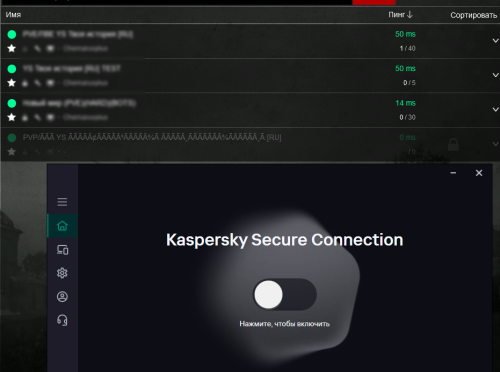
 INSUS posted a topic in Kaspersky Secure ConnectionПриветствую. Пару месяцев назад (точнее не скажу) лаунчер игры Dayz решил что настройки Secure Connection ему не указ. Я пробовал вносить все доступные приложения и в белы и в черный список для VPN (VPN для избранных), но лаунчер стабильно выдает завшеный в 4 раз от нормы пинг. Dayz и его лаунчер работают на платформе стима и актуальная версия поддерживается постоянно. Проблема не только у меня но и у товарищей, то есть глобальная. Перепробовал разные сочитания
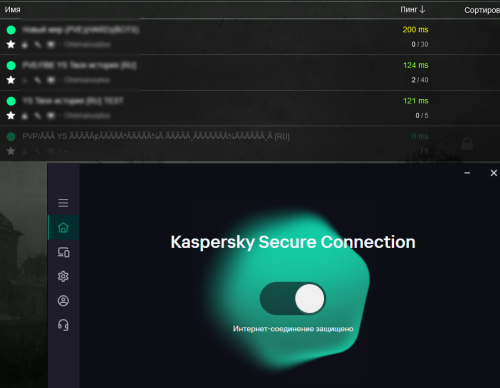
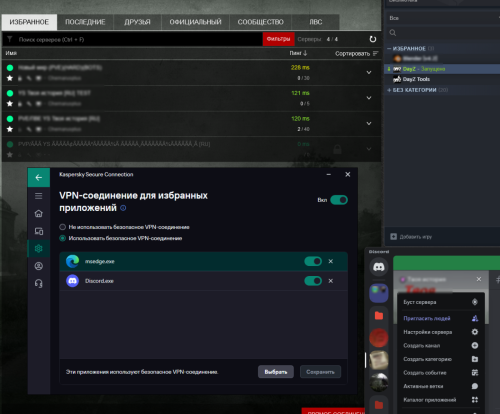
-
 Arisius posted a topic in Kaspersky Secure ConnectionI contacted PREMIUM technical support, they are spinning cotton wool and just wasting my time. In general, your Kaspersky VPN Secure Connection has stopped working in Kazakhstan

-
 Panda47 posted a topic in Kaspersky Secure ConnectionВсем доброго времени суток, интересует: 1) опыт использования данного VPN (ну коль он входит в премиум подписку, я не с России) для пользователей, преимущественно для тех кто с Казахстана, конкретно по скорости и пингу опыт. 2) интересует политика VPN в целом ещё (это уже вопрос к поддержке), почитав форумы сделал вывод что сайты блокируемые РКН он не разблочит, но поскольку я с КЗ интересна зависимость, в плане блокировка идентична (список с РКН) или же блокировка в рамках местных служб. В целом всё, просто нужны отзывы пользователей с КЗ и ответ поддержки по 2му пункту. Благодарю.
-
 Vladimir Serbia posted a topic in Kaspersky Password ManagerHello, I have four Gmail accounts that I use across three browsers: Chrome, Firefox, and Brave. In all browsers, I have the extension installed. Until recently, I had a feature where, when I opened the page https://accounts.google.com/, an icon for Kaspersky Password Manager would appear in the field where I needed to enter the email address and then the password. After clicking on that icon, a list of all my four accounts would appear, allowing me to select the one I needed. The password field would then be automatically filled in. Some time ago, I lost that icon, and it only happens on accounts.google.com. On other websites, the icon is still present, and everything fills in automatically. I should note that since I have four accounts, the auto-fill function was disabled. In other words, Kaspersky Password Manager did not automatically fill in the input field but gave me the option to choose. I’ve tried changing the settings, entering full addresses, enabling auto-login, but nothing worked. I don’t want to copy and paste credentials every time I log in. I am sending you an example of a website where the icon appears and the site https://accounts.google.com where the icon is missing.
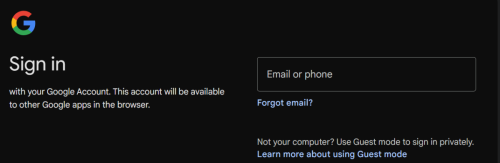

-
Timur SD posted a topic in Kaspersky Secure ConnectionKaspersky VPN Secure Connection перестал работать в России. У кого такая же беда? Сервис не работает. Подписка оплачена. Денег нет. Предлагаю объединиться для совместного решения.
-
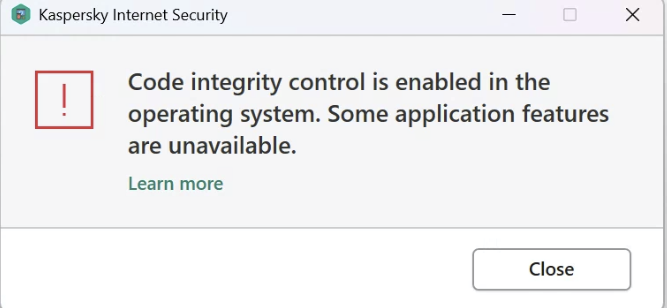
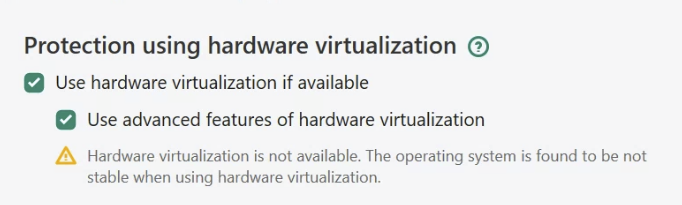
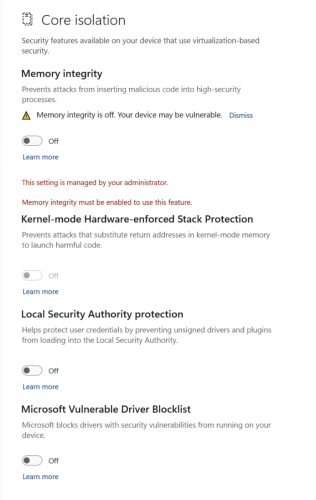
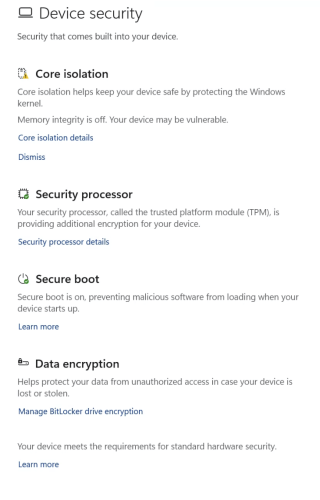
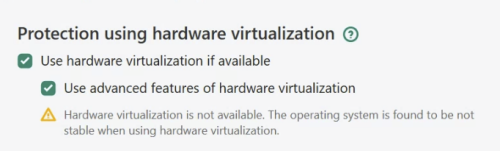
 MonsterMMORPG posted a topic in Kaspersky Internet SecurityI have followed the instructions and turned off everything but this error still pops up and i am pretty sure it would cause destability How to solve? It is a fresh Windows 11 install on AMD 9950 Here screenshots What I need to do to fix this issue? Thank you It is latest version Kaspersky Internet Security
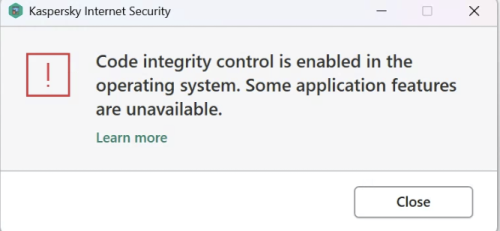
-
Marceu posted a topic in Kaspersky Secure ConnectionЕсли я куплю подписку на Kaspersky Secure Connection на территории России за рубли, смогу ли я ее использовать на территории европейского союза?
-
 Toli4 posted a topic in Kaspersky Secure ConnectionПосле оплаты подписки не загружается ни какой сервер из предложенных в ВПН . У меня подключено 5 устройств, 4 телефона и 1 пк . Мой пк и мой телефон при подключении ВПН просто бесконечная загрузка . 3 другие устройства работают и подключаются нормально . Я пробовал пере загружать телефон и удалял приложения с телефона ( Было очень трудно установить его обратно , потому как в приложении RuStore/ NashStore и иные установщики просто пишет что файл не корректен и не возможно его скачать и установить . Удалось скачать снова с другого сайта ) Установив его и с трудом зайдя в аккаунт ничего не поменялось . Что делать ?
-
fza-fza12 posted a topic in Kaspersky Security for Mail ServerI purchased a license for Kaspersky Secure Mail Gateway, and my mail server is Exchange. How can I sync them? Any ideas would be helpful. Thanks!
-
 Эля posted a topic in Kaspersky Secure ConnectionКупила Kaspersky Secure Connection, а как установить не понимаю ?помогите, пожалуйста..
-
 Eptiy posted a topic in Kaspersky: Basic, Standard, Plus, PremiumЯ знаю, что на данный момент поддержка secure sni в касперском отсутствует. По сути, отключение проверки защищённых соединений в настройках сети должно позволять secure sni работать. Так и есть: если настроить DoH на уровне устройства, либо браузера, то всё работает. Но мне такой вариант не подходит, так как DoH я настраиваю на роутере с openwrt, а так же пользуюсь hosts на этом роутере, чтобы он был единым для всех устройств в сети. Проблема с hosts в том, что настройка DoH на уровне устройства шифрует данные от роутера, отчего трафик с устройства, либо из браузера, игнорирует hosts. Вот в чём, собственно, проблема: пока запущен касперский на устройстве, secure sni не работает, не смотря на то, что проверка защищённых соединений выключена. Начинает работать только тогда, когда настроен DoH на уровне устройства/браузера. Если выйти из программы (трей - контекстное меню - выход), то secure sni начинает работать при DoH на уровне роутера. Если только приостановить защиту, то ничего не меняется, помогает только выход из программы. То, что secure sni работает без включения на самом устройстве - не ошибка. Проверено на Windows 11 (в настройках подключения DNS выставлен "Автоматически (DHCP)") в браузерах Yandex и Edge: даже с выключенной настройкой "безопасный DNS" проверка на secure sni проходится. Также проверено на Android (настройка "Персональный DNS сервер" выключена) в браузерах Chrome, Yandex, Samsung. В последних двух в принципе нет настройки безопасного DNS, но проверка на secure sni всё равно проходится. Возможно, я упуская какую-то настройку, которая мешает работе secure sni при DoH на уровне роутера. Пока что вопрос не критичен, защита всё-таки важнее. На крайний случай пропишу на устройстве отдельный файл hosts и настрою DoH прямо на нём. Но хотелось бы, чтобы всё работало от роутера и касперский не мешал работе всех нюансов.
-
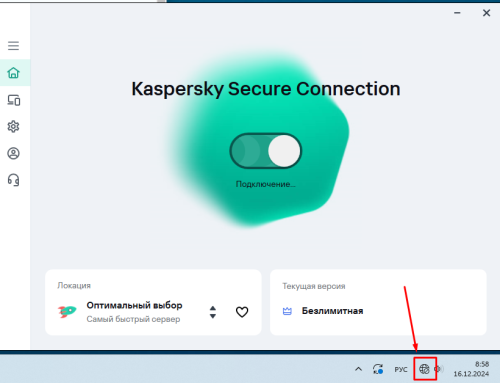
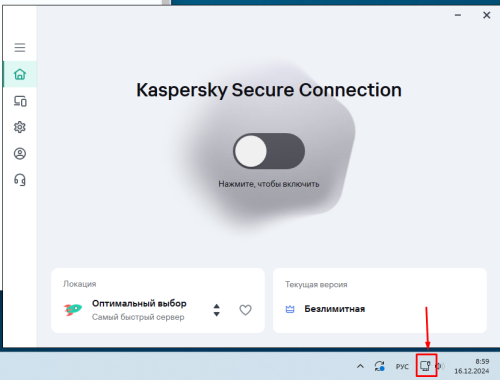
 kashirskiy posted a topic in Kaspersky Secure ConnectionУ меня проблема с подключением kaspersky secure Connection Интернет на компьютере имеется но когда пытаюсь подключится к kaspersky secure Connection интерент сбрасывается а преложение kaspersky secure Connection не подключается. Пробовал полностью переустановить преложение не помогло ошибка такая же Пробовал подключаться к разным серверам, не получается( как связаться с тех поддержкой ? Проблему удалось решить только с подключением двойного интернет соединения
-
 Guest posted a topic in Kaspersky Secure ConnectionЗдравствуйте, как скачать с официального сайта Kaspersky Secure Connection, если есть подписка на него но не могу найти как его скачать не с официального сайта не с личного кабинета
-
 Jgfrt posted a topic in Kaspersky Secure ConnectionПериодически натыкаюсь на ресурсы которые блокируются SC. Отключаю ползунок - все ок. Как добавить исключения для отдельных ресурсов? Например, для github по https?

-
 RDB posted a topic in Kaspersky: Basic, Standard, Plus, PremiumI am not able to use expedia with secure keyboard. I am not able to type in the destinations under flight section as the system forces me to use Kaspersky secured keyboard for some reason! and that keyboard just doesn't work! Has anyone else faced this problem? even after disabling it from kaspersky privacy settings and restarting the browser, I am still struggling with this problem. Any solutions?